Mini Shaders by bestnickname
Mini shaders is a programming puzzle game (inspired by the awesome games that zachtronics makes) that acts as a very high level and simplified version of shader programming. This isn't super related to the theme but in my head I was thinking "computers are basically small worlds, oh lets make a game about computers, oh lets make a game about programming, oh shaders are cool"...
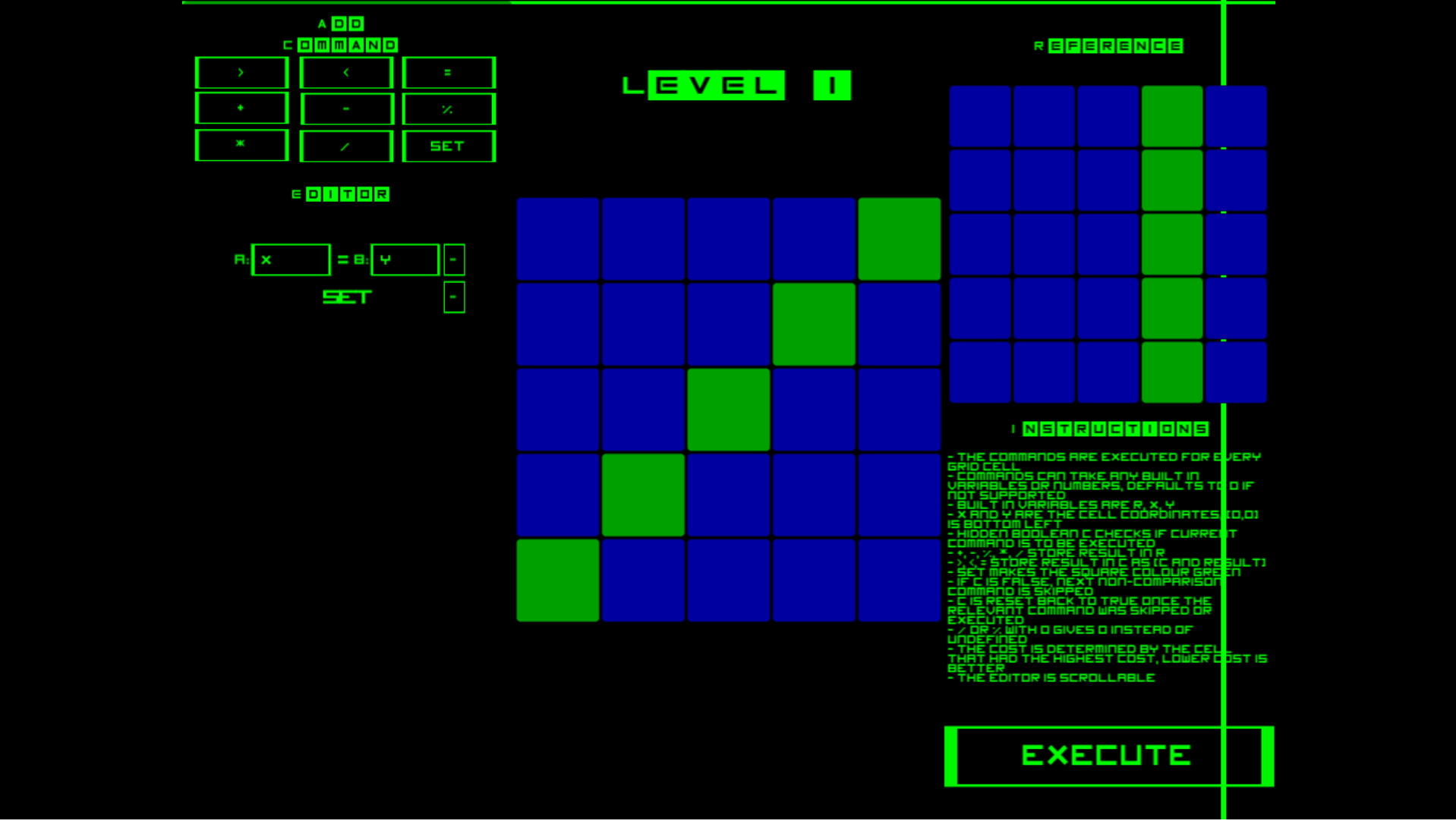
In this game, you are required to match your grid with a given reference grid using a set of provided commands. These same commands run for each grid cell so you are required to rely solely on state to determine what actually gets drawn.
These instructions and tips are given in the game, but for completeness sake, here they are: - The commands are executed for every grid cell - Commands can take any built in variables or numbers, defaults to 0 if not supported - Built in variables are r, x, y - x and y are the cell coordinates, (0,0) is bottom left - Hidden boolean c checks if current command is to be executed - +, -, %, *, / store result in r - >, <, = store result in c as (c AND result) - Set makes the square colour green - if c is false, next non-comparison command is skipped - c is reset back to true once the relevant command was skipped or executed - / or % with 0 gives 0 instead of undefined - The cost is determined by the cell that had the highest cost, lower cost is better - The Editor is scrollable
Tools used: - Unity - FL Studio for music - Hitting my keyboard really hard for sound effects - Inkscape for the graphics... which is really just a bordered square that gets used everywhere - www.dafont.com for fonts
Game can be downloaded at: - https://drive.google.com/open?id=0ByaymGrbjPRvZUVHTHktU2lYTkU (windows 32) - https://drive.google.com/open?id=0ByaymGrbjPRva3g1U3c3MUFYUGc (windows 64)
EDIT: uh I forgot to add the source code link initially... here it is, my bad -_-" https://github.com/igorawratu/ld38
EDIT2: It seems the "try again" button is broken
| Original URL | https://ldjam.com/events/ludum-dare/38/mini-shaders |
Ratings
| Overall | 304th | 3.235⭐ | 36🧑⚖️ |
| Fun | 289th | 3.118⭐ | 36🧑⚖️ |
| Innovation | 46th | 3.882⭐ | 36🧑⚖️ |
| Theme | 487th | 2.545⭐ | 35🧑⚖️ |
| Graphics | 425th | 2.735⭐ | 36🧑⚖️ |
| Audio | 331th | 2.594⭐ | 34🧑⚖️ |
| Humor | 397th | 2.034⭐ | 31🧑⚖️ |
| Mood | 299th | 3.032⭐ | 33🧑⚖️ |
| Given | 26🗳️ | 16🗨️ |
Took me a while to get it, but then it worked nicely. Having 0,0 in the bottom left is irritating, I prefer 0,0 in top,left.
Beat all 5 stages, with 3, 2, 6, 4, 4 moves.
When I have the following commands:
X + Y
R < 3
SET
The whole screen becomes green! Except when it doesn't. Sometimes the value of R gets reset to 0 or the assignment just doesn't work.
Then I restarted the program and managed to complete all the levels just fine. That is a *bit* weird in it?
Other than the bug I really like it! Good work!
My only complaint is (0,0) being bottom left, being used to y+ goes down makes it a bit unintuitive.
=====================================
First impressions of the game before playing: Looks like an interesting one, definetliy more unique than all the others I've seen. But also looks quiet complex.
Then I played the game
POST-PLAY
=====================================
-Music
The sound fit, especially the sound effects, and the music, but the music got repetitive after a while
-Gameplay
It was very, very hard to understand at first. I had to seriously read the instructions a few times, and even then it just reminded me that I have math notes to do xD The text and UI was also pretty small for me, so I a changeable screen size is recommended.
However, once the player truly grasps the full gameplay (which I still think I'm doing somewhat wrong) the game or puzzle itself is quite interesting and intriguing. However, I agree with one commenter, using y+ to go down is a bit strange.
I think a tutorial should be added, that explains things one by one (although I know how hard tutorials can be in Unity)
-Theme
To my best knowledge, this didn't fit the theme very well, but it didn't really matter
-Innovation:
The game itself was innovative, and much, much different than all the games I have rated so far.
EDIT
-Graphics
The graphics fit the overall aesthetic of the game, and it had a nice simple, clean feel to it with that still daunting display of commands and such. It added to the game really well.
OVERALL
=====================================
It was a unique, fun little puzzle game that was very hard to understand at first.
Bit overwhelming at first but in a good way, things look interesting so it makes me want to figure out what's going on. Then again I am a programmer, so maybe that won't apply to everyone.
Pity about the try again button bug! I had to redo some levels...but not that much of a train smash.
Would be cool if there were goals to try to achieve in terms of number of operations.
All in all a really cool little game!
To address some of the comments:
-I definitely agree that both a better difficulty curve, as well as a tutorial would help a lot. If I were to work on this further, that would definitely be quite high priority.
-Definitely agree with the confusion of 0,0 being bottom left, luckily this is quite easy to change
-The stack idea is really good, and is definitely a good extension to the current model. I also think adding more commands such as abs would be good as it allows for distance calculations, resulting in shapes such as circles etc.
Great mechanic and sound, nice entry !!
Good job, keep it up!
I also liked the score screen at the end: I got 3,3,5,6,5. I'll probably comeback later and come up with better some better solutions.
Overall really great!
- The instructions aren't written very well, so it can be hard to figure out what they mean at first. "Hidden boolean C checks if current command is to be executed" sounds like out-of-context word salad unless you already know what the "hidden boolean C" is all about. The explanation of control flow would likely have been better without mentioning a "hidden boolean" at all.
- Not being able to reorder commands isn't a big deal now because the programs are all so short, but it would be a real pain for larger programs.
- Due to only containing a few levels, most of the commands go unused.
- I'm not sure why there's a countdown between levels. I already verified that I'm ready to start the next level, so why make me wait?
- Clickable UI elements should
- I want more levels!
I'd love to see a post-jam version of this that adds more levels and possibly more features. I had a lot of fun trying to figure out optimal solutions, but in the end my scores were 2, 2, 6, 4, 5... clearly not all optimal! Maybe I'll have to revisit it later.