Hartifacts by lisyarus
A small puzzle game about connecting cities with roads to collect valuable artifacts from ancient temples! You earn money by connecting to cities, spend money to build roads and unlock new road types, and your goal is to connect the roads to temples.
Collecting artifacts can hardly be called harvesting, but I really didn't want to make a farming game, so here we are :)
Most controls are done with mouse. Press [ECS] to exit or [R] to restart a level. Right-click to move the camera, middle-click to rotate it.
The levels are stored in the levels/ folder and are simple PNG files, sorted alphabetically to determine the levels order. You absolutely can (and should if you liked the game!) make your own levels!
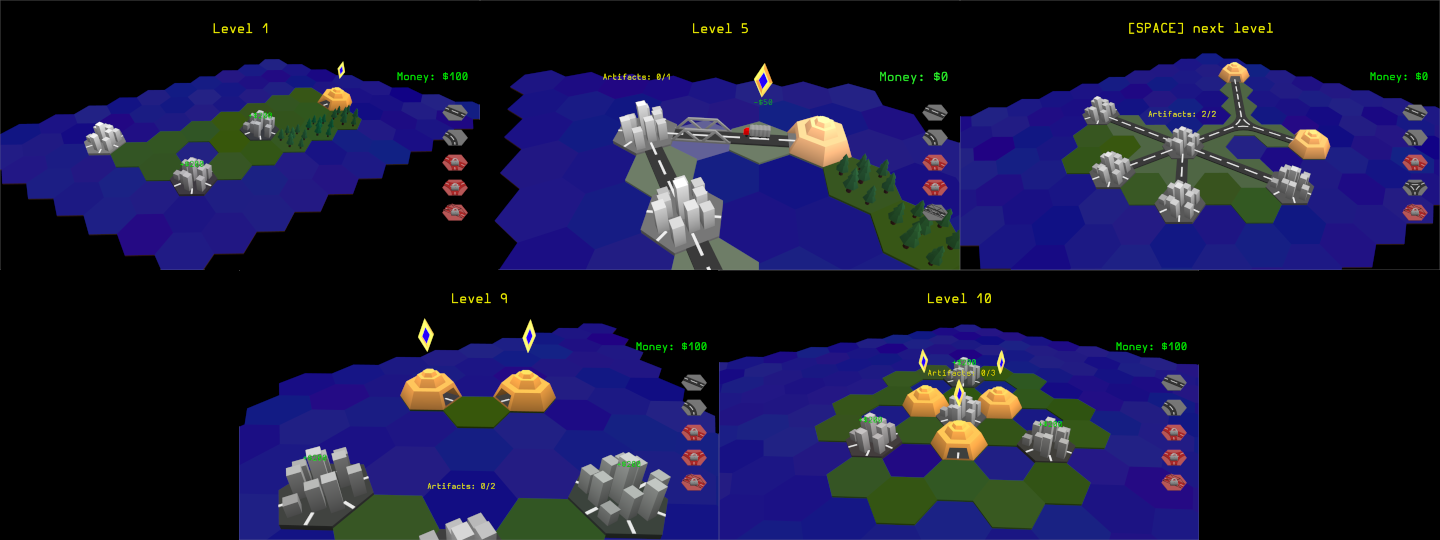
| Link | https://lisyarus.itch.io/hartifacts |
| Link | https://lisyarus.itch.io/hartifacts |
| Link | https://bitbucket.org/lisyarus/ldjam52/src |
| Original URL | https://ldjam.com/events/ludum-dare/52/hartifacts |
Ratings
| Overall | 35th | 4.019⭐ | 29🧑⚖️ |
| Fun | 6th | 4.278⭐ | 29🧑⚖️ |
| Innovation | 35th | 3.926⭐ | 29🧑⚖️ |
| Theme | 326th | 2.278⭐ | 29🧑⚖️ |
| Graphics | 102th | 3.87⭐ | 29🧑⚖️ |
| Audio | 169th | 3.154⭐ | 28🧑⚖️ |
| Humor | 212th | 2.361⭐ | 20🧑⚖️ |
| Mood | 146th | 3.375⭐ | 26🧑⚖️ |
| Given | 20🗳️ | 33🗨️ |
The 3d models look good and the puzzles are interesting, and the UI is easy to use.
Some ambience would have been nice (seagulls, ocean sounds etc) to add some more background noise.
Overall, a really solid puzzle game!
The tile flipping effect when the level begins is pretty nice. The controls are pretty intuitive. All in all, this is very good.
You found a good pace for the difficulty increase.
Sadly no background music and the "shadow" or covered area could have some other color then black to make it not so dark in full screen, or zoom in to the map could also help.
Also it would be nice the have a "next" level button or something to not have to switch only for next level to the keyboard.
Graphics and animations are nice, I'd change some color scheme maybe. Sometimes it's hard to understand where the tunnel of the Temple is (when it's not facing camera) – you have to guess.
Speaking of temples, you can rotate the camera with the middle mouse button. Guess I should mention this in the description, thanks :)
> Ah, that’s a shame, there’re just 12 levels in total :D
> Speaking of temples, you can rotate the camera with the middle mouse button. Guess I should mention this in the description, thanks :)
Huh, I didn't know that :D Anyway some indication without rotating would be nice (like a small detail). I almost didn't know what to do in one of the first levels, where the entrance is on the back (at that point I didn't know that there should be an entrance, and I can't connect it just like Cities – from any side)

One UX gripe -- I couldn't tell how much a piece cost to place before I bought it, which messed my math up sometimes. Luckily it was easy to restart the level.
Like @danmerey mentioned above, Level 7 stumped me a bit before I, you know, figured out [no spoilers].
I love the low-poly art style, and I especially love the seamless interaction the user has with the hexagonal grid tiles. I have an intense appreciation for the number of models that needed to be made for the different road types, and the system that detects the orientation for tiles-to-be-placed.
The animation of the truck from the artifacts to the main city was nicely executed. It added a good dose of game feel. It's also cool that the trucks speed up if another artifact is captured while one truck is still driving!
The only thing this game could've used was a small hint at how to use the mouse. It took me a second to realize that I needed to click and drag from the main building to create roads (I thought I had to click and place).
[FINALLY](///raw/a43/d4/z/562b9.png)
From trying out the custom map maker - is there a color I can use to specify the orientation of the artifacts? I made this map, but I don't think I'll ever be able to reach the artifact lol.

Good point about clicking vs dragging the mouse: I guess I should've just kept the "Drag to build a road" text on from the start.
Thanks for using the, erm, "map editor" :D I'm happy someone did that. You can change the orientation of a temple with the blue channel of the pixel: it needs to be a number 0..5 that specifies the orientation. 0 means bottom-right with the default camera orientation (it's just "right" in the PNG), and then it goes counterclockwise.
Really liked the intro/outro tile flipping. Sounds were on-point, but as some mentioned some background audio variety would have helped.
The levels were easy enough and pretty straightforward to solve. My only problem, that there was one and only way to complete the levels. Sure the order of construction may be a bit different, but you always end up with same configuration. So I think it would be great to relax possibility space a bit for puzzles, at the same time you could create somewhat more challenging ones. Then again, I fully understand if that was deliberate choice for `Compo` scope that would allow more players to complete the game.
I tried create a level with what I said above in mind - allowing more design choices for the players. But the maps were in 2D, so each pixel has 8 neighbors instead of 6 in hexgrid. Couldn't figure out which 2 pixels are you dropping to create hexgrid. Maybe example template with dropped pixels would be helpful here. Also it seems the artifact mines are automatically oriented to closes patch of land? (Thinking of a case, where should be a longer bridge to the mines, even though there is land nearby)
From design side of things, would be interesting so see more map tile types. For example:
1. Cities with exits not to all sides (then how to orient them?)
2. Pre-build oriented patches of road so you have to build around or with it.
Considering the levels, notice how all levels are kind of rhombic in shape, or more specifically they are parallelograms, which are skewed rectangles. They are built by taking the rectangular tiles from the level bitmap, going from bottom to top row by row, shifting each row of tiles by 1/2 to the right. I completely agree that it's not the most intuitive thing to work with! Even I got confused about it multiple times :D What helped me is the realization than in the bitmap each pixel only has 6 real neighbours; the 2 on the top-right & bottom-left are kind of fake.
The orientation of temples is determined by the blue channel of the pixel: values 0 to 5 mean 6 possible orientations, starting from east (positive X in the bitmap) and then going counterclockwise. A questionable choice, again, but it works and this felt enough for Compo :)
UPDATE: actually I think it fits the theme, indeed, and in an original way.
PS: I was surprised at the very small download size by being a 3D game, then I noticed it's because you used raw C++ with SDL, rare to see it around :)
Very nice work ! Well done !

It is a pity that there is no music, but the game is really fun and i played it until his end with pleasure =)