LD23 April 20–23, 2012

RPG Kelgar – we are recruiting!

Starting location

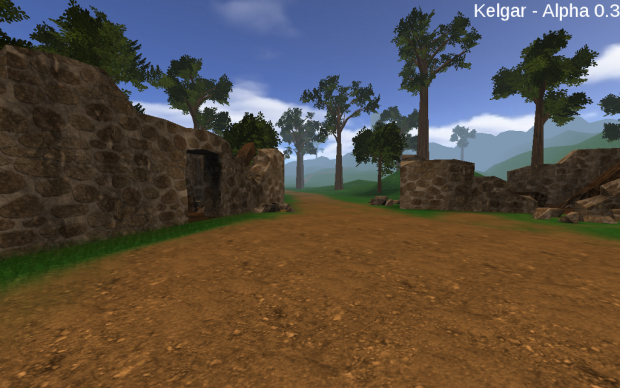
Kelgar is a non-linear, modern role playing game. It plays in the middle ages in a fantastic, unnamed country. The player can choose from different alternatives when acting. The world of Kelgar is not perfect, it is in war and you can see the consequences.

It’s currently in Alpha State, but already playable. The game is free to play and cross-platform (Windows and Linux).

This game started as a entry to a game contest (not Ludum Dare, though), which I won. It was a one man project in this days. Currently the team consist of Rick (Lead Developer), Michiel (Mapper), Matthew (Mapper), Corey (Music Artist) and Daniel (Music Artist).

We currently are searching for 3D Modelers & Animators ,Quest Designers and Concept Artists to complete the development team of Kelgar. If you are interested in developing a 3D RPG and in improving your skills, than send me a e-mail.


Link Sheet:
Game Design Document
IndieDB page
Old contest entry thread and current thread on PAS (=engine) forums

Isolated Assault 2 Official Trailer And Gameplay!

The official trailer for Isolated Assault 2 is here!

PLAY THE DEMO HERE

DontBeNoobish recently asked for an exclusive look at the game so far, so I gave it to him! <3

His gameplay video is now up, check it out, and don’t forget to Subscribe to him!

SOUNDCLOUD: http://soundcloud.com/robproductions-1

Game should be coming… soon. I hate to go Gabe Newell on you guys, but really there’s still a lot to do!

I’ll keep you posted, have a good one! <3

Tags: game, progress, SuccessStory, trailer, unity, unity3d, update, video

The Hack-a-Jam

Visit here!

Hey everyone! I am glad to announce that the second Hack-a-Jam will be starting on July 14, and I am your host.

The Hack-a-Jam is a gaming jam that is different from others. Instead of one overall winner, there is an infinite amount of categories that you can win in, and there will always be multiple winners. Here are some examples of categories you can win in:

Best Graphics
Best Audio
Most extra items (dev logs, etc.)
Most Creative
Most Glitch-free
Longest Game
Shortest Game
Hardest Game
Easiest Game
Best themed
Most fun game

The amount of time given in the jam is voted on by the community, along with the theme. You can submit themes, and most of them will be sent to the Polls section, where others can vote on themes.

The Hack-a-Jam logo

By winning, you will get a badge and bragging rights, along with your name listed on the website permanently as a winner. When this jam gets to be huge, you will be really, really, really, really, really, really, really, really famous! The rules are not very restricted, as the jam is purely for fun:

1. All game content must be created within the set time. Note: You can use other music, placeholder graphics, etc. as long as you are allowed to!
2. Your game is not required to follow the theme, but would greatly improve your chances of winning. Unless every other game is not following the theme, it is almost guaranteed that your game won’t win anything.
3. You must work alone, and you must create everything included in the game.
4. All game creation tools are permitted, such as GameMaker, Photoshop, Flash, Paint, etc. Note: By game creation tools, I mean any tools that can be used to create your game.
5. All game extensions/DLLs are permitted. If you want to make it multiplayer (if you are using GameMaker), go ahead and use 39dll.

The second Hack-a-Jam takes place on July 14, so you should sign up now! Good luck everyone!

Tags: competition, gamemaker, games, Hack-A-Jam, hackajam, infinite categories, jam

New target platform for next Ludum Dare?

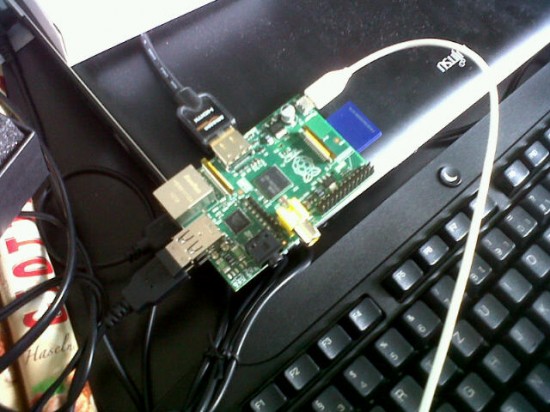
Actually I’m really considering using this Raspberry Pi as my new target platform for game jams like Ludum Dare. The technical specifications are rather limited which gives an extra challenge. As I’ve already been using mostly python and pygame for game development this should work without much extra effort. Next I’m going to test if my previous entries run on it. (This should not prevent me from having additional Windows builds of my games 😉 )

Raspberry Pi – Runs Linux

On other platform-related news, some French guy that goes with the webname “Loopingstar” has experimented with the basic idea of my LD23 game Bottlecolonies and made a port to Flash with some extras added. I especially like the variations in buildings and clearer visual feedbak of points earned/lost while placing buildings. You can give it a try here: http://loopingstar.fr/colonies/colonies_v2.swf

Tags: flash, pygame, python, raspberry pi

Mini-LD #36 – Contrasts!

And it’s over! Thanks to the 30 guys who actually tried their hands at such a challenging theme!

THEME: Contrasts!

Happening at your house from July 9th all the way to the 15th!

What do I mean with ‘Contrasts’?
I mean everything!

Be it graphics (i. e. green on red), physics (Think magnets) or the gameplay (Die to win). Else, just go crazy and make something that’s the total opposite of a usual game!

RULES:

  • Do you have that one framework you made, but couldn’t use for LD, because you didn’t want to make it public domain? Here’s your chance. Grab it and use it! (Don’t write your whole game beforehand, though.)
  • No need to add your source. You can still do that, though.
  • Feel free to work in a team, if you want to!
  • More time. I’ll give ya a week. Really relaxed, to get warm for LD.

CHALLENGES:

One week is too easy? Well, try some of these challenges.

  • Implement a single piece of everything: music, SFX, a single finished sprite  – All that stuff. Just use your skills to the fullest.
  • Use at least 8 colors per sprite. (Get that thing colored!)
  • Go funky – Every color used must have it’s contrasting color implemented (Use blue, get orange in there – red, green – black, white.)

And that’s about it so far.

If you have further questions, ask away in the comments or tweet me here.

All Entries

(EDIT: I hope everyone who got the submission link is happy now! :])

McPixel – The Ludum Dare Story


www.McPixel.net


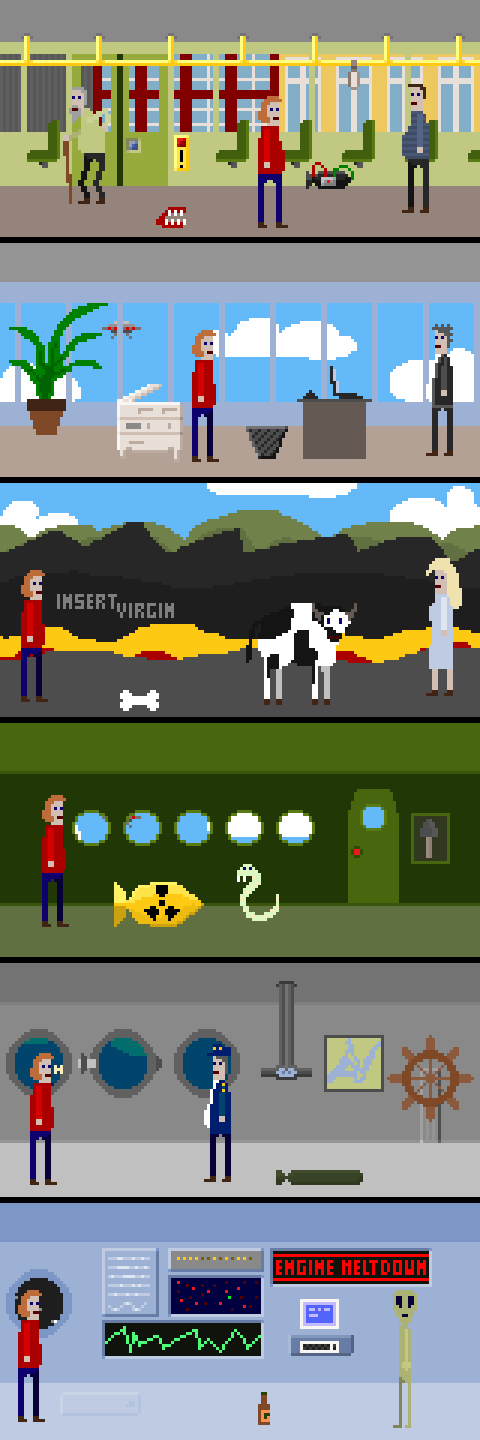
Most of you know, but some of you don’t. Anyways, McPixel was created for Ludum Dare 21 in 48 hours. It had 6 levels and a very special ending. You can still play that version, and you can read how it became a fully featured crazy game!

Exactly one year ago, I quit my dayjob and went indie. Ok, perhaps it wasn’t as simple as that as I was looking for other jobs and creating a game in the mean time. This game was Thelemite and by now it has got over one million plays worldwide. But before I could manage to finish it, A WILD LUDUM DARE APPEARED!

That’s right! Right when I was running out of cash and had to finish my game ASAP, Ludum Dare 21 was taking place. And since I am a terrible compo addict, I could not let that pass, so naturally, I joined in! As I always do :)


As every other time, everyone was super excited to hear what the theme is. 10, 9, 8, 7, 6, 5, 4, 3, 2, 1… and the theme is… 503 Service Temporarily Unavailable! Ludum Dare servers were literally crawling under the amount of visitors that time, but thanks to almighty Phil Hassey‘s mad web coding skills and Mike Kasprzak‘s ability to tame hoards of panicked developers, Ludum Dare 21 was a huge success, one that the compo had not seen before.

And it was a success for me too! I managed to create a tiny little pseudo point’n’click adventure called McPixel! I was trying to create a failproof idea, so I thought about a series of short point’n’click puzzles based on an even simpler engine that I can create within first 24 hours and spend the entire second half on creating more levels for it. I took out my favourite gel pen and started doodling my idea.


And I started working. As planned, I managed to create a working engine within first 24 hours, and went to sleep happy!

The first level I made was totally insane, because I was actually a bit late with my 24h mark, and I was up for too long and my brain experienced a shutdown so I just drawn animations mindlessly without having any idea what I am doing. The engine I created allowed my to create levels for it involving no coding, entirely in graphics editor, reducing chances to screw stuff up.

After I was done with my almost 20 hour stretch of first-day LD work, I took a juicy 4h nap and woke up with dysfunctional brain cells only to produce more mad levels.

I am really proud of careful planning I did that time and my simple engine allowed me to succeed in creating a whole of six levels in the end and a special ending.


Here are the original McPixel levels:

Play the original version here


After the compo, I quickly got back to finishing Thelemite and waited restlessly for the results. And the results were really great!

So I decided to make McPixel into a full game and set myself a goal of 100 levels!

After Ludum Dare McPixel, along other games got some press coverage that kept me motivated to work on it more. Here is a list of McPixel related links I managed to assemble after Ludum Dare 21.

RPS comment, Oujevipo.fr, Dallas Observer, Indiegames.com, Seetio.com, Youtube LD21 video, Dogbomb’s LD21 mashup, Dealspwn.com, Indievault.it, Pixellevel.de, Retrozentrale.net, Simply-Indie.de, Superlevel.de, Chocogames, Oldpost.com (?), Ripten.com, Nerd-Age.com, Gamezone.de, Indie-Game.fr

I was crunching and creating more levels for McPixel having to occasionally release a side game in the mean time just to help me survive. The engine I created during Ludum Dare is 90% intact up to this day and I am very much proud of it. If you would like to delve into details as to how McPixel levels are made, check out McPixel Creator’s Guide.


Now, McPixel is released. It is a full game with all of the 100 levels I wanted to make. I am really happy about releasing it and watching people have fun and go ‘wtf!’ when playing it is priceless. I am not writing this so that you can admire my ego or envy me. I want to motivate you! Making games is fun! And making games with friends is even more fun! And finally, making game swith friends in 48 hours is the best fun you can find in game making community. This is what Ludum Dare is. It is fun and friends and oppoturnities! Once you join it, you will never regret it.

Mark’s First Ludum Dare

In about 50 days, I will partake in my first Ludum Dare event.

I started making video games before I knew what a compiler was. I remember in middle school finding a book at the library that taught you to build your own games using QBASIC. I studied the lessons, and started coding my own games with pencil and paper using the syntax I learned. I didn’t actually understand what I was supposed to do with that code to make it work until high school when I took a programming class and learned all about the pieces of software that you needed to install to compile and run your code.

Since then, while I’ve dabbled with game modding, I never really completed a game worthy of any sort of attention. I was just as well enjoying the constant challenge of completing any programming project that the (revenue-generating) world would throw at me. As I honed my craft, though, I was overtaken with the fact that I wasn’t doing something right. I’ve gone through plenty of different paradigms: the procedural spaghetti code of Pascal, the Test-Driven Development-minded ideas of Inversion of Control from the ALT.NET community and C#, and the KISS of python. My work brought me from architectural overengineering in my first job out of college, to “just get it done now” in my current job as a consultant. Over time, I’ve learned lots of different possible ways to architect a solution, and am hoping to finally bring much of those lessons back to where it all began: making video games.

With 50 days out, my plan is pretty simple: work on developing the toolchain I’ll use to make my 48-hour game. While 50-days out seems like a lot, it really comes down to seven weekends of half-devoted time, plus a few days throughout the weeks after work.

These posts will detail the decisions and plans that I make in order to make this Ludum Dare successful.

Tags: introduction, ld48_24

Progress on Fractured Soul

Comments

djdduty
08. Jul 2012 · 21:10 UTC
Awesome looking progress, I am glad to see that you are still working on it. I cannot wait to see what you do with it later on.

My First Ludum Dare

Hey Guys,

My name is Scott Rehlander and I will be entering my first Ludum Dare Aug 24.  I have been wanting to do this forever, but the weekends have never worked out right.  I have written a couple games for Windows Phone 7 and dabbled in some game engines/graphics renderers like Axiom, Farseer, Corona and XNA.  I develop C# full time at a robotics company and have been programming my whole life.

My current project is a back to the roots 2d RPG made for win8/wp8 with a combo attack quirk built into the battle system.  Looking forward to meeting (and competing against) some of you guys.  I know I have some solid competition!!

Tags: LD #24

Strengths and Weaknesses

My first step in planning out this Ludum Dare is to analyze what I can do right now. The goal is that in the next 50 days, I can spend time between exploiting my strengths and working on my… less than ideals.

Major Strength: Programming

My biggest strength, IMO, is my programming ability. I’m constantly on the lookout for ways to reduce complexity in how I write my code. I’m not going to claim that I’m anywhere near where I want to be (the ideas of functional programming is something I’m pretty interested in learning, even if it just means bringing some good ideas over to my imperative code), but I believe I have enough experience in other programming pursuits to tie back into game development.

One thing I’ve enjoyed doing is writing code that doesn’t necessarily work, but succinctly describes what I want the program to do. In game parlance, I’m developing code that should only care about the logic of the game. Anything about sprite rendering, entity storage, etc, should be handled by some outside, magical framework that reads my mind, bakes me cookies, and does all of that boilerplate stuff for me. Then, I build that magical framework. Minus the cookies and telepathy.

1942 Clone Screenshot

It’s not much to look at, but it will do as a test case.

You can view the results as I go on my bitbucket page. Right now, there are two “games” in early development (a 1942 clone, and a physics-based platformer). They both are supported by the same Python framework, ffld (“Framework for Ludum Dare”) that I write during development. I’ll go more into detail of the framework in later posts. For now though, I will say this: while the name of the framework might seem to insinuate otherwise, the goal is not to cut corners. Instead, the goal is to allow for the modularity of common code for game essentials (e.g., physics, collision, graphics rendering, asset loading, game entity tracking) , leaving only for the custom logic that will make my game unique. Of course, to keep the scope creep down, I am adding some constraints; it will only support 2D games, and be based around pygame. At some point later, perhaps I’ll look into expanding to OpenGL, but pygame works will for my needs currently.

Hopefully, my development will be a large asset to rely upon. As far as strategy goes, this means that when coming up with a game idea, I will be better off sticking to an idea more interesting from an interaction point of view, as I have no worries with being able to throw together the strange code needed to cause it all to work right.

Major Weakness: Graphics

Pitfall: The Mayan Adventure Screenshot

Not by me. Not in a million years.

As of today, I can’t build a grass texture to save my life. This is my biggest fear: that no matter how cool or unique of a game I can build from a game logic standpoint, the graphics will just look childish. I’m heartened by viewing some past Ludum Dare winners who eeked by on pretty cheesy graphics. I’m pretty sure one of the reasons that I never did more game development in the past was because it was so exhausting trying to find graphic assets. Sure, you could find a cool sprite sheet here and there, but not enough to make a full game. You want another sprite, similar to the one you found online, for the next level? Not with these two left hands abusing my gimp window (I guess one of my other weaknesses is taking the time to develop relationships with people who could help in this regard).

And so, one of my large goals that I have tasked myself with achieving over the next 50 days is to become better at making graphics. This does not mean that I plan on becoming a turtle-necker. My goal here is not Pitfall: The Mayan Adventure. Realistically, my hope is to get into a situation where I can develop graphics that pass as… well, whatever they are supposed to look like. Maybe just one step above “programmer art”? I feel that with some work, I could probably make some grass textures that are more than just surface.fill(GREEN) if need be.

The Other Attributes:

Music/Sound

I don’t have much experience generating sound, but a quick look over the various toolkits shows that it doesn’t appear to be that difficult (some of it can be randomly generated very easily with tools such as bfxr and sfxr. In the coming weeks I hope to play some more with these tools. I doubt I would want to concentrate too much on this, but I realize that music and sound will contribute to the overall atmosphere of a game in a way that could be very time-effective. Even spending a single hour making a quick song, and another for adding sound effects, could be the difference between a hack and a game.

Planning and Research

Well, considering I have a gameplan of things to do 50 days before the event, I’d like to think that this is all pretty good. At some point I like to think that I’ll do a full mapping of my time during the LD weekend (When will I sleep? How long should I spend on design? How long can I develop the game? When do I call it done and spend the rest of the time polishing? How much liberty would I allow myself to deviate from such a schedule?) I also plan on reading some more post-mortems and other tips around the LD site. Of course, I could very well go into this thinking I’ll just let my first Ludum Dare hit me like a ton of bricks and learn for the next one. I feel, however, a certain pleasure in the humility of watching my best laid plans  get absolutely destroyed.

Writing

While I don’t have a lot of writing experience, I do like to think that if I take my time I can be a pretty decent writer. That being said, LD isn’t about taking your time. I don’t plan on using writing to much effect since it is pretty time-consuming, but that might change if I find myself with an idea that doesn’t need a lot of code to do. Perhaps in a future LD, when I feel a little more comfortable, I will try to make a story share the spotlight of one of my games.


Tags: ld48_24, Planning
Will Ludum Dare 24 see the rise of… team_soda?

Oh man, Ludum Dare this year is going to be the week before PAX… and mere days before PaxDev! That being that case, I want to have something really special to bring with me to show around to all the other game developers who are also attending PaxDev.

As we all know from HUGMONSTER (-o^_^)-o and from Burning Platform that the fancy graphics just aren’t my strong suit. Therefore my grand plan is to collect some friends and co-workers who complement my weaknesses and form a team for my very first 72-hour Jam entry!

The only thing I can tell you for certain is that like last time, this entry will be another Android game. The rest we will see in good time!

Tags: LD #24, ld24

0

This entry was posted on Friday, July 6th, 2012 at 7:12 pm and is filed under MiniLD #36. You can follow any responses to this entry through the RSS 2.0 feed. You can leave a response, or trackback from your own site.

Graduating from Programmer Art

As I discussed in my previous post, my largest perceived weakness going into an event such as Ludum Dare was my graphic-making abilities. This past weekend, I took my first step toward exercising that particular skill. Prior to this weekend, I had never created a sprite in my life (that wasn’t entirely one color). Heck, I never even doodled in my notebook in middle school.

Where to Start?

At first, I really didn’t know how I would go about improving myself. Isn’t the designing of sprites just art? Isn’t visual artistic ability just something you’re born with? My brain is so imbalanced to the left hemisphere that I’m constantly falling into traffic. What kind of fool’s errand am I going on here? However, throwing doubt to the wind, I set out to build a sprite.

The first task I gave myself was to pick a graphics tool. I tried some of the ones list in the Ludum Dare Tools section, but didn’t see anything that struck my fancy. At one point I was on Chapter Two of a PyGTK Tutorial in the hopes to build my own tool. Luckily I shut down that bit of insanity. Eventually, I decided to just work with good ole’ Gimp, which worked better than expected.

Next, I went scrounging for tutorials. I didn’t think I’d actually find anything worthwhile, but I was badly mistaken. If you’re a programmer looking to get started with Pixel Art, you MUST read Derek Yu’s Pixel Art Tutorial. It breaks things down step-by-step, which is extremely helpful. Don’t be afraid by Derek’s amazing looking image, the ideas transplanted just as easily into my practice images.

I started very simple: following the tutorial to create a dead-simple picture (a machete). It wasn’t too shabby, but it was also a pretty simple image to begin with. So I decided to go with something a little more advanced to really test myself. I already had some sprites pulled from the NES Game “1942” to use for graphics in a game I’m screwing around with, but maybe I could replace them with some sprites of my own. So, I would use the tutorial’s lessons to create my own sprite of a fighter plane.

Step One: Draw a Concept

Some Clip Art I found to use as inspiration

For me, step one was to get an idea of what I wanted to draw. For Derek, this is Part Three (yeah, I’ve purposefully renumbered the steps to make things confusing for you). First, I googled for a top-down view of a plane, and found something to use as a concept. Next, I tried to draw with pencil and paper a likeness of this plane. I’m not really sure why I decided to do this (after all, I already have some concept art in front of me) but it just felt right. Later I decided that this worked pretty well, as the image I drew was something that I knew I could at the very least draw, which gave me a boost of confidence. It also allowed me to customize the image a bit more to what I wanted. Now to be sure, my drawing abilities are very sub-par (and fortunately for you, I didn’t scan the image I drew), but by studying the original image part by part, I was able to get something decent.

Step Two: Pixel an Outline

I created a new 64×64 pixel image in Gimp, and prepared to embarrass myself. Finally, I ended up with the following:

Some things to note about this:

  • Although you don’t see it in the screenshot above, when working in Gimp I made sure to enable the grids so I had lines separating pixels.
  • There are some jagged lines. While I did heed the tutorial’s warning, I felt that there wasn’t much I could do about some of the jaggedness, particularly near the back of the wings. I hoped that they would come out later in the process.
  • Learning how to use the various Gimp tools to draw/erase/etc in a straight line is pretty helpful. Particularly, it is faster to use this method to draw a line rather than placing every pixel with the pencil tool. Even lines that are drawn at strange angles will give you pixels to start with, and you can just fine tune the resulting line with either the pencil or erase tool
  • Speaking of the erase tool, you’re obviously going to need to set it to “Hard Edge”.
  • One tip is to have a second view open to see what the image looks like in it’s actual size. After you’ve opened your Gimp window and have zoomed in on the image so you can work with the pixels, click “View -> New View”, and Gimp will give you another window that you can set to a different zoom (which is probably best to keep at the default zoom)

Step Three: Add Color

The next step was to add color. I bucket-filled the areas. This was actually pretty nice, since I have always been under the impression that if you bucket-fill a sprite it’s going to look terrible, and the only way to get something decent is to color each pixel individually. You’ll also see that I decided to add a propeller blade to the front for no particular reason.

These are just three colors that I randomly picked. Some day I might actually learn about color theory and all that, but I’ll save that lesson for some other day. Already, I’m pretty darn impressed. I would be happy with this! However, there is more that can be done.

Step Four: Shading/Lighting

The next part is what really makes the image “pop”.

I’m not sure if I got it “right”, but I did get… something. Notes on this step:

  • The basic idea, as explained in the tutorial, is to pretend that there is a source of light, choose the direction it’s coming from, and draw where the shadows should go. Also, lighten where the light hits directly. I sort of changed my mind up half-way through where the light was, so I might be kind of all over the place. Especially on the right side of the tail section. However, it should be pretty clear that the light is above the plane’s vertical axis, and to the left.
  • Here, the dodge/burn tool is your friend. The dodge will lighten, and the burn will darken the pixel you click. Remember to set the tool to “Hard Edge” or else it will affect multiple pixels!
  • Although it might be obvious to some, this wasn’t to me: if you have the default color for the pixel and you dodge (lighten) it, then decide you’d rather keep it at where it was, doing a burn (darken) will NOT get you back to your original color. You’ll need to undo, or just redraw the pixel
  • I reread the tutorial after I was done, and one tip was to do the shadows (darken) first. You’ll end up drawing more shadows this way, which sounds like a good thing. Think about it: with a single point of light, you will have more areas with less light (shadows) than you will being directly hit by the light. I’ll have to keep this in mind next time.

Step Five: Selective Outlining

As you can see, the pixels that I drew for the outline back in Step Two have been dulled down to the colors that are surrounding them. This makes the image less “hard” (or using Derek’s words, “less cartoony”).

  • I made use of the “Smudge” tool. As with the other tools, I made sure to set the “Hard Edge” option so that I would be affecting one pixel at a time. The way the “Smudge” tool works is you click and hold your mouse button on one area (i.e., a blueish pixel in the cockpit window ADJACENT to a black “outline” pixel in the cockpit window), and then drag the cursor INTO the black “outline” pixel. You can think of it as smudging your finger across the page, pushing some of the blue onto the black. Really, what this means is that you get some blend between the dark black and the light blue, without needing to manually pick the dark blue color. The cockpit glass is where it’s most noticeable, but I did it for the majority of the outline pixels.
  • Unlike the other tools, the Smudge tool requires a bit more finesse, since you have to “drag” color from the correct source pixel into the correct destination pixel. Obviously, this can be a pretty long process for all of the outline pixels. If I knew that there would be a large group of pixels in a row that would all have the same smudge source color, then I would smudge one of them. After, I would use the Color Picker tool to select the new color that was created, and use the pencil tool to draw that color onto other pixels that would do the same thing. This was especially effective for those long, straight lines of outline pixels.
  • One thing I could have concentrated on more was to do the selective outlining a bit lighter on the very outside edges of the sprite, as suggested. I played around a bit with the smudge settings, but could have gone even further by using the dodge tool to lighten up these pixels even more.

I Survived!

It’s by no means worthy of the video game hall of fame, but it’s better than stick figures. Some final thoughts on this entire process:

  • In total, it probably took me a bit over an hour for this one sprite. I imagine I can cut this time down by knowing the keyboard shorcuts for gimp, which I was only partially familiar with. Another was the fact that I did this using the trackpad on my laptop. A mouse on a desktop would probably be faster.
  • While Gimp has great toolage for messing around with a single image, I can imagine creating animated sprites would be difficult. On the one hand, Gimp has nothing built in to animate the sprite as you’re creating it. On the other hand, it would not be too hard to write a program that simply animates the sprite for you that you can stick into one corner of the screen while Gimp is open.

Comments/criticism welcome!

Tags: GIMP, graphics, programmer art, sprites, tutorial

Woah…

So here I am ready to add to the pool of “it’s my first LD” posts. Then I start scrolling through the things other people are working on… and woah. There’s the intimidation factor. Love it though. : )

I’m from a web dev background – okay that’s a lie. I’m from a communication studies background, but realized by my last year of school that I didn’t care for any of the career opportunities in my field, started taking some e-commerce electives and created an independent study in web-technologies. Long story short, I did some crappy jobs at ridiculously low rate, leveled up, and now do web-dev (almost exclusively back-end) full time.

I have not made a ‘game’ since we had to get those graphing calculators in highschool and they turned out to support BASIC like programming. I’ve talked about it a million times, but, well, I haven’t written a book yet either. ; p So I decided to do LD #24 to give myself some “sit down and do it” motivation. And also an “no see I have to work on this today, I’m doing this thing!” excuse. I’m thinking I’ll need more than a little practice time before that though.

Maybe I’ll have to do MiniLD #36 to get my feet wet.

Comments

MadGnomeGamer
08. Jul 2012 · 21:41 UTC
Cool! Have you decided what tools to use yet?

thePalindrome, trying again!

hello, I’m thePalindrome, who would be better known in the Minecraft modding community, and I’m going to to mini-LD #36!

As those of you who would know, I have a bad history of LD’s, mostly because of my short attention span…

But I shall do this mini-LD, and I shall at come in the top 10 at something!

I have some pretty good ideas, and so I think I’ll come up with a game that will be enjoyable for everybody!

…Now just to decide if I’m going to use flash or C++, portability or familiarity…


What would you guys say?

Comments

MadGnomeGamer
08. Jul 2012 · 21:35 UTC
Use Flash; a lot more people will play your game.

Team Crucial – Mini-LD #36

Team Crucial

Almost time for ze Mini-LD #36!

Gamer and I are awfully pumped. We’ve come up with what we think is a pretty nifty idea.

It’s a simple enough concept: you’re an angel who’s somehow swapped places with a demon. You have a halo that you can launch around and bounce off stuff, and the real game mechanic is that you can teleport to the ball, allowing you to reach places you can’t reach just by jumping and walking about. First half you’ll play as the angel, second half as a demon (throwing a fireball instead), hence the contrast theme 😀

So here’s a list of stuff we need to implement and want to implement:

Need:
Platforming engine + teleportation
Ball physics (halo reacting realistically to slopes)
At least 10 levels
Character animations

Want:
Different halos or powerups
Having the halo/fireball “colour in” the world as it flies about.
More detailed character animations such as turning to face the mouse etc.
As many levels as possible
Nifty lighting stuff
Original music
A more coherent plot


I have a fairly solid concept of ball physics, so that’s what I’ll be working on first. The next step will be making a decent platformer engine, then fleshing it out into a proper engine.

Gamer is going to be working on a character design and perhaps an example level. The biggest challenge for him will be making nice neat character animations, so he’s probably going to be working on that initially.


Hopefully we haven’t bitten off more than we can chew. We can’t wait to get started tomorrow. Will be updating this post with progress 😀


(edit:)

DAY ONE – two initial tests finished!

So at the end of day one I’ve managed to hack together a pretty alright ball physics engine. It’s horrendously coded (entirely procedurally) and a bit buggy, but it was mostly so I can conceptualize the maths behind it.
Here it is:

http://www.fileize.com/view/3115e2b7-c5c/
(click and drag the ball to toss it around)

It’s based off some maths I read in a book a while ago about coordinate rotation. Essentially, you detect when a ball is touching a line (with basic trigonometry using the line’s x, y, and rotation), then rotate coordinates of the whole system to as if it was a flat surface, calculate how it should bounce, then rotate it back and apply the new velocities to the ball.
The next step for me is to thoroughly neaten up the code. I’ve made each line a separate instance and hard coded each in so I really need to separate it up into classes and generalize. Then I need to figure out a way of reducing the number of tests per frame. I don’t really have time to muck around with more complex systems so I think I’ll just use a basic grid and test for collisions only with objects in each section. Hopefully this’ll allow me to have a lot more lines on the stage without too much lag.


As for Gamer, he’s come up with a character design and made some pretty nifty sprites:

http://www.fileize.com/view/545c455e-776/
(arrow keys)

He wants to turn the walking animation into more of a jog, and make a proper jumping sprite, but so far the I think the character is really neat. These aren’t the final controls btw, just an example file. We’re going to make the character’s head face towards the mouse and, if you’re running the opposite direction to the direction you’re facing, you’ll face backwards.

That’s all for today!

Comments

09. Jul 2012 · 07:07 UTC
That sounds like an ambitious design :) What tools are you using?
Puzzlem00n
09. Jul 2012 · 13:54 UTC
I wouldn’t worry to much about neatening the code up and that sort of proper OOPness you seem to want to sort out. I mean, sure, you have a week for this one, but in most jams, you don’t have time for that kinda stuff. Besides, why would you want to, you’re trying to make a fun game, not a programming assignment. Forget what all these professional programmers tell you, forget the insides the player doesn’t even see and go for the result! There’s my advice. =)
unBecomingNift
10. Jul 2012 · 12:57 UTC
Enthralled as I am at the idea of a “Ludum Dare”, with however absurd the pronunciation of the word may be. I am also quite animate to get started, and my work will be done to compose Art-related content, such as Character Design, Level Design, and “Cut-scenes”.

Testing…

I have officially submitted an extremely early build that whill continue to update throughout the MiniLD. This game will never become a full one. On the upside, this is literally my first ever game. 😀

MiniLD #36 – Super-fun entry!

In past game jam events, I have always felt the jealous stab of pride when it comes to talking about my game idea or theme. I know that when it comes to programming, ideas are cheap and success comes from perspiration, marketing and luck. The ten thousand people and five hundered fully-featured websites that came up with ‘Facebook before Facebook’ can attest to that. That doesn’t make it any easier for me to admit that nobody wants to steal my dumb idea.

So, my simple idea for MiniLD #36 is a top-down team-based military shooter. As you lose health, your display loses contrast and it become harder to tell friend from foe.

Thanks to the relaxed rules of this MiniLD, I will be ‘borrowing’ some of the graphics functions I made for my unreleased entry in MiniLD #34 ‘Aspect’.

Will this be the first game jam I actually finish? Probably not, based on my previous experience, but I hope to achieve my super-secret goal of learning how to properly package Python projects.

Comments

suan
09. Jul 2012 · 09:07 UTC
well, this idea is pretty awesome. great interpretation of the topic =)
BlizerD
09. Jul 2012 · 18:55 UTC
As Suan said, the idea is great! Good luck!

Mini LD – Contrasts

Hello. First, off, thanks for reading my post 😀 Today, I’m adding to the My First Ludum Dare™: Mini Edition pile.

I was always intrigued my Ludum Dare. make a game as fast as you can? Sounds awesome, and has led to some of my favorite games! I’ve never gotten in, though, for two reasons.

  1. I have the attention span of-ooh, a Killing Floor update? brb
  2. Lack of experience developing – the most independent thing I finished was a modification of the Game Maker Catch the Clown tutorial.

This time, however, I have a week, a theme I can use, and not much else to do (go away, Steam list with over 100 games), so here I am.

Yesterday, I was thinking of taking the concept of contrasts loosely – maybe you start out as a soldier for a Nazi like army, and slowly realize the world isn’t as black and white as your superiors put it. Unfortunately, I’ve had to reign in my thought for now – I was figuring out how to get characters in top down games to not get stuck on single pixels, so developing a platform engine on my own would be difficult (and using a tutorial or framework like the Grandma engine didn’t feel right). So, once I got home from a looong car ride, I figured I could make a basic top down shooter, where different weapons of colour destroy their respective ships. How I’ll figure that out? Weeeell, we can worry about that later…

TL:DR gonna do a top down shooter w/ coloured enemies and weapons.

Comments

09. Jul 2012 · 12:04 UTC
Good luck!
TehSkull
09. Jul 2012 · 16:14 UTC
There are games similar to what you’ve described. It may be a good idea to add some confusion/challenge to the mix by making the player shoot a contrasting bullet at the enemies.

You are unstoppable when you are mad

I was going to tell you what my game is about. Hahaha! That’ll never happen! Guess by yourself!

Minild #36 My first game in Ludum dare

Hello guys:

I am newbie in Ludum dare, its my first time i create a game for this competition. I am from Spain, I don´t have a lot of experience, but i try to do my best. . My challenge its finish this game in 48 hours, max 72 hours. The game doesn´t have a good graphics, i am pretty bad drawing, but i think the game really like people I do it around 12 hours, i want to read good & bad commentarys about my game. You can try it in: http://www.jastro.nixiweb.com/minild/


You can see the game in development in:

http://www.jastro.nixiweb.com/stream/

http://www.mediavida.com/stream/jastro


Controls:

TYPE 1:

Left Arrow && Right Arrow keys->  move.
Z -> For take control of a mob (you must hit with the mob with sprint ability)
Z-> For use mob´s ability.
C-> Destroy the mob.
R-> Restart Level

TYPE 2:

A && D->  move.
Q -> For take control of a mob (you must hit with the mob with sprint ability)
Q-> For use mob´s ability.
E-> Destroy the mob.
R-> Restart Level

Some Screenshots:


Thanks you for read & Play.

5

This entry was posted on Monday, July 9th, 2012 at 2:02 pm and is filed under MiniLD #36. You can follow any responses to this entry through the RSS 2.0 feed. You can leave a response, or trackback from your own site.