LD32 April 17–20, 2015

Fixed Critical Bugs!

I have updated Dino Bros with a new v27 that fixes some of the serious (and very minor) issues:

  • Hooked up the proper sound effects for dinos and bread being hurt (I made them for the jam!) [github]
  • Added a splash logo for my partner in crime, @thejotne! [github]
  • Fixed scope issues on cutscenes. [github]
  • Fixed level ordering, replay and the “press 1 to win” feature (now you have to go into debug mode!). [github]
  • Moved the “press 1 to win” and the “make cutscenes go faster” debug buttons only work in debug mode (lshift+backtick) [github]
  • Continuity: the king now dies off screen so you think he’s still alive. [github]

I tried hard to only fix the game breakers, and super small details that don’t really affect the game, just my peace of mind.

Check out my entry, leave a comment, and I will check yours out!

Cutscenes! Now with scope!

Cutscenes! Now with scope!

Bread! Lots of it! With Pickelhaube!

Bread! Lots of it! With Pickelhaube!


“SHAFTED” Post-Mortem

Phew, I survived my first Ludum Dare! When the theme was revealed, I was pretty stoked. My original idea was a space shooter where you manipulate asteroids in order to destroy your opponents, and I spent most of my Friday night putting together some basic code logic revolving around that concept. I ended up catching one of the “SAW” movies and was convinced I should come up with something a bit more twisted with an interesting narrative. I came up with a basic premise “disgruntled tech employee plots to murder his boss in an unconventional manner”, and it was off to the races from there. After 2 more days of struggling to refine and balance all of the aspects of my concept while still meeting the jam deadline, the end result was a short game that tells an enjoyable, yet dark story.

What Went Right:

– Finishing: The #1 challenge for any creator is actually finishing a project. I’m proud of that more than anything else.

– Mood & Narrative: 2 hours before deadline, I made the last minute choice to add the voice overs. Despite my terribly amateur voice acting skills, I’m satisfied with the results.

– Music: I’ve been making music for way longer than I’ve been making games, so I tend to place a heavy focus on the audio.

– The intro: I really like how it came out.

What went wrong:

– The “hacking” gameplay: I spent so much time on setting the mood and telling the story, I ended up rushing a bit on the hacking element. I wanted to flesh it out to where you had to research different log files, corporate schedules, memos, etc. to determine which elevator your boss was on. Due to time, I opted for something much simpler. I’m definitely going to add all of that into the post-ludum version though!

– Not setting up a seperate scene to restart gameplay after the intro: Right now, if you restart, it takes you back to the start of the intro.

– The game’s length: due to making the hacking more simple than I originally planned for, the game ended up a bit on the short end.


You can play the game HERE.


Gameplay videos added!

Just to prove that Star Driller Ultra is indeed beatable, I’ve put a gameplay video of how to. Basic tip: try not to change the target too much.

And for the heck of it, I also put together the gameplay video of Unconventional Stick Swinging Simulator, even though it’s a super-easy game to play.

In other news, I’m putting together some notes on how the graphics were put together in Star Driller Ultra.

LD32 Post Mortem

So the phrase post-mortem is quite accurate, in that I did not finish nor submit my game. The experience probably best summed up by my tweet on Saturday evening.

Nope nope nope, too much time on tooling / workflow not enough on making the game. Not enjoying… I’m out. #LDJAM

— Harry Jones (@_delph) April 18, 2015

Here’s a gif of what I did manage (distressingly probably 5/6? hours work)

glaive


The important thing when you fail, is to learn something from that failure, I think the lessons for games jams to be taken from this experience for myself are as follows:

  1. Use tools you are familiar with
  2. If you’re trying something new (e.g. pixel art animation) give it a try before the jam too – doing a warm up over the week before is a good idea! – and make sure you’ve got your workflow / import process sorted before hand – that’s a getting to proof of concept and repeating a couple of times at least!
  3. Seriously… use tools you are familiar with
  4. If you set yourself rules about media blackout to keep focus and motivation, keep to these rules!
  5. Did I mention? “Use tools you are familiar with”
  6. Before taking part in a jam make sure you’re comfortable with the time pressures involved, e.g. if Ludum Dare is a bit too much might #1GAM be more your style?
  7. Oh and… you should use tools you are familiar with
  8. Provide yourself a workspace that encourages you to work on your game and does not distract you
  9. Really, just use the tools you are familiar with
  10. Short deadline game jams – especially when you’ve only managed a few more before and struggled with making something you were proud of – are not the best place to learn new skills, they’re somewhere to expand / experiment and hone existing skills

The last one might be more about my personality type. I find have unrealistic expectations about what I can achieve when first learning something; it’s not bad to know what you want to be able achieve, but until you try something it’s silly to try to guess how long it’s likely to take to get to that quality.

I enjoyed moments of  the jam, and it was nice to code in JavaScript for a while (not to mention the difference in load time between Unity WebGL export and doing it yourself pointed out the gains to be had from ‘doing it properly’), and got some insight / reminded myself as to why code can descend into entwined state / flag based hell if you don’t think you have time to give the architecture proper thought (false economy coding!), which as echoed in point 10 suggests that perhaps for me slightly longer deadlines / time periods are more suited to giving good motivation!

Rocket Rabbit: The Post Mortem

Going into Ludum Dare, I knew I wanted to make a shmup. I needed to come up with an unconventional weapon, though. I decided on carrots, and what better protagonist to have than a rabbit that shoots carrots? Initially with the theme I thought I’d make a light-hearted game with bright colors and a ridiculous setting a la Parodius, but…

Rocket Rabbit

I worked on the game a bit and got bullets and enemies in. After that, I composed a lighthearted track for the first stage then started working on boss music. The boss music came out super tense and action-y. It conflicted with the stage 1 track, and I liked it a lot more. This was Saturday evening mind you; I didn’t really have time to produce any more music, so I said screw it, the game is going to be more serious. I scrapped the first track and started building the game around the boss music.

Then came the assets to replace my placeholder art. I turned on the boss music and just did this stream of consciousness sort of thing, drawing whatever came to mind. “This is tense; let’s add some blades,” and everything went downhill from there. Suddenly everything was made of metal and it was going to be hardcore.


blade4x2

The Blade, a whirling, fast enemy that charges straight at the player while firing barrages of bullets. I really hated this guy during playtesting.


I’m a programmer, not an artist. It takes a long time for me to make one asset. This was my first time manually rotating a fairly complicated sprite. This guy took at least an hour to finish, which is a ridiculously massive timesink in the grand scheme of things. Looking back, some of the shading is messed up, mainly around the center disc.


player4x

That rabbit is wearing goggles and a scarf. You know he means business.


I had an awful time just getting the player sprite to look passable, as you can see in the timelapse around ~4:00. Getting the illusion of depth was hard and lots of dithering conflicted with the style of the rest of the game. Eventually I opted to just layer sheets of hard-edged metal on top of each other and it seemed to work OK.


The Bad


The thing that hits me *every* LD is that I haven’t allocated my time as best as I could. 48 hours is a REALLY strict time limit. You really need to know which corners you can cut and which ones you can’t. Polish is extremely important, and you need to leave time for it!

The number one complaint I got is that there is no visible feedback for hitting enemies with >1 HP. This would have been a nice addition, but I was so caught up implementing core functionality that I didn’t even have time think of it.

Among other things I thought of that I wish I could have implemented:

  • A longer stage 1
  • A second stage (!! getting ambitious there)
  • HP bar for bosses. I actually thought of this towards the end, but there was an hour left and I needed to leave time to implement a quick menu screen and game over screen and to package up the game. I didn’t know there was a submission hour, so maybe I could have done this.
  • More detailed border during gameplay. Given how long it takes me to do things art-related, this was out of the question.
  • Disappearing carrots from the player’s ship


The Good


  • Art skill leveled up! It was my first time doing somewhat detailed animations for LD. It was also the first time that I worked with higher resolution art (typically I stick to 8×8, 16×16, or 32×32).
  • Music skill leveled up! It was my first time producing music for LD.
  • Got a shmup under my belt, a genre which I’ve appreciated for a long time but never seriously attempted to make.

I’m actually really happy with how my entry turned out this time given the time restraints. Some of the code is a bit spaghettified because I needed to add things NOW instead of properly, but it’s nothing that can’t be fixed up. The main thing to remember is that the end user doesn’t care what your code looks like!

Amazingly enough, there were no massive bugs in the Ludum Dare version and everyone I’ve talked to has been able to play the game just fine. There’s only one thing I’ve noticed that is totally off, but you wouldn’t ever know unless you looked carefully: during gameplay, the starfield background is supposed to be purplish, not black. I thought I had made it purple but I never really checked… It was a really subtle problem with the code too:

love.graphics.rectangle('fill', 0, 0, unpack(self.bounds))
 -- which essentially evaluates to love.graphics.rectangle('fill', 0, 0, 0, 0, 600, 700)
 -- the last two arguments are discarded since this function expects mode, x, y, w, h
 -- should have been
 love.graphics.rectangle('fill', unpack(self.bounds))


Addendum: Funny Programmer Stuff


So alongside my Ludum Dare games I’ve been working on this library meant to complement love2d aptly name hug. There was one thing I was missing from it in my previous LDs that I dreaded reimplementing: animation. I knew I’d need animation for a shmup. During the week prior to LD, I drafted an animation API and put it in a separate branch on github. There are a few key concepts for the API, but the important two are frames and animations (a sequence of frames). A frame has a rectangle that specifies what part of an image it uses, a duration, and a list of attachment points. Imagine being able to say “here’s the point for the left hand on this knight guy, put a sword in his hand.” With attachments, this would be easy. You just get the attachment named “left-hand” and render the sword there.

As it turns out I didn’t need attachments for Rocket Rabbit (although, if I had more time I probably would have designed enemies that shot from points other than their center – attachments would work great there). What I DID need was a way to store arbitrary data per frame: specifically, the radius of a bullet, enemy, or player. “I don’t have time to add this to hug right now, it will take too much planning” I said, so in my moment of brilliance I ended up storing collision radius in the X component of an attachment named “radius.” Yuck. Problem solved, though.


Links


I’d appreciate it if you’d try out my game and throw me a comment. Anything that helps me improve the quality of my games!

Entry page
Timelapse

Tags: bullet hell, rabbit, rocket, rocket rabbit, shmup

Post Mortem on Guardian Against Shadows

Guardian Against Shadows places you in the role of a Maltese that needs to bark away the fearsome shadow monsters to protect his humans.  Bark to much though, and you’ll annoying the very humans you are trying to protect! That at least is the high level concept that I ended up with.  While there were some pretty sweeping changes from the original vision, the core of the game idea remained intact; the unconventional weapon is a dog’s bark.

A little bit of history on this idea.  Originally I was going to do something with giant monsters, regardless of the theme that came up.  My students are going to be starting their presentations on their giant monster (Kaiju) prototypes, and so I figured if I was going to take the time to create a prototype I should match up with their current theme.  Then about 5 or 10 minutes before LD started I found out that my Dad’s Maltese, Andy, had unexpectedly died that morning.  Seriously it was a shock, the little fluff ball was in perfect health when I saw him last Saturday.  So this got me thinking on how I could integrate some kind of memorial to Andy in my LD game.  When I got home and saw the theme of ‘An Unconventional Weapon’ it didn’t take me long to abandon the idea of giant monsters and go with the idea of ‘dog barks’ as my ‘weapon’.

What Went Right:

Scope Control – The initial idea was you were guarding a sick kid, and the game play would switch back and forth between the dog running around barking and playing in the room and a feverish dream where you used dog barks (collected from the bedroom scene) as literal ammo to fight back shadows.  Once that idea formed in my head, I gave it some serious thought on how I would approach this.  I swiftly realized that it would be pushing things badly even if I had the full weekend available to me, which I did not.  I knew that I only had about 12-14 hours tops to work on this.  So I had to choose between the bedroom scene and the FPS scene.  The bedroom scene was chosen because I felt it would demonstrate the idea of dog barks as weapons much more clearly if you controlled the actual dog.

Dog Look and Feel – I am very pleased with how the dog turned out.  Using my barks as the SFX is a bit cheesy, but what can you do?  Constraining the dog to the primary directions was both a design choice and a programming one.  I didn’t feel that adding in diagonal movement would add that much, compared to the complexity it would add in.

Mood – I rather stumbled into this one.  Having a sparse, bare room dimly let with the dog as the glowing center point just…really helped set the mood.  You are the sole point of light in a dark, scary world, and you will not back down from the shadows.  Perhaps I’m reading to much into it, but I’m pleased with how this aspect turned out.

What Went Wrong:

To Much Time Spent on Tiles – I spent probably close to an hour playing around with Procore’s Prototype tool, and then with Blender.  Now this isn’t Procore’s fault, I’m used to using their full tool pack but since that’s a paid package and I can’t release it as part of the source I couldn’t use it.  I was doing something wrong that was causing really bad lighting artifacts, so I switched to using Blender, and still stuck stubbornly to using tiles.  I should have just modeled it as one solid piece, as I still ended up with lighting artifacts.  Thankfully you can’t see them due to the low light.  What I should have done here was just use Unity cubes.  Would have been done with the level in minutes.

Shadow Monsters – While I’m happy with the rising up out of the floor effect I got with them, I wanted to do so much more with them.  At the very least I wanted them to have some shape beyond cubes.  I also had some ideas on simple AI so they wouldn’t just go straight towards you, but just didn’t have time to get to it.

Difficulty Progression – Gah.  While I did want to have the gradual sense of being overwhelmed and frantically barking to keep back the shadows, it happens way to fast.  Some different method would have worked a lot better.

Summary:

In terms of quality and implementing the theme, this is my best LD yet.  While I’m unsure if I can carry the idea much further, I definitely plan on polishing it up.  I had a lot of fun with the project and learned a few things, which I suppose makes any project a success.

You can play and rate it here: Guardian Against Shadows

MacOS X build!

Another fresh build. But it is quite slow on my machine (not so powerful).

Mac OS X

Since I will not touch the code, I will let it as-is. See you there 😉

Tags: dbo, jam

Combine Carnage hotfixed!

Some unfortunately-placed expensive object lookups have been removed, so the game Silly chickensnow runs properly without awful stuttering and slowdown. This applies to the Windows and Web versions for now, rebuilds for Mac and Linux will be up soon.

We took LD32’s keynote speaker’s advice to heart in trying something utterly new, and learned to use Unity in 3 days flat by just using it, without previous experience. Chalk it up to unfamiliarity with Unity’s built-in function costs, but this quick alteration should fix the choppy performance that has already been mentioned in comments.

Combine Carnage running faster after optimisation

Speedrun of Ultimate booter

Lots of people said this to me  : “Maaan, that game is too hard! I can’t finish it!” So, i made a speedrun. From start to boss chamber. (I don’t show boss in video because i don’t like spoilers. But you can get some tips for playing :3 )

How to make the graphics for Star Driller Ultra

[Cross-posted from ma blag]

So a lot of praises has been made about the graphics in Star Driller Ultra. How did we make such beautiful graphics in a short amount of time?

Well, actually, it’s a lot easier than you think.

Part 1: Making the model in Blender

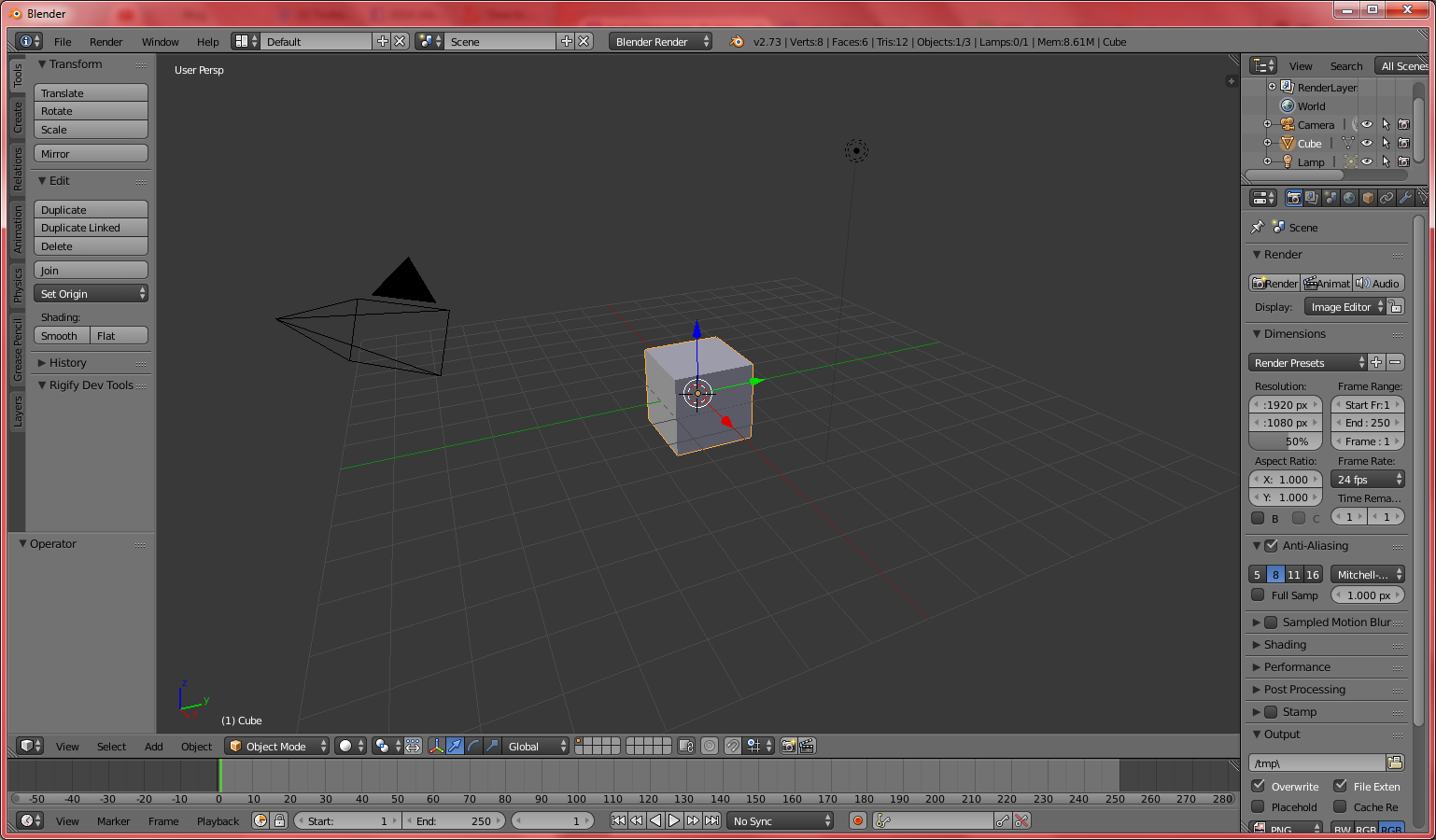
First, open Blender.

Easy enough...

Easy enough…

Next, click on “File” on the menu bar, then “User Preference.” Tap the “Input” tab, and change the “Select With:” from the dreaded default Right to the far more sensible Left. Finally, click “Save User Settings.”

You will thank me later.

You will thank me later.

Uhh…where were we? Oh, yes: make a shape.

Way ahead of you.

Way ahead of you. See? A cube!

Select that shape with the left mouse button, then go to the right pane and click on the gear tab (called Modifier).

Modifier selected

Modifier selected

Click on “Add Modifier”, and select “Wireframe.”

And this is where the magic is about to start!

And this is where the magic is about to start!

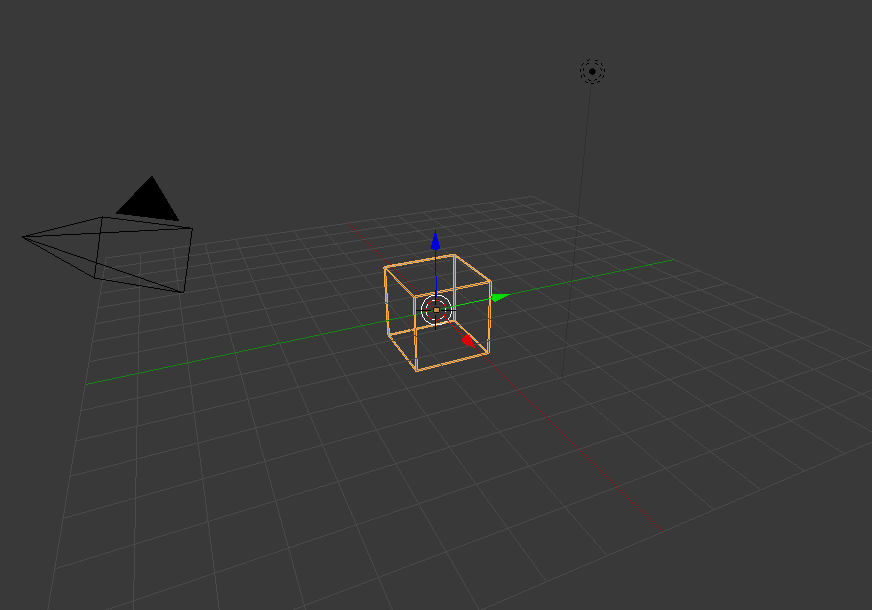
Now your shape is a wireframe!

It doesn't look that nice, though.

It doesn’t look that nice, though.

After that, it’s just a matter of adjusting the thickness value on the modifier.

That's more like it!

That’s more like it!

Now you can save this model in your Unity project’s Assets folder, and let the game engine do the rest.

Part 2: Toon shading in Unity

Next, we need to import some toon shaders in Unity. Open Unity, then click on “Assets” under the menu bar, and select “Import Package -> Effects.”

It's a poorly-worded location to put toon shaders into.

It’s a poorly-worded location to put toon shaders into.

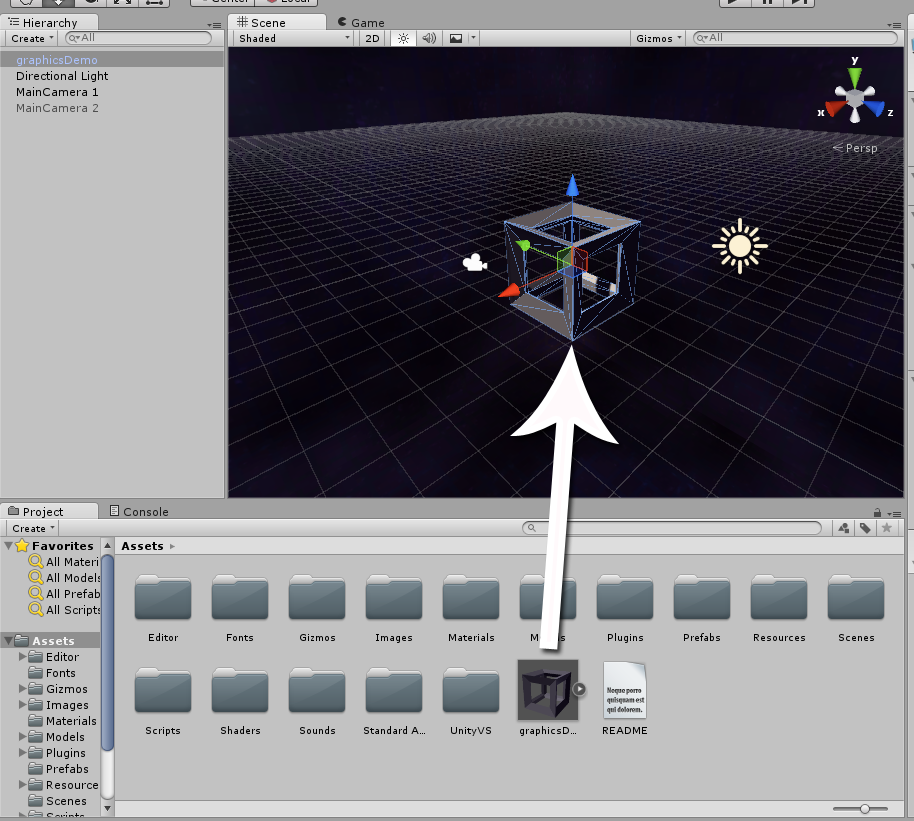
Open the Unity project, and drag your new model into the Scene.

Wait a minute...that's not toon shading!

Wait a minute…that’s not toon shading!

On the Inspector panel, there’s the Material component properties displayed on the bottom. Scroll down there, and change it’s shader to “Toon -> Lit”

Ooooh! So many shaders!

Ooooh! So many shaders!

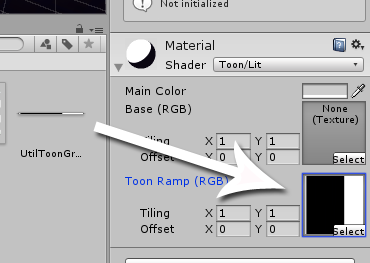
The cube will still look a bit ugly because it doesn’t have a ramp set. Change the ramp to a horizontal monochrome gradient that’s 2 pixel tall, and 256 pixels wide. This will act as the gradient applied to the object in response to the lighting.

A very sharp gradient as a toon ramp.

A very sharp gradient as a toon ramp.

For Star Driller Ultra, we used the ramp below:

Enlarged for your viewing pleasure.

After that, just change the Main Color on the material to whatever you want it to be.

Let's make it unoffensive green.

Let’s make it unoffensive green.

Part 3: Image effects (bloom!)

But wait! If you switch from Scene pane to Game pane, you’ll notice the graphics isn’t as awesome as Star Driller Ultra.

Not awesome enough.

Not awesome enough.

That’s because we’re missing some image effects; specifically, bloom. Fortunately, we’ve already imported it, remember?

Again, poorly worded.

Again, poorly worded.

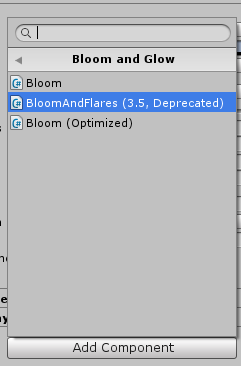
Click on your camera, and in the inspector pane, use Add Component to add the following three image effects, in order.

  1. Image Effects -> Camera -> Vignette and Chromatic Aberration(Adds darker, blurry parts at the corner of the screen)

    Bloom2

  2. Image Effects -> Bloom and Glow -> BloomAndFlares(Adds blooming light effect)

    Bloom3

  3. Image Effects -> Other -> Antialiasing(Soften shapes with jaggy edges)

    Bloom4

Furthermore, for Star Driller Ultra, We’ve adjusted the values in each of these image effects under the inspector as follows:

Lots of numbers.

Lots of numbers.

And that’s about it. You can see the results for yourself.

A true work of art.

A true work of art.

TANKED Post Mortem

For Ludum Dare 32 my take on the them was a little… unconventional. I made a rail shooter (TANKED) where you start with a conventional gun and as the levels progress and you add modifications, it becomes less and less conventional. I had a ton of fun working on this game and and planning on exploring some ideas I had that would not fit within the scope of a jam. Now on to the good parts:


What Went Right:

BOOM

I got to make the weapon system and use physics mostly to the effect that I wanted to, with enemies reacting in exaggerated manners when hit by your weapons. The shooting feels nice, and the variety of weapons (400 combinations!) were really what I think made the high points of my game.


What Went Wrong:

CARNAGE

I should have gotten an early version out to my friends so they could have helped me with a few feedback issues. A lot of people think the enemy damage text is you losing points, and the radar is not as clear as I’d like it to be. Probably the biggest problem plaguing this version of the game is the lack of balance with some combinations being crazy overpowered, with a few being next to useless. I didn’t give myself a lot of time to design the levels, so there’s a lot of room for improvement to make them tighter and let different weapons shine.


Wrapping Up:

I’m very happy with how this jam went and I’m going to keep iterating on this game over the next short period of time to see what all I can do it and if it’s worth pursuing further. For that, feedback is greatly appreciated, so try TANKED and let me know how you feel about it, and let me know what your favorite weapon combos are!


Alright, back to work and rating some games.

Conclusion

I just posted a summary of the whole event on my development blog and but wanted to post my conclusion here as well.

Having a somewhat finished framework ready to go really help a lot in the development since I could immediately jump in and didn’t have to bother with a lot of the boilerplate code. I really hope to get this small framework a bit expanded so things will end up even easier and less hack-ish to code, because while writing a framework you can take your time to design things properly, I did not have that time during the Compo which ended up in a lot of code repetition.

Synth Guitar

While nobody will watch someone code or sit around for hours on end, I still like to stream stuff, because it kind of forces me to keep working on it and not start some video game or randomly browse the internet. In addition to that it gives some nice conversations from time to time and you feel less as a solo developer. I just hope to get a better solution for the webcam, since I feel webcams make streams a lot more interesting.

It took a lot of time, but in the end it was really nice to have something finished and ready to be voted on.

Game

See you next round, maybe? :)

Tags: conclusion, post-compo, post-mortem, tips

Dr. U – improved

ld32_promotion_03

Hey guys,

thanks for the awesome feedback so far. We had quite a few people complain that they didn’t catch the space key thing. So we put up a better text for the controls. We also increased the volume of the tutorial speaker, should be much more audible now.

Take care


Interstellar Borders Update

Interstellar Borders has been updated with a crash fix, some typo fixes and most importantly, increased movement speed.

Check it out if you were turned away by any of those things!


http://ludumdare.com/compo/ludum-dare-32/?action=preview&uid=52764

UnConvention (Post Mortem Part 1)

Hello! I am a 14 year old game developer and I am going to try to portray my process in making my LD32 game. And no, the post is not named after the theme. Sometimes my strangest ideas end up being my best ideas.

Let me rephrase that. My strangest ideas are always my best ideas.


http://ludumdare.com/compo/ludum-dare-32/?action=preview&uid=46961

Poster

The evening I heard that the theme was “an unconventional weapon, ” I must admit my first thought was a baguette sword. I don’t know why. I did not in fact make that, but I have seen somebody’s game who did. Anyway, I sat down and thought for a while, what could be an interesting play on the theme? I could just make a game with a baguette sword, or something like that, but that has never been how I end up interpreting seemingly self explanatory instructions. I prefer to find, if you like, a loophole—something I can guarantee is original and makes you wonder if it really fits the theme. And since the theme is a few words, hardly a legal document, this is usually a fun challenge that lasts, oh, a minute or so.

So Unconvention was born!

What better way to interpret the word unconventional than the unconventioning of conventions?

Comic-Con? Kaboom.

I had a rough idea of what I wanted to do. Aerial view, conventions down on the ground below, maybe they could get bigger or stronger. Then I thought a bit about the weapons you could use to destroy the conventions. In my loophole, it didn’t really matter at all what the weapons were, as long they were a weapon that un-conventioned conventions. An Unconventional weapon.

Then I went to sleep, or tried to. Ideas were flowing through my head at a rapid pace and it was all I could do not to jump onto the design right away.

The next morning, Sunday, I couldn’t actually start work yet. I had been working on a modeling project for school that I needed to get done as soon as possible, and so rushed through some final retopology and called it a day

(this project can be seen at https://cgcookie.com/blender/images/friendly-robot/).

Then I cracked down on my game design.

I started out be designing my landscape. Using blender I quickly outlined a vast expanse of terrain using the ANT landscape generator. Then I decimated it for a low poly look and added a few quirks like highlands and larger bodies of water by pulling large bits up and down. I also pulled the edges down and got a cool coastline that was roughly in a square but in-game it would appear very natural. I applied a gradient texture with grass, sand, rock, etc. by UV unwrapping the mesh from a side view. This ended up looking amazing, so I put a halt on the landscape construction and moved on to some basic controls in Unity.

I fear I spent way too many hours on the controls, feeling alright because of the fantastic view of the landscape below me (now with a water plane). I made controls where there was an open spot in the middle of the screen where the cursor was free to move (cursor replaced with a crosshair) and if it went outside this safe area the space station would move in that direction. It was based on the idea that the player would be using the laser inside the safe zone mainly but occasionally moving it towards the edge and in that case the screen should move to accommodate it. Great and done.

next I actually planned out the game in the sense that I made a progression of screens on paper so I knew what to make in what order. My dad and I planned out what gameplay features I should make, and in what order, so I wouldn’t get caught up on something of low importance. Then I got to it.

Now, I quickly decided a few things. One was that you were in a space station, one that could quickly navigate to be directly over any point on the globe. The space station would be the weapon itself, armed in a few different ways but all focused on the one task. The weapons I chose to be on the space station were bombs and a laser.

I first created the bombs. They were a simple model, one that took maybe two minutes at the most. The dropping of them was equally easy, though I threw in the effect that you were much higher up than you really were (about three times the height of the mountains) by making the bomb shrink as it fell. This created a fun illusion of falling a good bit farther than they really did. These working, I moved on.

Bombs in action:
bombs


Laser was next, this was very simple as well. I just made a screenpointtoraycast based on the crosshair coordinates. Then a line renderer did the work of rendering a laser beam that also shrunk at the bottom to add illusion of height. A little particle system with a ball collider and point light followed the end of the ray, and this collider, having a “laser” tag, could be detected by anything I wanted to be zapped.
Giant laser


More to come in Part 2!

SUPER msPAINT BROS

So I’ve been getting some questions about how I’ve made the art and what I used. Well for the most part I used good ol’ MSPaint!

brothrow

There is nothing quite MSPaint paint for pixel artwork. I know I should move onto better programs but I’m lazy and I like what I’ve been used to for like fifteen years or so.

I also use Fireworks (yes I’m so super old) for some of the font and outline effects. I own PS but it’s easier to use the old stuff sometimes. Deluxe Paint for the Amiga anybody?

I’ve been having so much fun playing games lately! I’ve so far played and rated 60 and I’m not stopping tonight! I’m going to later on, publish my favourite games of this LD and why. But before I can do that, I must play more games!

And now to leave you have a old naked guy flying into the screen:
laveyouwith
-Joel

Comments

22. Apr 2015 · 21:20 UTC
Dudebrah Deluxe Paint is my jam. Look up Grafx2 for the modern spiritual successor, that’s what I’ve used in jams.