23

LD10

LD7: Pathmania: Way of the Jelly

This was my entry for Ludum Dare #7, which was the first LD I entered. The theme (growth) eventually gave me the idea of growing a maze.

So, you create the maze as you walk around inside it. When the game begins, the maze is just a set of disconnected squares. Each of these squares can be linked with a set number of its neighbours (how many depends on the square, from none to four), and you create new links by walking from one square to another where there’s no previous link. Once a link is created it can be walked on as much as you want, but a link can’t be removed once created, so you have to be careful when creating your maze so you don’t get stuck.

Once I had that working the deadline was looming close, so I threw in some keys and locks and made the objective to clear all locks of each level, to make the thing resemble an actual game. In the end there was four levels, a random level generator, and also a level editor.

pathmania-ss7.jpg

I wrote in the original README that I’d continue to work on the game, something I haven’t done. I still like the general idea behind the game, but it has this tendency to degenerate into just staring at numbers, which isn’t very fun at all, and on top of that it’s easy to get stuck, having to restart the level if you don’t pay attention. Perhaps some of the extra elements I didn’t have time to put in the game for the compo — more tile types, powerups, bombs, enemies — would have made it better (more varied if nothing else), but I think the interface is the main problem. It should be more obvious what tiles can connect, how many exits are left, etc, so there’s less guesswork, no number tracing, just puzzle solving. Since the levels are so “dynamic” getting that to work would be tricky, though.

Download: [ Windows | Linux (x86) + source code ]

Tags: final, jellies, keys, linux, locks, maze, post-mortem, puzzle, screenshot, SDL, Windows

LD8: Attack of the Fireflies

This was my second Ludum Dare entry, for LD#8. Theme was swarms. This time you’re playing the Master of Fireflies, out for revenge against some mushroom-dwelling things who didn’t invite you to some insignificant party last week. So you send your swarm of fireflies after them to torch their mushroom homes. That’ll teach ’em! The mushroom-dwelling things doesn’t take kindly to this though, and starts spraying water around, which unfortunately kills your swarm and stops the mushroom fires. The battle is on!

fireflies-final2.png

This was the first time I made something with a swarm-like behaviour, which was nice. The game turned out ok, though not really finished — those mushroom-dwelling things only ever face right, for example, and the levels weren’t supposed to be that flat. There should have been platforms and stuff. Still, there’s a win condition and level progression and such, so that’s something at least. Anyway, it’s kinda fun-ish for a little while, torching mushrooms while those poor guys losing their homes at your hand try to kill off your swarm, but it gets boring and repetitive after a while.

Oh well, I had fun making it, and learned some new things in the process, so I choose to consider it a success regardless =)

Download: [ Source code ]

Tags: attack, final, fireflies, linux, mushrooms, post-mortem, revenge, screenshot, SDL, swarms, water, Windows

LD8½: Moon

My entry for Ludum Dare 8.5. LD 8.5 wasn’t a 48 hour compo, we only got 24 hours to make the game in, but the start time was flexible so you could choose the 24 hours of the weekend the compo was held that was best for you. I managed to use exactly 24 hours on my entry =)

Themes were Moon (actually “But even if you doubt their overwhelming findings, the Moon will never be the same to you again. Never will you raise your eyes to look at her without wondering: IS IT OR ISN’T IT AN ALIEN SPACESHIP WORLD?”, but everyone interpreted it as just “Moon”) and Anti-Textmode, no text at all in the game.

Title screen

The story, which you have to guess at since there’s no text (and the readme is rather sparse), goes: You’re a rabbit, minding your own business on the moon, when one day a butterfly comes flying from somewhere. It flies straight into a crater, which happens to lead to a huge system of caves beneath the surface. Curious rabbit as you are, you follow it, and so the game begins.

First screen

When I started making this I actually intended to make one of those bullet hell shooter games, but for some reason the game evolved into this cave-flying exploration game in stead. Or, well, calling it an exploration game might be a bit of a stretch since there’s only 5 rooms in the game, not counting the exit room (which is a very quick drawing of what’s supposed to be me in my bed, getting a good night’s sleep after 24 hours straight spent coding and drawing), but it would have been if I had spent less time fooling around with the code. For such an art-heavy game you’d think most of the time was spent drawing things (all the rooms are just bitmaps, there’s no tiles), but I actually spent most of the time on code. So, the art didn’t take much time, which kinda surprised me, though of course everything being lores greyscale had something to do with that, and I did rush it a bit too. Anyway, doing the art was a lot of fun.

It shoots!

So anyway, you fly around in this cave system, collecting flashing ring things to open gates while avoiding monsters and projectiles and such. It’s a shame the game is so extremely short, because I really like it and think it could be a good game with some more work. Maybe I’ll get back to it sometime =)

Download: [ Windows | Linux/source code ]

Tags: butterflies, caves, exploration, final, greyscale, linux, moon, post-mortem, rabbits, screenshot, SDL, Windows

LD9 (Untitled)

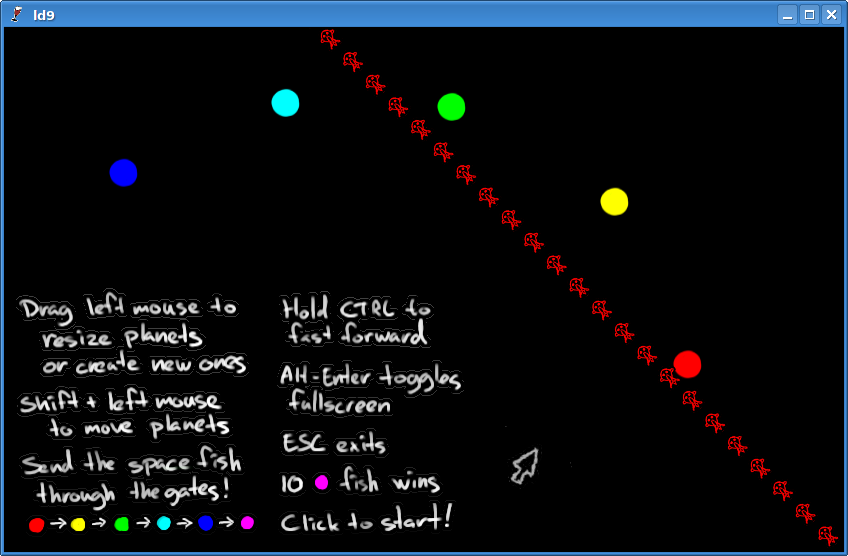
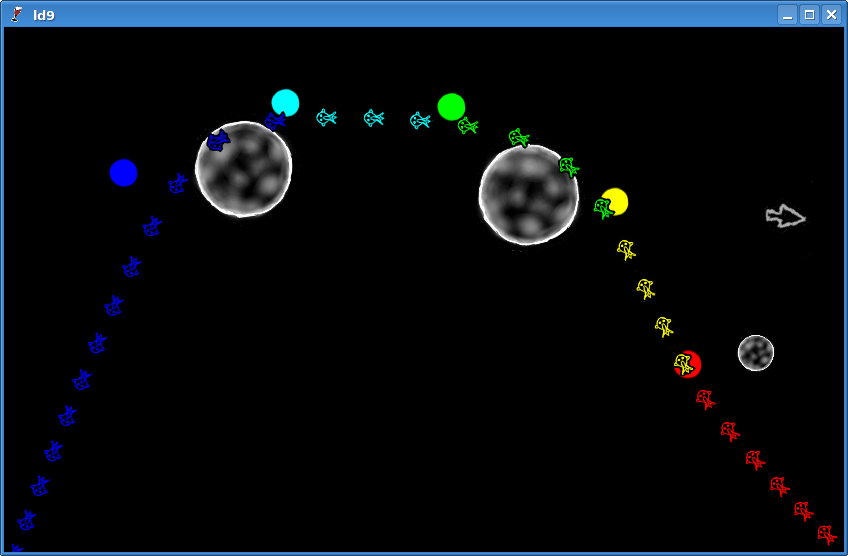
The theme for LD 9 was “Build the level you play”. The premise is that you’re some god or something whose sole purpose in life is to control the path of some space fish, guiding them through gates that changes their colour, and get at least some set number of fish to go through the spectrum in each level. You control their path by creating planets, of course. Planets attract fish using the laws of gravity.

The game comes with in-game instructions, since noone ever reads READMEs, ever

This is actually the first game where I’ve used OpenGL, apart from some small fiddling. (This also made it easy to make the game window freely resizable with hardware scaling, and I made sure the window always keeps the correct aspect ratio by inserting black borders where appropriate. Incorrect aspect ratios are always annoying.)

That aside, this one didn’t go very well. I spent a lot of time just fiddling around with insignificant things and not getting any parts of the game done, and about midway through I changed the aesthetics from creepy-ish paper-cut-outs floating around — something which at least looked somewhat interesting — to badly drawn space fish, and also inverted the planets, for reasons which completely escapes me. I had also coded up an in-game level editor that I used to create the included levels, but this was disabled for the compo release. For a compo where the theme was “build the level you play”. WTF?! Why did I do this? I have no idea.

Space fish swimming through space, towards magentadom and beyond

The gameplay itself also had its issues. I think I made the gravity a bit too “realistic”, since inserting a planet subtly effects everything — so it doesn’t really matter if you’ve fine-tuned your existing planets to perfection if you have to insert a new planet or even move an existing one, the new gravity will upset the fish and you’ll have to fine-tune again. So, while the gameplay can be fun-ish for a little while, the constant required adjustments can quickly get annoying.

After the compo I played around with visualization of gravity by using a GLSL shader, which made the game somewhat more interesting (not to mention extremely colourful). Another thing I tried, both during the compo and after, was making the planets be effected by gravity, so they’d float around too (until they collided and launched themselves at light speed off the screen), and also make the fish generate gravity, attracting other fish and planets. Somewhat fun to watch and play with, specially with gravity visualization enabled, but the game was pretty much impossible then, heh =)

Download [ Windows/source code ]

Tags: final, gravity, linux, opengl, planets, post-mortem, screenshot, SDL, space fish, Windows

The Theme

The Ludum Dare Theme

Tags: motivation

Get set, ready..

Bit of a slow start for me — lots of time wasted trying, and failing, to sleep. Got it eventually, but now a lot of time has gone by already. Oh well..

Got a couple ideas for what I’m going to make. I was thinking of maybe making a vertical shoot-em-up thing with enemies sending projectiles towards other enemies when they die, but it seems a couple other people have similar ideas, so I might end up making something else. Or maybe not, we’ll see I guess..

In the mean time, here’s a photo of my desktop:

gerrys-desktop.jpg

Tags: deskphoto

Humble beginnings

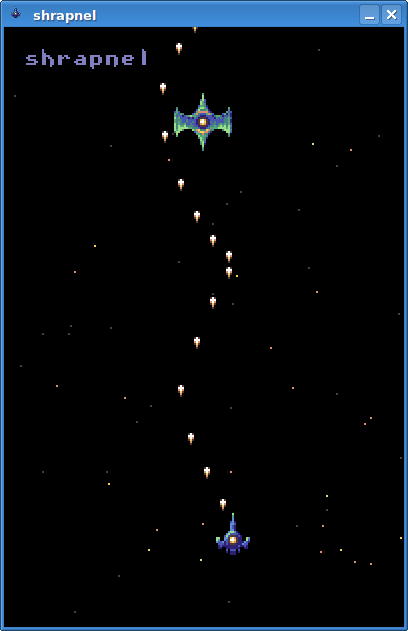
Woo, first screenshot:

mjau-ld10-0.png

Seems I’m going with the vertical shmup idea after all. I think it could turn out to be fun.

Tags: screenshot

Progress

Work is going pretty slow, but I’ve finally got some interaction into the game. Also made a font and some more gfx, and gave it a (temporary) name.

Fire!

Now I just have to make the enemies do stuff, add collision detection and such, and add the chain reactions.. and levels..

Tags: screenshot

sfxr sdl – sound effects for *ALL* =)

I ported DrPetter’s excellent sfxr (info) to SDL, so it can now be compiled and run natively in Linux!

Download: sfxr-sdl.tar.gz

Just type ‘make’ to compile. You need SDL and GTK 2.

Tags: effects, explosions, fun, laser, linux, random, SDL, sfxr, sound, tools

Beetroot and pomegranate soup

One of my flatmates made some beetroot and pomegranate soup for us to eat today:

Yummy

Pretty good stuff =)

Edit: Recipe here =)

Tags: foodphoto

Egg!

So, another night spent trying to sleep, another extended morning spent sleeping.. Oh well, I worked out pretty much everything I need to do to make this into a (hopefully fun) game, I think. Woke up today feeling pretty bad though, but I hope that’ll pass once I eat some food:

dscn0211.jpg

I’ll go eat this now while humming the “I love egg” song.

Tags: eggs, foodphoto

I see stars

Food did indeed help. Then I coded up a scrolling starfield!

mjau-ld10-2.png

Things left to do:

  • Make sprite code support several frames per image (makes some later things easier)
  • Make more angles for shots and enemy shots
  • Make collisions work
  • Chain reactions
  • Make more enemies, maybe some powerups and such too
  • Make levels
  • Scoring
  • Sounds and music
  • Title screen and obligatory scroller

I think that’s doable in the time I’ve got left. I hope.

Tags: screenshot

Bullet hell

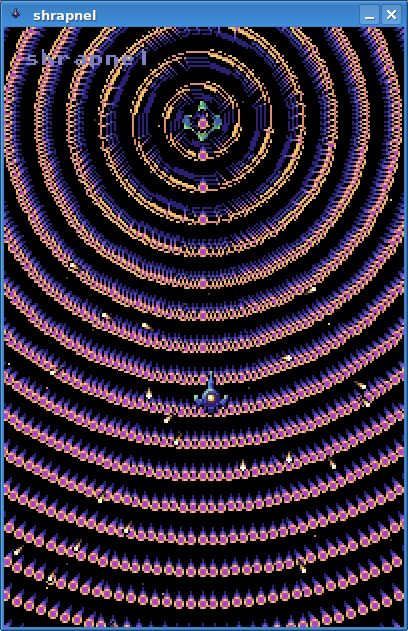
Progress! Finished the first few points of the todo list. Also, enemies can now have their own update/AI function to do stuff, such as shooting at you.

mjau-ld10-3.png

Hm, perhaps I should reduce the amount of shots a tad..

Tags: screenshot

Skolebolle!

My flatmate is at it again, making delicious foodstuffs:

dscn0213.jpg

Fresh baked skolebolle.  Mmm =)

Tags: foodphoto

Chain reactions! Explosions!

Yay! Chain reactions work now. Also, explosions!

mjau-ld10-4.png

The explosion gfx is a bit square perhaps, but I spent way too much time on it already and time is running short, so it’ll have to stay as is for now I guess.

Next: Levels! The game is actually sort of playable now, but everything just sits there. The game needs levels that scroll, making new enemies enter and stuff.

Tags: screenshot

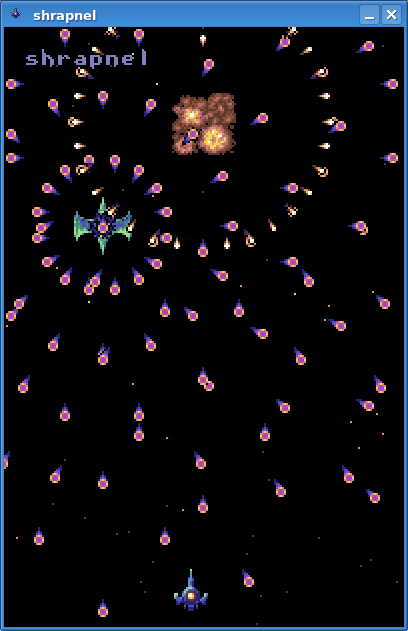
Shrapnel: Final entry

Shrapnel!

mjau-ld10-5.png

Downloads (both have windows exe + source code and Linux makefile):

Uses SDL, SDL_mixer and SDL_image. I used kate for code/text, gimp for graphics, sfxr for sound effects (thanks DrPetter!), and pxtone to make music.

If the Linux version crashes when you run it on 32-bit x86, use this SDL library (contains a fix for a bug in SDL_SoftStretch)

Edit: Figured out the Windows sound latency issue! Seems the SDL.dll I used was buggy. Replacing it with one from libsdl.org fixes things.

Tags: chain reaction, final, linux, pixels, pxtone, screenshot, SDL, sfxr, shmup, shrapnel, space, vertical, Windows

Shrapnel: sound latency fix

For everyone who was having issues with huge sound latencies in Windows, here’s an updated zip that should fix the issue:

[ shrapnel-ld-c.zip ]

The only changes in that zip from the compo version is that I rebuilt the executable without debug info and with optimization (no code changes), removed svn files to make the zip smaller, and replaced the buggy SDL.dll I was using with a good one from libsdl.org.

I’ll probably write a postmortem in a few days.

Tags: fix, shrapnel

30 minute drawing compo entry: Running out of time: Clock thing in the desert

Running out of time: Clock thing in the desert

(click for full size)

Made in Gimp with a tablet. First time I’ve used the smudge tool, went a bit crazy with it =)

Tags: 30min, art

Shrapnel Post-Mortem (+ timelapse!)

This was my fifth Ludum Dare (including 8.5). Before this compo I went through all my previous LD entries and wrote some small post-mortems for them, and looking back, I’ve never been particularly good at handing in finished entries for these compos. I think maybe the first one I entered (7) resulted in the most complete game. That one (which I named Pathmania: Way of the Jelly for some reason, I think it was supposed to be some obscure joke) left a few things to be desired, but it had a title screen, several levels, a random level generator and even a level editor! Shrapnel has one thing it didn’t have, though: Sound =)

Libraries and tools

I used the SDL, SDL_image and SDL_mixer libraries (which in turn uses some libs for decoding png and ogg vorbis), the rest was written from scratch during the compo. All work was done in Linux, using the KDE desktop with 4 virtual desktops. Tools I used was:

  • kate: Text editor. The split view feature is great!
  • gcc: Compiler and cross-compiler.
  • gimp: Graphics. I always use several views of the same image when making pixel graphics, this time was no exception — one for 1x, sometimes one for 2x, and one for 8x or 16x. Sometimes I use a mouse, sometimes tablet, this time I mostly used a tablet.
  • sfxr: DrPetter’s sound effect generator we all know and love. I used the SDL port which I ported myself during the compo =)
  • pxtone: Pixel‘s music editor (v 0.8.3.4).

Other things:

  • xchat 2 and firefox: Internet distractions =)
  • amarok: Music player. Tuned to Nectarine during the compo =)
  • scrot: Screenshot utility, to take screenshots for the timelapse video. Worked really well, I didn’t notice it at all.

General

I had those previous half-finished entries I mentioned in mind as I started out, and simplified a few things right away. For example, I’ve traditionally used libpng directly for loading images in stead of simply using SDL_image. There’s a few reasons for this, but most of them have usually been irrelevant for my LD entries anyway, and SDL_image is a lot quicker to use than libpng. You just call one function to load your SDL_Surface from a file and that’s it.

So for this compo, I did what I should’ve done all along and went the quick and simple way, using the SDL, SDL_image and SDL_mixer libs. I think that worked out well, it took almost no time at all to set up the traditional black window with an event loop, and some image loading capabilities for good measure. I added sound later on, which was also very quick and simple. I still made the game in plain C, but I did some header magic to autogenerate loading and unloading code for resources, setting defines and including the header several times in the file that should get the handling code. This way I didn’t have to worry about either spreading things out in several places or making some fancy resource management system, just put the resource IDs and filenames in one place, and the resource is instantly available for use with that ID. I’ve done similar things in some earlier LDs, and while the headers can look a bit hairy it works really well =)

The result: Less fiddling with technical fluff, more time to work on the actual game. This was a very good thing, since I worked horribly slow and inefficiently during the entire compo and could use all the time I got. I also had major trouble getting to sleep during the compo, which didn’t exactly help (that happens sometimes, compo or not .. I’ve tried several variants of sleeping pills before, but none actually work on me for some reason). So, I ended up wasting more hours just lying in bed trying to sleep, during the night, than I spent actually sleeping, which ended up being during the day. Ugh.

I also spent some time porting DrPetter’s sfxr tool to SDL and Linux, since the Windows version had some issues when I ran it in Wine, and I was determined that for this Ludum Dare, I would have sound in my game or die trying. The porting work was done entirely during the compo, so that “wasted” some time too, though I don’t really see that as a waste of time since I ended up using the port to make some really nice sounds that I feel add a lot to the game. Similarly, the time I actually spent sleeping, eating and going outside for some air was time well spent, I doubt locking myself in the room for a 48 hour marathon would’ve resulted in a better game. On the other hand I could’ve really used some of that time to make more and better levels. The short and crappy levels are, I think, Shrapnel’s most major flaw.

What went right

Well, I made a playable game, and I think it’s kinda fun despite its many flaws =)

The food I ate during the compo was great, probably the best I’ve had during a Ludum Dare so far. One of my flatmates made us lots of delicious food =)

I kinda like the graphics, too. It’s not amazing by any means, and the ship designs are perhaps somewhat uninspired standard fare, but at least they’re not plain ugly =). The graphics was made in Gimp with my tablet. Before the compo started I had some serious issues with the tablet in Gimp, so I was afraid I wouldn’t be able to use it. Gimp would freeze, crash, make all tools behave like the “move layer” tool, and generally misbehave in any number of ways. Thankfully these issues magically disappeared the day before the compo started when I compiled GTK and Gimp from source and installed that in stead of using the distro’s packages.

The sound effects are great, which I have DrPetter’s sfxr tool to thank for. The time spent porting it to SDL was time well spent in that regard =)

I also like the music, which I made with pxtone (pxtone works well in Wine as long as you touch .ptcop files before saving them, since only overwrite works). I was equally determined to get some music in the game as I was about the sound in general, but initially I didn’t have any musical inspiration at all. I tried to make some tunes, but everything I did sounded like crap (specially since I don’t really know any musical theory, it can be a bit hit or miss). I was ready to give up and continue making the game — this was during the last hours of the compo, there wasn’t much time left and I really should be spending time on more important things than trying to make music — and even switched over to the code desktop, ready to do some coding again, when the whole tune suddenly popped into my mind out of nowhere. So, I switched back to pxtone and, according to the timelapse images I’ve got of my desktop, the primary and secondary voice was basically complete in literally three minutes for the first half, four more for the second half, note for note what you hear in the final tune apart from some minor tweaks I did later. That includes time for listening to it a bunch. It was so weird! I did spend some more time with it later, added the drums and such (and made the ingame background thing), but the whole thing was done pretty quickly. Most of what you can see of the pxtone window in the timelapse video (below) is actually rejected tunes, listening to it, and doing and undoing small insignificant tweaks =)

What went wrong

I already mentioned a bunch under General, so I’ll skip that here.

By far the two biggest complaints I’ve seen about my game in the comments have been that the game is too short, and that there’s not much connection to the chain reaction theme, and both of those are really at least partly because of the levels, or lack of, and their design. Actually calling it “level design” is a bit of a stretch since I didn’t really put much thought into their design at all, there wasn’t enough time. They were literally thrown together at the last minute. For the next compo I really need to set off some time for level design, or make some game where level design isn’t so important.

There really are chain reactions in the game, I made the game with the idea in mind from the start — when you kill enemies, they send out shots that kill any other enemies they hit (or you!), which again sends shots when they die to kill yet more enemies, and so on — it’s just not very apparent that they’re there since the level design I mentioned doesn’t really take advantage of the fact at all, except perhaps for this one place. So, there’s not often you actually see chain reactions happening unless you’re both lucky and work really hard at making some. Originally I wanted to have a bit more advanced enemy behavior too, with them floating around the screen for a while before going on, going both left and right and upwards in addition to just down, so that you had to choose both where and when to shoot to make the most chain reactions possible. I’m sorry I didn’t get around to that, because I think that that would definitely have been a much better game. However, that would also have required good level design, and even with the current enemies I think that some decent level design, levels to really set up potential chain reactions, could have had an impact.

Also, the scoring system could use some work perhaps, but the effect the chain reactions have on the score isn’t really obvious in any case (see next section). There should have been some visual feedback when combos happen and such, or at least a mention in the readme in the slim chance that someone should happen to read it.

There’s also a few bugs that slipped through. The most apparent one is probably that the last level sometimes ends before you get a chance to kill the last few enemies, so you win the game with enemies still firing shots at you =). Another bug is that the Alt test when pressing Alt-Enter for fullscreen doesn’t actually work, so you go into fullscreen just by pressing Enter without Alt. Maybe that’s a good thing though, since the fullscreen toggle is undocumented and it’s easier for people to accidentally discover it that way =)

Another undocumented feature is the joystick support. I wonder if someone used it?

Last words

Overall, I think I’m going to call the game at least a partial success. I didn’t get done nearly as much as I wanted to or even could have had I been more efficient, and the levels are a huge detractor, but it’s still kinda fun to play, and I like it =)

By the way, it actually is possible to take advantage of the chain reactions for higher scores if you’re just aware of the scoring system =). I think my record is around 11800 or so.

First, you lose one point for every shot you fire, so if you want high scores it’s in your best interest to not just keep firing, but choose somewhat more carefully where and when to fire.. like a bleak shadow of the original intent with the smarter enemies, heh. You only score 1x the points for each enemy you kill yourself, but enemies killed by the death fire of other enemies get a combo multiplier — 2x for the first one, 3x for the next, and so on. Score is also multiplied by the current level number.

Or, if scoring’s not your thing, you can also try to beat the game by not firing a single shot =)

Timelapse

Finally, here’s a timelapse video of my desktop during the compo. I turned off the computer when I went to sleep, since it’s a bit noisy and is in the same room as my bed, so it’s broken into three parts. I use four virtual desktops, you can see which one I’m in in the little indicator at the taskbar if you look closely. During the compo I used the top left mostly for code (kate), top right for graphics (gimp), bottom left for IRC (xchat2) and internet (firefox), and bottom right for sound (sfxr) and music (pxtone) and sfxr porting =) (except for day one, when sfxr porting was done in the top left desktop).

There’s one screenshot for every 30 seconds at 30 fps. I used scrot in a shell script loop to take the screenshots in the background during the compo, and then mencoder to combine them into this video.

Hm, looking at this I seem to be doing a lot more work than I actually did. Like I said, inefficient..

Tags: post-mortem, shrapnel, timelapse, tools

Shrapnel Post-Mortem (+ timelapse!)

This was my fifth Ludum Dare (including 8.5). Before this compo I went through all my previous LD entries and wrote some small post-mortems for them, and looking back, I’ve never been particularly good at handing in finished entries for these compos. I think maybe the first one I entered (7) resulted in the most complete game. That one (which I named Pathmania: Way of the Jelly for some reason, I think it was supposed to be some obscure joke) left a few things to be desired, but it had a title screen, several levels, a random level generator and even a level editor! Shrapnel has one thing it didn’t have, though: Sound =)

Libraries and tools

I used the SDL, SDL_image and SDL_mixer libraries (which in turn uses some libs for decoding png and ogg vorbis), the rest was written from scratch during the compo. All work was done in Linux, using the KDE desktop with 4 virtual desktops. Tools I used was:

  • kate: Text editor. The split view feature is great!
  • gcc: Compiler and cross-compiler.
  • gimp: Graphics. I always use several views of the same image when making pixel graphics, this time was no exception — one for 1x, sometimes one for 2x, and one for 8x or 16x. Sometimes I use a mouse, sometimes tablet, this time I mostly used a tablet.
  • sfxr: DrPetter’s sound effect generator we all know and love. I used the SDL port which I ported myself during the compo =)
  • pxtone: Pixel‘s music editor (v 0.8.3.4).

Other things:

  • xchat 2 and firefox: Internet distractions =)
  • amarok: Music player. Tuned to Nectarine during the compo =)
  • scrot: Screenshot utility, to take screenshots for the timelapse video. Worked really well, I didn’t notice it at all.

General

I had those previous half-finished entries I mentioned in mind as I started out, and simplified a few things right away. For example, I’ve traditionally used libpng directly for loading images in stead of simply using SDL_image. There’s a few reasons for this, but most of them have usually been irrelevant for my LD entries anyway, and SDL_image is a lot quicker to use than libpng. You just call one function to load your SDL_Surface from a file and that’s it.

So for this compo, I did what I should’ve done all along and went the quick and simple way, using the SDL, SDL_image and SDL_mixer libs. I think that worked out well, it took almost no time at all to set up the traditional black window with an event loop, and some image loading capabilities for good measure. I added sound later on, which was also very quick and simple. I still made the game in plain C, but I did some header magic to autogenerate loading and unloading code for resources, setting defines and including the header several times in the file that should get the handling code. This way I didn’t have to worry about either spreading things out in several places or making some fancy resource management system, just put the resource IDs and filenames in one place, and the resource is instantly available for use with that ID. I’ve done similar things in some earlier LDs, and while the headers can look a bit hairy it works really well =)

The result: Less fiddling with technical fluff, more time to work on the actual game. This was a very good thing, since I worked horribly slow and inefficiently during the entire compo and could use all the time I got. I also had major trouble getting to sleep during the compo, which didn’t exactly help (that happens sometimes, compo or not .. I’ve tried several variants of sleeping pills before, but none actually work on me for some reason). So, I ended up wasting more hours just lying in bed trying to sleep, during the night, than I spent actually sleeping, which ended up being during the day. Ugh.

I also spent some time porting DrPetter’s sfxr tool to SDL and Linux, since the Windows version had some issues when I ran it in Wine, and I was determined that for this Ludum Dare, I would have sound in my game or die trying. The porting work was done entirely during the compo, so that “wasted” some time too, though I don’t really see that as a waste of time since I ended up using the port to make some really nice sounds that I feel add a lot to the game. Similarly, the time I actually spent sleeping, eating and going outside for some air was time well spent, I doubt locking myself in the room for a 48 hour marathon would’ve resulted in a better game. On the other hand I could’ve really used some of that time to make more and better levels. The short and crappy levels are, I think, Shrapnel’s most major flaw.

What went right

Well, I made a playable game, and I think it’s kinda fun despite its many flaws =)

The food I ate during the compo was great, probably the best I’ve had during a Ludum Dare so far. One of my flatmates made us lots of delicious food =)

I kinda like the graphics, too. It’s not amazing by any means, and the ship designs are perhaps somewhat uninspired standard fare, but at least they’re not plain ugly =). The graphics was made in Gimp with my tablet. Before the compo started I had some serious issues with the tablet in Gimp, so I was afraid I wouldn’t be able to use it. Gimp would freeze, crash, make all tools behave like the “move layer” tool, and generally misbehave in any number of ways. Thankfully these issues magically disappeared the day before the compo started when I compiled GTK and Gimp from source and installed that in stead of using the distro’s packages.

The sound effects are great, which I have DrPetter’s sfxr tool to thank for. The time spent porting it to SDL was time well spent in that regard =)

I also like the music, which I made with pxtone (pxtone works well in Wine as long as you touch .ptcop files before saving them, since only overwrite works). I was equally determined to get some music in the game as I was about the sound in general, but initially I didn’t have any musical inspiration at all. I tried to make some tunes, but everything I did sounded like crap (specially since I don’t really know any musical theory, it can be a bit hit or miss). I was ready to give up and continue making the game — this was during the last hours of the compo, there wasn’t much time left and I really should be spending time on more important things than trying to make music — and even switched over to the code desktop, ready to do some coding again, when the whole tune suddenly popped into my mind out of nowhere. So, I switched back to pxtone and, according to the timelapse images I’ve got of my desktop, the primary and secondary voice was basically complete in literally three minutes for the first half, four more for the second half, note for note what you hear in the final tune apart from some minor tweaks I did later. That includes time for listening to it a bunch. It was so weird! I did spend some more time with it later, added the drums and such (and made the ingame background thing), but the whole thing was done pretty quickly. Most of what you can see of the pxtone window in the timelapse video (below) is actually rejected tunes, listening to it, and doing and undoing small insignificant tweaks =)

What went wrong

I already mentioned a bunch under General, so I’ll skip that here.

By far the two biggest complaints I’ve seen about my game in the comments have been that the game is too short, and that there’s not much connection to the chain reaction theme, and both of those are really at least partly because of the levels, or lack of, and their design. Actually calling it “level design” is a bit of a stretch since I didn’t really put much thought into their design at all, there wasn’t enough time. They were literally thrown together at the last minute. For the next compo I really need to set off some time for level design, or make some game where level design isn’t so important.

There really are chain reactions in the game, I made the game with the idea in mind from the start — when you kill enemies, they send out shots that kill any other enemies they hit (or you!), which again sends shots when they die to kill yet more enemies, and so on — it’s just not very apparent that they’re there since the level design I mentioned doesn’t really take advantage of the fact at all, except perhaps for this one place. So, there’s not often you actually see chain reactions happening unless you’re both lucky and work really hard at making some. Originally I wanted to have a bit more advanced enemy behavior too, with them floating around the screen for a while before going on, going both left and right and upwards in addition to just down, so that you had to choose both where and when to shoot to make the most chain reactions possible. I’m sorry I didn’t get around to that, because I think that that would definitely have been a much better game. However, that would also have required good level design, and even with the current enemies I think that some decent level design, levels to really set up potential chain reactions, could have had an impact.

Also, the scoring system could use some work perhaps, but the effect the chain reactions have on the score isn’t really obvious in any case (see next section). There should have been some visual feedback when combos happen and such, or at least a mention in the readme in the slim chance that someone should happen to read it.

There’s also a few bugs that slipped through. The most apparent one is probably that the last level sometimes ends before you get a chance to kill the last few enemies, so you win the game with enemies still firing shots at you =). Another bug is that the Alt test when pressing Alt-Enter for fullscreen doesn’t actually work, so you go into fullscreen just by pressing Enter without Alt. Maybe that’s a good thing though, since the fullscreen toggle is undocumented and it’s easier for people to accidentally discover it that way =)

Another undocumented feature is the joystick support. I wonder if someone used it?

Last words

Overall, I think I’m going to call the game at least a partial success. I didn’t get done nearly as much as I wanted to or even could have had I been more efficient, and the levels are a huge detractor, but it’s still kinda fun to play, and I like it =)

By the way, it actually is possible to take advantage of the chain reactions for higher scores if you’re just aware of the scoring system =). I think my record is around 11800 or so.

First, you lose one point for every shot you fire, so if you want high scores it’s in your best interest to not just keep firing, but choose somewhat more carefully where and when to fire.. like a bleak shadow of the original intent with the smarter enemies, heh. You only score 1x the points for each enemy you kill yourself, but enemies killed by the death fire of other enemies get a combo multiplier — 2x for the first one, 3x for the next, and so on. Score is also multiplied by the current level number.

Or, if scoring’s not your thing, you can also try to beat the game by not firing a single shot =)

Timelapse

Finally, here’s a timelapse video of my desktop during the compo. I turned off the computer when I went to sleep, since it’s a bit noisy and is in the same room as my bed, so it’s broken into three parts. I use four virtual desktops, you can see which one I’m in in the little indicator at the taskbar if you look closely. During the compo I used the top left mostly for code (kate), top right for graphics (gimp), bottom left for IRC (xchat2) and internet (firefox), and bottom right for sound (sfxr) and music (pxtone) and sfxr porting =) (except for day one, when sfxr porting was done in the top left desktop).

There’s one screenshot for every 30 seconds at 30 fps. I used scrot in a shell script loop to take the screenshots in the background during the compo, and then mencoder to combine them into this video.

Hm, looking at this I seem to be doing a lot more work than I actually did. Like I said, inefficient..

Tags: post-mortem, shrapnel, timelapse, tools