donaldducky

LD28

My First Ludum Dare Entry

I have my own blog at: http://pyjamacoder.com/ so this is kind of a mirror of my post there.

I’ve been contemplating trying it out to see if I could make a game in 48 hours. Well…this past weekend was the first one I’ve had free since I started paying attention to this competition.

I didn’t really prepare to create a game at all…but rather did it on a spur of the moment decision. I figured, what better time to try to create a game for Ludum Dare than now? After all, actions speak louder than words.

Here is my very first Ludum Dare 28 entry: Existence

It can be played at: http://pyjamacoder.com/ld28/

And the source code can be retrieved from github: https://github.com/donaldducky/ld28-existence

Here’s what it looks like:

existence

Deciding where to start

The choice of tools was pretty simple for me:

  • I have no experience using any “game development” tools
  • People who play Ludum Dare games have access to a web browser
  • I have a web development background

I ruled out trying to learn how to use a game development tool. Creating a game is hard enough as it is, add in a 48 hour time limit and some kind of theme and you don’t have too much time to think. Why bother trying to learn the quirks of something you’ve never used and may not use in the future?

The second point is pretty important for exposure. People who visit Ludum Dare obviously have access to a web browser. Being a game developer of some sort, it’s very likely they use modern browsers such as Chrome and Firefox. After playing and rating some games on the site, I feel like I made the right decision with this. A lot of games are Windows only (thanks to the tools they use), or they use something like PyGame, which I seem to have trouble installing on my machine (OS X Mountain Lion). I decided to stick to web technologies available in a modern browser without any sort of plugin (ie. no Flash).

Making stuff for the web is what I do for a living. If I’m going to make a game in a web browser, I should use the tools I’m already comfortable with. That was a no brainer.

I managed to cut out some of the learning curve and debugging time from the start and that played to my advantage.

The Toolset

I stuck with some of the standard web development tools that generally make my life easier. I will list the tool and the reason for the choices.

For my editor, I used Vim.

Browser of choice: Chrome (stable not Canary)

It’s getting late, so I’m going to have to continue this in a part 2…coming soon.
My first LD experience part 2

This post is a continuation from my previous post about creating a game for Ludum Dare 28.

In the previous post, I discussed why I selected the tools I did and the reasons for creating a game for the web. I also described why I didn’t use any pre-existing frameworks to aid in my endeavor.

In this installment, I’ll be talking about what I spent my time doing during the 48 hours.

Preparing for the journey

This was my first time attempting to create a game for Ludum Dare. I’ve toyed around with some game development code in the past, but having no immediate goal made me stray from the ultimate goal of creating a game.

There was one thing I’ve read and was eager to try out: creating a component entity system. This is a good thread to start reading about it if you’re interested.

I wanted this to be as “pure” as possible for my first foray into LD territory. Creating a game engine from scratch would be a part of the learning experience.

At this point I decided a few things:

+ create a game engine that focused around using a component entity system
+ the game will be 2d tile based
+ no animation
+ no sound effects or music

For points 2 and 3, it would simple to create sprites and place them appropriately. Creating an animation would take time away from developing the actual game. It takes practice making sprite animations and I’m not seasoned by any means.

The point about no sound effects or music was kind of easy from my perspective. I didn’t have any experience creating any audio and felt it wouldn’t have been a wise use of my time trying to figure out how to even get some audio.

With those things decided, I was ready to find out the theme.

Day 1: The theme is announced

The theme “You Only Get One” was announced at 9pm EST.

I drew a blank. I didn’t want to do any of the more obvious things like giving someone one life or one bullet. At the same time, I didn’t want to sit here thinking about what kind of game I wanted to make when I didn’t even have an engine to work with.

I figured the best thing to do was setup my project and get my game loop running. Setup my canvas with a rendering system. And then render…a lone person.

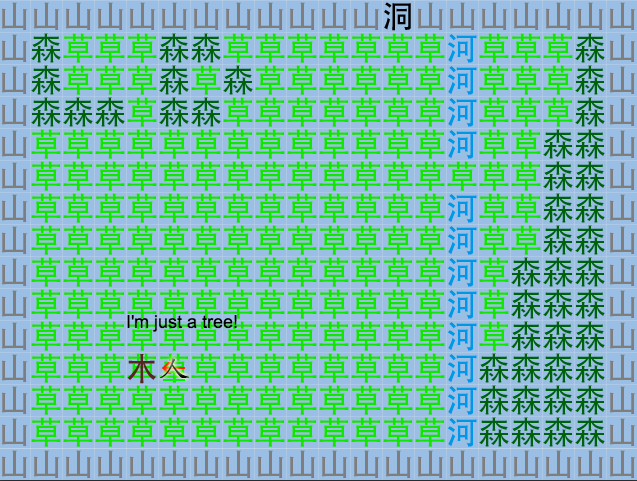
Drawing a pixely person was going to be quite the task for me. I was thinking about making some kind of placeholder that used a character to represent a person (kind of like Dwarf Fortress or Net Hack). And then I realized…I can represent an entire word with a single Chinese character.

The human was born: 人

The solution was so simple and it happened to fit the theme.

From that point on, I added a few more sprites for things like mountain ( 山 ), forest( 森 ), grass ( 草 ) and cave ( 洞 ).

I'm just a tree

Satisfied with the start, I went to bed around midnight.

Day 2: Engines roarin’

I got up around 8:30 on Saturday morning and started digging in.

I wasn’t too sure where I was heading yet, so I refactored the code for a couple of hours in preparation of adding more entities and maps.

After that, I created a second map and added some triggers to move the player between them.

A few more systems were added to handle keyboard input, some simple collision detection, AI, and a life system.

New sprites were created to serve as NPCs and a battle system was put into place…the player could attack the enemies and the enemies could defeat the player.

The game was starting to take shape. I figured I could add a few more maps and spend more time on the content of the game (as well as the theme).

Not wanting to wreck my normal sleeping pattern, I crashed around 11:30pm.

The hero bloodied by a skeleton's punch

Day 3: The end is nigh

I slept in until around 9am on Sunday.

I remember waking up and thinking “only 12 hours left”. I wasn’t panicked because…12 hours! It sounded like quite a bit of time.

Once I got to my computer, I instinctively started refactoring…but I forced myself to stop. I didn’t have a finished product yet and there’s no reason to make your code super clean when there’s nothing for it to run.

I figured out how to quickly add pausing functionality and a game over screen. I tried to figure out a way to “reset” the game but I figured, refreshing the page is probably the quickest and easiest way to implement this.

By now, I had a pretty good system in place and could start seeing the real power of a component entity system.

Time was running out and I realized I didn’t have a way to “end” the game.

I knew it would be ridiculous to try and come up with say…15 more screens, so I focused more on giving the game more depth.

I wanted to have a complete game so I started working on the final map and quickly put together a couple of “ending” screens with less than an hour left.

Because the game ended up being 3 screens, it was pretty easy to test. I even fired up FireFox for good measure before submitting it.

I had about 15 minutes left before it was 9pm and I wanted to submit it before the time limit (I didn’t realize there was a 1 hour submission window).

I managed to take a screenshot, upload it to my web server (I had forgotten my sudo password) and fix a couple of things (I used symlinks to the Bower libs) to make the 9pm deadline.

A game was created and I couldn’t be any happier with the outcome of the result.

More to come…

I ended up typing way more than I thought I would so I’ll end it for now. In the next post, I’ll be doing a post mortem (if you want to call it that) and reveal some interesting tidbits about the game, so stay tuned!

Ludum Dare 28 part 3

This is the third part of my LD 28 experience. You can read the previous parts here: part 1, part 2

The actual entry is here: Existence
The game is playable here: http://pyjamacoder.com/ld28/

People on the Ludum Dare website seem to love doing these post mortem things.

So, without further ado, here’s my post mortem on creating Existence.

Preamble

I mentioned in the first post that I entered the compo on a spur of the moment decision, without any real preparation. This isn’t quite true. I’ve looked at creating a component entity system for a while now…I just haven’t had any success with it.

Tip 0: Be prepared

In reality, I’ve been thinking about how I wanted to set one up, which made it easier for me to get started. I’m also a developer in my day job, so I’m somewhat experienced with how to handle looming deadlines.

Nevertheless, it was still a challenge.

My goal

I wanted to create a game from scratch, no matter how long or complex, just to see if I could do it.

I’ve tried to create a game in the past, but for one reason or another, I lost interest. Most of the time it was because of something unrelated to the game itself or I would go down a rabbit hole trying to make something too…perfect.

This was basically a way of testing my ability to cast aside some of my weaknesses and actually complete something.

The game engine

Fire!

Creating a game engine from scratch obviously puts me at a disadvantage compared to someone who uses something full featured like Unity. It cost me time to create something that would do such basic things like running a game loop, parsing a sprite map, loading a map and drawing to a canvas.

My engine couldn’t even play a sound or have a good way to load another screen. Heck, I couldn’t find a simple way to ‘reset’ my game after playing it without having to resort to the web browser’s refresh feature. Although…that is exactly what the refresh button in a browser is supposed to do!

Revelations like that are part of the reason I learned so much during this 48 hour development period. If you think about it, it’s basically the same as hitting the good ol RESET button on an NES.

Tip 1: Know your tools

As a web developer, refreshing the page or redirecting is the ultimate reset button. We don’t really like doing it but it’s there if needed. In a pinch, it works like a charm.

Creating my own engine meant I knew what was possible at any given time. I wasn’t hit with any nasty surprises. I wasn’t restricted to doing things in a particular way. I knew where to extend it and didn’t really have to fight with it to see how something was “supposed” to be done.

The drawback was that I had to create it. If I was proficient with some kind of framework, you better believe I would’ve used it 😀

The theme

I spent quite a bit of time on the game engine and didn’t think too much about the theme, at first. There was no point in spending all my time thinking about a concept when I couldn’t paint any pixels on the screen. As I finished some of the initial setup, things started to fall into place.

Tip 2: Don’t get sidetracked

As I started seeing what was possible, I focused my ideas on what could be done with the time left.

For instance, I wanted to do something more than I had done on the final screen. But I didn’t even have an ending screen. In order to ‘finish’ the game, it needed an ending screen, no matter how simple it was. The primary goal was to finish a game.

I didn’t have a good way of displaying screens with the normal game loop, so I had to resort to some hackery. I’m not too proud of it but sometimes dirty things need to be done :p

In the end, the theme had to do with having one “life”, which is so cliché but at least it was achieved in a unique way (I think).

The game itself

I was very pleased with how it turned out.

The game was only 3 screens, which doesn’t seem like much, but I was able to add some depth to it. I didn’t want the player going from screen to screen collecting ‘x’ items or destroying ‘y’ monsters. There wasn’t much of a story but each room gave you a sense of discovery and purpose.

Here’s a (non-exhaustive) list of features:

  • multiple maps (3) linked together
  • action button to interact with characters and items
  • multi directional shooting
  • multiple weapons with different properties (wind, fire)
  • weapon type immunities (you can burn down the world tree but wind doesn’t hurt it)
  • npc ai scripts
  • treasure chest (that tell you what was in it after you open it)
  • dialogue
  • damage animation (when you get hit, blood flies out)
  • hp bars
  • moving between screens saves the state (number of enemies, treasure, etc)
  • multiple endings!

All of this and the game is pretty smooth with no real bugs!

Which brings me to my next lesson.

Tip 3: Practice!

I don’t create games (often) but I do develop a lot. I’ve learned a few techniques here and there and continually try to practice my skills.

When you complete something, take the time to reflect upon it. Was there anything you didn’t like? What’s a better way of accomplishing what you’ve done? How have other people accomplished the same tasks?

Do some research. The best way to learn is by reading about other people’s experiences and see how they do things.

I couldn’t have gotten this far without all of the experience I’ve gained over the years and all of the valuable resources available. The internet is a gold mine of information.

Speaking of resources, I also created a walkthrough and a guide of sorts for people to know what each character represented in the game. Judging by the comments, it proved useful to at least a few people, which makes it worth it.

Overall

Explosion!

I would not change how any of this went. I was able to stay focused and complete my goal of creating a playable game, no matter how short it ended up being.

I will probably enter future Ludum Dares because it was so enjoyable 😀

I’ve already posted so much about my experience but I wanted to capture as much about it as I could.

I have at least one more post in me about the actual game engine if anyone’s interested.