someguy22

LD22

Setup For Ludum Dare 22!

With the start of LD #22 in less then a week now, I’m getting my tools set up! I’ll most likely be using

  • Unity 3d Indie (Experience: 1 1/2 years) : Mostly Javascript as the language
  • Possibly Blender 3D (Experience: 1 1/2 years)
  • Garageband (Experience: 2 years)
  • CFXR (Experience: 1/2 year) : The BEST program for sound EVER
  • Pixlr (Experience: 1 year) : Online substitute for Photoshop :p
  • Unity Forums (Experience: 1/2 year) : The best weapon in my arsenal! My Page

Without a doubt I’ll be using Unity’s Standard Assets Source Code as no man can code without it!!! Also, I may use some of assets from Unity’s example packages such as: Lens Flares and The First Person Demo (demo is removed for some reason, I guess it’s obsolete)

Good luck to all, hope Notch doesn’t completely own us!

Tags: blender, expierence, garageband, good luck, LD #22, setup, sfxr, tools, unity

Isolated Assault & Timelapse

So I finally settled down from LD22 and got time to render out the footage I took while making Isolated Assault, my entry. Some screenshots:

I had fun, but lost some sleep. :(

Anyways here’s the time-lapse video (The first and third music tracks are ones I created for another game, the second I created for this one. Process for the second one’s creation is shown in the video. Oh and I do tend to watch Notch’s live stream and play other people’s submissions from time to time.)

Isolated Assault – Ludum Dare 22 Timelapse

Resolution is a little large, you may want to go full-screen to see what applications I’m using.

Isolated Assault Post-Mortem

My entry for LD22 (ISOLATED ASSAULT) was somewhat of a wave survival game, getting harder with each death, until you reach the goal, the escape chopper.

I had a lot of fun, and, after being my first time, I will most definitely do this again.

Here’s the “Proper” Post-Mortem:

How I Spent My Time

Timelapse here if you want to take a look.

Basically I came up with an idea while I was making the game. I had already pretty decided it would be first person. And also I had pretty much decided the enemies would be cubes. (Just to make it easier on myself)

I didn’t particularly like the theme, alone, but it was better than kittens. 😛

Mainly I worked on getting the character movement to be as smooth as possible, that’s where most people messed up, to make the game fun and re-playable. I tried to make the sword animations as hectic as possible, just to make it look a little more stylish. I made the wall and floor textures 8 bit and repeatable. I made the music overdone, with a lot of instruments (using garageband) and very complicated. I did this because I remembered all those 2d games with catchy music but terrible graphics.

I implemented the theme by having enemies appear if you put on sunglasses, but disappear if you take them off. The catch was that in the sunlight, without sunglasses, you burned. So you had to find shaded “safe” areas to take off your sunglasses and regenerate health, while the enemies disappeared.

The sound effects were done in CFXR (I especially like the enemy death noises). The language I used was Javascript. The game engine was Unity Indie. The 3d modeling software was Blender. This cannot get any simpler.

I chose these programs because, well, they were free, and also because they’re proper towards making an indie game.

What I Learned

  • The smoother the gameplay and character movement, the better
  • Sound is a very important part of game development
  • Don’t over-complicate things, keep your main code in as few scripts as possible
  • Particle effects make the game seem more complete

What Went Right

  • The music was mostly catchy and was repeatable
  • The gameplay was smooth and the sword attacks blended together well
  • The implementation to the theme (being alone, only when your glasses are on)
  • The sound design was okay, especially with the enemy deaths

What Went Wrong

  • There should have been more enemies
  • The enemies should have been easier to fight
  • There should have been more things blocking your path
  • There should have been better GUI controls and being able to change the mouse sensitivity
  • The level design should have been worked on better
  • The game should have been longer

All in all, I think I did an okay job, maybe not the best, but it was fun enough to please my friends, and good considering the amount of time I had. (Less then 48 hours, more like 30, I had to go to some places)

Try it out here.

Tags: blender, post-mortem, unity3d

Confused About A Few Things…

After using my Ludum Dare account for a few weeks now, I’ve been noticing a few weird things… If anyone can help me (and others with the same problems) please don’t be afraid to speak! 😛

1. Association With WordPress.com And Gravatar.com

  • I tried logging in to wordpress.com with the account I created for Ludum Dare, but it was saying someone else owns the username :( So for some reason either the Ludum Dare account is completely different from a wordpress account (which makes no sense, being that I’ve seen those people running around with avatars :P) or the password is not being accepted from wordpress for some reason.
  • The Home Page on LudumDare.com/compo says “Add an avatar – gravatar.com, use same email”. So I did. And it didn’t work. Because it said I didn’t have a “wordpress account”.
  • Instead I created a separate wordpress (using wordpress.com and not ludumdare) account with the same email.
  • I got into gravatar using the wordpress account, and changed the avatar, but it didn’t change my ludumdare account’s avatar (No surprise there)
  • I tried logging into LudumDare with the wordpress account, and it failed.

Suspicion: I think for whatever reason, LudumDare accounts are just not compatible with WordPress accounts.

What Could Be The Fix: That “WordPress 3.3.1 is available!” always bugs me. Maybe because Ludum Dare does not have the latest wordpress, the accounts are no longer working with each other.

Question: How did you people out there get avatars? How can I log into WordPress with my Ludum Dare account?

2. Video Embed HTML Code not working

  • I tried to embed a video by going into HTML mode and pasting the HTML code that YouTube gives you to embed. It didn’t work, all I got was empty space.
  • I tried the “Old Embed Code” and it had the same problem.
  • I tried the visual edit view and clicked “Add video with URL”. It gave a link to the vid, which was not the embed I wanted.

Suspicion: Ludum Dare’s HTML is outdated or is not compatible with the standard YouTube embed code.

What Could Be The Fix: Whatever code other people use to embed videos should be public or on the ludum dare home page. OR, Ludum Dare needs to update or make sure their HTML code is working properly.

Question: How did you people out there embed videos? What code did you use? Is there an easier way besides code?

3. Visual Edit for adding pictures and videos are messy

  • I’ve added pictures into a post before, using URL, but they came out stretched and distorted.
  • Instead of adding pictures using URL, I added them from the computer, and they came out perfectly.
  • The “Add Video” button for URL, as I said before, just gives a link to the video. I don’t know what happens if you upload a video from your computer, but definitely the easiest way is to do it from YouTube or another site.

Suspicion: The Visual Edit mode needs to be updated, or fixed, or made easier to use.

What Could Be The Fix: Updating WordPress.

Question: How did you people out there make your titles in a larger font and make your pictures not distorted, to the side, and embed videos? (The last one being the most important)


Sorry if that seemed a little noobish, but I am a noob at heart, and the best way to get help is to ask the community! 😉

Please comment, and thanks for the help in advance!

EDIT: Gravatar problem fixed, you need a wordpress account with the same e-mail as your ludum dare account. (Thanks Chaoseed)

Video embedding is solved thanks to matthias_zarzecki. “The video-embed-thing drove me mad when I tried to figure it out. Turns out just adding the link into the text automatically creates the embedded video.”

Comments

07. Jan 2012 · 17:59 UTC
The video-embed-thing drove me mad when I tried to figure it out. Turns out just adding the link into the text automatically creates the embedded video.
07. Jan 2012 · 18:36 UTC
WordPress.com accounts are completely separate from Ludum Dare accounts. See, “WordPress” is software you can install on your web host that lets you have blogs, but “WordPress” is ALSO the organization that maintains that software, AND they run that software on their webhost to let people have blogs.
07. Jan 2012 · 21:41 UTC
Okay that clears it up a little! 😛

ISOLATED ASSAULT: Summary and HQ (Results)

Thanks all who voted and competed along with me! It was fun and exciting to finally join Ludum Dare, and I can’t wait to join again for the 10 year anniversary! :)

Once again, I’m going to honest (and critical) and try to make this mega-post interesting! 😛

PLAY THE GAME HERE

My goals for Ludum Dare 22

  • Before the competition started, I had some goals in mind that I wanted to make.
  1. I wanted to make sure “Fun” was the best category, so that people could replay the game, and have a good time playing.
  2. I wanted the gameplay to be smooth and the animations smoother.
  3. I wanted to beat Notch in at least one category (knowing how hard that would be). 😛

What software I used

  • Unity 3d Game Engine
  • Blender 3D Modeling Software
  • Pixlr Photo Editor
  • Cfxr Sound Generator
  • Unitron Script Editor
  • Garageband Music Creator
  • Text Edit Text Editor

How I made the game

  • I quickly had come up with an idea for each of the most likely themes before LD22 started. My theme for “Alone” was a game where you would be sometimes alone, and then all of a sudden, you would be crowded with people.
  • After the theme was announced, I decided that the game would be first person (the easiest of all the persons) and that you would have to fight your way through endless hordes of cubes (the easiest of default shapes). You could only see the cubes when your glasses were on, but if you weren’t in a shaded zone when your glasses were on, you’d start burning. This was a way to keep the player moving, and a way to make them constantly nervous.
  • I worked on the player controls and LockCursor, etc. But the gameplay does not complete a game. I needed an enemy. One that would appear only if your glasses were on.
  • I whipped up a cube model and texture and soon came up with this:

  • Whoo Hoo! Now I have a cube!
  • Next I worked on making the cube look at the player, and then having it disappear when the players “glasses” (A semi-transparent plane) were off.
  • By now my Unity Scene looked like this:
  • Soon I got Health implemented, and then it started to look like a Test level.
  • I kept at it, knowing it would soon look like a game.
  • The cube could soon move towards the player, and deal damage at close range.
  • The first “Shaded Zone” was created, (using a Trigger) and the player would not take damage while inside it.
  • I worked on making the zone a little prettier, and expanding the floor plane. I added a skybox, and changed the ambient light to near black.
  • All along I had been slightly working on a music track, but now I decided I needed to finish it.
  • The level was extended, the cube had a spawn code and could replicate itself, and the textures for walls and the floor was created in Pixlr.
  • I created a variety of sound effects in CFXR like jumping and enemy death noises (my favorite).
  • I worked on making an in-game tutorial, by timing when the music starts with the same time that it tells you that there is no one there.
  • The menu was easy, all I had to do was come up with a name and choose the font, and soon my game looked legit. (Sorry for the lack of photos here)
  • I asked my friend if he could play a test version on his computer (a windows) and I’m glad he did. The font I chose was bugging out on his computer, so I changed it to something else, and it worked fine.
  • Now I knew my game was compatible on Windows AND Mac
  • I created another music track for the menu, a helicopter to go to as the goal, and a stats screen so you could try to beat your own score.

Rating Other People’s Work

  • I specifically rated the games that had the fewest ratings and tried to give most of them a fair, solid score.
  • Mostly I gave 3.0s when I thought something was average.
  • For a few people that put little effort into it, I had to give some 1.0s.
  • I was sad that Notch had not really implemented the theme and pretty much made a different version of Minecraft. (Most likely this was just because he wanted to, or he felt like it.)

How people rated my game

  • I can thank my friends, family, and Ludum Dare community for playing the game and enjoying it, especially DontBeNoobish‘s Gameplay Footage:

  • I was proud with how my game turned out compared to most of the other entries.
  • People mostly liked the audio and innovation of the game, but there were a few things I could’ve made better (More enemies, options, etc)

The Results!

  • Coolness – 52% Bronze medal | At first I thought that the bronze medal meant third place, but then I realized Coolness didn’t have the same rating system. Oh well, it was still good to see that my playing of all those low effort games went to good use! 😛
  • # 40 Community – 3.55 | Wow! Community? I didn’t realize I was that popular! 😛 I guess this rating makes sense because of all the excited posts I made with links to this game. I did a LOT outside of the game (Time-lapse, post mortem, gameplay video, tips)
  • # 108 Innovation – 3.20 | Good, people liked my idea of the sunglasses and whatnot!
  • # 113 Mood – 3.20 | I think the music accomplished the overall feel of the game.
  • # 118 Audio – 3.00 | Once again, the music, but also the enemy death noises made this count.
  • # 113 Theme – 3.33 | Well, you are sometimes alone…
  • # 202 Humor – 2.29 | I wasn’t even going for this (other than the ReadMe) so I have no clue how it ended up higher than overall.
  • # 323 Graphics – 2.67 | Although mine was one of the few 3D first person games, I guess people didn’t really like the low effort GUI and enemy textures.
  • # 435 Overall – 2.50 | Oh no! Overall score seemed like an important one…
  • # 487 Fun – 2.06 | Really? This was the category I was focusing on, but yet it got a 2.06! Yes, I guess I did better than almost half of everyone else, and I’m not complaining, but this ended up at the bottom of the list, when I had worked for it to be the top.

Comparison To Notch 😛

  • My goal was to beat Notch in at least one category, and it turns out that was too easy:
  • I ended up beating Notch in 7 different categories!
  • A comment on the community rating: Last LD, Notch won third place (if I recall correctly) in the community category, but now he received a #49! And I received a #40! So after all the years Notch has spent on Ludum Dare and Minecraft, and the entire fan-base he collected from the Top Computer Game Of 2011, I was able to receive a better score than him from 3 weeks of posting on Ludum Dare!

I send out a huge thank you to all who rated my game (yes, even those of you that got me that horrible “Fun” score) and hope to join again for LD 23! Please remember Rob Productions again for next Ludum Dare, and you can expect a post-compo version coming in time!

Links:

TIPS ON MAKING A UNITY GAME

POST MORTEM

TIMELAPSE

THE GAME AGAIN

Tags: blender, comparison, LD22, Ludum Dare 22, notch, post-mortem, progress, results, screenshot, timelapse, unity3d

Ludum Dare Updated Their WordPress!

Finally we no longer get that annoying, “A new version of WordPress is out!”

It seems with this update they seemed to fix all of the problems I had before (Noob Confusion Post Here) and more!

The new Upload/Insert button is easier to use than the other ones, and the GUI makes a lot more sense.

Thanks, Ludum Dare website managers! :)

My Un-Success Story (What could never happen – Isolated Assault 2!)

Ludum Dare 22:

While Isolated Assault was huge success in my eyes considering it was my first Ludum Dare game, and by the scores it received, I’m struggling to come up with a Post-Compo version. You see, I’m just not feeling the motivation to work on it. Every time I sit down, I just feel, “Wow, this is old.” It’s like one of those projects I just gave up because I had no motivation for it.

That’s how it went with Dunnet (My most worked on game), and with my First Person Shooter (My first professional game), and with all those projects I started but never got around to.

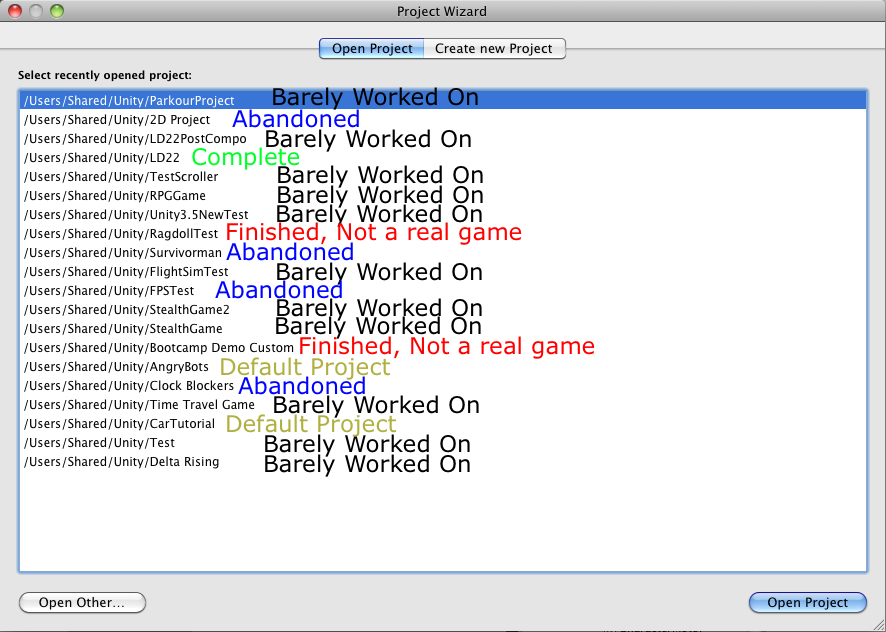
Currently my Unity Project Folder looks like this:

Where “Abandoned” have been worked on for a while. I could always go back to the “Abandoned,” but I haven’t, and why should I?

My Problem:

I need a due date on projects.

Some people can never get work done knowing there’s time management involved. For me, it’s the other way. Knowing that there’s no time to procrastinate, and that there’s a reward for finished, I can get a lot of good things done.

I also have problems focusing on one idea and getting it implemented quickly. All of focused ideas I have are too complicated even for top-notch game companies.

Therefore, Ludum Dare was perfect for me–it gave a theme for the game and a deadline. I now know my best work will probably come from future LDs.

Will there ever be an Isolated Assault 2?

Not now. And probably not from me. Anyone familiar with Unity (That means you, reader!) can take my Isolated Assault Source files, and add some new levels, as long as I receive credit.

I have no motivation whatsoever to make an Isolated Assault 2. All my ideas were expressed in the first one. You are a guy. That fights cubes. That wears glasses. The only thing added to this game would be gloss.

Will you participate in LD 23?

Of course! Ludum Dare is the best way to manage time and get good games squeezed out!

Will you stop asking yourself random questions?

Never!!!!

Now I ask you, do I stick with deadlines for making games, or do I learn to get around them?

Do I use Ludum Dare to create all my of my work?

For some reason, I need some sort of reward/time limit for everything I make, because that’s just how I work.

Either way, I’ll obviously still be doing LDs, and I can’t wait for LD23!

Tags: Assault, can't wait, Failure, Isolated, LD #22, motivation, postmortem, progress, time management, unity, unity3d, UnSuccessStory, update

How To Write Music For Video Games

So one of the most important parts of game development is getting the music to fit the game. In this post, I’m going to show you how to write your own music from scratch while still giving some tips for advanced composers.

This tutorial focuses mainly on Garageband users, so forgive me if some of the terms are incorrect for different programs.

Software

  • You don’t need costly software to write music, some of the most default programs can do the job.
  • Garageband is recommended for Mac users.
  • A good alternative is Noteflight.com, which can write music the… professional… way. You can save it to a wav. file.


WARNING TO GARAGEBAND USERS – DO NOT USE MUSICAL TYPING FOR RECORDING, use the SCORE EDITOR
A – Region Name field: Type a new name for the selected region in the field.

B – Region Pitch slider and field: Drag the slider to transpose the selected Software Instrument region up or down by up to 36 semitones.
You can also type the number of semitones in the field.

C – Velocity slider and field: Drag the slider to change the velocity of selected notes.
You can also type the velocity value in the field.
A note’s velocity reflects how hard the key is pressed when you play the note.

D – Zoom slider: Drag to zoom in for a closer view or to zoom out to see more of the track.

E – Graphic/Notation View buttons: Click to change the editor to graphic view or notation view.

F – Note Value button: Click to choose the note value for notes you add.

G – Fix Timing button: Click to fix the timing of notes in the selected region, or notes selected in the editor, so that notes move to the nearest grid position.

H – Beat ruler: Shows beats and measures for the area visible in the editor.

I – Playhead: Shows the point in the project currently playing.

J – Notation display: Shows the musical events of Software Instrument regions in standard music notation.
You can move notes to adjust their pitch and where they start playing, and change how long they play.

K – Scroll bar: Drag the scroller to move to a different part of a track.

Chord Progression

  • To start off writing your piece, you need a good chord progression.
  • Pick a tune you think can be repeated for the entire song.
  • If stuck, choose four whole notes that descend or ascend.
  • Place the rest of notes in the chord.
  • Try placing a note that’s two steps away to complete the chord.

Adding Other Instruments

  • If you want your song to slowly gain instruments over time:
  1. pick a short tune that can be played to the measures of your chosen chord progression.
  2. One by one, add the instruments with their short tunes until the climax of the song.
  3. This is where the lead comes in.
  • If not, add all the instruments at once at the beginning of the song.
  • There should be only one or two instruments playing the lead in a simple song.

Writing The Lead

  • The lead should have its own instrument(s).
  • Pick a tune that fits the chord.
  • The lead will not have a repeatable tune.

Increasing your song’s intensity with EQ

  • In Garageband, you can edit the instrument’s EQ levels under “Edit Instrument”.
  • EQ levels are the different frequencies of normal sound.
  • Each instrument should have a different EQ frequency.
  • Bass instruments should have a higher base and lower treble.
  • Lead instruments should have a higher treble and lower bass.
  • Feel free to mix these last two up for variation.
  • An example of the lead instrument’s EQ
  • Notice how the lead instrument’s EQ is not that extreme. For background instruments, extreme EQ can be a good thing.

Variations

  • Note that all songs don’t follow the same pattern, this is just one way of writing a song.
  • To make your song sound different or catchy, think of it like making a movie, or a level.
  • Introduce the background instruments first, then show the listener your lead instrument.
  • During a change from loud to soft in music, have a common tune play before the change.
  • If it happens several times, the audience knows that whenever you play that tune, the sound level will drop.
  • Let the audience expect what is going to happen next, so that it becomes catchy.

Obviously I didn’t go into the more advanced note placement tips, or note timing instructions, but this is just a general tutorial.

Good luck writing music in the future, and hope to see more music in Ludum Dare games! :)

If you want to see an example of a Garageband project, see my Isolated Assault Piece (from Ludum Dare 22).

And if you crack open the Isolated Assault Source Files, you can see the same song under Assets/Sound/LD22Track.mp3

One final note: You learn best from experience, so out there and make a song!

Tags: game, music, tutorial

Comments

callidus
05. Feb 2012 · 16:54 UTC
Thanks for taking the time to write this @RobProductions :-)
09. Feb 2012 · 21:06 UTC
No problem. I actually could’ve taken more, but I was in a hurry, and I already had written a similar post on Noteflight.com (After it was accidentally deleted because of “Character Limit” :( ) I was worried all my writing would be dumped in the trash again, but I guess not! :) Thanks Ludum Dare system!

LD23

Hello, Ludum Dare. We meet again.

Last Ludum Dare, (22) I entered the compo with Isolated Assault, a 48 hour game.

Since then, I’ve struggled to make a post-compo version, because it’s too boring, the game’s basically already complete, and I don’t think that many people will play it anyways.

So what have I been doing these past months?

  • First, I’ve been working on improving my music. I realized, much after the fact, that the song I wrote for Isolated Assault was actually kind of catchy and pretty impressive considering what other songs I’ve written at the time. (Here’s a tutorial for writing music I made so that hopefully there will be more amazing music in Ludum Dare entries)
  • Also, I’ve been working on a YouTube series called Conner’s Kingdom using a game called Minecraft. (Made by Notch, who joins Ludum Dare every competition)
  • Finally, I’ve finally been able to sit down work on a game project, after being inspired by Mirror’s Edge. Remember “Parkour Project” from this image?
  • I’ve been developing the project into something better and worked on, using scripts and elements I’ve already created from past games, and I’ve got a pretty good free-run system. Using some pre-made buildings, I’ve got an open world level started, though it still needs a lot of work, and I have no clue how I’m going to make the story line.
  • I’ve also been working with light-maps and working on improving my level lighting, and I’m impressed with Unity’s shadow system. Though I won’t be able to make moving objects have shadows, because that requires Unity Pro.
  • I realized I’ve been using techniques to get around Pro features, such as overlaying a plane over a camera with darkened edges to get around the fact that you can’t have vignettes in Unity Free. And I’ve also realized that particles can add a lot of detail to levels, and Unity’s new particle system works pretty good.

So what will I do for Ludum Dare 23?

I’m hoping the theme will be new and creative this year, for the 10th anniversary, but yet specific enough that I can make a game out of it. I think I want to make a 2D side-scrolling action game, but I’m not sure until I see the theme. I might stick with first person, though, because it’s much easier.

I hope to once again record a time lapse, though with less frames per minute, because the last one took forever to render and watch. Also, I will probably lower the resolution to an easy 720p and use YouTube instead of dropbox, to make it easier to watch.

I’ll make another post detailing the tools I’ll be using later on in the week. Thanks for reading, and please remember Rob Productions when voting for Ludum Dare 23!

Oh, and one more thing: Last Ludum Dare, I said my goal was to beat Notch in at least one category. I ended up beating him in seven.

Apparently, I’ll have to raise my goals. This competition, my goal is to get top 10 in at least one category. (Btw, last Ludum Dare my closest place to top 10 was #40, in the community category)

Comments

InstantIcecream
20. Jul 2012 · 23:37 UTC
Oh, and one more thing: Last Ludum Dare, I said my goal was to beat Notch in at least one category. I ended up beating him in seven.

I’m in, But What Am I Using?

Ludum Dare 23 is getting closer! I’ve improved some of my applications since last time, and I have a lot more experience with the ones I’m keeping!

For the game engine….

  • Unity 3d Free – I’ve had almost 2 years experience and created several games that (in my opinion) look better than the majority of Unity free games. (No offense, its just that the best Unity games are made with Pro, which makes sense)

For 3D Modeling…..

  • Blender – I’ve had about 2 years experience and I learned mostly through tutorials. I’m not that bad at this either.

For texturing…..

  • www.pixlr.com – free alternative to Photoshop, though buggier and harder to work with.

For sound……

  • Garageband – yes it’s not Logic or Ableton or anything but it comes with iLife and it gets the job done if you know what you’re doing. I’ve been using this for a while and more recently I’ve been influenced by dubstep so be prepared if any songs I make for LD23 have dubstep elements…
  • BFXR – Last time I used CFXR, but I found there were a lot more options in BFXR, so I stuck with it.

Once again I’ll be using Unity’s Standard Assets Package and maybe some from the FPS Tutorial. I’ll try to write as much scripts as possible during the LD, but if I’ve already written something in another game, and it means saving time, I might borrow it. Of course, it’ll be written be me, just before the LD.

Oh, and for timelapsing I use a terminal script that takes a screenshot every 6 seconds or so.

Also, be prepared for a special game surprise by Rob Productions in a short while! (Hint: turning my UnSuccessStory upside down!)

INVASION OF THE TRIVIALS (Results and HQ)

For Ludum Dare 23, I made Invasion Of The Trivials which you can play here.

It is a First Person Shooter where you have to save the miniature Trivials from the mega-spheres!

I feel like I did better on this game, but it sort of lost the originality Isolated Assault had.

How I rated Other People’s Games

The games where a lot better overall this time around and I mostly gave 4 stars for most categories.

 Results (Drum Roll)

#211 Audio 3.03 #226 Mood 3.06 #268 Humor 2.58 #289 Graphics 3.18 #387 Overall 3.05 #427 Fun 2.82 #545 Theme 2.79 #704 Innovation 2.33

Audio my highest rank, at #211, which made sense I guess. I put a lot of work into the music and sound effects, so thanks voters!

Innovation, however, was the lowest. I didn’t think an FPS was very original, but the idea of saving the smaller towns was new, so I don’t know what happened here…

Looking at my score compared to last LD, I did a lot better last time, my highest rank being #40. Then again there was a lot less people less time.

STAY TUNED FOR A SPECIAL GAME SURPRISE! (A sequel to a very popular game by Rob Productions :3 )

Nice job, everyone, great LD! <3

Tags: compo, ld23, post-mortem, postmortem, results, timelapse, tiny world, unity, unity3d, update

ISOLATED ASSAULT 2!

Surprise!

Since the post about my greatest weakness, I’ve started a new project I thought I would never finish. I just called it “Parkour Project” because the main thing I was trying to implement was climbing and free-running. However, all my story ideas would’ve taken 5 years to implement. (Some stuff about un-corrupting a futuristic city with hovercraft)

So half-way through, I thought I should do the folks down at Ludum Dare some justice, and decided to do Isolated Assault 2. However, that meant I had to make everything from scratch again, because my current “Parkour Project” was using a completely different character set up. It took a long time, but I finished the character controls and improved the enemy AI and sounds.

The demo is now complete (the first 2 levels… I’m working on the others right now)

I’ll explain the rest in the FAQ, but why don’t you read it while the demo is downloading? :3

Mac Demo

PC Demo

FAQ

Will there be music like what we heard in Isolated Assault?

Yes! The traditional looping music track over the entire level is back, but I’ll also be including a new music system that plays certain tracks based on character situation and position. The original Isolated Assault track has been remastered and put into the first level. I will be mixing in orchestra sounding tracks with dubstep tracks (what I’m used to). This has been a fun new experience writing music in a new style, and also it’s interesting mixing in dubstep and orchestra to make one awesome music-packed game!

What’s this whole battle arena about?

The battle arena has changed since the build of the demo (sorry) and is currently under heavy development. I’m adding music, new spawn codes, and enhanced weapons, so be ready for the next demo!

When will the full game be complete?

Well considering I’m only on level 3 right now, and considering there’s going to be more than one chapter and a cool new story to implement… NOT SOON… However, new demo versions will be constantly built and I will constantly keep you guys updated on Ludum Dare and Unity Forums. I’m not actually sure if I should let you see more than the first chapter before it’s done… give me a comment and I’ll see what I can do. Certainly an idea I have is that as I make the levels, I release the demo versions, so you can play it as its being made. (The continue button should work with multiple versions of the game)

Will the final game cost money?

Probably not. Most likely not. If this game gets on Steam (see below) they might recommend I make it cost money. But I don’t really want to do that because I owe you guys something, and making money is not important.

What’s your favorite changes from the original Isolated Assault?

EVERYTHING! Mostly the cinematic scenes though. It’s cool to match music up to voice and animations, so hopefully the taste of cinematics you get in the demo will be extended!

What are the controls and stuff?

Information like that can be found in the README file. (And also the credits)

Thank you all for supporting the original, and thanks for helping make a great LD that got this series started. Yep, I said “series”! I was sort of hoping to get the final version on Steam, but I have no clue what they’re looking for and the submission page looks very… professional. Any ideas? Do you think I should just submit and see what happens?

Anyways, any other questions can be asked in the comments, and be sure to stay tuned for updates!

Thanks Ludum Dare! <3

Tags: Assault, compo, demo, game, indie, Isolated, LD22, music, post-mortem, postmortem, progress, screenshot, SuccessStory, unity, unity3d, update, video, youtube

Isolated Assault 2 Soundtrack Now On Soundcloud!

You can now listen to the songs you heard in the demo on soundcloud!

SOUNDTRACK HERE

I’ll be uploading more later (not that this does not include all songs in the demo) However, some songs you hear now will be in the next version of the demo! (Yay for spoilers!)

~~~~~~~~~~~~~~~~~~~~~~~~~~~~~~~~~~~~

Get The Demo Here: http://www.ludumdare.com/compo/2012/05/17/isolated-assault-2/

Isolated Assault 2 is a new indie Adventure/FPS game that originated in a video game competition called Ludum Dare. Every so often, a demo will be released so you can keep up with the latest version. Check back on LudumDare.com to see the latest news!

Tags: game, music, postcompo, soundcloud

IA2 Updates!

Hey Ludum Dare folks, just wanted to keep you updated, so here’s a few… well… updates:

Update #1 – Earlier on the week, a local art show held a video presentation that had short movies and videos from sent in by people from the area. One of them was my Isolated Assault 2 Trailer. I was excited, as over 100 people filled a theater to watch it. Yay for video editing magic! :)

Here’s the vid, in case you haven’t already seen it:

Update #2 – I’ve been working a lot on music… and on Star Trek Online… and I’ve made a new playlist that you may want to check out! It includes songs from my previous games at Ludum Dare and in general. I’ve also released a cool dance song that I think sounds pretty good. I’m going to add it to the battle arena playlist.

Coming out with another demo real soon, but until then you can check out the first one if you haven’t already!

Happy gaming, Ludum Dare! <3

Tags: demo, music, soundcloud, SuccessStory, unity, update, video

Screenshot Saturday! (IA2 Update – Special Cube)

It’s screenshot Saturday and I thought I’d share this with the Ludum Dare folks:

I’ve been making some variations to some of the cubes to add some… variation. The stronger cubes will be less rare as the game progresses. And I’m currently on level 4… Which means I’ve only completed 1 level since the demo… sorry guys! :/

Looks like now I don’t want to release another level unless it really stands out. But keep checking for updates and previews – the full game will be a blast!

Tags: saturday, screenshot, SuccessStory, unity, unity3d, updates

Comments

29. Jun 2012 · 14:24 UTC
I’m sorry to inform you that those are not cubes, they are rectangular prisms.

Isolated Assault 2 Official Trailer And Gameplay!

The official trailer for Isolated Assault 2 is here!

PLAY THE DEMO HERE

DontBeNoobish recently asked for an exclusive look at the game so far, so I gave it to him! <3

His gameplay video is now up, check it out, and don’t forget to Subscribe to him!

SOUNDCLOUD: http://soundcloud.com/robproductions-1

Game should be coming… soon. I hate to go Gabe Newell on you guys, but really there’s still a lot to do!

I’ll keep you posted, have a good one! <3

Tags: game, progress, SuccessStory, trailer, unity, unity3d, update, video