Quick NIKRA preview video
Hey everyone!
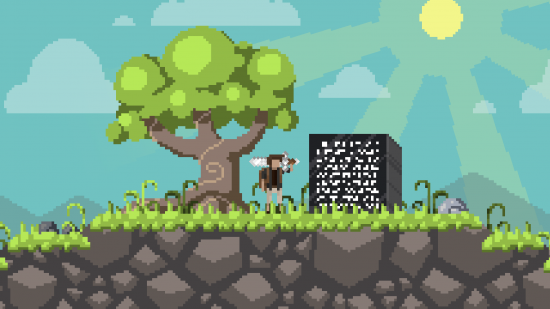
I uploaded a quick video to YouTube showing what I have so far in NIKRA
CLICK HERE TO SEE IT!
Thank you!
~Seth
I uploaded a quick video to YouTube showing what I have so far in NIKRA
Thank you!
~Seth
Howdy! As a personal challenge, I’ve decided to get in on this Mini Ludum Dare, having faced sore disappointment last time I’ve tried  48 hours goes by way too fast but I’ve managed to whip up a pretty sweet Particle Editor for the Torque 2D game engine.

A few noteworthy…notes! – The whole thing is made with a stock copy of T2D engine 3.0 – All assets used here are distributed under the MIT license along with the Torque 2D game engine. – The UI is obviously unfinished and many features remain unhandled. Still lots to do but I’ll keep updating it throughout the week since submissions are accepted until the end of the week. In the meantime, enjoy the video! Particle FX editor – WIP video
Team Quadratics is proud to present the first demo of our newest project, A Family Affair, a game about an ongoing Mob War in a small city. Designed for the Stemfuse Spring Got Game Competition, A Family Affair strives to combine the tactical thought of a turn based strategy game with the quick reflexes and skill required for an action platformer. Although this initial release is somewhat unpolished, especially in regards to the AI, we are planning on continuing development over the Summer to improve the game. In the mean time, we’d love to hear your thoughts on the game so far. Also, we’d really appreciate it if you could take a quick moment to vote for A Family Affair in the competition. Every vote counts, and we’d really appreciate your support.


LD 29 is the first LD that I participated in. The jam went okay, beside not having a great idea, I didn’t get to finish all that I wanted to do. The game didn’t do too well in the rankings, but its not a big deal. Every time I make a game using Pygame, I find myself typing in the same thing over and over, wasting time. That’s why I made Rapid Pygame for MiniLD 51.
Rapid Pygame is a set of classes and tools that help accelerate the game development process when using Pygame, letting the developers to focus on game play features rather than the tiny building blocks behind the scene. It requires Python 3+ (Its time to move on)
Now of course, since Pygame uses Python, no body is going to use it, let alone this library. However I did spent a lot of time writing the docs for this project.
Enough words! Lets see what it can do!
Painless relative loading
Games load stuff. Images, sound, levels… And its pretty common to load a file relative to the executable or script. How do you do it in Pygame normally?

(Getting the path of the script, and then use os.path.join to join together path names. Loading from “./” wouldn’t always work since its relative to the current working directory)
Its fairly easy to read and understand, but its long and kind of messy.
Enter the ImageLoader class

Easier to read and understand. Loading using the instance is all relative to the path given in the constructor. Cross-platform relative path loading made easier.
It would be a pretty boring helper class if that’s all it can do. ImageLoader is also capable of other things outline here. Loading all images in a folder, loading a sequence of images and giving back a path string relative to the origin if you don’t want to load an image.
Collision powered level manager
One approach of managing a map in games is using collision, the player can move around, as long as he/she is not colliding with the level. Its intuitive and powerful. Rapid Pygame provides a way of quickly getting a level up and running.

This will produce a level that a player can move around in (left right and jump). The level manager will take care of gravity, player movement and level collision. Pretty simple right? A 60 line basic game :). This will become even shorter and simpler in future version of the library. The details about the level format and the player class can all be found in the docs.
Behind the scenes
That’s pretty much all the features of the library, other than the pre-made Player class that renders animation for you. Below is a bit about how the level manager behind the scenes.
One thing the level manger do is take the level landscape, and break it down into rectangles, which are then used for collision checking with the player. I’ve made some improvement to the algorithm compare to the old ones I used in the past. Each block represents a rectangle
The old approach is to break the level down into strips either vertically or horizontally.


The algorithm in the library will try to maximize the area of the rectangles, producing fewer rectangles for faster collision checking

Although its not prefect

Both methods are probably fast enough to not have a real impact on the game’s performance, but its nice to know that the algorithm that powers the manager is semi-smart XD
Well, hopefully I didn’t just waste my time typing this up, even though I highly doubt it. Thanks for reading and good luck to everyone in your future LD endeavors! Whether you use Pygame or not
After seeing the Air Control posts all over the Internet today it has inspired me to host my first Game Jam!
Create a Simulator game by the end of June and submit to:
http://itch.io/jam/air-control-jam
Starts on Monday and runs until the end of the month, winner decided by way of vote!
 Please come and take part 😀
So, my Accessibility Jam game is more or less finished. The jam is not really a competition, but I actually have a few friends who’re blind (and they’re all Linux experts, a pretty geeky blind bunch IMO) so I really wanted to finish it. My game is completely audio based, so that any blind person can play it with a screen reader + standard browser. (There’s a visual so deaf people can play it too, although it’s impossible for deafblind people.)
Game “Arpeggio”:

(Direct link: http://ludumdare.tabesugi.net/arpeggio/)
The overall experience was quite fun. Since this was a long jam, I made a couple of generic library/functions for audio and keyboard based games. Also the feedback was generally positive. I still have a couple of ideas of audio-only games. I think I will continue this line of project.
I decided to give my LD28 entry, “Wraith”, a quick face-lift. I basically replaced the low-res textures with better ones, added some models, fixed the problems with the Oculus Rift settings, and made it so that killing the wraith doesn’t win the game (it only causes it to go away for a minute, giving you more time to escape from the maze). I’ve renamed this version, “Wraith: Haunted Halls”.

Here’s the link to a YouTube video showing it off: https://www.youtube.com/watch?v=D1lUSYzyGaE
The download links are:
Windows: http://www.parsecproductions.net/games/wraith_hh.zip or https://www.dropbox.com/s/fntgdl7nnnu3q0q/wraith_hh.zip
Mac: https://www.dropbox.com/s/q5caehsww8q3p3x/wraith_hh_mac.zip
Feedback appreciated!
I’m almost done for submitting the game! it doesnt have a lot of features yet but ill add more after ludum, im to short on time to do that now! see ya in a few hours!
Hey, I built a new game engine: LDML, Try it out! :DDDDDDDDDD
Tags: 2D, game engine, ld48, LDML, Ludum Dare, tools
I must admit that it feels pretty awesome to complete a project, not only for the venerable Ludum Dare comp but also for the Torque 2D community, which have been sans-editors for way too long now.
Get the editor here!
This is a fully functional Particle Effects Editor, allowing you to create new Particle FX from scratch, load a few examples from disk and save your work to use in the Torque 2D game engine!
The UI is a bit clunky and this required a few source code modifications and bugfixes to the Torque 2D MIT codebase but this tool can definitely help anyone create kick-ass particle effects!
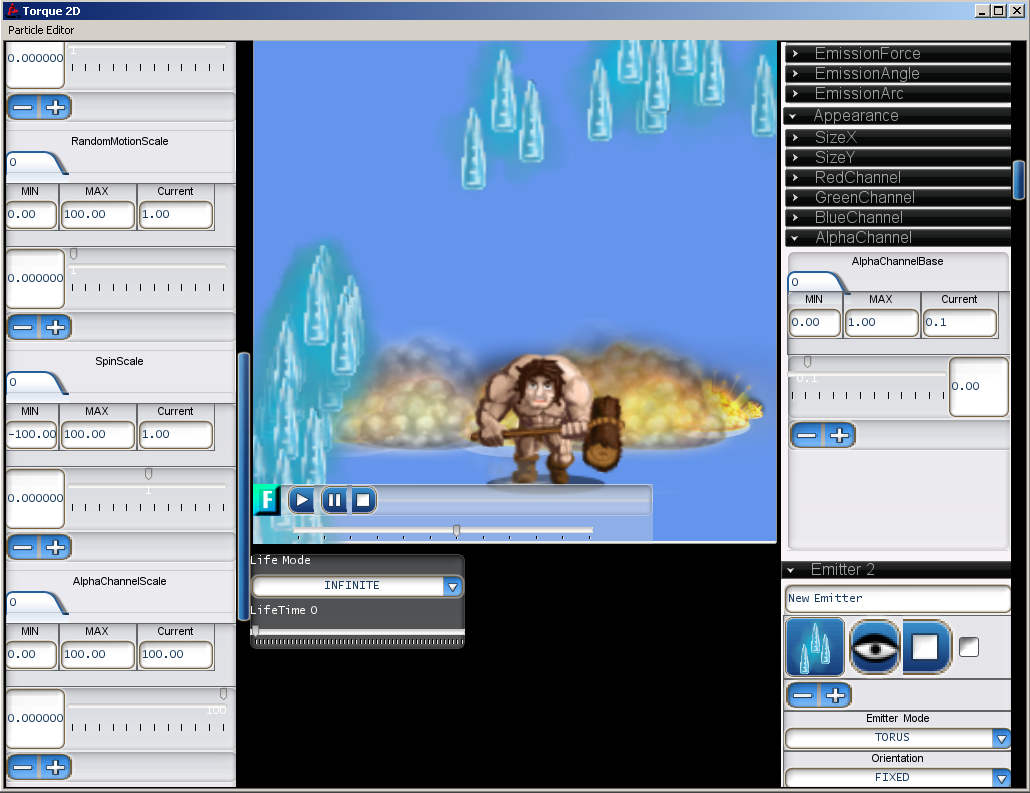
Barbarian slowly walking away from explosions, while magic hale surrounds him. Metal.
If you want to understand how everything works, make sure to read the T2D Wiki as it covers everything related to the Particle Effects in T2D.
A few things to note :
– Example Files are loaded from \modules\Editor\plugins\ParticleEditor\1\ParticleFX\
– The animations and images must be declared as a valid T2D asset – just look at the examples in the ToyAssets and ParticleViewer folders. Feel free to drop your own assets in there for additional fun!
– If you plan to use these Effects in a T2D project, you have to manually edit the .asset.taml file (it’s XML format) and change the AssetName field to something unique. (Will be fixed eventually)
For those who aren’t familiar with the Torque 2D game engine, know that it is an open-source 2d game engine powerhouse, maintained by its community of users and game-makers
You can grab it from here
If you have any questions, make sure to visit the garagegames.com forums, that’s where we all hang out!
Took a week, totally worth it!
Hi all,
During a past compo, the LD#22 if I remember well, I tested and rated a game that I really liked.
I would like to find that game back, but I didn’t found it by browsing, so I was thinking to see my past rated games.
Is there any way to do that?
Thanks
C.D
 PoV said something on twitter about that he/LD have the data to what games people have rated(or commented, don’t remember), but it isn’t a feature on the LD site (yet..?). So yea I don’t think it’s possible, but I would really like a way to do it too
 Well, it looks like it’s time to talk about removing the Source Code requirement from Ludum Dare. For 12 years, one of the key differentiating factors between the Compo and Jam has been the requirement for source code. You were never required to GPL the code, just share it. It still belonged to you. Alas, this generosity is getting abused more and more these days.
Please help me out by posting other reports of abuse in the comments. I seem to get these every so often, but I’ve neglected to keep a record of them. I will add them to the list above.
There are definite benefits to everyone sharing source code, so we don’t want to discourage it. But at the same time, the internet sometimes abuses good thing, and the source code has been abused for a few years now. Not to mention, some companies make it difficult to report fraudulent apps, so I would rather err on the side of the community and make it entirely optional. That’s my thinking anyway.
This ultimately means that the difference between the Compo and the Jam are the following:
Share your thoughts in the comments.
For reference, an older discussion on this topic.
Hi, this is going to be my first time doing the ludum dare. Does anyone have some tips they could share with me?
So i’ve just made a quick “game” if you would even call it that to try out random tile generation. It only works on windows because i haven’t got around to make it work on the mac or linux. So if anyone would try this on there windows machine that would be great!
0This entry was posted on Saturday, June 7th, 2014 at 3:45 pm and is filed under MiniLD. You can follow any responses to this entry through the RSS 2.0 feed. You can leave a response, or trackback from your own site.
Hey all! I wrote a game framework for the creation of 2D games. It’s written on top of LWJGL for OpenGL bindings (meaning it’s super fast!). Here’s a link the GitHub repository, if anyone is interested in helping me out, or you want to try it out. Here’s a quick example of a platformer I scratched up in 20 – 30 minutes, it uses modern OpenGL for rendering – but in this gif it may be laggy, since, well, it is a gif.

Since last ludum dare, I’ve been working on what was my basecode, expanding it, and making it generally more useful. Some cool features it now supports are:
-Parsing in entities and components from XML
-Live-Scripting of game-logic during play
Note that this is a work in progress, it may be buggy, and often some things stop working correctly, which is exactly why I would love more people to check it out, and give me some feedback, be it bug reports, feature requests, or just your general thoughts, thanks:)
You can find IceEntity here: https://github.com/NicoM1/IceEntity
If anyone wishes to contribute, I would love that as well, just submit a pull request, or tweet me @nico_m__
Thanks for reading, make cool games;)
Tags: basecode, Entity-Framework, haXe, HaXeFlixel
Hi!
I like to introduce you my indie video game company: Link at Google Play
Hope you like our games!
Bye
I just posted a tutorial on making realtime multiplayer games using PlayerIO.
Check it out:
Tags: multiplayer, playerio
Hi
My LD29 JAM entry was Super Plumber Bros, a collaboration with @clangmuir and @nomoon based on our impressions of some rather obscure old Japanese games. We just finished and released the full, post-compo magic version complete with leader-board and Japanese localization! Seriously, when you are playing for a high score, the game is completely rad: well beyond my expectations. I’m super happy to have been able to carry a game like this, and it would never have happened without the Ludum Dare.
Oh by the way: right now the leader-board is just us devs. I doubt you could make it on if you tried.

Who posts a screenshot of their leaderboard? I mean, seriously! Who does that!?
Thanks!
z.
