LD30 August 22–25, 2014

Afterlife Dance Party Post-Mortem

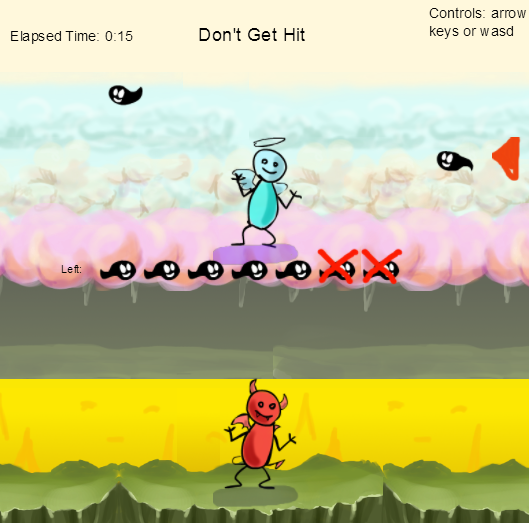
This was my third Ludum Dare, and although I did Afterlife Dance Party within 48 hours and mostly solo, I decided on the last day to switch to the jam so I could have someone help me with music (John Fio to the rescue!) Now, goals and lessons learned and stuff…

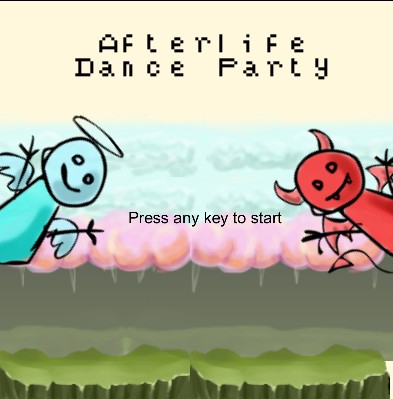
screenshot1

I went into this jam with some very specific personal goals, which I think helped a lot as self-imposed constraints which lead me to come up with an idea relatively quickly.

1) I knew I didn’t have my usual levels of energy for this LD as I’ve been swamped at work, so I wanted to do something around a very simple mechanic that would not involve worrying about the camera, complex input or creating levels.

2) I felt like drawing, so I wanted to do something where I got to make some animations

3) Past game jams have always had me tooling with mechanic balancing, tutorials, and feedback until the very end, which usually leaves the art super rough. This time I wanted to leave myself some time to do a pass of cleanup on my art. Fortunately, this constraint worked rather will with #1.

So how did I do?
screenshot2

Well on all fronts I think I accomplished my goals. The mechanic in the game is incredibly simple 4-arrow key input and a goal of “dodge the things.” Instead of having to create levels I just created a set of spawn rules that got progressively harder, so the core of the game was pretty much finished on Friday night. I had a blast drawing all the animations, and actually left some time to color things, so goals succeeded there as well.

I actually think switching to the jam was also a sort of success. I can do ambient music or very mild stuff if it doesn’t matter if the music is disconnected from the gameplay, but once this idea developed I realized that my skills were just not up to par to write something that would accompany a dance party. Since the initial reason for doing the compo was that I didn’t have energy to spend on more than 48 hours, it was no issue for me to switch over and get help with music. Afterall, the goal was to not spend too much stress that weekend.

screenshot3

Gameplay-wise, there were a few things I was a little sad I didn’t get to. Mostly I wanted to do a pass on spawn rules and tracking to prevent “impossible” dodges, such as if something spawns in the center and on the bottom layer at the same time. I also really wanted to implement diagonal transitions, which would have also helped with this issue, but they proved too scopey for the weekend. I think those would have helped me end up with something that could have been played for a lot longer with a more satisfying ramp up in challenge.

Between now and December I have a couple of goals for myself to prepare for next Ludum Dare:

1. Get more music practice in, and find a tool that I can get comfortable with.

2. I want to do next LD in something other than Construct 2, so get some practice in with Gamemaker or something. Don’t get me wrong, I absolutely love Construct 2, but I want to expand my tools knowledge and learn some different applications.

That’s all for now, thanks to everyone who played my game!

https://www.youtube.com/watch?v=Z98rd5i8vx4

Tags: jam, LD30, post-mortem, postmortem, timelapse

Timelapse!

This was a pain to get done! Failed rendering 6 times after rendering for 4 hours! BUT, now it’s done!

Connector – Post Mortem

Check out this short ‘trailer’ to see what it’s about or play & rate it here. (http://www.ludumdare.com/compo/ludum-dare-30/?action=preview&uid=23493)

tl;dr: if you have an idea but think it’s not fun enough, try it anyway if you can’t think of something better, you might be surprised :)

The longer read

The theme was a tough one again, at least one where it was hard to be creative since the theme described something (of course it can still be interpreted differently) which would result in a lot of visually (in broad terms) similar games. Think of planets, space, a double sided platformer or any side by side worlds where two things happen at once, when you have a theme like ‘chaos’ there isn’t really something that’s described. Anyway, enough about the theme.

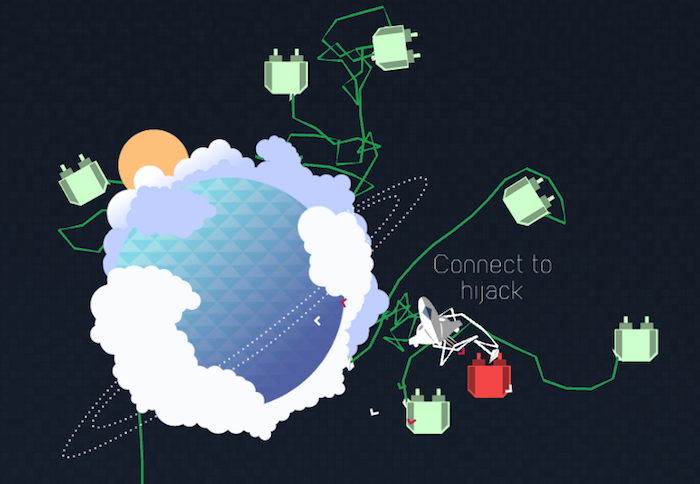
After brainstorming a bit we quickly landed on the idea of taking it pretty literal and physically connect planets in space, with the humorous twist that you’re there to provide the galaxy with internet. Connecting planets with an ethernet cable (because why would you do this wirelessly, everyone knows it’s more efficient to just lay a cable!). We figured the rest of the mechanics would come along the way while building the cable physics and topdown spaceship movement.

It didn’t, we wondered at one point what the fun would be just flying around and connecting planets. Would it be time pressure?, Impending doom? Snapping cables? After having the rope physics and movement mostly done on the first day the other two were mostly spent pivotting and prototyping several gameplay ideas. What if you would be attacked by ufo’s and had to connect them to blow them up or had waves of asteroids coming which would screw up your cables and you had to reconnect them? What if it was some kind of tower defense this way that you had to purchase turrets!? (some of which you can see gif’d here)

Eventually we were running out of time and we still (in our minds) didn’t find anything fun yet, so with around 3 hours left on the clock we decided we just build the original idea. Connect the planets, everytime you connect one you get this extra sound track layer mixed. Added to that was the turrets that we built, figuring after you connect more and more planets these ‘enemy’ turrets would come trying to destroy your cable. How to defend against them? Just connect them to your cables / powered planets and they become yours :)

We realised that this was pretty fun after all, it’s not hard but it we didn’t have much time to balance everything out. And to be honest, it’s better to have it a bit too easy than impossible or very hard, especially when someone will play it for a short amount of time.

Our main lesson is learned is, something in your head might not seem to be fun, but if you don’t have any better ideas just prototype it instead of just trying to think of something better. Especially if you’re working with a tight schedule :)

Play & Rate it here

Trappy Tomb Gameplay

In Trappy Tomb the ghosts of all who’ve perished within the tomb haunt it still, will your immortal soul add to the party or will a statue be built in your honour?

Play here…

Trolls invaded and tried to shut it down but we are fighting on 😉 if you earn a statue it’ll appear once I get moderation working! I’ll read the troll-spam so you don’t have to 😉

The LD community has supported me amazingly through this testing experience! A step on the journey I guess- thanks everyone you are AMAZING

jimmypaulin

Heavenly Finger Squad – Post Mortem

heavenly_finger_squad

What went wrong :

  • I started late, sunday morning, so I spent about 20 hours on my game
  • I didn’t prepared much, my coding skills had turned rusty, I lost a lot of time on a simple array problem

What went right :

  • I kept things small
  • I decided to make a single screen game
  • I created all the graphics in one shot, so I had everything ready when I started to code

Play here


Looking Glass Post-Mortem

This Ludum Dare was my 8th time. I’ve come a long way since then.

This time round, I made “Looking Glass”. I’ve been rewatching the Stargate series for the god knows how manyth time, and it’s struck me as just how good the Stargate itself is as a games design device. You get this big circular thing as a barrier between worlds, a “home base”, plenty of room for exploration of mechanics, completely different level and terrain design, so much storytelling potential, it’s why it works so well as a device in the show as well.

I knew I was going to enter the jam from the start, there’s no way I could make the assets needed to in time, so I was either going to find publically available assets or find a 3D artist with time to spare. I didn’t find an artist in time, so I just used some assets I found that were free to use.
I spent the first day making the actual gate effect, it’s a complicated system to be honest, since then I’ve been thinking of ways to simplify it, probably using Rendertextures than the current method.
The basics of it are this –
A custom shader on a material, attached to a plane. This material fills the Z buffer.
A system of 4 cameras
Camera 1 – parented to the outgoing gate (though gates are bidirectional here this is important). Moves relative to the camera relative to the gate direction. Some funky Quaternion Maths going on. Clears to skybox Depth of -4
Camera 2 – same as Camera 1 although it doesn’t clear at all. Depth -2 (so it’d override Cam1)
Camera 3 – Player camera, clears to depth buffer Depth -1, ignores the custom materials
Camera 4 – Directly parented to player camera, Clears to depth, depth -3, culling mask ignores the incoming portal

So what happens is the cameras all move relative to the player, Cam 3+4 are directly, Cameras 1+2 move so they’re always offset by the portal position+rotation. The effect here is that Cameras 1+2 only get drawn onto that material (due to the clever depth shader), however there’s some overlapping with the incoming portal having 2 cameras draw on it, so camera 4 does some absolute magic to make the outgoing portals camera not draw on that. Honestly I can’t exactly explain how it works, I’m not a very good technical writer. We’re basically talking about a lack of something overlapping another lack of something so a something can draw on one lack of something rather than the other.

The effect, however, is rather amazing. We get an effect similar to the portal series of games.

View a video here.

Teleporting was rather easy. Attach a rather thin collider, make sure you grab the players rotation relative to the portal, and set the transform and rotation relative to the new portal. There’s still a rare glitch where the player will come out a bit too far back and be clipping through the portal, but it was a simple fix, I just didn’t have time.

As I spent day 2 and the morning of day 3 quite ill, I didn’t have much chance to implement any real gameplay. This was a real shame, I wanted to make the game about exploration, but with a bit more actual interactivity than I managed.

I made a bunch of different worlds, added an updating “database” with the new fancy Unity UI system, and plopped a few terminals in there to guide the player along a journey of different planets. I managed to add 2 hidden worlds too, dropping a few hints here and there as to their addresses. Someone’s already hacked the game to find them too!

Have some screenshots of the first 2 areas

7905-shot17905-shot2


And don’t forget to play  + rate! Any feedback is much appreciated!
Game link

Crystal Planet – post mortem

Crystal Planet

Entry: http://www.ludumdare.com/compo/ludum-dare-30/?action=preview&uid=29762

Description:

You have to send special signal to make connection to another planet.
Signal is a result of adding multiple lasers with different colors (RGB).
Lasers beam are created from generators(flying balls).
You can apply specific color to generator using crystals and your laser.

Your task is to prepare your SIGNAL similar to TARGET signal.

To change target, press [space].

Gameplay:

I started with idea of making 3d “laser and mirrors” type of game. Where you would have mirrors with different colours, and your beam react different on each one. I even succeed but find it very difficult to control beam direction. After fighting 1 day to make it enjoyable I dropped it. Finally I ended up with concept of split colour to R G B code and make objective to generate given colour (RGB code) to connect to another planet.

Graphic:

After last LD where I fight a lot with creating graphic by my own, I decided that next (this) LD I will start in jam. Possibility to use already created assets so I could spend few hours on creating effects, or level design and then focus on gameplay was good decision.

Audio:

First time I used electric guitar for sounds effect and I’m very happy of it. I planned to spend more time on recording audio, but because of loosing time on first idea that I dropped I could use only audio that I recorded for tests. Anyway final result is ok, and I’m sure I will make something better next time!

Evolve:

I’m thinking about possibility to run over planet, explore new crystals and then prepare special signals. Then each signal could create something, or make special attack for different targets.

Do not hesitate to try!

http://www.ludumdare.com/compo/ludum-dare-30/?action=preview&uid=29762

Tags: audio, color, coloring, Cosmic, game, guitar, jam, LD30, planets, post-mortem, postmortem, progress, screenshot, timelapse, unity, unity3d

Postmortem

Ahh, the dreaded postmortem writeup.

I’ve been putting this off as earlier this week I became sick and further destroyed my sleep schedule.
Regardless, I feel like this Ludum Dare was particularly fruitful. Using tools that I am familiar with and have had experience with made a huge difference this time about. As an example, during my last Ludum Dare I attempted to use Twine without having had any prior experience with it. When attempting to do specific things I found that the editor did other things that made what I wanted difficult. A lot of effort was not being used correctly as I attempted to combat the editor that I was unfamiliar with.

During this Ludum Dare I decided to simply build everything myself. Using jQuery as my lib and some functions I’d written previously for other projects made this project flow smoothly. While the end product did not seem to be particularly fascinating I’m rejuvenated and excited that I was able to make a complete game and get it entered within the time limit! I consider that significant progress since the last Ludum Dare.

I was also happy with the amount of focus I had on my project this time around. As soon as Ludum Dare started I was prepared. As soon as the theme was out I wrote upon five to seven pieces of paper every single idea that I had in regards to the game I was going. I started with a game that was going to be about the connections between machines and the users that used them and moved to the connection we have with objects around us. From that I thought of mirrors, objects that have long had various interpretations involving fear and a subtle curiousity of the unknown.

Initially I’d intended the mirror to have a monster coming through that the player needed to stop, but with my current amount of skill and the hours ticking by I decided to make something more Twine-like where the player will be presented with options to choose from. As for the mirror speaking to the player and informing them that everything they do is wrong… well, that was tied into an awkward understanding of the inner debate that goes on in the minds of some people. Being scared to talk or confide in others, a social anxiety if you will, I’ve had experiences where I realize I’ve been debating with myself for hours about something. Talking to myself and effectively denying everything I want, tearing it down, and tearing myself down. I wanted this game to be something like that. A game about the connected worlds inside the mind. The interconnected ideas that stray and degrade the rest of a person’s happiness. The things we all need to let go of but can’t.

It ended up being kind of weird and hardly polished. It ended up not really going anywhere with any obvious goal. But I’m happy. I made a complete game in 48 hours for the first time. I made ‘graphics’ that ‘moved’.

I’m really looking forward to the next Ludum Dare. Next time I want to use HTML5 Canvas or WebGL to produce my graphics. In the meantime, I’m going to be practicing and fiddling about with those and I think I want to play with Hexels a bit as well. I want to practice producing assets and whatnot for my games. It’s the only way I can get better, after all.

So I look forward to seeing you all next time and I hope you all stay well till then.

Precipice: Post Mortem – Entity Component System Library

Here are some links:

Play | Rate

Short version:

The jam went well, because I because of a library I made called e – which is a functional Entity Component System library in Javascript and because I knew my limitations. But if I had have slept more, I would have got a lot more done, instead of staring at my screen for 10 hours like a zombie.

Choose your battles:

Before I started I already had two ideas that I wanted to try.  The first was a top down stealth game, the second was an arcade minimal touch shooter.

I decided against the top down stealth game because I didn’t have a lot of experience with path finding, and AI.  And if I was going to do that game justice I would probably need more than 48 hours to complete it.  A few Ludum Dare’s ago, I wouldn’t have made that decision, I would have just gone for it and missed the target.  So I am happy that I am more aware of my limitations and what I can reasonably achieve – that means I am definitely learning.

The touch arcade idea was a lot more pure than what I ended up with.  Retrospectively, I think I simplified it because it was harder to communicate exactly how those mechanics were going to work, without iterating constantly.  So I made a more conventional game.  I will definitely revisit the original idea, but the idea is so abstract that, again, trying out wasn’t going to do it justice.

As I am writing this, I can hear a devils advocate’s position, which is: I shouldn’t be aiming to make a more “complete” game, I should be following my instincts.  And I am very aware of that perspective, but I think it is actually more balanced for me to think in the “finish something” mindset for the next few jams.  Because honestly, if I make any more half baked prototypes, I would probably burn myself out.

The more jams I do, the more I understand that I have so much more to learn.  The more I come up against my own limits, and just choosing one weakness to focus on and improve is more productive for me, than learning on all fronts and not making any progress.  Life is short, and you really only get to make so many things in life.

That all said, this jam went pretty swimmingly and here’s why.

Why did it go so well?

I stumbled across Entity Component Systems 6 months ago, and I’ve had enough time to allow my head to get around the concepts.  I did a lot of research and read everything I could find on the topic, and often came up against a lot of bad advice.

I ended up writing a library, which I call ethat has completely changed how I work, and made my jam code very neat and extendable.

In fact, there is nothing I would really change about the existing code, which challenges the myth of prototype code needing to be redone for production.

After working as programmer for a few years now, on fairly large projects, I am more familiar with the tools and having great tools really helps.

I tracked down this horrible collision bug using the Chrome debugger, I hosted my game using the gh-pages of github and I used Light Table to be able to inject changes to my game code without refreshing the page.  All in all, it was fairly joyful.

What went wrong?

There was a stretch of 10 hours at the end of the jam, where I just was completely unproductive due to being so tired.  I should have slept for 2 hours and came back.  It would have made the game so much better.  And because I was so tired I stopped working on the game 4 hours before I needed to.

That time could have been spent on a tutorial, different levels, better animations, a menu system you name it.  Sleep is important.


So far I have had a great time judging games, and I would like to a round up of my favourites so far.  I’d also like to do a post on why this library was so great.


-James


Comments

30. Aug 2014 · 12:47 UTC
Entity Component Systems are just awesome :)
30. Aug 2014 · 21:47 UTC
Yes they are! :)

Streaming your Ludum Dare games!

I am STREAMING LD games on Twitch soon at exactly 9PM GMT (9AM NZ) for 2 hours!

Click here to watch me Stream!

If you’ve made an entry, I’d love to play it!

Click here to submit your game for me to play!

Click here to see the spreadsheet of games

If you wish to tune in while I play it, don’t worry – I’ll only play your game if you’re watching! Follow me to get an update on when I go live!

Introduction

Hey! I’m Adam Thompson, creator of Dream Epoch for this month’s Ludum Dare, and developer behind indie game studio EMOTION THEORY.

bloggif_53fc4a588a61e

For LD30 I made Dream Epoch – a little adventure rpg demo

Please play and rate it if you haven’t already!


Cheers everyone, and see you on Twitch!

Writing a Match-3 game in Unity

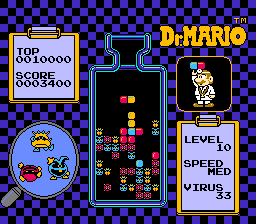
Dr. Mario (source: Wikipedia)

Dr. Mario (source: Wikipedia)

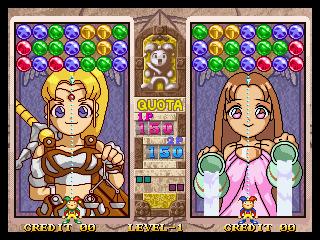
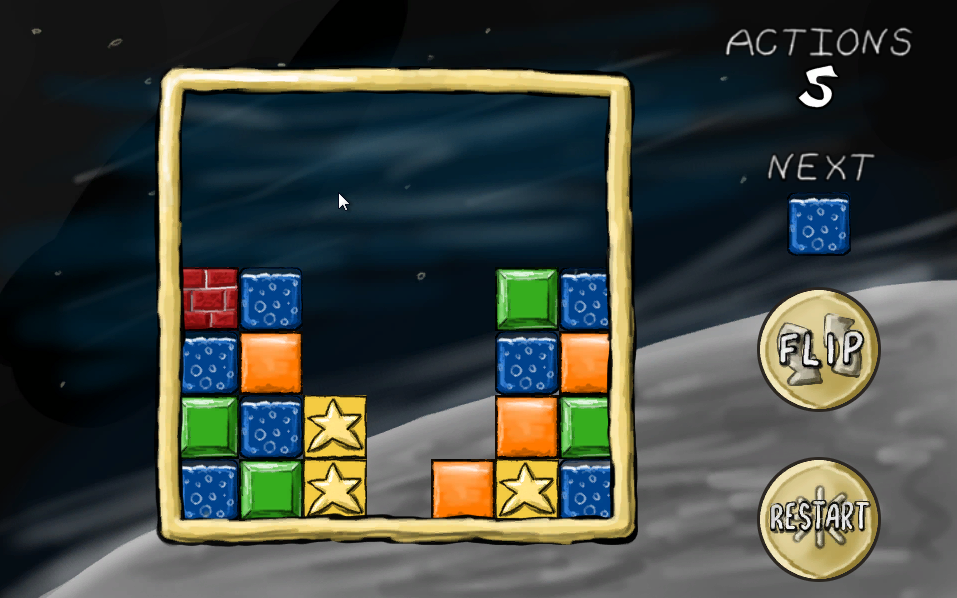
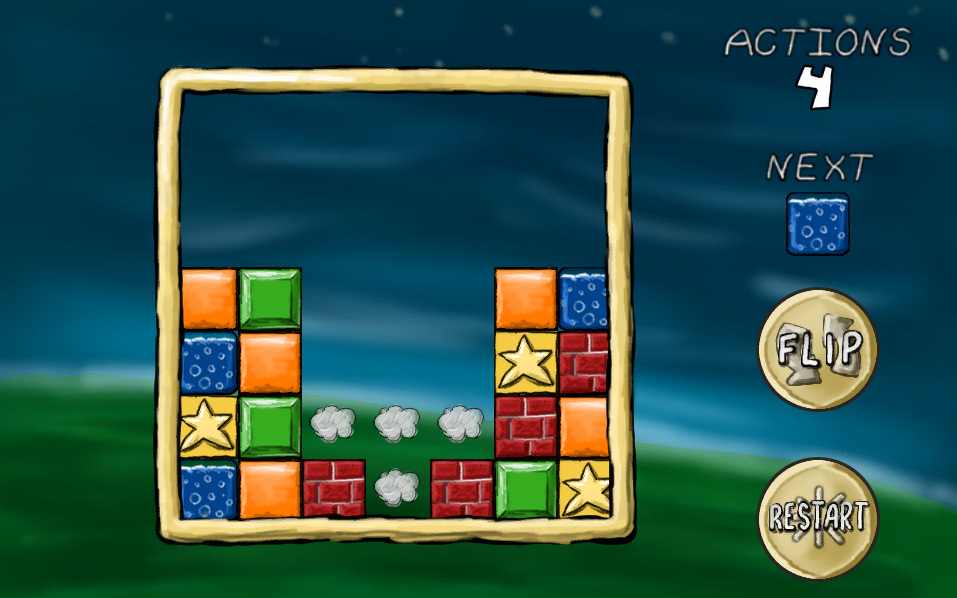
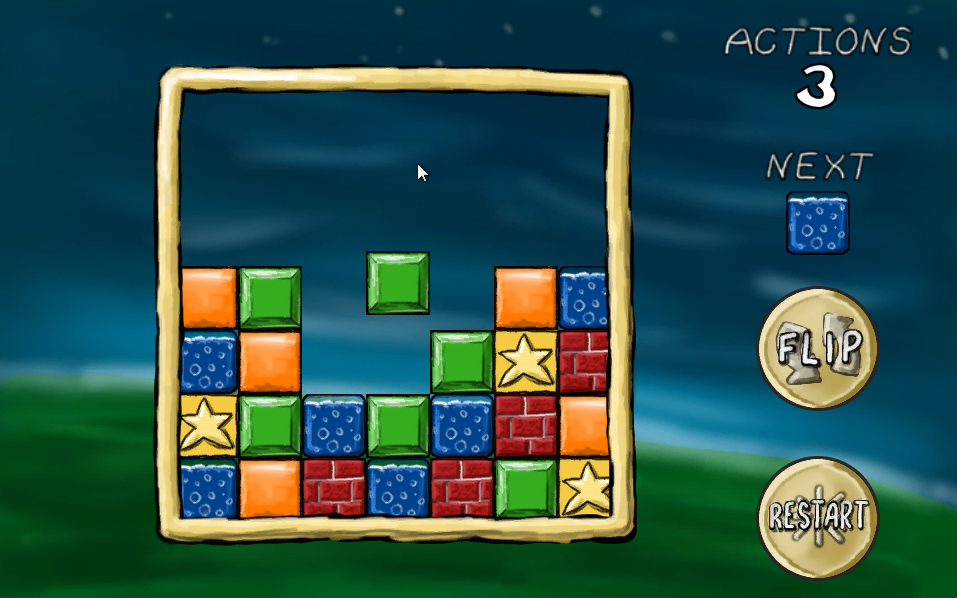
This year in SeishunCon‘s digital gaming room, I was reintroduced to the match-3 game. I’d played Dr. Mario when I was younger, but more competitive games like Magical DropBust-A-Move, and Tokimeki Memorial Taisen Puzzle-Dama were something very different.

Ultimately, I realized just how many more-or-less neutral decisions are involved in making a match-3 game.

During this year’s Ludum Dare, I decided to jump in head-first. I did a bit of a warm-up the week before, trying to build a Tetris-style algorithm that detected and cleared out lines. This tutorial from Unity Plus was a huge help. Of course, the Tetris matching algorithm–a complete row of tiles–is much simpler than an algorithm that picks out irregularly shaped patches of matching tiles.

If you want to see all of these code samples in context, check out my Ludum Dare 30 repo.

Two worlds
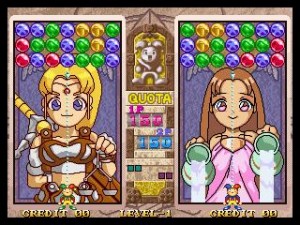
Magical Drop 3 (source: Kazuya_UK)

Magical Drop 3 (source: Kazuya_UK)

The trickiest part of building a puzzle game in Unity is that the game itself doesn’t live in world space. Not fully, anyway.

This isn’t as true in other genres. Platformers, for example, live almost exclusively in the Unity game world. The player’s Transform tells you its location. Colliders (or, in some cases, raycasts) tell you when the player is on the ground, hitting the ceiling, or colliding with an enemy. Even if you aren’t using in-game physics, you’re probably adding force or setting velocity on a Rigidbody so that you get collision detection for free.

Not so with a puzzle game. If your game involves clicking, you might get some coordinates in world space, but you’re probably going to convert that to a cell in a grid that lives entirely in code. There’s a good reason for that–it’s far easier to write the logic for scoring a game like Tetris or Dr. Mario when you’re thinking about blocks or tiles, not individual pixels.

I'm pretty sure this is not how Tetris is supposed to work.

I’m pretty sure this is not how Tetris is supposed to work.

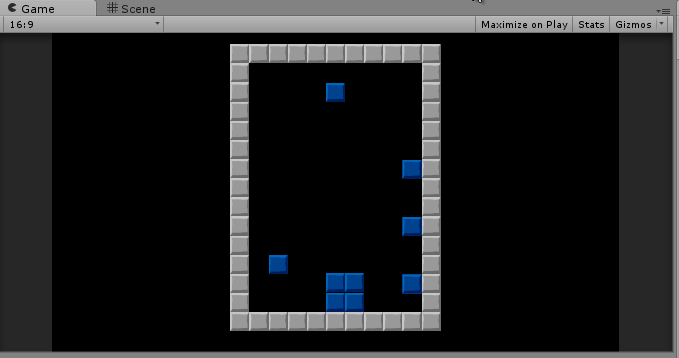
My warm-up actually tried to live in world space as much as possible. It used physics to determine when a tile had landed, and only transferred data back to a two-dimensional array to detect row completion. That seemed safer–what happens in the game world is real, after all. It’s what the player sees, so if you store your data there, there’s no fear of getting out of sync, right?

I was wrong. No matter how I tweaked it, it never did work right.

The Unity Plus tutorial I linked above was a huge help. If nothing else, it allowed me to trust that moving my logic fully out of the game world and into an abstract data structure was a valid approach. If you haven’t already, go back and at least skim it, because I intend this post to be an extension from Tetris logic into match-3 logic.

Converting from board to world space

Once I figured out this transition was manageable, this part was easy. I created a GameTile class that tracked the color, row, and column of the tile, and updated the tile’s position based on that. Here’s an abridged version:

public class GameTile : MonoBehaviour {
 
 private Transform _t;
 private SpriteRenderer _s;
 
 [System.NonSerialized]
 public int TileColor;
 
 [System.NonSerialized]
 public int Row;
 
 [System.NonSerialized]
 public int Column;
 
 void Awake () {
 _t = GetComponent<Transform>();
 _s = GetComponent<SpriteRenderer>();
 }
 
 Vector3 tmpPos;
 public void UpdatePosition()
 {
 tmpPos = _t.position;
 tmpPos.x = (Column * Board.TileSize) - Board.WorldOffset;
 tmpPos.y = (Row * Board.TileSize) - Board.WorldOffset;
 _t.position = tmpPos;
 
 _s.sprite = Board.Current.Textures[TileColor];
 }
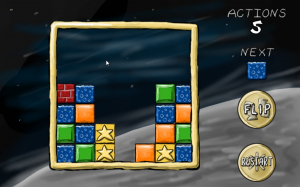
Tiles in a grid

Tiles in a grid

Note that, in this case, TileSize is a constant that represents the size of a tile in Unity units. I’m using 64×64 pixel tiles, and the sprite size in unity is 100 pixels per unit, so TileSize works out to 0.64. I’m also using a constant offset so that the middle of the 7×7 board is at 0,0 world space, and the lower-left corner is tile 0, 0 in game space.

I also created an array that represents the gameboard as a static field in a class called Board. (Board started off as a static class and became a singleton because I needed to set some values in-editor, so it’s clumsily straddling the worlds of game object and static class.)

 public const float TileSize = 0.64f;
 public const float WorldOffset = 1.92f;
 
 public const int BoardSize = 7;
 public static GameTile[,] Tiles = new GameTile[BoardSize, BoardSize];
 

While the Unity Plus tutorial used a two-dimensional array of integers, I decided to store references to my GameTile objects in this array. This allowed me to pass data to and from tiles directly and (as we’ll see later) made tile-clearing and animation generally easier.

Whenever I made a change to board state, it meant that I could simply loop through the board array and tell each tile where it was supposed to be:

 public static void UpdateIndexes(bool updatePositions)
 {
 for (int y = 0; y < BoardSize; y++)
 {
 for (int x = 0; x < BoardSize; x++)
 {
 if (Tiles[x,y] != null)
 {
 Tiles[x, y].Row = y;
 Tiles[x, y].Column = x;
 if (updatePositions)
 Tiles[x, y].UpdatePosition();
 }
 }
 }
 }

Note that in every case, we’re always converting from abstract game space into world space. Unity game objects aren’t storing the important game state information directly; they’re always a representation of that state.

… and back again

In my game, there was one case where I needed to convert from world to game space, and that’s when the user clicked an empty space to drop a tile. To do this, I simply created a large collider behind the entire gameboard with this script attached:

 void OnMouseDown()
 {
 if (GameState.Mode == GameState.GameMode.Playing)
 {
 mouseClick = Camera.main.ScreenToWorldPoint(Input.mousePosition);
 mouseX = (int)Mathf.Round ((mouseClick.x + WorldOffset) / TileSize);
 mouseY = (int)Mathf.Round ((mouseClick.y + WorldOffset) / TileSize);
 PutNextTile(mouseX, mouseY);
 Soundboard.PlayDrop();
 GameState.ActionsTaken++;
 }
 }

That’s really all there is to it. Note that it’s basically the reverse of UpdatePosition() above, which converts from game to world space.

Detecting and clearing matches
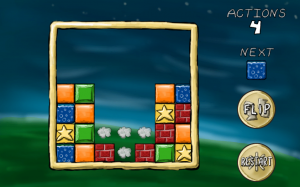
Clearing matches

Clearing matches

This is the trickiest part. Actually, this is probably why you’re reading this blog post.

Horizontal matching (as in Tetris) is pretty easy–you just need to look for contiguous tiles in the same row. Even allowing horizontal or vertical matches (as in Dr. Mario) is just a variation on this theme. However, trying to track a set of contiguous tiles that can vary horizontally and vertically is going to take some recursion.

Each time we take an action that changes the board, we’ll trigger a check. The first thing we do is copy our entire board array into another array:

 static void CopyBoard(GameTile[,] source, GameTile[,] destination)
 {
 for (int y = 0; y < BoardSize; y++)
 {
 for (int x = 0; x < BoardSize; x++)
 {
 destination[x, y] = source[x, y];
 }
 }
 }
 
 static bool clearedTiles = false;
 public static void MatchAndClear(GameTile[,] board)
 {
 clearedTiles = false;
 // Make a copy of the board to test
 CopyBoard(board, toTest);
 
 //... continued...

Why? We’ll see later that it makes it much easier to tell which tiles we’ve checked.

We start the process with a brute-force approach. We’ll go cell-by-cell (first rows, then columns), testing each cell. For each test, we’ll reset some variables we use to track our testing, and then call a separate function (which we’ll later use for recursion):

// Continued from MatchAndClear() above...
 
 currentTile = null;
 collector.Clear ();
 
 for (int y = 0; y < BoardSize; y++)
 {
 for (int x = 0; x < BoardSize; x++)
 {
 TestTile (x, y);
 
 // Continued later...

Let’s take a look at that TestTile function:

 static void TestTile(int x, int y)
 {
 // Tile already tested; skip
 if (toTest[x,y] == null)
 {
 return;
 }
 // Start testing a block
 if (currentTile == null)
 {
 currentTile = toTest[x, y];
 toTest[x, y] = null;
 collector.Add(currentTile);
 }
 
 // ** Skipped lines--we'll come back to these later **
 
 // If we're processing this tile, test all tiles around it
 if (x > 0)
 TestTile(x - 1, y);
 if (y > 0)
 TestTile(x, y - 1);
 if (x < Board.BoardSize - 1)
 TestTile(x + 1, y);
 if (y < Board.BoardSize - 1)
 TestTile(x, y + 1);
 }

If this function finds that the cell is null, then we skip it. A null cell means that it’s either empty, or we’ve already tested it. (That’s why we copied it into a separate array–we can manipulate the new array at will.).

If the cell has a value, though, we’ll do a few things. First, we’ll remember it as our “current” cell–the one at the top of the chain of recursion. Then, we’ll remove it from our copy of the gameboard so that we don’t test it twice. We’ll also add it to a List so we can remember how many contiguous tiles of the same color we’ve found.

There’s two other conditions we might run into later in the recursion, but we’ll talk about them later. Once we’ve tested a cell, we’ll then grab the four cells around them an run them through the same test.

The “current” cell is now set, indicating this isn’t our first level of recursion. On these function calls, we now have three possibilities for each cell.

First, the cell could be null, which again means we’ve already tested it or it’s empty. Again, we’ll do nothing if that’s the case.

Second, the cell could not match the “current” cell. In that case, we don’t consider it “tested.” Our recursion tests for a single set of contiguous tiles of a single color. Just because this tile isn’t part of the current set doesn’t mean it’s not part of a different one.

// From TestTile() above...
 
 // Tile doesn't match; skip
 else if (currentTile.TileColor != toTest[x, y].TileColor)
 {
 return;
 }

Third, the cell could be the same color as our “current” cell. If that’s the case, it’s been “tested,” so we’ll set it to null in our copy of the board. We’ll also add it to that List we use as an accumulator. This is one of the conditions we skipped in the example above:

// From TestTile() above...
 
 // Tile matches
 else
 {
 collector.Add(toTest[x, y]);
 toTest[x, y] = null;
 }

The function will continue recursing until it’s exhausted all options, either by hitting an empty cell or the edge of the board. At that point, we return to the main “brute force” loop to handle our results.

If our accumulator has more than three tiles, then this was a successful match. If not, then we’ve tested one or two tiles, but we don’t need to take action:

// Continued from MatchAndClear() above...
 
 if (collector.Count >= 3)
 {
 foreach (GameTile tile in collector)
 {
 ClearTile(tile.Column, tile.Row);
 clearedTiles = true;
 Soundboard.PlayClear();
 }
 }
 currentTile = null;
 collector.Clear ();
 }
 }
 
 if (clearedTiles)
 {
 SettleBlocks(board)
 }
 }

Here, as we’ll discuss later, I’m simply triggering some animations. The simplest approach, though, is to loop through our accumulator and call DestroyObject on each matching tile’s game object. That kills two birds with one stone: the in-game objects are gone, and the cells in our board state are set to null.

Dropping tiles
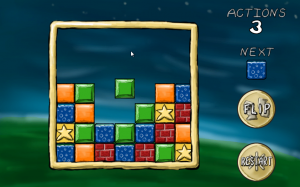
Dropping a tile

Dropping a tile

Certain changes–dropping a tile or clearing tiles, in this case–can leave unsupported tiles which must be resolved (if those are the rules of our puzzle game, of course). This is actually a really simple algorithm.

We’ll go column-by-column this time, then row-by-row. The order is important here.

In each column, we’ll work our way up from the bottom until we find an empty cell. Then, we’ll make a note of that cell. The next time we find a tile, we’ll simply shift it down to that location and add one to our “empty cell” index:

 static int? firstEmpty;
 public static void SettleBlocks(GameTile[,] board)
 {
 for (int x = 0; x < BoardSize; x++)
 {
 firstEmpty = null;
 for (int y = 0; y < BoardSize; y++)
 {
 if (board[x, y] == null && !firstEmpty.HasValue)
 {
 firstEmpty = y;
 }
 else if (firstEmpty.HasValue && board[x, y] != null)
 {
 board[x, firstEmpty.Value] = board[x, y];
 board[x, y] = null;
 firstEmpty++;
 }
 }
 }
 UpdateIndexes(false);
 }

When you’re done, don’t forget to call your matching function again. It’s entirely likely that dropping tiles has created some empty rows.

In fact, if we were scoring points, this would make it easy to award combo bonuses or multipliers. All of these repetitions of dropping and clearing blocks are just recursions of that first call that was triggered by a player action. We could tell both how many total matches resulted from a player action, and how many levels of “chaining” were required for each action.

Animations

This is a working game, but it’s not intuitive, primarily because we have no animations. Tiles disappear, then reappear on lower rows. It’s hard to figure out what’s really going on unless you’re watching closely.

This is tricky to do. Game objects are always a representation of game state, so our tiles are always laid out on a grid. Tiles are always in one space or another; so a tile might be in row 1 or row 2, but it’s never in row 1.5.

What’s the trick? We should never be manipulating the game board and animating at the same time. Think about how Tetris or Dr. Mario work–you don’t drop the next tile until everything has had a chance to settle. This gives a brief reprieve for the player, but it also ensure we don’t have any weird race conditions or interactions.

As an aside, I recommend creating a “game state” enumeration whenever you start a new project. I’ve never written a game where I didn’t need to know whether the game was in play, paused, showing a menu, in dialogue… I could go on. Best to plan for it early–that way you can ensure that every line of code you write tests that it should be running in this state.

Admittedly, my implementation is kludgy, but here’s the basic idea–when we clear or drop a tile, we trigger a state change. Each GameTile object knows how to handle this state change, and (more importantly) it knows when to tell the gameboard that it’s finished with its animation:

 void Update () {
 if (GameState.Mode == GameState.GameMode.Falling && Row != LastRow)
 {
 targetY = (Row * Board.TileSize) - Board.WorldOffset;
 
 tmpPos = _t.position;
 tmpPos.y -= FallSpeed * Time.deltaTime;
 if (tmpPos.y <= targetY)
 {
 Board.fallingBlocks.Remove(this);
 UpdatePosition();
 Soundboard.PlayDrop();
 }
 }
 }

When a clear animation finishes, the game needs to check if it should be dropping tiles:

 private static float timer;
 private const float DisappearTimer = 0.667f;
 void Update()
 {
 if (GameState.Mode == GameState.GameMode.Disappearing)
 {
 timer -= Time.deltaTime;
 if (timer <= 0)
 {
 GameState.Mode = GameState.GameMode.Playing;
 SettleBlocks(Tiles);
 }
 }

When the drop animation finishes, it needs to check for matches:

   if (GameState.Mode == GameState.GameMode.Falling && fallingBlocks.Count == 0)
 {
 GameState.Mode = GameState.GameMode.Playing;
 MatchAndClear(Tiles);
 }
 }

This cycle repeats until we finally don’t have any more matches, and then the game can go back to doing its thing.

Tags: LD30, SuccessStory, unity
Comments

SuaveDoesAmerica
17. Apr 2016 · 13:07 UTC
That unity plus tutorial is invite only :( Is there another version posted around the web?

How to make a 3D game in less than 48 hours

People keep wandering – how did I make my entry and comments like: “I don’t understand how you people make something like this in 48 hours. Do you even sleep?”, “Wow for 48 compo your graphics are spectacular!”, “Definitely a good looking game for 48 hours!” and “Thats really great work for 48 hours “. So, timelapse of my Twitch stream condensed to 144 times normal speed may give you hints how.

I used ShiVa3D game engine made by developer “Shiva Technologies” from France – awesome small community with great support and big potential, so check them out. Engine is awesome, it works great, you mostly play with it, it using LUA-like language – very popular gaming scripting language. Using this engine for couple of years now I’m so exited version 2.0 is coming soon to the public, opening more possibilities for developers to create great apps quick. And that the reason I use it for my company projects too – it is fast, especially if you making mobile games. It both simple and advance. Simple usage, compilation, import, export, security and ability to build for multiple platforms. Advanced users (not like me) can mess with theirs games, exporting code to c++, write plugins, make various API integrations like advertising and monetization for mobile platforms. All the things your “standard” game engine can do.

I’m not greatest designer in the world and I don’t even bother to make most of UV mapping for this project, time constrain, laziness, you name it, but ShiVa engine manage to fix it using advance graphic engine, which I didn’t crank up to the max.

Here we go – enjoy the “show”, don’t be to picky. Constructive criticism and job offers are welcomed.

Don’t forget to play the game: http://www.ludumdare.com/compo/ludum-dare-30/?action=preview&uid=35966

Tags: #48hours, compo, compo timelapse, LD30, shiva, shiva3d, timelapse, twitch

MERGE

First forgive me my bad English. I will try to express a synopsis of my game.
01
This game chronicles the journey of a last lapse of energy (perhaps a spirit, a conscience, a soul), who wanders into a mind in coma , trying to re-establish the connections to the higher layers of consciousness.
The player must drive this lapse in the moments that connect the conscious and unconscious. In constant oscillation, the game proves challenging.

Have Fun!

Lotus: A game development journal..

Well, Saturday was my mum’s birthday, so I had to travel to that, and then Sunday was a bbq and repeat watching of “Guardians of the Galaxy”, so I definitely had to go to that! In the end, I think I started development at about 8pm Sunday, and finished at 2am Monday night, so a game in 30 hours was pretty impressive as a personal best!

Sunday was a bit strange.. I was thinking about the rubiks cube on the table and wondering if there was a way to portray all the connections on a flat plane without any lines crossing over.. I drew out lots of different diagrams with the transitions between the colours about thirty times, searching for one. The best happened when I started again and drew a cube almost corner on. Drawing the lines led to a hexagon with all the vertices joining. From there it turned into a triforce with semicircles on the outside, and from there, it turned into three linked rings.

I learnt pretty fast that I can’t draw circles on paper (or ms paint) to save my life.. So after tightening up the rings, I switched to Java2D and had to figure out the measurements by hand. To draw everything, I used CVG to construct Area objects based on the overlap of circles which I could then colour in. After that I had to figure out a data structure. Perversely, I decided to have a data structure which is based on Boolean logic. This meant that to decide on the location of a cell, it was either on the inside/outside track, or within the center or outside the circle. For all the movement rules, I had to get the colour of the cell into an array, alter it, then push it back. This took me to 2am for all the shifts and I went to bed.

On Monday, I realised that the rotations of the pieces had not been added, so I did that and added the lines to make the control buttons more obvious. I could have written Shift left, or L/R on the buttons, but I wanted it to be mysterious, alien and independent of language. These little lines were a bit of a time waste.. It would have been better to have hover highlight on everything.

For kicks, I set all the colours of a rubiks cube and sent it to my friends. It was 5pm. Coming back from lunch, I decided that I could make some levels a puzzle game. This meant that I had to create an obvious win condition, and come up with puzzles.. And that is how I spent a lot of the day, fiddling to set cells and fiddling to see if puzzles were completable. I guessed that the pieces that corresponded to corner pieces would be able to be put anywhere, so I used that in the rest of the puzzles. I wasted a lot of time corresponding the puzzles to the colours, and positioning the outer circles for the level selection. Coming up to 2am, I realised that the final 2×2 rubiks cube had no win condition, but the logic was slow to write, so I left it. I don’t think anyone noticed.. It’s not like I had anything to show afterwards!

I was surprised that the reactions to the game were so positive and that someone had the patience and skills to complete it! And I was also relieved that it was completable!

I think I made the correct decision to make 6 levels, rather than work on extra features I had dreamed about.. With cells turning into coloured balls and moving round the circle to the next cell (the locations and movements would have to be coded by hand). Sound would have been fairly easy, but I was worried that music would be repetitive if someone was playing for a while, so I left it out.

It would have been better if I had used WYSIWYG to determine where the circles should go, or made a function for click to select cell (and report the cell). I didn’t, and I found it especially difficult to go through a process of selecting the correct cell every time. This would have probably saved 5 hours.

Rate link: http://www.ludumdare.com/compo/ludum-dare-30/?action=preview&uid=19350

Connecting Worlds – Post mortem

EntryImage

[Play my game “Connecting Worlds” here]


This time was actually the first time I had a chance to send in something that I felt was finished and worth posting.

Naturally this is also my first post mortem, so bear with me :p

Being in the Netherlands ment that the theme would be announced 3 am local time. I tried staying up but I kind of wanted to sleep at 1 so I decided to not stay awake.
The next day first thing I did was look up the theme and take a good shower which helped out pretty well.
I think I only got a few options for myself but this one seemed small enough to actually finish in 48 hours.
Sunday I wouldn’t have much time so I tried to complete as much as I could on Saterday.
I started out in Planbox (a handy tool I’de like to use instead of the old-school TODO txt files), planning all things I needed to do to complete the idea.

Starting with the art for the planets actually came pretty natural and I was very, very pleased with how it turned out.

World World2


I was going to use Unity which allows for coloring of sprites so I only used grayscale colors to “draw” the images (actually just placing pixels).
Also, I just love how you can make stuff look like something with a few layers of gray, presenting angles in the image that aren’t really there, if you get what I mean.

After 4 hours or so all art for the game was done (planets, bridge, turret, initial astroids) so it was time to build the gameplay.
Usually I just spend time making “useful” stuff to speed up development, though this time I just went with what I had to do and do more “hacking together”.

The next day I didn’t had much time and I ended up with all features implemented, just non of the interface to support it.

48hoursIn

This ment that I just had to move away from the compo and try submitting to the jam the next day.

The next day I spend some more time doing art for the UI and implementing that all.
In the end – it was the last 10 minutes before deadline – I called it done-ish and started to get the stuff ready for the web.
There was no sound and not much polish but it had to go and I was happy with it.


I guess it’s time for the propper post mortem categories now :p


The good

  • I made pretty sick art: I actually didn’t though I was able to impress myself with the quality of art I made this game. Sure I made art before but this time I felt like I grew a little in what I could do, and now CAN do.
  • I finished it and it has gameplay!!: As I said, usually I spent more time working on utilities that “help” me finish my games easier but this time I just went ahead and actually hook everything up and get it to work as a real game.
  • The game is pretty fun and easy to extend: I haven’t played it with someone else yet, but even solo the game was pretty fun (even it was too hard).

The love for programming flamed up as it never did before. Which is a good thing since it inspired me to continue to work on this thing and continue with my other projects a bit easier as well. Completing a game and sharing it is, I think, one of the most important things to do if you work in this industry. I had never done it before…well I did with the companies I worked for, but this time it was really something that is truely me and no-one else and that makes it feel very special.


The bad

  • Astroids: The art for the astroids!! Omg I have redone that so many times because I wasn’t pleased with it. The end result is pretty good. The other times I tried to hard to make it match the other style with the black and white stuff only. (Don’t tell anyone but the final astroids are just a random outline filled with a gradient stroke.)
  • Balancing: I didn’t took the time to actually play the game as a full thing during development. In the end this led to a pretty hard game since I didn’t had time to balance it out a little. Most of the values in there are just my first intuition of what I though would fit (not horrible but could have been better).
  • No explanation: I fixed this pretty early on the next day after submission by adding a simpel line that you can actually press f1 to show the keys again. I had this implemented but didn’t let the player know this.
  • Some bugs: Sure there were some bugs that actually broke how the game should be played (clicking disabled buttons with the mouse would trigger and such). This again was due to the fact that I didn’t played my own game.

The day after submission I spent the full day going through everything and fix the bugs that broke the game as well as update the entry post to provide extra information.


What’s After…

At the moment I’m still working on the same project and I’m almost done implementing the Versus mode that was brought up in several comments on my submission entry.
Thanks all for the comments! I really kept me focused on what was next.
I’ve also polished up some things and I still want to fully implement touch and mouse support since that’s what I’m trying to do with my other current project I’m working on (tablet racegame).

Versus

I will post the updated version with Versus mode soon so you can all play it against your friends and family!


Tags: post-mortem, tl;dr

Color Wheel (download error fixed)


For those who had issues with downloading the game before, the issues have been resolved by switching from dropbox to mediafire.

Click on the picture to visit the entry.

For those who have not played our game yet, I suggest you give it a try.

We hope to create an upgraded version of the game later this year to help the game reach our original vision of it. For more information on the upcoming Color Wheel Version 2, visit our blog.


Dude Launch Post-mortem (Ludum Dare 30 compo)

This was my first Ludum Dare and actually first game ever. I had a blast developing and playing my game, so I thought I’d contribute a small write-up of how things went.

DUDE LAUNCH -- launch dudes at the moon! Includes 3 game modes: campaign, endless, and &quot;infinite dudes.&quot;

DUDE LAUNCH — launch dudes at the moon! Includes 3 game modes: campaign, endless, and “infinite dudes.”

An example of Infinite Dudes mode of Dude Launch

An example of Infinite Dudes mode of Dude Launch

What I used:

  • Code: Haxe (language, targeted Flash), HaxeFlixel (library), Flashdevelop (IDE)
  • Art: Paint.NET
  • Sounds: bfxr
  • Music: Autotracker-Bu

What went right:

  • Theme/idea — I loved the theme and was inspired to draw from Italian author Italo Calvino’s short story “The Distance of the Moon” (from Cosmicomics) for my game. The premise is that the moon comes extremely close to the surface of the Earth, and all you need to climb onto it is a boat and a ladder. If you aren’t familiar with it, then you may recognize La Luna, a Pixar short that was based on Calvino’s work.

    A still from the Pixar short animation La Luna, based on Cosmicomics by Italo Calvino

    A still from the Pixar short animation La Luna, based on Cosmicomics by Italo Calvino

  • Central mechanic — I wanted something arcade-y, so skill-based and fast. Something fun. While brainstorming, I remembered an old DOS game called Night Raid (maybe Night Raid 2?), where you shoot bullets from a little bunker to stop parachuting dudes from landing and invading. This fit brilliantly with my initial idea: instead of shooting bullets, you launch dudes (hence the game’s name) from the ladder, who have to jump the gulf of space and use gravity to land on the moon)

    An old DOS game called Night Raid

    An old DOS game: Night Raid

  • Programming — I’ve been working on a hobby game in HaxeFlixel (nowhere near done), and I know programming already, so this was not too challenging for me. No bugs were found, as far as I can tell.
  • Music, sounds — the content generation tools recommended by the Ludum Dare community are amazing! They create assets almost instantaneously, which helped my game feel way more polished. Autotracker-Bu is next to magic, and I actually plan to sit down and peruse its source thoroughly.
  • Art — I am not a pixel artist. I decided to embrace my programmer art, and use a simple style (again, reminiscent of Night Raid). I stayed consistent in my style, so I think I pulled it off :) — the best part is of course the dudes themselves.
  • Juice — though I could use more juice, all the extra little things worked well. The pretentiousness of juxtaposing a Calvino quote on a Flash game works well on two levels: it heightens the silliness of “Dude Launch” and serves to set up the setting and theme of the game. Other little things include the particle emitters (explosions), level transitions, and the multiple game modes.

What (almost) went wrong:

  • Controls? — I say with a question because the whole point of the game is the wonky QWOP-like controls. If the ladder was rigid and the boat had pixel-perfect movement, what would be the challenge? Still, some people complained about it, though many more “got it” and loved it. Another person requested key-remapping, which I think is also a little much given this is a Flash game (can you remap QWOP keys?) and a game made in 48 hours.
  • UI / feedback — no one commented on this, but I feel it was a failure. If I had more time and skills at designing UI, I would’ve presented feedback to the user differently than just have “debug”-type info splashed in the upper screen. I think a bar at the bottom tracking dudes left would’ve been better. Also, dudes could’ve changed color to reflect their velocity, so players could better understand why they died or not.
  • Time — simply put, I went up until the last hour working on polishing my game, removing comments from the code, packing it all up, hosting it. Putting things like music (!) in at the last minute was risky but I am so glad I powered through and kept working. Next time I’ll have better pacing.
  • Scope — originally, the idea was to have dudes walk around on the moon then attempt a return. After the first couple hours of day 1, I knew there was no way I could get that to work. Thankfully, having dudes explode when they hit the moon or sea was fun enough by itself, so I had a better-scoped game than I realized! The lesson here is: pare your game down to the lowest level of workable gameplay and make it really good.

Overall, I’d say my game was successful. I set out to make a simple, weird, funny game that people found both amusing and fun. Most of “what went wrong” didn’t really go wrong — it almost did. In fact, it came out way more polished and bug free than I would’ve anticipated. But most important of all: the players. The feedback from players has been positive and most have embraced the ridiculousness of the game and controls. It’s really satisfying putting a game out there and seeing others enjoy it.

Thanks to all players and your input!

Thanks for being a really great community. Looking forward to more Ludum Dare compos/jams in the future!

P.S. – my favorite comment on the game: “Very creative and intuitive control scheme. This could be expanded into a full game with a bit more story, obstacles etc. It’s really fun as it is and there’s something strangely beautiful about seeing a host of little naked dudes caught up between the moon and the sea – Calvino would have approved. :)

Tags: compo, dude launch, flash, haXe, HaXeFlixel, journal, LD30, ld48, Ludum Dare, post-mortem, postmortem

Streaming live plays of your game!

I will be taking requests and streaming live plays of Ludum Dare #30 games off and on August 30-Sept 1.  I am new at this so I may be a bit slow and disorganized, please be patient.  :)  But hay, it’s live feedback and I’ll rate your game on the stream as well.  (Special thanks to metaldemon (AtomicVikings) for the inspiration.) http://www.twitch.tv/haymanmarc/

Comments

KingBolonzo
30. Aug 2014 · 18:08 UTC
Sounds awesome love to see it please let me know when and where u start. If you could play my game id Love u forever lol my game is holiday nightmare

Connected Worlds with Connected Words

What is it like to be John Cleese, Emma Watson, or Notch? Connect words to enter their worlds through the social network.

In Connected Words, you arrange words to try to figure out what people are saying.

Just listen to the reviewers!

“Another typo theme interpretation, which turned out actually pretty fun and playable.”
43iscoding

“Surprisingly addictive”mrexcessive

“this was too hard!”danidre14

“this will be training of language for me”shimage


Get connected today!

ConnectedWordsAnim

Comments

43iscoding
30. Aug 2014 · 19:31 UTC
When dragged out of context, my comment looks weird :/