thomastc

LD22

A lonely ninja in alpha stage…

I’m quite satisfied how far I managed to get on day one. My game is playable online, so I encourage you to click the screenshot below and give it a swing. Or just read on!

(Note: The game is hosted at a temporary location. Eventually, I’ll make it show up somewhere on frozenfractal.com.) (Update, 18 Dec 17:45 GMT: My host seems to be down. Sorry! I’ll move it before the compo ends.) (Update, 4 Jan 2012: Updated the link to point to the final location.)

The basic idea is a platformer with a ninja rope, like you have in Worms. The objective is to collect all coins, then make it to the exit. Your rope will not hold on dark surfaces. Nasty spinning wheels will kill you when you touch them.

All this is written in 675 lines of JavaScript, using the HTML5 canvas element and a little bit of jQuery.

Getting the physics to work was somewhat tricky, and I’m aware that there are still some bugs in that area. However, I’m quite pleased with the effect, and how much fun it is to swing around on your rope.

I initially wanted to make it possible to adjust the rope’s length with the mouse, by dragging it away from the point where the rope connected to the wall. It turned out that this was hard to get right with a moving viewport, since the mouse cursor is continually moving relative to the game world. Keyboard controls work better.

The level loader loads directly from Inkscape SVG files (XML), fetched via an AJAX request. This allows me to use Inkscape to directly edit the levels, which is very time-efficient. Magic colours are used to indicate which object represents what.

It’s incredible how effective a simple circular gradient and some noisy grain is to set the overall mood of the game. I had to draw it to a separate, static canvas and overlay it on top of the game canvas, otherwise it would be slow in Firefox (and in some people’s Chrome too, I heard).

The slack rope while shooting was a happy accident resulting from a bug, so I kept it and modified it a bit.

There are currently two levels, but only level 1 is somewhat finished and functions as a brief tutorial of sorts.

To do for tomorrow:

  • do more with the theme ‘alone’; develop some kind of storyline
  • add more levels
  • create sound effects
  • tweaking, playtesting
  • add better sprites and animations, also to fit in with the theme
  • add transition between levels
  • come up with a better name
  • particle effects?
  • music?
Incidentally, I’m on IRC as frozenfractal, on Twitter as @frozenfractal and on the web at frozenfractal.com (which badly needs an update!).

Comments

timmahh
17. Dec 2011 · 21:27 UTC
Wow, I spent quite some time just mucking around with whats been done so far, can’t wait to see the end product.

A lonely ninja calling it a day

Whew! What a ride! What an experience! And above all: what a game! I’m extremely satisfied how well my first Ludum Dare went. My game, called “I Am A Ninja”, though short, does not have too many bugs, is fun to play, has a nice graphical style, even does some character building… it just looks done. Here it is! Click the screenshot to play!

Screenshot of my game "I Am A Ninja". Click it to play!

Yesterday I collected a list of things that had to be done today, and in part thanks to luck (not getting stuck on tricky bugs), in part to good planning, I got through them all.

I started with adding a storyline to fit in with the theme. Well, maybe it’s not so much a story as it is a character and his characterization… but it fits, nonetheless. Unfortunately it is told through text only and does not integrate with the gameplay.

I then drew up some instruction graphics to stick at the bottom of the page. Unobtrusive, but there when you need them. On smaller screens they’ll be below the fold, but I think that price is worth paying for not slapping the instructions into the player’s face.

Then came the most challenging and fun bit: drawing animations. I’d never done this before, but as my character is just a 32 by 32 pixel silhouette it was over almost before I got started, and it looks nice. The animations are packed into a single 128 by 128 image, with 4-frame animations for each of 4 states (standing, walking, swinging, falling). The protagonist is actually the only sprite in the game; all the other things are pure canvas geometry. (There’s one more image for the noise overlay and another for the instructions.)

Then I built two more levels, for a total of three. My brother’s playtesting shows that an experienced gamer can get through in about 10-15 minutes, which is perfect for a game of this scope. However, when building levels I really don’t have a clue what I’m doing… I just throw stuff together randomly with some regard to how difficult I think it would be. I have little to no experience in this area, and I hope it doesn’t show too much.

The same goes for sound effects. If there’s one thing I don’t like about my game, it’s those: they don’t fit in at all with the style. But without a decent microphone, I was stuck with bfxr, which makes all games sound like the MS-DOS era. I wonder if it would have been better to have no sound at all. On the bright side, I just noticed that sound does not work at all in Firefox, so I get some A/B testing for free!

With just a few hours left, I turned to polishing. The first step was a dying animation; simply making the player disappear would not do. So I added a simple particle ‘engine’ and made the character fall apart into a bunch of white sticks when he dies. Combined with the sound effect (one of the better ones), it really gets the idea of “painful” across.

Then, once I had the particle system anyway, I reused it to make the hero leave behind a trail of sparkles. When swinging through the room on your rope, this gives a really nice effect. I initially tried for a black smoke cloud instead, but that just came out looking as a cartoon-like cloud of smelliness.

Finally, I added a nice animation for the end of a level, sucking the player into the vortex. Turns out, it’s quite tricky to tie this into the physics: your standard Newtonian mechanics just end up in oscillations. Some friction that increases near the centre of the vortex did the trick nicely.

The finishing touch was to replace some jQuery show() and hide() calls by fadeIn() and fadeOut(). It makes everything feel so much smoother.

And that’s it! Thanks for reading! I hope you enjoy my game as much as I did making it!

LD24

Frozen Fractal joining LD24, and announcing a WebGL library!

My previous <shamelessplug>entry</shamelessplug>, for LD22, being a resounding success, I’m now back for more! I used to be known as ThomasTC, but now I’m Frozen Fractal on here, frozenfractal on IRC, @frozenfractal on Twitter, and frozenfractal.com on the web at large.

Like last time, I’ll be using HTML5 and canvas. Unlike last time, rather than plain 2D canvas, I’ll be using WebGL! It’ll be all fancy-like, with shaders and stuff. Maybe even 3D.

This post is also a kind of base code declaration. “Kind of”, because I’m spending my free time this week writing my “base code” up into a nice open-source WebGL library!

It’s called Gladder (GL-adder, or G-ladder, or just more glad, take your pick). Gladder is…

  • … opaque. It does not expose WebGL, but rather aims to wrap it in a straightforward way.
  • … thin. Many Gladder classes are direct equivalents of WebGL constructs.
  • … light. It has no dependencies, other than WebGL itself.
  • … flexible. It tries to make as few assumptions about your application as possible.
  • … unobtrusive. It does not change default behaviour of anything.
  • … cross-browser. It abstracts away browser differences.

The only similar library I could find was Glow, but I found its documentation lacking (read: nonexistent), the website yellow, and the code messy. I’d rather write my own bugs than inherit someone else’s; that way, I have at least a sporting chance at fixing them.

Another drawback of Glow, as with many other OpenGL wrapper libraries, is that it still forces you to deal with OpenGL and its state changes. Gladder aims to abstract all hidden state away and let you deal just with objects and draw calls. Here is an example; there’s still one gla.enable() call, but no code to bind shaders, programs, buffers, uniforms, attributes… all of that is handled behind the scenes. The advantage of not exposing OpenGL at all is that the library has full knowledge of the GL state, so it can skip expensive state changes whenever possible.

Since I don’t yet know what type of game I’ll be making, I’m forced to keep Gladder generic. To do that, I’m working top-down from code samples. First, I come up with something I’d like to be able to do, like render a spinning cube. Then I’ll write the code that I would like to result in a spinning cube being rendered, but it won’t work because I haven’t implemented those parts of the library yet. Finally I write the library code that does the actual work behind the scenes. I might iterate a few times, cleaning up the example code even further. I hope this approach will result in a straightforward, easy to use API.

You can get Gladder on GitHub. Several important things are still missing (e.g. modifying buffer data, loading textures from images), but I’m going to push hard to make it usable before LD24 starts.

Note that the interface is still in flux while I improve things and make them easier to use. If you would like to use Gladder for the compo or jam, let me know and I’ll focus a bit more on adding JSDoc comments and more examples. During the compo you’ll be on your own though, because I’ll be busy making a game!

Tags: canvas, html5, javascript, webgl

Enemy DNA

Here’s what I’m working on: a Space Invaders clone with evolving enemies. The idea is that the last few enemies to survive will be cross-bred to grow the new generation for the next level. Hopefully this will lead to a sequence of ever-varying levels of increasing difficulty, without me having to do anything!

I currently have a swarm of freely moving enemies, each with a set of parameters (floating-point values in the range  0-1), which I call their DNA. I also have bombs, bullets and collision detection.

Their appearance is based upon the very same DNA string, so we get a nice variety of enemies:

Infinite variety in infinite combinations

If things go according to plan, we might start to see some convergence in colours and faces after a few rounds.

Current behaviour is still limited to “move in a straight line and drop bombs at random moments”, but the next step will be to do something interesting based on the location of nearby bullets, the player and other enemies, all parametrized by their DNA. I’ll make enemies die if they collide with each other, and add some rules that result in “safety in numbers”, so I might get some interesting swarming behaviour out of that.

As it’s an HTML5 game, I’m planning to store the DNA of the entire population inside the URL fragment, so you can bookmark certain levels and try out different branches of evolution.

Comments

mfitzp
25. Aug 2012 · 10:47 UTC
Lovely idea and like the aesthetic. You’ll probably want to look at adding some element of randomness (mutation) and cross-over (wholesale swapping of ‘chunks’ of DNA) to keep things variable and interesting. Otherwise you’ll very quickly find yourself with all the enemies identical.
26. Aug 2012 · 12:26 UTC
Thanks for the ideas, mfitzp!

Work in progress screenie of Cytosine

Cytosine is a Space Invaders clone with enemies that evolve and become smarter each level. Here’s a screenshot. If you want to try it, play online here, and let me know what you think! It’s a HTML5 canvas WebGL game, so a recent Firefox or Chrome version is required.

A screenshot of Cytosine

A screenshot of Cytosine

Comments

willh
26. Aug 2012 · 10:25 UTC
I found that the controls (switching from moving left to right, etc.) sometimes lock up, making it hard to dodge enemy fire. Is it when I’m firing lots of bullets?
26. Aug 2012 · 12:27 UTC
Noticed that too, and hoped that it was just my machine :) Will have a look.
26. Aug 2012 · 12:57 UTC
Aaaaand it’s fixed. It happened when you pressed one arrow key before releasing the other.
willh
26. Aug 2012 · 15:51 UTC
Brilliant! Much better.

Cytosine postmortem

I’ll talk about what went well, what went badly, and how I could have done better. That’s not to say I’m not satisfied; on the contrary, I’m really happy how things turned out, but there’s always room for improvement eh? I’ll also throw in some things that did go well, so that other LD’ers might learn something.

This post will make more sense if you play Cytosine first and/or read how it works.

Evolution of the idea

No pun intended, really! Waking up on Saturday morning and seeing the theme, I realized that “evolution” did not fit any of the three or four ideas I’d been saving for a rainy day. So I started out with some brainstorming using a mind map. Clearly, some kind of evolution had to take place in the game, but how would this interact with the player? At the bottom of the sheet, I wrote four possibilities:

  • Player controls breeding?
  • Player controls conditions?
  • Player battles evolving species?
  • Player plays in evolving levels?

Clearly, the third of these piqued my interest. Why I chose to do Space Invaders instead of another type I don’t know; it was the first one that popped into my mind and I stuck with it.

That might have been a good thing, but in retrospect, I should have made it a continuously scrolling shoot-’em-up rather than a static one with levels. That way, evolution could happen much faster: when aliens breed, their children could immediately appear, and the feedback loop would be tighter and clearer to the player. Overcrowding would trivially be prevented by scrolling the surplus population off the bottom of the screen.

Unfit fitness

Another problem with the current approach are the fitness criteria: what makes a particular set of genes “good”? In the final version of Cytosine, the aliens must do two things to reproduce:

  • survive
  • stay close to at least one other alien

Note that the player does not enter this picture only indirectly, through the “survive” criterion; but surviving can be most easily done by staying far away from the player. This promotes cowardly behaviour, and does not breed for aggressive traits that could have made the game more interesting.

I had hoped that accurately dropping bombs on the player would contribute to survival, but as it turns out, moving towards a bullet-spraying tank generally leads to instant death. In hindsight, I should have changed the rules to add a third fitness criterion:

  • hit the player

An alien would only be allowed to reproduce after it has dealt damage to the player; the number of children it gets could even depend on the amount of damage. Instead of “die on first hit” the player would have a health bar, or a huge number of lives.

This might not be realistic, but games never are; they’re supposed to be fun and challenging!

Choice of platform

I’m really happy to see significantly more HTML5 entries in this Ludum Dare than in my previous one (#22). The web has the lowest barrier to entry of all platforms to date, both for the player and for the programmer.

And it’s finally beginning to take shape: all major browsers except Internet Explorer support enough of HTML5 to make a game, and if you use the right feature subset, porting is trivial. I developed using Firefox on Linux, but all I changed to make it work in Safari and Chrome on OS X and Windows was some CSS because the font rendered with a different baseline.

However, it’s not for everyone. Even though I’ve finally got the hang of JavaScript and its dozens of peculiarities and pitfalls, the language still caused problems at times. Ever tried writing something like this?

return
     overlap(a.x - a.width, a.x + a.width, b.x - b.width, b.x + b.width) &&
     overlap(a.y - a.height, a.y + a.height, b.y - b.height, b.y + b.height);

That works fine in all other languages with C-like syntax, but makes your function return ‘undefined’ in JavaScript, because of semicolon insertion. Go figure. I had wanted to learn CoffeeScript before the compo, but I didn’t have time.

Graphics

Often, when people use OpenGL for any kind of program, they find themselves staring at a black screen for hours while trying to find out which of the 30 different function calls they got wrong. Fortunately, I had prepared by writing a WebGL wrapper library (called Gladder) so the staring-at-a-black-screen-time was reduced to less than half an hour; not bad!

It wasn’t all perfect though. I tried to use framebuffer objects to do some fancy glow and motion blur effects, but found that rendering to a framebuffer disables antialiasing (which you get or don’t get at the discretion of the browser). Things looked so much uglier, and I didn’t want to implement my own expensive supersampling, so I abandoned the idea.

I had prepared for doing sprites by forgetting to install Paint.NET, but in the end I used a pure geometry approach without any prefab pixels at all. That saved me some time by not having to muck around with texture loading code. Besides, vector is relatively under-used, and looks different and cool.

Sound

This was a mixed bag for me. Creating sounds with bfxr was a breeze, also because I’d used the program before. The music was more of a risk, because I had never done that before, so I saved for last “in case I had time left”. I used LMMS, which I’d barely used before, and never for a complete song, but I think it turned out pretty catchy. The song is really simple; I’m still not sure if I have any musical talent, but if I do, it disappears as soon as I touch a computer.

The technical side was less of a downhill road. In my previous LD entry, I was forced to rip out all sound at the last minute, because some browsers (looking at you, Chrome) decided to re-download the sound every time it was played.

Having learned from that, I intended to use a JavaScript library that uses Flash behind the scenes. I’d meant to try some of these before the weekend, but forgot. So when it was time to add sounds, I tried SoundManager 2 first, but found that it resulted in a 200-500 millisecond lag; far too much to be useful. I didn’t get round to trying jPlayer, but its demos seemed to have similar issues. This appears to be common for Flash audio; why Flash games don’t suffer from it, I don’t know.

I decided to give plain old <audio> another try, but with a ‘data’ URL. This lets you embed the actual sound file in base64 encoding directly in the src=”…” attribute. I wrote a few lines of Ruby, so that I could put INCLUDE(sound.wav) into my HTML and it would get substituted.

This worked, but the problem is that each <audio> tag can only play a sound once. Rewinding back to the beginning is one of those things that don’t always work in all browsers. For polyphony, you have to create new Audio objects in the code. And then it dawned on me: if I’m passing this src attribute from the HTML into this Audio() constructor, why not load the base64-encoded wav file via AJAX instead? So that’s what I did, and it worked perfectly. I don’t even wait for it to load, betting on all sounds having been loaded by the time the game starts. The code is right near the top of game.js if you want to have a look.

Of course using base64 encoding gives a 38% increase in file size. It might be possible to download the binary WAV via AJAX, then base64 encode it in JavaScript, but I haven’t tried. I could also optimize by using MP3 and Ogg Vorbis files, but to have it work on all browsers, you need to supply both. As these sounds are short and there aren’t many, the overhead of WAV is acceptable. For the music, I did provide an MP3 and an OGG file, of course.

Looping the music turned out to be another interesting challenge; the ‘loop’ attribute was ignored by Chrome (if I remember correctly). I ended up attaching a rewind-and-play handler to the ‘onended’ event, as suggested here. It’s not at all gapless, but that’s at least in part because I trimmed the WAV file, then accidentally generated the MP3 and OGG files from the untrimmed one, and blamed the browser for the gap until the compo was over…

Conclusions

These are my recommendations for current and aspiring Ludum Darers:

  • Have a concrete idea. If it’s too vague, make it concrete before you begin. If there is one thing you take away from this post, let it be this. “Something with evolving enemies” is just not good enough to start coding, and you need to start coding early. Ideas can be changed instantaneously; code cannot. Steal (parts of) other game concepts if necessary; being 100% original is nearly impossible anyway.
  • Every once in a while take a step back to see where you are. Reality checks are essential. Maybe set a timer to take a break every few hours. It’s worth it. Keep asking yourself the question: “If there were only one more thing I could add or change, what would be it?” That thing is the most important, and that thing is exactly what you should be working on.
  • Know your language, platform, libraries and tools. Choose something you’re already comfortable with. In a 48-hour compo, you need to use your time effectively; learning a new language or library is not something you want to be doing. I solved this problem by writing my own library, ensuring that I knew every line of it, but of course that’s not the only way.
  • Abandon things that don’t work. You could waste hours trying to get that one nifty framebuffer effect working, or you could use those hours to fix glaring issues with the controls, or to make sure you have more than half a level. Version control helps here, by letting you revert to a previous revision.
  • Save risky things for last. Otherwise, you’ll risk wasting time that you could have spent better elsewhere. If you’re not sure something will pan out, only try it after you have completed the essential parts of your game.

I hope this post was enlightening and at least somewhat useful. Now, if you’ll excuse me, I have a thousand games to play.

Tags: postmortem

Comments

27. Aug 2012 · 18:10 UTC
Mind maps rock, am I right? Don’t know where I’d be without them.
27. Aug 2012 · 20:19 UTC
“That might have been a good thing, but in retrospect, I should have made it a continuously scrolling shoot-’em-up rather than a static one with levels.”
27. Aug 2012 · 20:31 UTC
Kurama_Youko: That’s really interesting! Why did you want to go the other direction?
27. Aug 2012 · 21:10 UTC
I think it’s because I wanted to add an evolvable weapon system and powerups, which made more sense in a shoot-’em-up context (they didn’t make it into the game due to time). Also, I simply didn’t have any better idea during the competition. Now yours seems to make much more sense to apply standard genetic algorithms, and since I didn’t implement the weapon system… Well, maybe it’s just that “the grass is always greener in the neighbor’s yard” 😛

LD25

Frozen Fractal is in again!

It will be hard to top the success of I Am A Ninja (LD22, 50th place) and Cytosine (LD24, 31st place), but I’m going to try my best.

Like my last two games, this one will also be HTML5. I’m not yet sure whether it’ll be canvas2d or WebGL, but I’m leaning towards the simplicity of canvas2d.

My previous two entries were written in raw JavaScript, but this time I’ll be using CoffeeScript instead. It’s just a more pleasant language to work with, and less verbose so quicker to type.

For preparation, I’ve written a tiny Ruby webserver using Sinatra, which uses a Rakefile to automatically compile my assets:

  • CoffeeScript is compiled into JavaScript.
  • SCSS is compiled into CSS, using Compass for its CSS3 mixins (which automatically add vendor prefixes like -webkit- and -moz-).
  • Inkscape SVG files are exported to PNG files.

This makes for the quickest development cycle: just save the file, and refresh the page.

I have three rough game concepts. Here’s to hoping one of them can be bent to fit the theme.

Good luck everyone!

Tags: canvas, coffeescript, compass, html5, inkscape, javascript, ruby, webgl

I’m just going to leave this here

Park To Park screenshot

Park To Park after a day’s work


You’re an nice businessman in a suit and a top hat, and your mission is to pave over the hippie-infested, goat-ridden park and turn it into a beautiful, functional parking lot.

Main work for tomorrow:

  • Balancing and playtesting
  • Maybe another type of enemy or two for the higher levels
  • Sound effects
  • Music
  • Nicer win/lose screens
  • Maybe an intro screen if I have time

Park To Park is already online and playable here. Comments are welcome!

The making of Park to Park

Park to Park screenshot

Park to Park screenshot

Here’s how my LD25 compo entry, Park to Park, came to be.

Concept

I had three basic game ideas lined up that could be made to fit a number of themes. I woke up early Saturday morning, checked on my phone what the theme was, immediately picked this one, and had a fully formed idea before I’d even finished my shower. There would be an evil businessman who wanted to turn a lovely green into an ugly parking lot. Of course there had to be protesters, so why not make them the ultimate symbol of love that is the hippie? The goat just fit in quite naturally. I’m not sure where this all came from; inspiration is an unpredictable mistress.

Coming up with a title was harder, but because I don’t like changing titles halfway, I just cut the knot after ten minutes and went with Park to Park.

Programming

I’m very familiar with the technology (HTML5, CoffeeScript and CSS3/SCSS), but programming still took longer than I anticipated.

I initially thought I could get away with really simple collision detection, but it didn’t work out so I had to make it more sophisticated. Somewhere along the line, a bug crept in that occasionally causes an enemy to miss a boundary and walk off the screen. It’s very rare and I couldn’t reproduce it, so I finally submitted with this bug still in.

Someone also found a bug where you can divide the playing field into two disjoint regions, by “skimming” along the opposite edge and then looping back. This is not good for your score, so this is not exploitable, nor does it crash the game in any way, but it’s still weird. I should have started pouring concrete as soon as the tape touched the edge of the concrete, rather than waiting until the villain has his feet back on safe ground.

From my previous games I learned that people like to compete against themselves, so I added a scoring system and a hiscore list. The list is saved using HTML5 local storage, which I’d never used before, but it turns out to be incredibly simple (it’s basically just a hash map, though it only stores strings).

For sound, I reused the technique from my previous game Cytosine, downloading base64-encoded WAV files and programmatically creating <audio> elements using a data url. It’s far from efficient, but quite effective.

Another problem with programming was — again — the music. How hard can it be to make HTML5 audio loop gaplessly? Pretty hard. I ended up having two <audio> elements, starting one when the other finishes. After the weekend, I got a bug report from someone saying that both were playing at the same time… For next time, I should probably research libraries to make this easier.

Gameplay

As usual, I didn’t take enough time tuning the gameplay and difficulty level. From the comments so far, it seems I got it mostly right by pure luck.

My biggest mistake was that I didn’t know my genre. I based this game on a game I used to play on Windows 3.1 whose name I could not remember, and I didn’t hear of its ancestor Qix until after the weekend. If I had known, I would have added the enemies from Qix that creep along the edge. This would force you to move and make it impossible to sit and wait indefinitely for the right opportunity, and make the game much more tense and exciting.

Graphics

This is the aspect I’m most happy about. I had a lot of practice lately using Inkscape for another, somewhat bigger project that I’m working on, and got a lot of inspiration and courage from Chris Hildenbrand’s excellent blog 2D Game Art for Programmers. Add some rudimentary but effective animations, and I’m quite happy how the look of the game turned out.

It’s really too bad that the characters end up so small on screen, and moving so fast. It’s hard to see the flowers on the hippie’s robe and the weird rectangular pupil of the goat (really, those guys are scary up close), and the hearts on the underwear of the businessman when he’s stripped for a split second before he gets wrapped in his own tape.

Park to Park entities sprite sheet

Getting all the tiles right and lined up for smooth edges of the concrete (except in some, ahem, corner cases that I later discovered) took quite some time, and with hindsight I should maybe have selected a simpler approach (like masking in code) to make it look good.

Park to Park rotated tile sprite sheet

Later additions to the graphics include the logo, and the lines on the concrete of the car park. As there was no entrance, I just made the arrows point in a circle. I suppose it’s a metaphor for the futility of industrialist progress, or something. Maybe. I guess.

Sound

For my first two Ludum Dare entries, I used Bfxr. For this one, I wanted more natural-sounding effects, so I used my webcam microphone instead. With no practice at all, it turned out I’m a lousy foley artist.

The “win” sound is me playing a scale on a tin whistle, sped up and pitch-shifted downwards. The “lose” sound, lacking real construction tape, is the crumpling of a plastic bag with some effects applied to it. The goat and hippie sounds are just my voice shifted up and down, respectively. The popping sound for placing the tape is me popping my cheek like this (well, almost like that). I did the “pouring” sound by shaking a bottle of water; that one worked out particularly well.

All sounds were recorded and edited in Audacity, which was also a first for me. Maybe it was my inexperience, but I think that’s one of the worst designed, erm, hacked up user interfaces ever. But it works, and it’s free, so I shouldn’t complain.

Music

Some people like the music, some people hate it. If you are in the latter camp, feel free to turn it off! The melody is a pastorale for two wind instruments by J.B. de Boismortier, entered by me into LMMS.

Since I’m not good enough at music to play anything myself, I had to find a tune that would work reasonably well when played mechanically by a computer. The harpsichord sample fits well with that, as harpsichords naturally have relatively little room for expressivity. The problem with LMMS’s harpsichord sample, though, is that it seems to be off-key, or at any rate it would sound awful together with any of the other samples like flutes and organs. That quite limited the options to make it sound interesting.

Chrome

By which I mean, intros, endings, menus and the like. The win/lose screen is just some basic HTML and CSS with a CSS3 transition applied to it. I had this idea of making it into an official-looking letter, hence it is exactly the ratio of a piece of A4 paper, but that didn’t really work out.

I had some images in my head of what the intro screens should look like, but didn’t get round to them, so you fall right into the game.

On IRC, Cryovat (much concrete beauty be upon him) mentioned that he was disappointed at the lack of a game over screen after winning, so I spent the last two hours scaling up the villain’s image, pulling him apart, and animating the parts with CSS3. I won’t spoil the effect; if you want to know, go and play for yourself!

Tags: postmortem

Comments

Cryovat
18. Dec 2012 · 20:44 UTC
Thanks for the name drop. 😀

LD26

Frozen Fractal to design levels, properly this time


The best thing for me about Ludum Dare is competing against myself, and trying to do better than last time; not just in rankings, but also in the quality of my game and in my own personal satisfaction. Looking back at my first three Ludum Dares, there’s a clear progression visible.

The first was JavaScript and canvas2d, primitive geometric graphics and no sound.

The second was CoffeeScript and WebGL, still primitive geometric graphics but OMG PARTICLES! and included some awesome sound effects from Bfxr and braindead but catchy music from LMMS.

The third was CoffeeScript but back to canvas2d, home-recorded sound effects, music written by a professional 18th-century composer (but butchered by me in LMMS), and animated sprites done in Inkscape.

Each of these has helped me hone my skills in a particular area. This time, I’m raising the bar again. One thing I suck at is level design. Of my three games, only the first had real levels, and they were bad; in the later two, I cowardly sidestepped the issue by dumping increasing numbers of enemies into the same boring rectangular area. So this time, I’m aiming for a game that will force me to practice level design. I’m even reading a book about it!

I’m also going to try my hand at pixel art and pixel animations. In GIMP, if I can’t find anything better that works on Linux. (Any recommendations?)

As preparation, I’ll be looking into how to use SoundManager 2 properly, because HTML5 audio still sucks.

The community is what makes Ludum Dare awesome, and it’s thanks to you. So good luck to you all, and may the code be with you!

Thoughts on the theme

Minimalism. I’m happy with this theme, even though we don’t have a game concept yet. One could say that every Ludum Dare game is minimalist by its very nature; the tight deadline forces you to leave out everything that is not essential. But making this into a theme explicitly opens up new avenues of exploration.

The most minimalistic game I can think of can be made in 15 minutes. The screen is initially black; when it turns white, press the space bar as quickly as you can. The time you have to do this decreases each time, until you finally miss the deadline. Your score is the number of times you got it right. There is just one problem with this game: it’s unbelievably dull.

Minimalism in other games? Canabalt is a minimalistic platformer, doing away with enemies and even left/right controls and focusing purely on the jumping. Duck Hunt is a minimalistic shooter, discarding player movement and the environment. The board game Go could be seen as a minimalistic turn-based strategy game: no health, no production of new units, no upgrades, not even unit movement; just capturing of enemy units.

These are as simple as can be, yet all of these are compelling games in their own right. Go in particular has an incredible amount of depth resulting from its extremely simple set of rules; it must be every game designer’s dream to come even close to this.

I predict we’ll see lots of black and white pixel art. Perhaps also some Philip Glass-like music. I will be voting in the Theme category based on whether people did something original with the theme, rather than just “platformer with minimalist graphics”.

Let me conclude with some inspiring quotes. It seems we’re in good company:

  • “Keep it simple, stupid.” —Kelly Johnson
  • “A designer knows he has achieved perfection not when there is nothing left to add, but when there is nothing left to take away.” —Antoine de Saint-Exupéry
  • “Simplicity is the ultimate sophistication.” —Leonardo da Vinci
  • “Everything should be made as simple as possible, but not simpler.” —Albert Einstein

Got a thing, not a game…

So we’ve got this thing where you have a painting that looks like a Mondrian, and you can add/remove the red and blue colours. The lines shift according to these colours: red increases pressure (hot), blue decreases it (cold). The objective is to align the yellow rectangle with its ghost image. You can try it online here.

It’s not much fun, mostly trial and error, and we’re out of ideas for fixing it. We might just start over, although we don’t have any alternative ideas either.

Minimalism is hard!

Progress after a day and a reboot

So after abandoning our old concept (still online here) we’ve started from scratch and made this.

rake

It’s a Zen garden with square grey divs rocks, and you can move the rake by turning it around one end or the other (but not move it in a straight line). The objective is to circumnavigate the rocks and get to the other side.

This should make for a nice relaxing puzzle game after we’ve added some levels with non-randomly placed rocks. We’ll score the player based on how much distance they needed to traverse to get to the other side. Then we want to make the rake draw pretty waves in the sand.

Well, I guess this is done

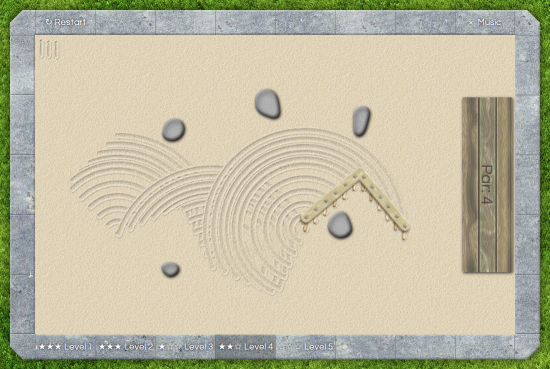
We pretty much finished our entry: Aranami. It’s a web-based geometric puzzle game, where you have to find the path for a triangular rake across a zen garden filled with unpassable rocks.

aranami


The name is Japanese for something like “stormy waves”, and is apparently a traditional raking pattern for rock gardens (as well as a knitting pattern).

Stars are awarded based on how close you can get to the “par” score, which is the minimal achievable number of moves as determined by us, the designers. There are eight levels of increasing difficulty. Please give it a try!

Aranami is going mobile!

The voting round isn’t even over yet, but the responses to our zen garden raking puzzle game Aranami are so positive that we’ve decided to make it into a proper game for iOS and Android!

After having weighed the pros and cons of various technologies, we’ve started writing Lua code in the cocos2d-x framework. We considered libgdx but found a $299 Xamarin license (needed to run the Java code on iOS) a bit steep. We also considered Haxe with NME but it seemed a little immature, and lacking good documentation. We also considered playN, but it did not appear to have any advantage over libgdx. So cocos2d-x it is.

Improvements we plan to make, compared to the Ludum Dare version:

  • More levels! We’re aiming for 30, instead of only 8.
    We might offer additional level packs as in-app purchases later.
  • Super-crisp, beautiful, HD, Retina-ready graphics.
  • Different rake shapes, starting with a straight I, going to the L from the LD versoin, then later on maybe U, T or Z shapes.
  • Correct par scores. We had some trouble with beta-testers achieving better scores than we had, so we intend to brute-force all possible routes to verify there is no shorter option. It’s a large state space, so I’m not sure how well this will work, and we might have to use some simplifications, heuristics or hinting. Apart from producing a par score, such an algorithm could also tell us how many possible routes there are, which is a metric for how difficult the level is.
  • An undo option.
  • A sandbox mode, where you can draw lovely patterns to your heart’s delight.
  • A level editor.
    In a future version, we hope to make levels shareable online.

Cocos2d-x is a bit harder to get started with than plain HTML5 and JavaScript, neither of us are familiar with the API and neither of us have a lot of Lua experience. But after a day or two of research, fiddling and hacking we’re finally over those first hurdles: we have a rake, and it moves in response to touch, both on Android and on iOS.

IMG_20130506_210409


So if you haven’t played Aranami yet, go try it now! Any additional suggestions for the upcoming mobile version would be hugely appreciated; you can leave them in the comments to this post, or on the entry page!

LD27

O hai, a compo!

The agenda is clear for the weekend, and I’m back for my fifth LD.

Joining the jam last time was fun, and I’m really happy with the game we built, but since there were only two of us and we both had to work on Monday, competition was pretty fierce. Although I mainly do LD as a challenge to myself, the competition element is still important to me, so I prefer the compo which seems a bit fairer — but that’s why it is the compo, and why the jam is the jam, after all. Thus, I’ll be working solo again.

It’ll be a browser game as usual. I considered libgdx + GWT instead of my usual CoffeeScript, but even if I wanted to port the game for a proper and official Android release later, the odds of LD-quality code being good enough are pretty slim, and I’d probably want a full rewrite anyway. Also, using JavaScript ‘directly’ has the huge advantage that you can build UI elements in HTML and leverage CSS3 animations.

Music (if I have time to do it) will be LMMS, and perhaps I’ll use it for some sound effects as well. Actually I might do music early in the weekend, because listening to it over and over will help me set the mood for the rest of the game.

I can do vector art in Inkscape reasonably well nowadays (for a programmer, that is), but I’ve never tried pixel art, so I’d like to practice that this time. For lack of a better tool on Linux, I’ll probably use Gimp. Ideally I’d also like to do something with parallax scrolling, just because I’ve never done it, it’s ridiculously easy to make, and it looks really cool. I hope I can come up with a game that fits the theme and combines both of these — and ideally isn’t a run-of-the-mill platformer either!

Jack and the Alarm Clock is done!


screenshot1

Jack and the Alarm Clock!

You’re Jack, of beanstalk fame, trying to steal the giant’s treasures, but you have only 10 seconds before he wakes up! Place snooze buttons in strategic locations along the way to keep him dozing until you reach safety.

I’ll do a proper postmortem later, probably tomorrow. First sleep.


Jack and the Postmortem

I love reading everyone’s postmortems. Either people do clever things that I would never have thought of, in which case I’ve learned something; or they don’t, but then I at least get to feel smug; it’s a win either way. Here’s how my Compo entry, Jack and the Alarm Clock, came to be.

Screenshot from 2013-08-26 17:05:45

Concept

“10 seconds”… what to do with that? I expected many time-limited games, but I wanted to do something different, which got me thinking about other meanings of the word “seconds”. In particular, the one about having a second helping at dinner. This led to the idea of a game about Hansel and Gretel, where you play Gretel who has to collect ingredients for the witch to stuff Hansel with seconds, ten times (actually, thirds, fourths, …). I dropped this idea because it would force me to build 10 levels, ideally with different ingredients on each, and I wasn’t sure I’d have time for that.

But the fairy-tale idea stuck, clearly, and so Jack and the Alarm Clock was born. A time-limited game, as I tried to avoid, ironically… but a game nonetheless, and that’s what matters most. A platformer is probably the least original I could have done, but I had never made a platformer before (unless you count I Am A Ninja). And it would allow me to do both the objectives I’d set myself: to use pixel art, and to implement parallax scrolling (just because it’s super easy and looks cool).

Coding

Before I had decided on the final concept, I’d already started setting up a WebGL canvas (using my own support library Gladder) and writing a Tiled importer. I was worried I was going to have to parse XML with a compressed blob of data in it, but no, Tiled supports JSON nowadays! So that was a lot simpler than I thought.

A tile map loader could have gone many ways, for instance a tile-based puzzler, or a Wacky Wheels-like racing game. When the loader was done and I still hadn’t come up with a more original idea, I decided just to go for the Jack game, platformer or no.

Collision handling and controls presented some interesting challenges. This article led to the key thought of updating x and y positions sequentially instead of simultaneously, which made things a lot easier and more robust. Aligning everything to whole pixels nicely dealt with all the roundoff problems that you have in a general-purpose physics system. That also had some aesthetic effect: in pixelated games, it always bothers me if the individual sprites are pixelated, but they don’t align to pixel boundaries between each other!

I got pretty much all the coding done on day one, including graphics, sound, winning/losing, restarts and level progressions. This is what it looked like at the end of the first day:

screenie

Sound and music

By the end of the first day my brain felt like porridge, and coding had slowed to a crawl, so I decided to turn to music instead. Because I suck at composing (proof) I picked two traditional jigs that I learned to play on the Irish tin whistle. The slow(ish) tune is From the New Country, the fast one is Scatter the Mud (although I learned to play both a bit differently). I had done some experimenting with LMMS‘s C64 synthesizer emulator in the days before, so I felt confident I could use that to make a decent-sounding chiptune.

All sound effects were done in bfxr, with the exception of the game-over sounds. Both the “fee-fi-fo-fum” sound and the victory tune (notes shamelessly stolen from Mario) were done on the same C64 synth, taking care to transpose them to D so they would blend in well with the rest of the music.

Sound coding was a huge nightmare in my first HTML5 games (so much that I once dropped it entirely). I tried various sound libraries like SoundManager 2 and SoundJS but they either failed to deliver low latency, or failed to work at all in some browsers. But shortly before the compo I discovered Howler.js, which worked perfectly out of the box and made me very happy.

Graphics

This was the first time I tried my hand at pixel art, and I’m fairly satisfied with how it turned out:

sprites


With tile-based levels, there’s an interesting interplay between the level and the tile map, and I found myself switching frequently between Tiled and GIMP. Fortunately, both tools make this very painless. And while making levels, I discovered that my tile map supported something I hadn’t planned for: you can see the branching beanstalk in level 6.

If I have one regret about this game, it’s that I wasn’t able to put in as many graphics as I’d have liked. Some variety in the beanstalk, some more detail on the ground and in the castle, some birds flying through the air or clouds moving, some more different types of platforms…

Somewhat less faithful to the 256-colour era is that I threw in some noise to make the sprites look more interesting.

Fun fact: the most detailed-looking sprite is probably the cottage, but I only drew that in the last hour of the compo. I think I was improving; this also shows in the hen and harp sprites, which were also among the last ones. I wonder if Jack would have looked any better if I hadn’t started with him…

Level design

I’ll admit, level design is not my favourite activity. Perhaps this is also because I have very little practice and am not very good at it.

Tiled made the mechanics fairly painless, but there’s still a large amount of iterative test-adjust-test involved. Worse, by the end of it I had no idea if the difficulty level was about right. I tried to rope in some playtesters, but didn’t get much useful feedback.

Due to lack of time, there is also much less variety across levels than I would have liked. I made each next level by copying the last and putting in a new beanstalk, but the giant’s castle looks identical (and identically uninspired) each time. Worse, it’s in the same location, because moving it meant moving tiles around on three different layers, and (to my knowledge) Tiled doesn’t make that easy. It would have been nice if the beanstalk got higher, lifting the castle up, instead of just becoming more twisty.

Hacks and goofs

I thought it would be nice to end this post with some dirty secrets. Of course it’s horrible spaghetti code to begin with, with loads of global variables, public fields, and interactions and interdependencies that should not be, but here are some particular gems:

  • There are hardcoded constants all over the place. These mostly represent coordinates inside the sprite sheet. But this is OK since these are also used inside the level tile maps, so they cannot easily be changed anyway.
  • The fences on the left and right side are made impenetrable in code, rather than in the tile map. As I developed the first level, I increased its height several times, and I got tired of having to extend the invisible wall upwards!
  • Someone reported that they couldn’t make a particular jump, even though I could easily make it on my machine. I figured this was a problem with my physics implementation, which used a variable time step and therefore could have slightly different results depending on the speed of the machine. I ended up using a 50 millisecond fixed timestep. If not enough time has passed when it’s time to draw a frame, the elapsed time is added to an accumulator, and when it reaches 50 we do another step. No interpolation or anything fancy, but it looks smooth enough to me. (If the frame time exceeds 100 we still only do one step, in order not to end up in a death spiral where frames take longer and longer to compute.)
  • The clouds were one of the very last things I added, to spice up the background. It’s just a hardcoded grid of 256×256 tiles, 15 in the horizontal and 5 in the vertical direction. I knew this was sufficient because none of the levels are larger than that! (They run out near the top; this is intentional.)
  • When the giant’s hand appears and lifts the player up, the player sprite’s update method would still try to apply physics to him. Instead of adding extra state handling to the Player class, I opted for the quick way out, something only JavaScript will let you do:
    player.update = function() {};
    I used this same trick for the alarm clock’s digits, which would otherwise be animated sprites cycling through the numbers 0…9.
  • When you run out of time, the giant’s hand still appears from the top of the screen, even if you’re standing right next to him and he remains asleep!

Long story, thanks for reading. Now go play and rate it if you haven’t already!

Comments

LTyrosine
07. Sep 2013 · 12:41 UTC
Loved your game. Congrats.

LD30

Announcing jfxr: a tool to quickly make sound effects!

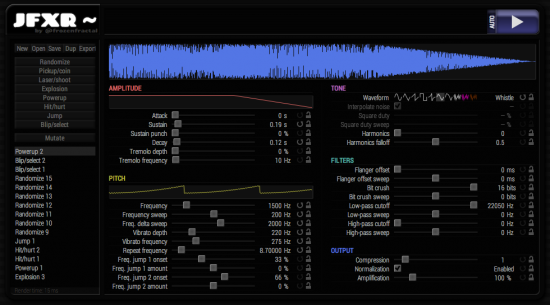
Ladies and gentlemen, in time for the next Ludum Dare compo, I bring to you: jfxr! It’s a browser-based tool to quickly generate sound effects for your games.

jfxr

Give it a try here – simply click the preset buttons on the left repeatedly to come up with new sounds. If you got something you like, fine-tune it with the many available options. Or if you know exactly what you’re going for, you can start from scratch, that is, the Default preset.

Jfxr should work in any recent version of Chrome and Firefox. Opera and MSIE users are out of luck because I can’t be bothered to test on those, and mobile devices might be a bit slow.

As you can probably tell, jfxr was heavily inspired by bfxr, but jfxr was designed to be more powerful yet more intuitive to use. It presents you with graphs of the most important parameters, so you can see what effects your edits have, and what modifications you need to do to achieve a particular result. I also find that jfxr’s randomized presets produce more useful output than bfxr’s.

I would love it if you would try it out! Please send any feedback my way via the issue tracker, or just comment on this post. Also, the source is fully open and should be fairly hackable (though I still need to clean it up a bit). Tip: you can easily share sound effects with others by clicking the Link button!

Tags: audio, jfxr, sfx, sound, tools

LD31

Any sound is better than no sound!

jfxrI’m seeing some “I’m in” posts saying stuff like “I won’t do sound because there won’t be time.” That’s silly: a game with primitive sound effects is much more engaging and immersive than a game that’s entirely silent.

For those people, here’s how to add sound to your game in literally one minute:

  • Go to jfrx.frozenfractal.com (Firefox or Chrome; sorry, no Safari or IE).
  • Choose a preset button on the left and click it until you get a sound you like.
  • Click Export and save it.

So I don’t want to see any mute games this time! No excuses!

Disclaimer: I wrote JFXR :) If you have any bug reports or feature requests and file them in the issue tracker this week, there’s a chance I’ll get them done before the compo. Also, feel free to comment on existing reports so I can gauge interest.