Ludum Dare 48 April 24–27, 2021

Playing your Ludum Dare Games and giving Design feedback!

Want to get First-Impression Playtesting *and *Design feedback *on your latest project? Join me on Twitch in just 15 minutes (between *7:30 PM - 9:30 PM [GMT-4]) where I'll be playing indie games submitted by anyone and everyone! https://www.twitch.tv/bluishgreenproductions (Please submit your games via the Chat / Discord)

Deep down the abyss

gif-thumbnail.gif

Come feel the mood of eldritch gods wanting you dead

https://ldjam.com/events/ludum-dare/48/deep-down-the-abyss

Gonna also rate some games tonight

Working on the post-compo version

Thanks to everyone that took the time to play! I'm sorry I've not been able to play more of your games, it's been a challenging month still getting to grips with a new job and learning a lot!

Here's an in progress of the new level sprites - I'm working on the movement and the level design.

post_onew.png

Play it here :m:

https://ldjam.com/events/ludum-dare/48/deeper-purple

Third Call...

Do you want me to play your game and register my game session on my YouTube channel?

Mark me below saying “yes, @gustavo-christino“ (to inform that you agree and allow me to do this), also leave the link to your project (this will make it easier for me to find you to play).

It’s a new channel and the content is in Brazilian Portuguese, however, for these videos, I will make comments in English (at least I will try, hahahahahah).

Channel (subscrible, if you like): https://www.youtube.com/channel/UC-VZfYAlStg2jDIrjJDidxQ/

Cover.png

First Call:

https://www.youtube.com/watch?v=7dy-tdwK9eQ

Second Call:

https://www.youtube.com/watch?v=hJ5NvUWYiJM

First LD with GameMaker - how it went

As a Unity guy for many years, I decided to try GameMaker for 2D. I had only tested a few things briefly for the jam, it was largely a risk to use it in the jam. Ultimately though, the flow in GameMaker is super nice for quick sprite drops, logic, etc. I chose the game to be fairly simple, and ultimately it fit perfectly for the type of flow GM offers. I miss C# for sure, the APIs seem somewhat inconsistent with naming etc. but there's enough documentation and online blogs etc. to find what you need.

I'll definitely try more GameMaker in the future.

Please try out my first GM game : https://ldjam.com/events/ludum-dare/48/deep-sea-explorer-1

Screenshot01.png

https://www.twitch.tv/itsboats

i twitching ur games come drop ur links in my chat >:)
(comments + ratings later off stream)

https://www.twitch.tv/itsboats

Playing and rating games rn - come hangout!

Screen Shot 2021-05-06 at 9.32.59 PM.png

Playing and rating LD48 games! Drop by and post your links to enter the queue. Rating live on stream and commenting any things we love/critiques later on for time.

https://www.twitch.tv/popdaddygames

Digmania Post Mortem

Originally posted to https://levidsmith.com/games/digmania

It’s been a while since I’ve written a Ludum Dare post mortem, but I decided to write one this time since it is LD48. Ludum Dare was originally referred to as LD48, due to it being a game jam to be completed in 48 hours. After doing so many of these, sometimes the post mortems started sounding like I was saying the same thing over and over again, which is why I haven’t written one in a while.

This is my twenty-third submission to Ludum Dare. I started back in April 2013 when the theme was Minimalism and I created a game called Amish Brothers. It was a simple game of collecting sheep, but it was my first ever Unity game. Learning Unity has opened some doors for me in life. It was one of those things that I never was taught in school or college, where I just had to pick it up on my own. For this 48th edition of Ludum Dare, I decided to use Unity again, which is now on version 2020.1. When I started with Unity, it was version 4.5 and things like GUIText and GUITexture have now been deprecated and no longer exist (I’m really starting to sound like an old-timer now).

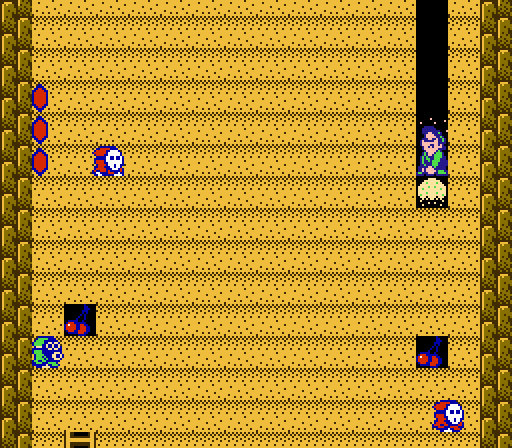
So this Ludum Dare’s theme was revealed to be Deeper and deeper. The classic arcade game Dig-Dug came to mind, and I didn’t have any other ideas. I decided to make a game in the style of Dig-Dug. Another inspiration was the digging levels in the USA version of Super Mario Bros 2.

One of the first decisions I had to make was to either use a Projection camera or Orthographic camera. Projection is nice to really make it look 3D, but Orthographic is good to keep all of the ground units the same size. I decided to go with Orthographic this time, however some of the 3D shading properties can still be seen. Otherwise, a player probably wouldn’t be able to tell the difference between a 3D orthographic game and a regular 2D sprite based game.

I think I did a good job implementing the basics of Dig-Dug, with adding my own spin on the game. I considered my Chicken Little game for Ludum Dare 46 to be successful, based on the number of scores that were submitted to the leaderboard. Therefore, I decided to make another game that was quick and simple to play, that would yield a varying range of scores based on how deep you dig. As with the Chicken Little game, I used my custom leaderboard code, which handles submitting the player’s name and score to my website. It works well, but it allows players to enter any alpha-numeric name and the score is validated based on a hash of the name, score, and key. If someone has enough time on their hands, then can probably figure out how to break it. However, I do like giving the player the ability to enter anything (aside from the words in the “bad words” file) for their name, which is like the old arcade and pinball machines. If the player has to create an account to submit a score, then they probably won’t bother.

The ground blocks are basic Unity GameObjects. When you press space to dig, it uses a one unit ray to check check if there’s a block below, and removes it if it exists. I also spawned a particle effect for the dirt being dug. If the player is holding left or right while pressing the dig button, then the ray will be horizontally left or right instead. Looking at it now, I probably would not have made a button specially for digging, and just perform the dig function whenever the player presses down, left, or right.

Unlike the arcade Dig-Dug, I had shovel collectibles spread throughout the game. The first shovel sits on top of the ground, and must be picked up first before digging. This is sort of a throwback to picking up the wooden sword in the original Legend of Zelda. Each additional shovel increases the digging speed. I used the clamp method to set a maximum digging speed (or minimum delay between digs) so that the dig delay never reaches zero.

There are four types of enemies in the game. Unfortunately, due to lack of time they all look the same, just with different color textures. I did model everything in Blender, so I could go back and add animations in a future release. However, the enemies do have different movement patterns, but very simple ones. One enemy moves horizontally to the left and right. Another moves in random north/south/east/west directions (similar to the Octorok in the original Legend of Zelda). Another enemy moves in a circular pattern. The last enemy is stationary, but shoots projectiles at you. The enemy speed also increases based on your current depth (they move faster the deeper you go). This is to ensure that the game doesn’t go on forever. I used proper object oriented style when making this game, by having one Enemy class, which has the basic attributes of the enemies, then four subclasses for each enemy type that control the different movement patterns and shooting. This way, I only had to write the collision code once for the enemy. Another difference from Dig-Dig is that there is no way to attack the enemies, and you can only avoid them.

I decided to allow the player to have three health before ending the game. I could have made it so that the game is over after one hit, but I liked giving the player a chance to recover after making a mistake. I also added a grace period (now called I-frames in the speed running community) before they are damaged again. I simply changed the color of the player’s material to red during the invincible period. I think not having a dig animation for the player is probably the biggest flaw in the game.

The ground blocks are spawned one group (10 total if I remember correctly) at a time. Once the player digs near the bottom of that group, another group are spawned, and the camera is moved downward. The camera also follows the player upwards when jumping. One fix that should probably be made is to limit how high the player can jump. However, I do like having the ability to trace your path backwards to the start. When the game is over, all of the block types are destroyed, the camera is moved back to the start, and the game is reinitialized.

As with most of my games, I used GarageBand for composing the music. I have a MacBook Pro specifically for composing music, then I transfer the files and generated song file over to my primary development PC using a shared folder. This process has worked good for me over the years. This time, I didn’t make any custom sound effects and just used BXFR, which is good for making 8-bit sound effects.

I took two photos outside of my house, which I used for the dirt texture and the rock boundaries. I modified those images a bit in Gimp, to give them more of a uniform color.

There were a few other things I considered for the game but just didn’t have the time or gumption to implement. The first idea was lantern powerups. Underground would be dark, but only a small portion could be seen using a Unity spotlight. As the player would collect more lanterns, the radius of the spotlight would increase, allowing the player to see more of the area around their character. I also considered adding gems, which would look pretty, but I didn’t have any other idea for them aside the score. Since the player’s “score” is how far they have dug downward, I thought adding a gem score would add unneeded complexity. Maybe if I developed the game further, gems could be used to buy powerups or other things.

I appreciate everyone who has played the game and submitted a score to the leaderboard. See everyone in October for Ludum Dare 49!

Entry page - https://ldjam.com/events/ludum-dare/48/digmania

Time lapse development

https://www.youtube.com/watch?v=ZNbBJWke0q0

Now You See Me: Post Mortem

Bannr.png

>>Play Here

Making a game in <5h when you have reptitive strain injury on your arms forces you to really pioritize stuff, because I can't type much before triggering pain.

I needed a way to create a game with very little code, but still innovative.

Time Hack

Restrictions often birth innovative ideas, and also narrows down the brainstorming process to save time. So on top of the theme, I self-imposed more restrictions upon myself. I decided to focus my entire game on a free asset I've been intrigued with to reduce coding: 2D Dynamic Lighting!

Creativity Hack

I find this framing helps creativity a lot; "A __ game, but ____." First, figure out a genre then add an insane twist! Like "A tower defense game, but no towers". In this case, it was An infinity runner, but you can't see the player character!"

Result

Now we have a game where you use dynamic shadows to figure out your position :V: Yay! And here's a breakdown of the time spent, I even had time to playtest & have dinner ^^

Any feedback would be greatly appreciated xD I've been told it's really hard! haha

photoem2021-05-07/em13-22-13.jpg

>>Play Here

Stranger Fish

Hey there ! We're looking for feedback for our game "Stranger Fish" :smile:

:arrow_right: https://ldjam.com/events/ludum-dare/48/stranger-fish

Our game is a underwater adventure where you need to find all the fish, going down deeper and deeper because some species like to live in the dark. Here is a picture with the fish that you can encounter on your trip !

I hope you will enjoy our creation !

fishesLD.png

Designing our root growing game: colors, UI and other design decisions

I would like to tell you a few things about the design process of the game we created. Mostly about the design decisions I had to make, as I was responsible for the visual design, including the UI, logo, the main screen, backgrounds etc. while my friend @kazrath was doing the coding part.

After learning about the theme, the first step of our development was sitting down with pen and paper and simply generating ideas. There are some common settings a game can have built on this theme: diving deep into the ocean, digging deep into the ground, build a simple dungeon crawler, travel deep into deep space, or travel deeper and deeper in someone's mind. After thinking really deep together for a while, we decided to create a game about a plant that is growing roots into the ground.

Why? Because @kazrath wanted to practice his Unity coding skills by implementing the root's pathfinding algorithm, while I saw a challenge in creating an underground environment in Inkscape, that can tell a story with very limited assets.

Our game is called "The Last Spores" and you can play it here: https://ldjam.com/users/pestodesign/games

itch-header.png

First the game mechanics and the story: we knew we wanted a game about growing roots, but to give it a background story, we decided to put the game in a post apocalyptic world. This immediately gave a nice goal to the game, and helped me with the visual design too! To win the game the player has to keep the last creature on Earth - a little fungus- growing and surviving. When you have a story and core mechanics, they are all guiding your upcoming decisions about visual design.

A small colorful plant growing in a dead, burned out world - this is the contrast of the story. So I decided to keep the colors in strong contrast too. The roots are representing life, and they are the moving part of the game - the "hero" if you will - so I wanted them to stand out with a neon pink color. Then I set the ground different shades of dark purple, gradually getting darker as the player is reaching deeper and deeper into the ground.

The main screen is containing the title of the game, and a human skull and the pink mushroom in front of a gray sky. I created another contrast while drawing the shape of the skull: the fungus and the roots are organic and playful, as opposing the blocky geometric shapes of the skull. I used the same principle when I created the obstacles in the ground for our root to grow around. This is an important part of design I think: make a rule for yourself and stick to that.

So I created some blocky stones and some pieces of junk, so the developer can scatter them around in the game level. These I colored to a unified gray, so the player can easily distinguish them from the pink root and the dark background. It is important to show that these are obstacles and not part of the background image. I created a repeated pattern of small stones and sandlike particles over the background color to make the ground more interesting. Now this layer I colored much closer to the purples of the background to make them blend in more. These are not obstacles, they are only setting the mood.

post-objects.png

With the logo and the UI of the game we wanted to keep things simple. As the roots are the main element of the game, they has to be shown in the logo as well. I also chose a font that is reminding me a bit of roots and branches, plus it has a dirty, post apocalyptic feeling.

The main UI elements are the health-bar and score in the top left corner. I wanted to show the roots there too, in a way that it is not obstructing the view, and it is not covering up the active roots. We don't want to confuse the player, we want to give clear information. Color wise I used the light blue for the health bar - same color as the energy orbs the player has to collect- and a pink number for the number of the collected spores. Then I matched the color of this small HUD to the ground colors, because it has to be visible at any depth.

One design task was to show the player which nodes are active and reachable by the root. We gave the nodes a highlight of course, but that was not enough, I wanted to add a "view cone" of sorts also, because the roots are only allowed to grow downwards in a 120° angle. First I just used a semi transparent blue arch, but then I had a better idea! Instead of a flat triangle I traced an image of an actual mushrooms spore print. This is the image you get when you put a cap of a mushroom face down on a paper, and let the spores fall from between the gills. It creates a very interesting image, and a great addition to my GUI!

post-mushroom.png

When you start the game, the first thing you see is a short comic about the background story. This page just happened in the last day of the jam, while Balint was resolving bugs like a madman, I had a bit of time after I was preparing the headers and texts for game submission. We were talking about the story during development between the two of us, and a comic is a great tool to pull the people into our world. I used the same image as in the main menu to show an empty world of ruins, while I guide the player close to the starting point of our story about the roots.

The game starts with a comic, then comes the main page with the skull. But when the player dies I wanted to show that the world has died as well (no pressure), so I am using a different background image. the colors are more washed out gray and the happy color of the fungi is gone. But I created a happy ending as well, picturing a different world. This is a great thing about working in vector: you can easily reuse, reshape and recolor elements you created earlier. Here are 2 of my main screen versions ( If you want to see the third version you have to win the game though! ;) )

post-mainscreens.png

Thank you for reading this long post! What I wanted to show you is that Inkscape is a really capable vector tool for game art design, and that design is mostly making your own decisions and stick to them :)

If you want to play the game you can do it here: https://ldjam.com/users/pestodesign/games And if you did, please let me know what you think of it!

Making some tweaks to Red Archer for the post jam version

Red Archer Post jam (LD sized image).gif

A lot of you guys said you didn't want to have to rely too much on the slow-mo ability in the game and that things weren't fast enough, so I'm making enemies a little slower, adding a tiny amount of aim assist and upping their aggression levels. This should make a little more of a challenge and also ensure that you don't have to use slow-mo all the time and will probably mean you'll be using the dodge ability more unlike in the jam version.

You can still use slow-mo though lol. I probably need to think of some way to either restrict/limit it or do something else to balance it.

That being said, thank you all for the ratings and feedback on Red Archer so far :)

https://ldjam.com/events/ludum-dare/48/red-archer

Post Jam version for Deeper Blue Sea available!

POST-ld48-cover-title-html5.png

Post Jam version includes these features:

  • Animated environment.
  • Swim animation for all the fish.
  • One more level.

You can play it here: https://betovf.itch.io/deeper-blue-sea-post-ld48

I would appreciate if you could play and rate the original jam version: https://ldjam.com/events/ludum-dare/48/deeper-blue-sea

Thanks for all the ratings so far!

hook.gif

We just wanted to say a big thanks to everyone that played our game already and the nice comments! We almost didn't managed to finish the game so it feels extra nice that some community members are having a good time with it :)

If you haven't played the game yet and like the look of the gif: It's called HOOKSHOT HELL and is a skill-based first-person platformer, where you have two hookshots (one to zip and one to swing) to climb down a mysterious tower.

https://ldjam.com/events/ludum-dare/48/hookshot-hell