LD27 August 23–26, 2013

Sausage shader

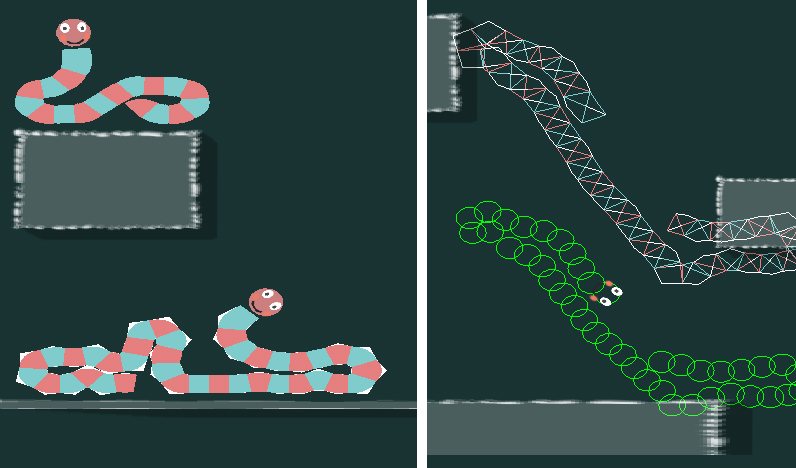
So things have been working out pretty good!  I got up to speed with java/libgdx pretty quickly, and my project is running great on desktop/phone/and OUYA builds.  I might have spent a bit too much time working on rendering the sausage bodies.  The original game just drew images for each link, so they looked pretty blocky.  After some experiments, I decided to write my own shaders for them in openGL.  It’s actually skinning the mesh in the vertex shader, and each frame all I update is an array of the node positions. The vertex shader computes the normals between the node and the previous/next segment, and used that to position all its verticies.

I found a neat trick for making curves in a fragment shader via http://research.microsoft.com/en-us/um/people/cloop/loopblinn05.pdf.  You can see in the bottom left, the discarded pixels are shown as white.  I was able to determine convex/concave orientation in the vertex shader without any if statements, but wont be using the convex shapes unless I can figure out how to stencil the sausage shapes somehow (the convex area is drawn on top of the segment fill area).

sausage_shader

There is still some work to do with capping each end, and allowing for changing the sausage length during play, but all in all it’s pretty neat.

I’m getting a bit worried about getting everything done by the end of october.  I’m going to switch gears and work on my level design pipeline.  I think I’ll make the levels in Blender, and write an exporter that will format them to be readable in Java.  I want to use a lot of vertex colors for the scenery, with textures here and there to flesh things out.  I also might play around with using the z axis to get some nice parallax and 2.5D effects.


Game Update 3 – Multiplayer Basecode Complete

So on my last update is announced I decided to write multiplayer into my October challenge project. Well all the basic “need to have code” is there. You can see other players and worlds sync up server/client. Now I just need to add in some prototyping stuff and than I will show off the game with the help of a friend playing from a separate computer. Hopefully I can do this by tomorrow.


Anyways, good luck with your project’s and can’t wait to see (and buy) them!

October Challenge accepted

So, Christmas is practically around the corner, right? Well anyway, I’m going to making a Christmas-themed game. It’s going to be called “Christmas Market Manager” where you get build your very own christmas market, build booths, get customers ,get rich and build the very best christmas market in the whole world. (Sorry, this sounds more like a marketing pitch than anything else.)

From a gameplay point of view it’s going to be like a very much stripped-down version of “Theme Park”, you have simple grid where you can build your booths on and you can use buffs (like some kind of Santa Clause who attracts new visitors) to attract new visitors. You do have some loose goals in the game like “Get 100 visitors”, “Make X amount of money” and so on.

It’s acutally something I’ve been prototyping for a long time and I’ve always tried to release a few weeks before christmas, but either real life got in the way or I totally forgot about it. I already do have a few graphics and some music available, so this should make the job a lot easier.

Here are some screenshots of the earlier prototypes:

This is the first prototype which I did a couple of years ago made with JavaScript and Raphael.js

cmm_veryold


This is another prototype for iDevices which I made with Objective-C with the excellent Sparrow Framework


cmm_old

From the technical perspective, I’m going to use CoffeeScript and my own game framework for JavaScript the web, which I’ve been in some projects for the last 1 1/2 years. As much as I would love my game to work on mobile devices, I do have some features in mind which would not work that well on the Android browser (like day-night-cycle, snowflakes and a couple of CSS3 animations which look really nice).

For the moment I’m concentrating on making it work on browsers, putting it up on Kongregate by the end of month and getting $1 through ads.

Rocking and Rollin’ K240 style

Header

And hello there! This is the second instalment of Space Mines K2013 aka “K240 and Space Mines plagiarism tour”.

In this part I’ll introduce you to the main parts of the game mechanic.  So let’s get stuck in…

Actually, wait a sec, before  we go on, I need to tell you that the majority of the graphics are ‘borrowed’ from an image search and therefore totally not mine. I did the menu’s etc. but actual graphics that look good are someone else’s, thanks, you know who you are. They’re used here as place markers and to put together a general feel, later i’ll do everything in Blender3D.

There are two main components at the  moment – building, and buying/selling.

Build menu

A building we will go,…

Starting the game

When you begin the game your base or HQ is set up for you.  Here you can access statistics on your population and a few other things, if I have the time to implement them.

Build Menu

This is where you find all the buildings you need in order to set up various aspects of your colony.  For instance, you might want to produce ore to sell and as a building material by setting up some mines. You’ll also need some accommodation for your employees to live in!

Big buildings

These are 2×2 squares in dimension. I was going to leave them out as I wasn’t sure how to handle them. Then I stumbled on the following article about K240 and how large buildings may have been implemented.

In a nutshell, big buildings in K240 are simply single  buildings copied over to adjacent squares.  A reference then points them back to the original building portion, or something like that.

The main issue I had was making sure the cursor resized to the large building when clicking on it, rather than treating it like a bunch of single square buildings.  The code goes something like this (it may not be pretty, but it works for now. Any suggestions on alternative implementations are welcome):

// Get the type of building chosen from build menu

startX = Math.floor(mouse.x/level.tile.width);

startY = Math.floor(mouse.y/level.tile.height);

building = getBuildingChoice();

If the building object returned has an attribute of large = true, then place large building by checking adjacent squares for an empty space:

if(building.large){

    if(isEmpty(startX+1, startY) and isEmpty(startX, startY+1) and isEmpty(startX+1, startY+1)){

        tilemap[startX][startY] = building;

        // Large buildings with be created which are a copy of the original

        //so there's only one true instance.

        tilemap[building.x+1][building.y] = new Large(building.x+1, building.y);

        tilemap[building.x][building.y+1] = new Large(building.x, building.y+1);

        tilemap[building.x+1][building.y+1] = new Large(building.x+1, building.y+1);
    }
} else {

    // place small building
tilemap[startX][startY] = building;
}

Selection Menu

Mine Info

What’s happening down in the mines!?

Right, so you built something,  now to find out what’s going on in there!  This is where the selection menu comes  in to play.

This tells you how many people are working, how much ore it produces (in the case of a mine) and how much it cost to build.

You can also upgrade your buildings to increase their capacity in terms of workers and storage (or living space, i.e.  for accommodation).

Building Simulation

So it’s probably worth mentioning, that there is a little more to this building stuff than may be apparent. When you first start you have a population of say 100 people (it changes every new game). So now you have 100 people without jobs or  a roof over their head.  If a building requires workers, then workers will be fed in to them until they are at full capacity.  Same goes for living, as you build accommodation, the population will begin to set up home.

This means you need to have enough work for people, but also enough people to work. If there are only 3  people working  in a mine that runs with 10, then they’re going to get p*ssed off and become overworked.  Eventually they’ll just leave by boarding the transporter.  You can hire them back, but obviously that costs money.
The Transporter

The transporter

Do you sell burgers?

This takes us nicely on to the transporter.  In K240 the transporter was a very important aspect of  the game.  You could buy blue prints for new technology, colonise other asteroids, and sell your goods.  Similarly the transporter in Space Mines K2013 has a similar roll (one could say identical).

Unfortunately my transporter is not yet developed to the same degree. At the moment you can sell  ore, and buy food and workers.  Once you dispatch the transporter it sets off  for Earth with all your ore.  Once it returns to your colony (in a few days), that’s when you get paid for your ore, not before. So you need to plan ahead.  Anything like food supplies and workers are already on board and so can be added  to your inventory immediately.

Conclusion

I think that’s about it for now.  Naturally I’ve skipped over a ton of stuff, but will provide more details and how I intend to do the graphic side of things and new mechanics such as the research component.

You can try out the current (basic and rather buggy) version below.  It works great in Google Chrome, but I can’t speak for other browsers at the moment.

Space Mines K2013

Thanks for reading!

footer

TreeVolve #3 | Banners


And today we talk about banners. What do you think about banners in mobile games?

I’m going to add banners for non-premium users and want to ask you what do you think about it. I want to add banners that don’t annoy users.

The first banner you will see when you start the game is a little banner on the bottom-left of the screen. It appears where no enemy appear and it stays for 15 seconds. The first 15 seconds of the game are the most easy and with less enemies. When the game starts to be more difficult the banner disappears.

Banner #2: After you end a game and click to continue there is a full screen banner that you can close immediately with a big X on the top.

Banner #3: Little banner on the right-bottom side where you see all your player challenge.

You can disable banners from in game purchase, the “premium” feature. It will cost something like 1€ and will give you some special features too.

What do you think about the banners? Are they too much?

Screenshot_2013-10-09-22-37-15 Screenshot_2013-10-09-22-37-39

 
Thank you =)

Contact GetFun

E-mail: info@getfun.it
Facebook: https://www.facebook.com/getfunIndie
Twitter: https://twitter.com/getfunindie
Google+: https://plus.google.com/100386666059538322642
YouTube: http://www.youtube.com/channel/UCbGttWmqa38CG-WO796hjMg


Well, I’ve Been Working On A Game For A While…

If I finish my current project by the end of October than I may enter in the October Challenge. I have been using this site for 3D models with much success.  If I have time I’ll post updates of my game…

Tags: October Challenge 2013

1/3 of the way through the month…Already?!

Gyahh, I’m not even 1/3rd of the way through making my game!

I always seem to take a lot more time over making games when I’m not doing a game jam, which is obvious but fairly frustrating.

I’m going for what is very much an arcade game that looks and feels like it could have been releasedin the early 80’s, with the pallette and sound limitations of the time very much in place. I’ve gone with Unity3D as it’s the only tool I can wield aside from a few older programs which isn’t the best for making a 2D game in but does have that all-important easy to port to anywhere factor.

How am I going to get that elusive $1 this time around though?

I’ve put a few games out with banners adverts already and this game isn’t going to be any different in that respect although I’m hoping to get in-app purchases, including consumable “extra credits” and extra ships to play with as part of the plan to monetise it. I’ve not played with IAPs before so I figure I’d best get some experience with this and the October Challenge seems to be the best place to start out with this.

Most of the main game is ready and working on Android but all those important features such as Achievements, Local and Global High Scores, Multiple Language Support (thanks Google Translate) and Freebies for sharing on Social Networks all need to be added and supported through promo videos and a website to point reviewers to. It’s going to be one crazy month, that’s for certain!

Realistically, I might finish completing the game by the end of October although what with expecting a new babby mid-way through the month it may well be wishful thinking!

Anyhoo, here’s a fairly recent screenie, including RAM / ROM check screen, it should feel authentic yup!

They Are Everywhere!

Photon’s October Challenge 2013: Day 9

(Copied from my blog: www.photongamedev.wordpress.com)

Woohoo! I think I have the physics just about where I want them: nice and “crispy”! The only thing I might change eventually is the wall jump, as it feels a little unnatural at times. However, I don’t feel its going to hinder the progression of my game design as it stands right now.

I also decided I need to take some time to really consider how I wanted to flex this game’s “fun” muscles before I dove too far in. I have a great concept, but as far as execution went, I hadn’t thought too specifically about how to make it a well-oiled machine as opposed to a cluster of gimmick-stages. So I fell back on some of my personal musings about the construction of games, particularly this writing: http://wp.me/p3AkJt-4V

So where were do my priorities lie? As a ninja-based, action platformer, surely this was going to fall somewhat on the instinctive side of things: a healthy dose of speed with some nice variation to keep the player on their feet. But I was also struck more profoundly about the side-effect of my reset power: the ability to directly undo your progress. In most games, progress is undone as the result of stuff like a lost life or failed objective… mistakes by the player. But not this game; the player has direct control over the ability to undo (some) progress. And as I said before, the mischief here is that such a thing can be for better or for worse.

So what does this mean for the design of the game? Obviously, I’ve been working on the fluidity and speed, as I want the game to feel crisp to control. Pacing will be important to some of the potential chaos that can ensue. Beyond that, I think the utilization of some simple switch-ups and traps will keep the player guessing at times. My suspicion is that the player might start to lean on the reset power as a panic button when needed. A simple trap might spring that puts the player in an urgent situation. Do you mash the reset button in your haste? Careful, you may have to backtrack and redo a certain section of the level to get back that lost progress. I want to utilize little things that can subtly punish the player.

So, in summary:

  • Capitalize on speed for a more urgent pace
  • Throw little but meaningful wrenches into the mix
  • Challenge the player’s ability to maintain progress without punishing them too heavily

Part of it is about making the “reset” power complement the frenetic nature of the action platformer. Give the player their speed and control, then let the subtle change-ups and reset power keep them alert and mess with their head a little. Haha… I like where this is going!

7dRTS continued

I really enjoyed working on my 7dRTS entry in July, and I kept updating it for another 5 weeks or so after that. It has become a supply-lines oriented strategy in which you need to balance the advance of your combat units with the advance of their supporting supply-lines.

– Terrain is randomly generated.
– You start with 20 units which are quite similar apart from the range at which they can attack, and you cannot make any more so it’s a bit like chess in that regard.
– The only resource is hitpoints that accumulate at supply-points, and those hitpoints can be transferred to any units within range to heal them.
– You start with one supply-point which has hitpoints being pumped into it continuously, so you don’t need to gather any resources or manage an economy. But you do need to manage the movement of that supply across the map by setting up supply-points and supply-lines between them.
– Supply-trucks will travel along the supply-lines and can be attacked by the enemy, and supply-points can be captured if an enemy unit comes inside them while none of your combat units are there.
– Combat units will slowly lose hitpoints by moving, so they need to be backed up by supply-points to be kept fresh.
– All units can move anywhere (land or water), but changing elevation incurs a speed penalty, and crossing into and out of water takes a long time.
– The time taken to cross into or out of water is greatly reduced within supply-points, so they also function as ports.
– Line-of-sight visibility calculations means that using terrain features is important.

supplyfront-ss

This idea started out as an attempt to make an RTS game with no resources at all, because I find resource gathering and eco management to be a boring chore that gets in the way of the more interesting spatial activity of moving combat units. However, the game did not have much depth with only combat units. The supply-lines were a way to reintroduce a type of economy, but make it an entity on the map with significant spatial influence instead of just a number in the corner of the screen. I also think it makes for more realistic scenarios because the supply has to actually travel to get somewhere, instead of teleporting around instantaneously which leads to comical situations like a factory continuing to produce units even when it is completely surrounded by the enemy.

I think the interaction of the supply-lines, terrain features and line-of-sight visibility could give some interesting gameplay.

*** Sorry, there is no multiplayer, just a rudimentary AI enemy ***

Video with info, download link in description:

(Original 7dRTS page)
http://www.ludumdare.com/compo/minild-44/?action=preview&uid=7091

Day 12: Introducing DRONE INVADERS

I finally decided on the name. There were many game names out there, but I only found 6-7 available. This one seems to fit the game theme the best. New title screen is ready, using the same Ruslan font.

Today I learned difference between Comparable and Comparator in Java. I changed the bullet code, so that you can fire multiple bullets (laser fragments) at the same time. Also, you don’t need to touch the alien to shoot it, but rather just fire in its direction and bullet hits it. Instead of going with full collision detection, I simply extrapolate bullet trajectory at the moment of firing and see which alien it hits first. This worked fine for all levels until the Boss level. Since Boss spits other aliens, he gets to be the first in array and bullet would fly through all the aliens and hit the boss. I left this behavior if you touch the boss directly. But, when you just shoot in some direction I’m sorting the aliens by y-coordinate to shoot the nearest one.

This new feature changes gameplay a bit. It’s now easier to play, and more enjoyable as aliens you shoot are no longer obscured by your finger. The game has turned from “precise touches” to “shooting fest” and only that 10-bullet clip prevents you from destroying everything in two seconds.

I guess I’ll now have to make alien movement even more challenging, so that the game doesn’t get too easy.

Day 12: Part 2

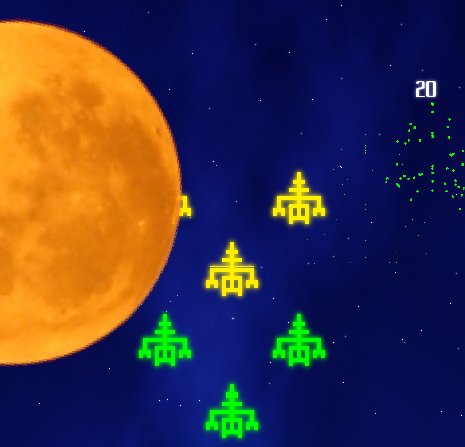
I started to like the game too much, and decided to work on it more before going to sleep. On levels 16, 26,… I added a big moon, and aliens are hiding behind it. The moon slowly moves across the screen, just in time to finish before the Boss level. This makes the gameplay really challenging. It was also challenging to do detection whether aliens are hidden behind the moon or not. Since moon is round, rectangles are not very easy to use. I looked into pixel-precise detection, but I’m afraid it would slow the game to look individual pixels each time a shot is fired – especially since moon is rotating all the time. So I just reduced the original sprite rectangle by some 12% and I’m doing the rectangular checks instead. It is not pixel-precise, but it works really well. The way it works, bullets fly over the moon and aliens fly under the moon, so you can shoot those who haven’t reached the cover yet.

I’m really satisfied with the gameplay now. It’s fun, challenging and engaging. Now I need more bosses, a couple of more alien types and powerups. Without powerups it’s a real challenge to reach wave 60, so I’ll try to create enough content to have new stuff show up at least until level 100 without repeating bosses. I guess it will be easier with powerups. We’ll see once I add those.

This is the first time I’m feeling it’s going to be a great game, rising above the average space shooter.

Comments

11. Oct 2013 · 17:57 UTC
Looks like a cool game, I really like the artstyle. :)

October Challenge Day 13

Today I worked on another new boss. This one is a giant aircraft. It was really easy to implement using Unity Playmaker. The gameplay is simple: The enemy moves using a Math Ping pong function. The health and attacks are handled by a simple Finite State Machine. One FSM runs the health, the other, the attacks.

I originally thought of only doing one boss, and a few levels. By reusing code, art, and Playmaker FSMs, I’ve been able to cut my development time in half. My new goal is to finish setting up ground enemies. I also need to redo some of my level encounters. I am aiming for at least 3 mission areas (unique environments) and 5-7 levels. If I can get one more boss going, I’ll do 4 areas. I think that should be enough content for a free ish web game.

After that, its the generic polish polish polish. I think I’m in good shape to release this before the end of the month.

October playmaker 2013 Oct- C130 Boss

Day 13: Shields, new Boss

I added a new boss and now I have two of them. Here are the alien names so far: Worker, Eater, Hairy, Glider. Bosses are called Worker Boss (it looks like big Worker and spits small Workers) and Borg (it’s cube-shaped and destructs into big cubes).

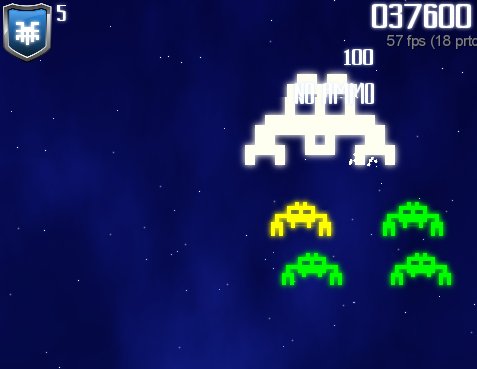
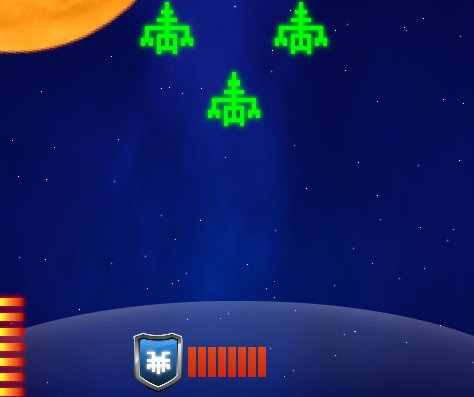
I also added the shield. I have drawn this nice shield icon before. I drew it using Inkscape and got inspiration from a some YT tutorial. I tried to follow the tutorial (it was for Adobe Illustrator, not Inkscape), but failed. So I started to observe some shields that I like and noted how it’s just a bunch or curves and gradients. I slapped Hairy on it, it looks really nice. This might even become the application icon for Android.

Anyway, the shield can be invoked at any time. It lasts 20 seconds. There will be some powerups to upgrade the shield to last longer. If aliens hit the shield it loses energy much faster, so you should still try to shoot them down even if shields are up.

Shield graphics looks like force-field. It required some manual messing with Gimp to draw it nice as I wanted a nice circle-segment instead of straight line and casting a gradient shadow that way doesn’t seem to be supported. Maybe there’s some trick I don’t know. So I combined multiple linear gradients at a different angle. It turned out really nice.

I tried adding some glow to the shield icon, but then it stands out too much. I’ll leave the glowing for situation when powerup flies across the screen and you need to pick it up.

With these new graphics, it starting to look like a complete game. I’m still thinking where to place the score multiplier and whether the current wave should be shown.

I’m also thinking that player should be able to buy some powerups before playing, but this would require some coins or something like that, and with current, fast gameplay it simply would not fit. Maybe a some aliens could leave some crystals behind them or something like that or random powerups would show up. Or you would simply get as much coins as the number of waves you survived.

5

This entry was posted on Saturday, October 12th, 2013 at 4:20 am and is filed under October Challenge 2013. You can follow any responses to this entry through the RSS 2.0 feed. You can leave a response, or trackback from your own site.

Indefensible

Hi guys, I’ve been slaving away for the past 13 days and I feel in the mood for sharing what I have created thus far.

The game is a sort of fusion between tower defence and top down shooter which takes place amidst burning rivers of lava. Using your keen rock throwing ability you have to fend off packs of ravenous monsters until you can get your hands on a machine gun and perhaps some sort of multi-missile launching machine. Not going into too much detail here, but you can read more and follow the progress HERE if reading this has sparked some wild excitement.

Screen Shot 2013-10-12 at 9.28.18 PM

This is the state of my todo list (looking like an awful lot for just 19 days):

Finish coding player weapons
Think up and implement player upgrades
Program, model and animate three different enemy types
Create a non-horrific GUI (not looking forward to this)
Add some music and sfx
Improve the graphics
Balance
Polish
Test
Bug squash
Release
Pray for some income ^^


All right, thanks a bunch for reading, or skimming through or whatever you did and I wish you all the best.

-Seb

Photon’s October Challenge 2013: Day 12

(Copied from my blog: www.photongamedev.wordpress.com)

Hey everyone. My Thursday and Friday ended up being quite long and eventful, and I was feeling a little burned out. On top of that, I might be getting sick. But who wants to hear about my woes? C’mon, y’all wanna hear about the GAME, right? So despite another absence, I knew I needed to get back into it before I let my rhythm get too heavily jarred.

So I’m chugging along, even if it be slowly. I started programming resettable game objects today, like the fading/crumbling platform. I’ve also brushed up the resetting power a bit so it doesn’t cause cloning (start position player and reset position player). I actually think the programming and stuff is going to be a bit simpler than I anticipated. Again, I think simplicity will be my friend here. I just think its going to be a matter of picking up my pace just a bit so I can make the October deadline, as I still have some graphical and musical stuff to think about.

So I still don’t have a whole lot to show, but I’m trying to keep some form of steady pace. I chose Stencyl because I know its good for rapid game-making and publishing a Flash game gives me an easy target for my $1. Stay tuned for some (hopefully) more substantial updates in the near future!

Guild of Dungeoneering – first playable version

Guild of Dungeoneering
“Recruit adventurers to explore dungeons for the glory of your Guild. Build the dungeon room by room, fill it with monsters, traps and treasure .. and hope your dungeoneers have what it takes to return victorious!”

[A dungeon crawler where you don’t get to control the adventurer. Instead you lay out the dungeon one room at a time (including treasure & monsters) and he proceeds according to his AI. You want him to explore, level up, find treasures and ultimately survive – but you don’t get to directly control him.]

Playable link:
–> Guild of Dungeoneering <–

Feedback:
In this devlog thread, please! (or to @gambrinous)

TODO list:
– Hero character & movement
– Remove tile-choice mechanic, replace with a random set of things you MUST place at the start of each turn. Example: a goblin, a +1 dagger, a new room.
– Monster, item sprites
– Hero moves to one room next to him only (of his choice), after you place things.
– Speech bubbles for heroes (& monsters) to show their intent & add a little humour (eg ‘Snakes. Why’d it have to be snakes?’)
– Bug with ‘?’ explorable spaces that have multiple entry points (only uses first-seen entry point)
– Bug with possible room/corridor tiles coming up that you can’t fit anywhere
– Actual RPG elements (eg levels, equipment, etc)
– Some sort of battle system (automated)
– Replace placeholder art

Photon’s October Challenge 2013: Day 13

(Copied from my blog: www.photongamedev.wordpress.com)

Still chipping away…

I was working on configuring basic gameplay settings that apply throughout the entire game, such as level exit conditions, total restarts of a level, item collection… stuff like that. Not much to write home about… again. But hey, progress is progress.

Day 14: Entity / Management System, Bug Fixing, And Mechanics Work

Hey all, what’s up? Part of the reason I haven’t been posting much on here as of late involves my work schedule changing. Since one of my coworkers is going on vacation this month, I’ve been working alot more hours than normal and some of my real-life has gotten in the way a bit. I hope to have a functional game by the end of the week. Then, I can start doing stuff like working on menu screens, score systems, maybe trying to update the graphics, etc. Enjoy!

Here’s a screenshot of what I’ve gotten done so far (these are just placeholder images, by the way) since the last time I posted:

HexagonGame-10-14-2013-939


I may not seem like I’ve done much which this project from a visual side of things, but if you saw the original code vs the new code, you would probably smack me since there wasn’t any kind of structure or form to it and it was really messy (which lead to bugs when I started doing more than drawing the Hexes on the screen).

First, I created an Entity interface with an AbstractEntity class that would contain methods that would load Textures, create Actors, and manipulate those Actors (translate, rotate, resize, etc.).

Then, I created the Ingredient and Candy interfaces that both have their own individual Abstract classes that are also extensions of the AbstractEntity class since both the Candy and Ingredients used to make that Candy are going to be displayed on the screen.

Lastly, I created a Manager interface and AbstractManager class that contain methods to group together all like Entities and create them all at the same time so that the Main class (this time, it’s actually all being run through a Screen class instead of the main one), contains the least amount of code possible.

By implementing these new systems, I was able to compress quite a bit of the code down to only what’s needed for each class and also was able to track down and get rid of some bugs that were caused because of bad and messy code.

Tonight, I implemented a randomization method into the IngredientManager class that will attach a random Ingredient to each Hex on the screen, as seen above.

The next steps, attach each Ingredient to whatever Candy needs them with a specified amount, allow selection of individual Ingredients with the mouse, change the color of only the Hex that the Ingredient is on, and several other mechanics.

Day 16: Recording a movie from libGDX game

I created a YouTube video showing some gameplay and first two bosses:

On my blog I wrote a detailed explanation how to make a YouTube video of libGDX game.

4

This entry was posted on Tuesday, October 15th, 2013 at 5:33 am and is filed under October Challenge 2013. You can follow any responses to this entry through the RSS 2.0 feed. You can leave a response, or trackback from your own site.

MinimalShmup news#2

So, a small post about what’s going on for MinimalShmup.

Because of the courses, I can’t work as much as I want, but the game is still being improved.

Now, the game is completely working with a gamepad, I added the structure of the HUD, and I’m implementing the scoring system.

The scoring system should be like this:
– You have one normal shot that power up when you take a powerup bonus, and a special attack that you can use with you gauge counter.
– The gauge is filled by shooting on enemies and you can “stock” them. ( You can have, for example, 3 full gauges and 1 half empty ). The gauges are in fact the amount of Bomb/Special attack/Analyse you have, but you can switch between them. Imagine you have 10 gauges, you can choose to use one for a bomb or switch to you special attack and use one for it, you’ll have 9 gauges after that.
– The gauges count in the scoring system, after each level, a multiplier is applied on you gauge counter and also on your lives and on the rank.

I’m also trying to optimise everything, and I’ll work on the first level, so I’ll be able to put a beta version here.

Stay tuned for more infos soon!

bonus: a screenshot
hud_screen

Tags: gamedev, minimalshmup, news, shoot'em up

Reckpunk : Half month report

Hi, I didn’t take the time to report about my progress here until now, so here I go!

The game is about destroying obstacles for a little character that you don’t control,
obviously, this little guy will take some detour, and give you a hard time :)

shot3

I aim for a joint release on android and windows / linux. Ah, the joy of cross platform coding!

For making the game, I use my own homebrew engine along with an editor for rapid level editing / testing,
the editor use winform / C# while the engine is coded in C and most of the game logic work through lua scripts.

editor_shot2

So far, I have 6 levels, and most of the coding is done, now I have to work on providing more levels, adding sound and music and obviously add polish to the whole.