LD28 entry released on Google Play
A quick shameless plug: I released the game I started as part of the last Ludum Dare on Android last week.
A quick shameless plug: I released the game I started as part of the last Ludum Dare on Android last week.
To avoid having to recreate some basic tk2d fonts and Unity scripts I’ve created during the past two Ludum Dares, I’ve set up a LudumDareResources repo on bitbucket.
I’ve also put up the barebones .NET application I use to create FNT files that I use with Unity 2D Toolkit under FntGenerator.
I’m not sure it’s useful to anyone else in its current state, but ideally I’d like to build upon it as I participate in more LDs.
Tags: base code declaration, bitmap font, tools

LD29: Upper Crust
What went right:
What could have gone better:
What went wrong:
Tags: ld29, postmortem
As with Ludum Dare 29, I’ll likely be using Unity scripts and tk2D fonts from my LudumDareResources repo and FntGenerator to create .fnt files for any new fonts.
Tags: base code declaration, bitmap font, tools
What went right:
I felt like the scope was perfect for the limited amount of time I had this weekend. This was mostly luck, but I also knew when to quit tweaking and didn’t regret it.
The match-3 and block-dropping algorithms fell into place like magic. To be fair, I’d given it some forethought–I did a quick Unity refresher on Wednesday where I attempted to build the line-clearing mechanic of Tetris with help from this tutorial. However, that’s a much simpler algorithm and I didn’t have an exact plan. It was a leap of faith that paid off early, leaving all of Sunday for polish. (I’d probably remiss if I didn’t mention that the match-3 concept was inspired by the time I spent in SeishunCon‘s digital gaming room this year.)
I’m happy with the art. I didn’t stretch myself stylistically, and it’s not as crisp and detailed as what I’d hoped, but overall it feels pretty slick if you don’t look too closely. I love posting those screenshots because it feels like a “real” game (well, at least to me).
As in the past, adding a GVerb track covers over a multitude of recording sins. I’m going to say this a lot in this post, but this feels like cheating.
Driving 40 minutes back from the Knoxville Game Design meetup is always a good way to start thinking about design and algorithms.
What could have gone better:
I basically shoehorned a puzzle game into the theme. This was premeditated, mainly because I was itching to dip my toe into the genre. It restrained the scope by removing the need for level design, which helped. However, it also felt like cheating the system to start thinking about a game genre so early (especially since I feel like my LD29 entry was a much stronger “Connected Worlds” concept).
Overall gameplay was good, but not great. I’m happy with this in one sense–I didn’t make a ton of explicit design decisions, so I won the “go with whatever’s easiest” lottery. Still, I feel like the “flip or drop” choice is missing something. I enjoy the game, but I restart as soon as I clear out all of the obvious flip combos. Once I have to drop blocks, it’s like I’ve failed. I feel like a “flip or shift” mechanic would have been better.
What went wrong:
Because I wasn’t livestreaming, I tried to do a status update video on Friday night. OpenBroadcaster doesn’t work smoothly on my laptop. I wasted about an hour or so tinkering with OBS on a night I ended up staying up until 4am.
I don’t understand music. Originally, I picked the current chord progression as a base, then played some random notes over it on a second track. Seemed clever on Saturday, but on Sunday I realized it was too chaotic. After talking to Mike at the post-LD meetup, I think I need to study up on some music theory basics rather than hoping a clever experiment will pay off. (I feel like I’m reusing the same chord progressions and I always use a similar rhythm/picking pattern.)
Overall, I don’t feel like I stretched myself like I should have. I stick to the same style musically and artistically because I don’t have a lot of range. I stick to Unity because it’s all I know. To be honest, I’ve had a few good ratings in past LDs, so I avoid the unfamiliar because I want to keep that up. Next LD where I have the time, I need to set a few goals–for example, use Inkscape instead of GIMP, or use a digital tool like PxTone or Bfxr.
Tags: post-mortem, postmortem
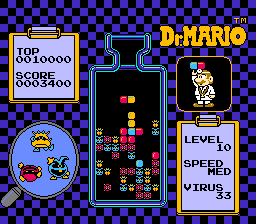
Dr. Mario (source: Wikipedia)
This year in SeishunCon‘s digital gaming room, I was reintroduced to the match-3 game. I’d played Dr. Mario when I was younger, but more competitive games like Magical Drop, Bust-A-Move, and Tokimeki Memorial Taisen Puzzle-Dama were something very different.
Ultimately, I realized just how many more-or-less neutral decisions are involved in making a match-3 game.
During this year’s Ludum Dare, I decided to jump in head-first. I did a bit of a warm-up the week before, trying to build a Tetris-style algorithm that detected and cleared out lines. This tutorial from Unity Plus was a huge help. Of course, the Tetris matching algorithm–a complete row of tiles–is much simpler than an algorithm that picks out irregularly shaped patches of matching tiles.
If you want to see all of these code samples in context, check out my Ludum Dare 30 repo.
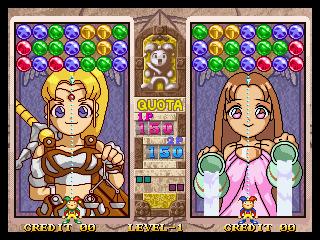
Magical Drop 3 (source: Kazuya_UK)
The trickiest part of building a puzzle game in Unity is that the game itself doesn’t live in world space. Not fully, anyway.
This isn’t as true in other genres. Platformers, for example, live almost exclusively in the Unity game world. The player’s Transform tells you its location. Colliders (or, in some cases, raycasts) tell you when the player is on the ground, hitting the ceiling, or colliding with an enemy. Even if you aren’t using in-game physics, you’re probably adding force or setting velocity on a Rigidbody so that you get collision detection for free.
Not so with a puzzle game. If your game involves clicking, you might get some coordinates in world space, but you’re probably going to convert that to a cell in a grid that lives entirely in code. There’s a good reason for that–it’s far easier to write the logic for scoring a game like Tetris or Dr. Mario when you’re thinking about blocks or tiles, not individual pixels.
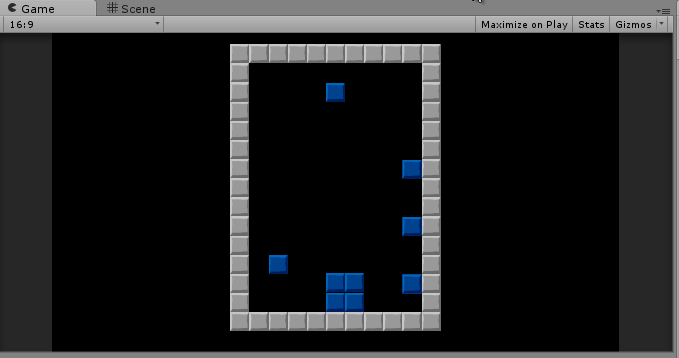
I’m pretty sure this is not how Tetris is supposed to work.
My warm-up actually tried to live in world space as much as possible. It used physics to determine when a tile had landed, and only transferred data back to a two-dimensional array to detect row completion. That seemed safer–what happens in the game world is real, after all. It’s what the player sees, so if you store your data there, there’s no fear of getting out of sync, right?
I was wrong. No matter how I tweaked it, it never did work right.
The Unity Plus tutorial I linked above was a huge help. If nothing else, it allowed me to trust that moving my logic fully out of the game world and into an abstract data structure was a valid approach. If you haven’t already, go back and at least skim it, because I intend this post to be an extension from Tetris logic into match-3 logic.
Once I figured out this transition was manageable, this part was easy. I created a GameTile class that tracked the color, row, and column of the tile, and updated the tile’s position based on that. Here’s an abridged version:
public class GameTile : MonoBehaviour {

 private Transform _t;
 private SpriteRenderer _s;

 [System.NonSerialized]
 public int TileColor;

 [System.NonSerialized]
 public int Row;

 [System.NonSerialized]
 public int Column;

 void Awake () {
 _t = GetComponent<Transform>();
 _s = GetComponent<SpriteRenderer>();
 }

 Vector3 tmpPos;
 public void UpdatePosition()
 {
 tmpPos = _t.position;
 tmpPos.x = (Column * Board.TileSize) - Board.WorldOffset;
 tmpPos.y = (Row * Board.TileSize) - Board.WorldOffset;
 _t.position = tmpPos;

 _s.sprite = Board.Current.Textures[TileColor];
 }
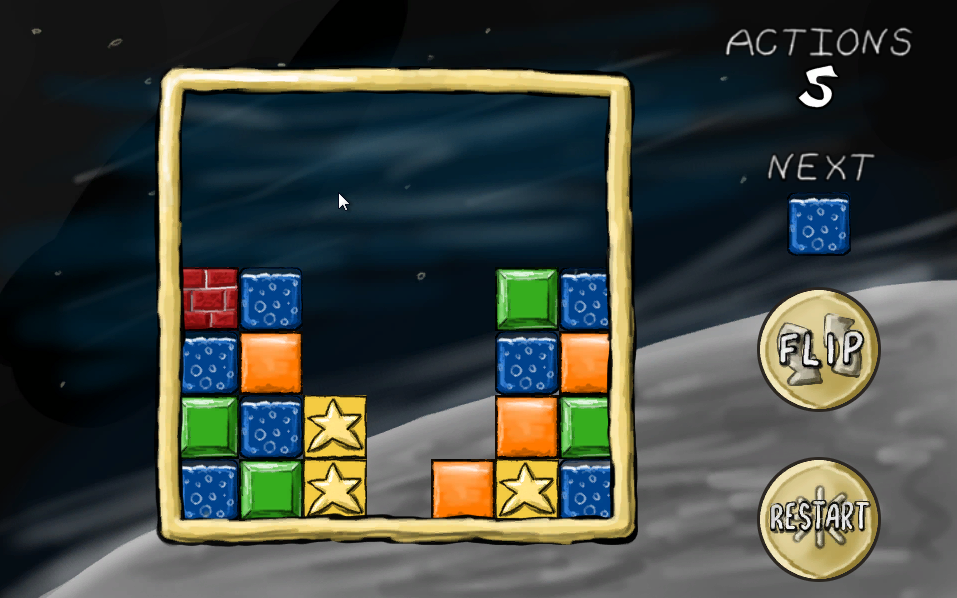
Tiles in a grid
Note that, in this case, TileSize is a constant that represents the size of a tile in Unity units. I’m using 64×64 pixel tiles, and the sprite size in unity is 100 pixels per unit, so TileSize works out to 0.64. I’m also using a constant offset so that the middle of the 7×7 board is at 0,0 world space, and the lower-left corner is tile 0, 0 in game space.
I also created an array that represents the gameboard as a static field in a class called Board. (Board started off as a static class and became a singleton because I needed to set some values in-editor, so it’s clumsily straddling the worlds of game object and static class.)
 public const float TileSize = 0.64f;
 public const float WorldOffset = 1.92f;

 public const int BoardSize = 7;
 public static GameTile[,] Tiles = new GameTile[BoardSize, BoardSize];
While the Unity Plus tutorial used a two-dimensional array of integers, I decided to store references to my GameTile objects in this array. This allowed me to pass data to and from tiles directly and (as we’ll see later) made tile-clearing and animation generally easier.
Whenever I made a change to board state, it meant that I could simply loop through the board array and tell each tile where it was supposed to be:
 public static void UpdateIndexes(bool updatePositions)
 {
 for (int y = 0; y < BoardSize; y++)
 {
 for (int x = 0; x < BoardSize; x++)
 {
 if (Tiles[x,y] != null)
 {
 Tiles[x, y].Row = y;
 Tiles[x, y].Column = x;
 if (updatePositions)
 Tiles[x, y].UpdatePosition();
 }
 }
 }
 }
Note that in every case, we’re always converting from abstract game space into world space. Unity game objects aren’t storing the important game state information directly; they’re always a representation of that state.
In my game, there was one case where I needed to convert from world to game space, and that’s when the user clicked an empty space to drop a tile. To do this, I simply created a large collider behind the entire gameboard with this script attached:
 void OnMouseDown()
 {
 if (GameState.Mode == GameState.GameMode.Playing)
 {
 mouseClick = Camera.main.ScreenToWorldPoint(Input.mousePosition);
 mouseX = (int)Mathf.Round ((mouseClick.x + WorldOffset) / TileSize);
 mouseY = (int)Mathf.Round ((mouseClick.y + WorldOffset) / TileSize);
 PutNextTile(mouseX, mouseY);
 Soundboard.PlayDrop();
 GameState.ActionsTaken++;
 }
 }
That’s really all there is to it. Note that it’s basically the reverse of UpdatePosition() above, which converts from game to world space.
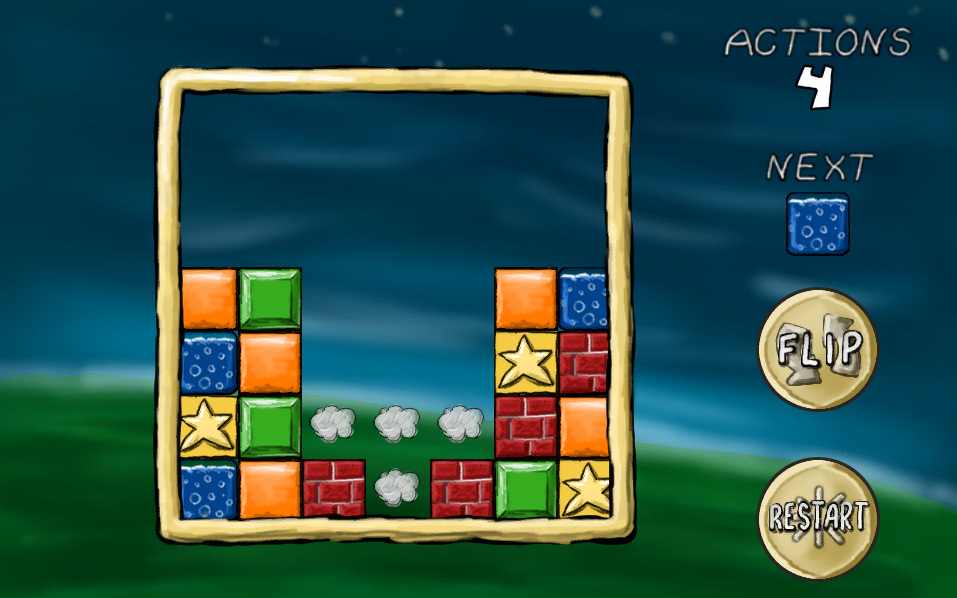
Clearing matches
This is the trickiest part. Actually, this is probably why you’re reading this blog post.
Horizontal matching (as in Tetris) is pretty easy–you just need to look for contiguous tiles in the same row. Even allowing horizontal or vertical matches (as in Dr. Mario) is just a variation on this theme. However, trying to track a set of contiguous tiles that can vary horizontally and vertically is going to take some recursion.
Each time we take an action that changes the board, we’ll trigger a check. The first thing we do is copy our entire board array into another array:
 static void CopyBoard(GameTile[,] source, GameTile[,] destination)
 {
 for (int y = 0; y < BoardSize; y++)
 {
 for (int x = 0; x < BoardSize; x++)
 {
 destination[x, y] = source[x, y];
 }
 }
 }

 static bool clearedTiles = false;
 public static void MatchAndClear(GameTile[,] board)
 {
 clearedTiles = false;
 // Make a copy of the board to test
 CopyBoard(board, toTest);

 //... continued...
Why? We’ll see later that it makes it much easier to tell which tiles we’ve checked.
We start the process with a brute-force approach. We’ll go cell-by-cell (first rows, then columns), testing each cell. For each test, we’ll reset some variables we use to track our testing, and then call a separate function (which we’ll later use for recursion):
// Continued from MatchAndClear() above...

 currentTile = null;
 collector.Clear ();

 for (int y = 0; y < BoardSize; y++)
 {
 for (int x = 0; x < BoardSize; x++)
 {
 TestTile (x, y);

 // Continued later...
Let’s take a look at that TestTile function:
 static void TestTile(int x, int y)
 {
 // Tile already tested; skip
 if (toTest[x,y] == null)
 {
 return;
 }
 // Start testing a block
 if (currentTile == null)
 {
 currentTile = toTest[x, y];
 toTest[x, y] = null;
 collector.Add(currentTile);
 }

 // ** Skipped lines--we'll come back to these later **

 // If we're processing this tile, test all tiles around it
 if (x > 0)
 TestTile(x - 1, y);
 if (y > 0)
 TestTile(x, y - 1);
 if (x < Board.BoardSize - 1)
 TestTile(x + 1, y);
 if (y < Board.BoardSize - 1)
 TestTile(x, y + 1);
 }
If this function finds that the cell is null, then we skip it. A null cell means that it’s either empty, or we’ve already tested it. (That’s why we copied it into a separate array–we can manipulate the new array at will.).
If the cell has a value, though, we’ll do a few things. First, we’ll remember it as our “current” cell–the one at the top of the chain of recursion. Then, we’ll remove it from our copy of the gameboard so that we don’t test it twice. We’ll also add it to a List so we can remember how many contiguous tiles of the same color we’ve found.
There’s two other conditions we might run into later in the recursion, but we’ll talk about them later. Once we’ve tested a cell, we’ll then grab the four cells around them an run them through the same test.
The “current” cell is now set, indicating this isn’t our first level of recursion. On these function calls, we now have three possibilities for each cell.
First, the cell could be null, which again means we’ve already tested it or it’s empty. Again, we’ll do nothing if that’s the case.
Second, the cell could not match the “current” cell. In that case, we don’t consider it “tested.” Our recursion tests for a single set of contiguous tiles of a single color. Just because this tile isn’t part of the current set doesn’t mean it’s not part of a different one.
// From TestTile() above...

 // Tile doesn't match; skip
 else if (currentTile.TileColor != toTest[x, y].TileColor)
 {
 return;
 }
Third, the cell could be the same color as our “current” cell. If that’s the case, it’s been “tested,” so we’ll set it to null in our copy of the board. We’ll also add it to that List we use as an accumulator. This is one of the conditions we skipped in the example above:
// From TestTile() above...

 // Tile matches
 else
 {
 collector.Add(toTest[x, y]);
 toTest[x, y] = null;
 }
The function will continue recursing until it’s exhausted all options, either by hitting an empty cell or the edge of the board. At that point, we return to the main “brute force” loop to handle our results.
If our accumulator has more than three tiles, then this was a successful match. If not, then we’ve tested one or two tiles, but we don’t need to take action:
// Continued from MatchAndClear() above...

 if (collector.Count >= 3)
 {
 foreach (GameTile tile in collector)
 {
 ClearTile(tile.Column, tile.Row);
 clearedTiles = true;
 Soundboard.PlayClear();
 }
 }
 currentTile = null;
 collector.Clear ();
 }
 }

 if (clearedTiles)
 {
 SettleBlocks(board)
 }
 }
Here, as we’ll discuss later, I’m simply triggering some animations. The simplest approach, though, is to loop through our accumulator and call DestroyObject on each matching tile’s game object. That kills two birds with one stone: the in-game objects are gone, and the cells in our board state are set to null.
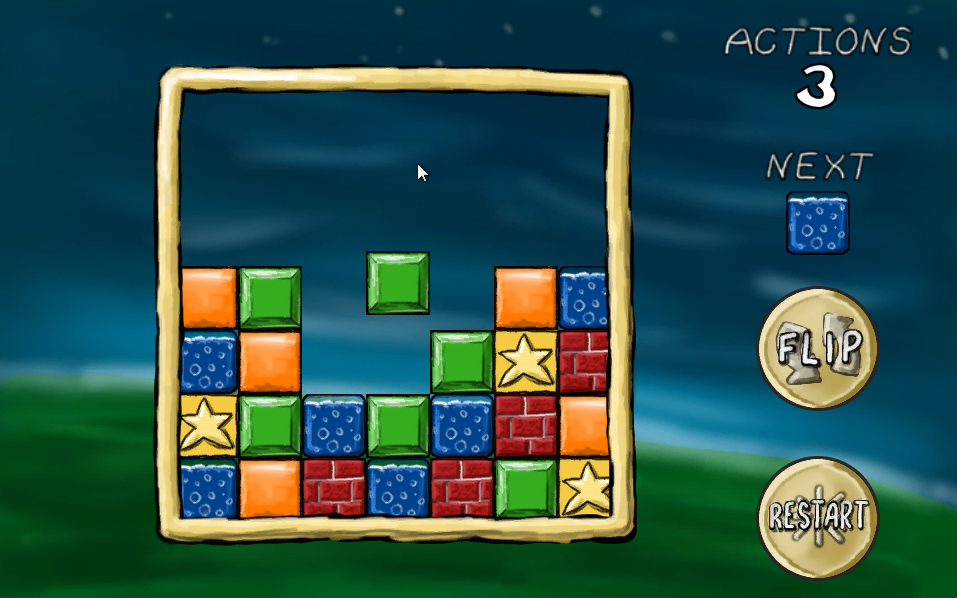
Dropping a tile
Certain changes–dropping a tile or clearing tiles, in this case–can leave unsupported tiles which must be resolved (if those are the rules of our puzzle game, of course). This is actually a really simple algorithm.
We’ll go column-by-column this time, then row-by-row. The order is important here.
In each column, we’ll work our way up from the bottom until we find an empty cell. Then, we’ll make a note of that cell. The next time we find a tile, we’ll simply shift it down to that location and add one to our “empty cell” index:
 static int? firstEmpty;
 public static void SettleBlocks(GameTile[,] board)
 {
 for (int x = 0; x < BoardSize; x++)
 {
 firstEmpty = null;
 for (int y = 0; y < BoardSize; y++)
 {
 if (board[x, y] == null && !firstEmpty.HasValue)
 {
 firstEmpty = y;
 }
 else if (firstEmpty.HasValue && board[x, y] != null)
 {
 board[x, firstEmpty.Value] = board[x, y];
 board[x, y] = null;
 firstEmpty++;
 }
 }
 }
 UpdateIndexes(false);
 }
When you’re done, don’t forget to call your matching function again. It’s entirely likely that dropping tiles has created some empty rows.
In fact, if we were scoring points, this would make it easy to award combo bonuses or multipliers. All of these repetitions of dropping and clearing blocks are just recursions of that first call that was triggered by a player action. We could tell both how many total matches resulted from a player action, and how many levels of “chaining” were required for each action.
This is a working game, but it’s not intuitive, primarily because we have no animations. Tiles disappear, then reappear on lower rows. It’s hard to figure out what’s really going on unless you’re watching closely.
This is tricky to do. Game objects are always a representation of game state, so our tiles are always laid out on a grid. Tiles are always in one space or another; so a tile might be in row 1 or row 2, but it’s never in row 1.5.
What’s the trick? We should never be manipulating the game board and animating at the same time. Think about how Tetris or Dr. Mario work–you don’t drop the next tile until everything has had a chance to settle. This gives a brief reprieve for the player, but it also ensure we don’t have any weird race conditions or interactions.
As an aside, I recommend creating a “game state” enumeration whenever you start a new project. I’ve never written a game where I didn’t need to know whether the game was in play, paused, showing a menu, in dialogue… I could go on. Best to plan for it early–that way you can ensure that every line of code you write tests that it should be running in this state.
Admittedly, my implementation is kludgy, but here’s the basic idea–when we clear or drop a tile, we trigger a state change. Each GameTile object knows how to handle this state change, and (more importantly) it knows when to tell the gameboard that it’s finished with its animation:
 void Update () {
 if (GameState.Mode == GameState.GameMode.Falling && Row != LastRow)
 {
 targetY = (Row * Board.TileSize) - Board.WorldOffset;

 tmpPos = _t.position;
 tmpPos.y -= FallSpeed * Time.deltaTime;
 if (tmpPos.y <= targetY)
 {
 Board.fallingBlocks.Remove(this);
 UpdatePosition();
 Soundboard.PlayDrop();
 }
 }
 }
When a clear animation finishes, the game needs to check if it should be dropping tiles:
 private static float timer;
 private const float DisappearTimer = 0.667f;
 void Update()
 {
 if (GameState.Mode == GameState.GameMode.Disappearing)
 {
 timer -= Time.deltaTime;
 if (timer <= 0)
 {
 GameState.Mode = GameState.GameMode.Playing;
 SettleBlocks(Tiles);
 }
 }
When the drop animation finishes, it needs to check for matches:
   if (GameState.Mode == GameState.GameMode.Falling && fallingBlocks.Count == 0)
 {
 GameState.Mode = GameState.GameMode.Playing;
 MatchAndClear(Tiles);
 }
 }
This cycle repeats until we finally don’t have any more matches, and then the game can go back to doing its thing.
Tags: LD30, SuccessStory, unity
 Is there another version posted around the web?
Here’s the usual post-mortem run-down for Ludum Dare 32: Lightbender. I usually do “What Went Right” and “What Went Wrong,” but there are elements of both in most of these categories.
Setup
Initially I planned on working with Mike for my first team jam. I had mixed feelings–while I’d like to see what a team could produce, Mike wanted to work in 3D. I have no Blender experience and feel my 2D skills are very strong, so I was uncertain. Ultimately, Mike got sick and I did the solo compo.
I was also relatively unprepared. The week before the jam was a crunch at my day job. I didn’t know how late I’d be working on Friday evening to get a testing release out to the client before Monday. I didn’t know if I’d even be in mental shape to be productive. Luckily I wrapped up a little after 6, had some extra time for a long dinner to clear my head, and was ready to go by the time the theme was announced at 9.
Jam Theme
 “An Unconventional Weapon” isn’t an overly restrictive theme, but it’s also tough to come up with something original. I left the Friday night meetup at the TechCo empty, staring at everything and hoping to come up with a concept. Driving home at night, the best I could come up with was manipulating streetlights.
Honestly, I wish I could have come up with a theme that subverted the usual video game tropes. De-escalating a situation non-violently and making allies out of enemies rather than escalating everything would truly be an unconventional weapon, while making an important point in the process.
Art / Microsoft Surface
I recently bought a Surface Pro 2 marked down after the Surface Pro 3’s release, mainly because I’d been interested in one as a drawing tablet. (Surface Pro 1’s and 2’s use Wacom Feel for pressure sensitivity and some other handy graphics tablet features.)
I feel like the touch screen makes me more productive than my Bamboo Fun. It’s not a massive improvement; swapping between coding and art by changing devices is just easier than dragging out a separate tablet. And since I was already using Bitbucket, pushing changes between devices was easy.
Unity 5
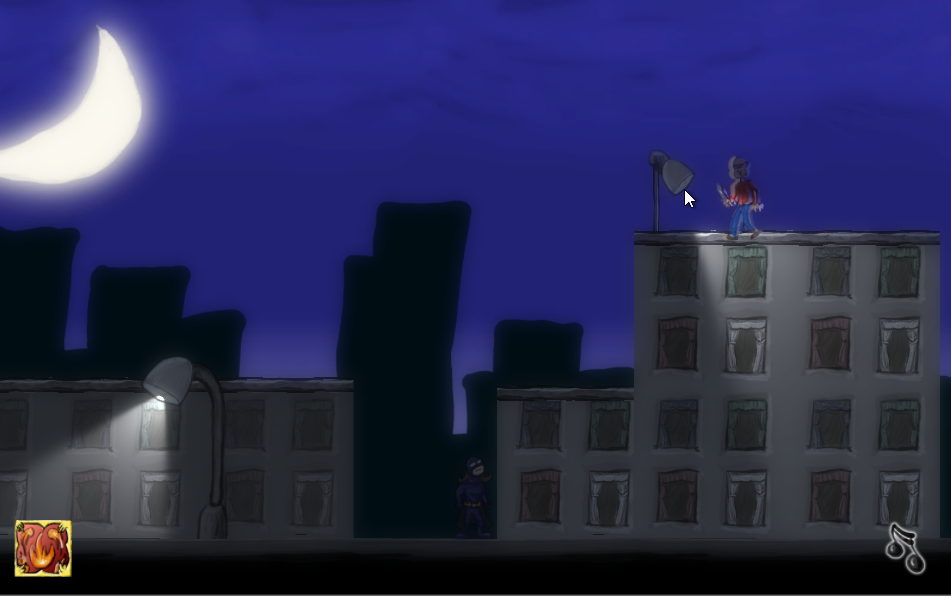 Knowing that my game concept would be lighting-heavy, I dug into Unity’s graphics features a bit more. I don’t know if Bloom was previously a pro feature or not, but it made a huge difference. With just a little tweaking, there was a huge difference in quality. It enhanced the contrast I was already building in to the art and lighting.
Platforming
Building a platformer is hard. I’ve been tinkering with it since very soon after I learned Unity and it’s always been just out of my reach. It was only a few months back that I started trying to code a platfomer character controller by myself. I’m really happy I was able to get one working from scratch in a weekend–it shows how much I’ve grown since I started doing game jams.
But.
 I still don’t fully understand what I’m building. Sure, I know how to successfully switch between grounded, jumping, and falling states, but making it feel natural and fool-proof is still trial-and-error. I’m stumbling through off-by-one errors and edge cases.
Since I relied on both raycasting in code and Unity colliders, I ran into serious problems getting them lined up. If raycast points were too far from the edge of the colliders, it was possible to never fall off a ledge. If they were too close, it was possible to fly up the edge of a building by holding the jump button.
Often, my first attempt at fixing a problem was to tinker with variables until things worked again. This was part of the reason the force of gravity is so excessive–I’d been trying to fix a problem with floaty falls and revert some of my trial-and-error tweaks. After enough tinkering, it’s very easy to get used to your own weird mechanics.
Post-jam, I did some refactoring that allowed me to build better, more natural jumps. I’ll probably post about that later, because it’s one of the few times I’ve actually used calculus outside of school.
Shaders, Lighting, and Cameras
I’ve only done a little tinkering with lighting, so this weekend was a learning experience. It didn’t help that I was combining normal Unity 2D sprites with 2D Toolkit tiled sprites, and unlit with lit sprites.
Unity’s built-in shaders are confusing if you’re just poking around for the first time–some shaders seemed to ignore sorting order, while others honored it. Trying to find the correct combination of lit vs. unlit and sorted vs. unsorted was trial and error. There were a few times I figured I’d painted myself into a corner and would have to give up.
 That said, I also pulled off some neat camera tricks with minimal difficulty. I didn’t want the UI to be affected by Bloom, so I ended up learning about multiple cameras and camera culling masks. It was far easier than I expected.
Music
The inspiration (if you can call it that) for the music was the Zelda dungeon theme. I wanted something with a driving rhythm, but that didn’t require a lot of complexity. The Zelda dungeon theme does have complexity, but it tends to blend into the repetitive part.
I didn’t end up with any of the complexity, or even the key changes that keep it interesting, but the music came together far more quickly than my last Ludum Dare foray into PxTone.
Thinking Ahead
This happens every Ludum Dare: I randomly take a little time on Friday or Saturday night for impromptu pre-planning, and it ends up paying off far more than I expected. In fact, it usually ends up being critical to the success of the game as a whole.
Friday night, I had proof-of-concept versions of the lighting, damage, and enemy mechanics. This really laid the groundwork for everything, and if I’d stopped work on Friday with any less, I wouldn’t have finished on Sunday.
I stopped working around 3am but I knew it’d be a little while before I got to sleep, so I sketched out three levels (and their associated powers). Again, I wouldn’t have finished with interesting puzzles without it.
Saturday night I dabbled with music, intending to get a baseline to build off of later. I ended up with something that I felt could be used as-is. Again, this was invaluable–I wouldn’t have had time Sunday to do any more work.
If you’re doing a game jam, I’d always suggest taking a few minutes here and there to deliberately tinker with concepts you aren’t ready to start on. It feels backwards–a distraction from your real priorities, “waterfall” instead of “agile”–but it allows you to start thinking about them for real, not just hypothetically.
Character Design
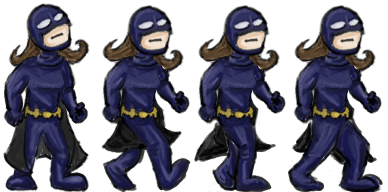 Soon after coming up with the concept, I decided the game was nominally superhero-themed. Without a very strong storyline, I realized the hero was just a generic superhero archetype, and so I might as well make the character female. (I think this was the result of hearing Mike discuss various articles and books on the subject of diversity in games, as well as keeping up with the Tropes vs. Women videos–“male” need not be the default setting.)
I’m far better at drawing male characters, mainly because I’m not a very practiced artist. But I’m also worried about making a novice mistake and getting something painfully, awkwardly, obviously wrong–and in the process coming off as a creepy artist who oversexualizes characters of the opposite gender (I’ve seen a few, what with all the conventions I’ve been to). Oddly, I think that helped–I was afraid of any design choice that would play up the gender of the character. That meant she could be first and foremost a superhero, not just a female character who happens to also be a superhero.
I was quite proud of my standing frame for the hero, but it came so late on Saturday that I had to start cutting corners. I saved frames of animation by rotating and adjusting the head and arms, so I only had to redraw the legs. It was efficient, but I felt like the quality suffered.
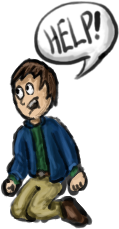 The captives were really just my “default cartoon person,” but I was happy with the mileage I got out of adjusting their facial expressions and position of the help bubble in animation. They felt much richer than they really are.
 The bad guys I was disappointed with, simply because I felt like I gave up last-minute. They’re poorly animated, lack detail, and are essentially bad cartoon “criminal” stereotypes (see the Beagle Boys from DuckTales for comparison).
Game Concept
As I said, I decided this was a nominally superhero-themed game–it was going to play on the archetype of a superhero fighting crime in the big city, but it didn’t much matter who, where, or why (beyond “superhero with light powers”).
At first, this was helpful–the theme was a very thin layer on top of the mechanics. I didn’t have to explain it, because everyone knows it already. I could focus on the how rather than writing out the why.
At some point on Saturday, I had an odd realization. As I combined all the graphics and particle effects, the morality of this game seemed horribly flimsy–it felt like you were burning people to death with unholy powers for simply being in your way while wearing a stereotypical cartoon criminal mask. Not exactly heroic.
This isn’t unlike my reaction to the violence in BioShock Infinite–I’d already read all the spoilers, but still kept expecting a reveal that your murder spree meant you were the real bad guy. Plus, I tend to be uncomfortable with dualistic worldviews that cleanly divides people into “good guys” and “bad guys” (not because I don’t believe in moral absolutes, but because I do).
Of course, this mirrors some of the discomfort I have with superhero morality in general. And ultimately, I think it was the result of staring at the game too long, not some sort of intrinsic moral failure. It’s not that different from a stereotypical Superman or Batman script (and I think I made the hero’s costume somewhat 60’s Batman-y to make that clear). My reaction was sort of like what happens when you stare at a word so long it stops looking like a word.
Tags: ld32, post-mortem, unity
Here’s a quick rundown of the ups and downs of my compo entry, Shifty Shapes, which was written in Unity.
Usually I make some notes about the top themes in each round of voting, but this time I went in cold. (Honestly: I have a few different game ideas floating around in my head right now, so I was open to doing something off-the-cuff.) I had all of the rules for the game written down within minutes of the theme announcement.
The sliding concept was inspired by a board game called Ricochet Robots that I played in analog gaming at Geek Media Expo, plus standard match-3 mechanics which I’d already figured out an algorithm for in Ludum Dare 30.
I knew I wanted this game to have some nice visual effects, since I envisioned it as one of those shiny mobile puzzle games.
Fortunately, there weren’t a lot of moving pieces in the concept, and I started building the effects early (even before I’d replaced the placeholder art).
Animation is something I don’t tend to think about (or I think about so late in the jam that it’s complicated to implement), but a little bit seems to go a long way.
Bouncing UI elements and blocks/items flying to their respective counts were easy to implement. I feel like my biggest win was making item and score counts only increment when the block/item reached it.
The main riff was based on something I’ve played around with before on guitar–variants of C, with Am and Em thrown in. It worked pretty well, which means I spent about 10 minutes working out the tune, leaving most of Sunday for recording and mixing.
Because I wanted new blocks to fill in like a circular progress bar, I ended up having to mess with Unity UI early (as it supports “filled” images). I’ll confess, it’s something I’ve avoided for the longest time, because it’s intimidating.
Rather than mess around with the large block of numbers that don’t seem to change anything (Unity just recalculates the X and Y positions when you change them), I’ve preferred to stick to world space, Camera.orthographicSize and Camera.aspect, 2D Toolkit, etc.
However, I feel like I’ve made serious progress learning Unity UI thanks to this game. And because I didn’t need to dip into 2D Toolkit for text, I think this is the first Ludum Dare where I’ve had no Asset Store dependencies.
There are few things more satisfying as a coder than being able to call a “Reset” method after a Game Over screen (as opposed to “screw it, I’ll just reload the scene”).
One of my big plans for visual effects was to have blocks “fill in” like a pie chart. That’s actually pretty complicated if you’re using Unity’s Sprites, and I spent more time than I’d like trying to make it work. Once I realized sprite masking was going to require shader code, I gave up on this approach.
Even though I was reluctant to mess with Unity UI, UI Image supported this exact feature, and I got the effect I wanted. However, I wish there was a way to do this via Sprites, and I spent more time than I’d have liked chasing that solution. (Although, I did do this first thing on Friday night so I could budget my time.)
I’ve been playing around with Krita recently, and because of some of its pen and paint effects, I initially picked it over GIMP. However, the art I created didn’t feel right–it had a dark, hard-contrast feel.
This wasn’t Krita’s fault, I just wasn’t familiar with it. It was definitely a case of thinking a tool based more on physical mediums would magically produce something “painterly” without me having to understand how it worked. I ended up redoing everything (except the cloud particles) in GIMP, and was pretty satisfied with the result, despite spending a lot of extra time on unused art assets.
Because I guess I have something to prove, I decided to try to mix in cajon, banjo, and mandolin in with guitar. I can’t tell whether it works or whether it’s all out of tune, because my first impression changes each time I listen to it.
I suspect part of the problem is I changed the speed on the guitar part in Audacity, and then tried to increase the pitch by the same percentage to compensate. Also, I’m not enough of a musician to pull this sort of thing off with consistent quality (which is why you’ll note all of the non-guitar tracks are mixed very low).
To be fair, it went OK, but this is the first time I’ve been frustrated with myself for not planning in advance.
I always go in building for the default Unity 960×600, only to remember on Sunday afternoon that it’s slightly too large for the LD site’s embed (and even a little awkward in my browser). I really need to standardize on a resolution and aspect ratio before I go into a jam. I tend to just jump in the preview window and forget about this part.
Also, given that WebGL builds seem to take somewhat longer than Unity plugin builds did, I need to start planning for this in advance. Luckily, I did a release to itch.io on Saturday, so I was able to iron out some WebGL issues with particle effect sprites early, but it would’ve been stressful if I had waited until Sunday.
Tags: LD35, post-mortem, postmortem, unity
I finally released the Android version of my Ludum Dare 35 game Shifty Shapes on Google Play.
Tags: LD35
I’m in, using Unity as usual. In addition, I’ve gradually been building a collection of one-off C# scripts that can be used for basic behaviors such as:
Per the compo rules, they’re open for anyone to use: https://bitbucket.org/dylanwolf/ludumdareresources
