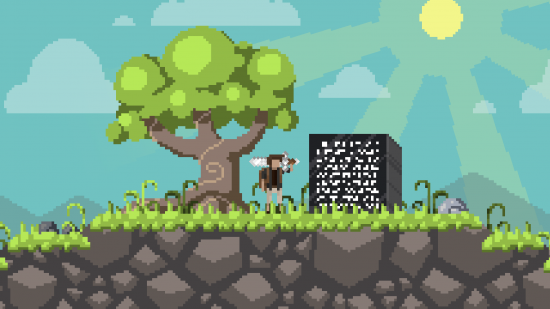
LD29 April 25–28, 2014

Light Runner Post-Mortem

Hey guys! So it’s been a while since I made Light Runner and with the results out I have come back to do a post-mortem.

First off, I managed to get top 500 in innovation and humour, top 1000 in all but graphics. I see this as positive, though certainly room for improvement.

So, here’s what went right:

  • Using Java, a language I am fairly familiar with.
  • The concept was solid. Without a solid idea this would have been a total flop, glad I was able to come to something decent quickly.
  • The sound effects, surprised my audio score was so low. Maybe the music brought it down.
  • The lighting also gave a good mood I think.

And wrong:

  • The graphics. I really need to take more time to make some quality graphics next time. I’m not an artist, but that doesn’t mean I should spend 10 minutes on the background of the game and never go and fix it! I think I rush due to watching too many timelapses.
  • The music, another thing that needed more time.

All in all, this Ludum Dare went decently. I need to not rush so much next time, and I can make something better hopefully. See you in August!


Thanks Everyone!

Untitled

Thanks everyone, if you want to check out my game, Reflection, you can HERE

See you next Ludum Dare!

Ludum Dare To Believe Ep 11!

Hey everyone! We are the Button Masher Bros!

We are getting down to the last few Ludum Dare to Believe episodes! Today we present – Ludum Dare to Believe! Ep. 11!

With 2497 submissions, there was no way we could play them all.

Luckily Reddit, twitter, and youtubers all stepped up to give us suggestions – and for that we thank you immensely!

If you like the games you see, be sure to check them out of Ludumdare.com and let the developers know what you think!

Today we will be highlighting:

Title: Warpigs
Category: Compo
Creator: sorceress
Link: http://www.ludumdare.com/compo/ludum-dare-29/?action=preview&uid=5745

Title: WWE(Worms War Evolution)
Category: Jam
Creator: romandtom
Link: http://www.ludumdare.com/compo/ludum-dare-29/?action=preview&uid=32169

Title: Mine Cannon
Category: Compo
Creator: lukbebalduke
Link: http://www.ludumdare.com/compo/ludum-dare-29/?action=preview&uid=26331

Finally, we’d love to hear what you think!

You can comment on the episode linked above, comment in this thread, or tweet your favorite submissions to us at: @ButtonMasherBro – Show, @MathBlasterRitz – Chris, or @jwowBMB – Josh.

Well I think my ratings are too good for my game.

I spent the probably lowest time making that game, something around two hours.

Comments

21. May 2014 · 09:40 UTC
It was a fair rating in every aspects. I think you could expect that Humor is gonna be a bit higher. 😛

Do minilds exist?

Hi, i asked when is minild 51, but does anyone know do minilds even exist anymore, cause i heard that they might not exist anymore (which is terrible, btw)?

Comments

ExplodingPig
21. May 2014 · 13:30 UTC
Yeah they still exist, in fact there was one not very long ago!

Thanks everyone!

Hi there, I’m reeeaally happy and honored that you guys played my first game in Ludum Dare competition! You’ve got no idea, it just feels really good knowing someone actually played your game and rated it relatively positively. So a very big THANKS to everyone. It was such an amazing experience. I’m definitely going to join the next one too! Here are my stats in case you want to see:


 Coolness 56%

#221 Mood 3.46

#332 Graphics 3.52

#381 Overall 3.35

#408 Fun 3.19

#424 Audio 2.96

#473 Theme 3.35

#887 Innovation 2.62


This is the end… beautiful friend

Thanks everybody for your submission, comments and votes. No matter if you finished first or if you finished last in the ratings, submitting a game made in 48 hours is what’s most impressive. This Ludum Dare was a real pleasure for me – to contribute and to play. It was be my first experience with you and now I wait the next. I think you were too cool with me – my game didn’t so good. Thank you for your review. See you later Alligator ++

http://www.ludumdare.com/compo/ludum-dare-29/?action=preview&uid=35835

Petite salutation de France 57

Coolness 78% #302 Graphics 3.59 #340 Mood 3.24 #503 Audio 2.86 #626 Humor 2.34 #749 Fun 2.80 #850 Overall 2.88 #1130 Innovation 2.20 #1257 Theme 1.56

Minild 51? (again)

Hi, its me again, i would like to know has minild 51 passed and if it did, how can i find out when is the next? If it didnt, when is it?

Thanks for everything (I’m not dying tomorrow)

So I didn’t “won anything”, if we get to the idea of getting some medals (except for a coolness one… maybe?). But anyway, it was a nice experience. So thanks people for your support, and/or making some rad videogaemz. This was pretty cool. As always, you have that little bug stick on your butt, about what could have you done better, and whatnot, and why the hell *this* game is there (jealousy, perhaps?). Ahahaha, but WHATEVER, that’s human nature to you.

Had some trouble at having time for judging other games. I got to 70 coolness, not so bad, but I could had done better on that aspect. The first day I was pretty tired, and had to get a bus next day in the morning, so had to stop there. And the rest of the time, well, college. College every second. If not, then it’s my regular personal project in RPG Maker which I can’t abandon.

I got #72 in graphics. It’s fine, but I know I could have done better. Got a nice place at Theme too. But I don’t care, I just care about graphics because I’m mainly a graphical “artist”, and that’s the spot that hurts, you know! Damn! Heheh. Whatever, I’m being dramatic.

I care about making a good game too, but that’s when places doesn’t mean a thing. At least for myself and my own development (?). That’s why I say that my graphical me is the only one bothered by placing and being competitive. I should care more though, if not, what will be of me in the future, when I have bills to pay? “OTL.

As for Gravedigger 20XX, I have some plans for it, a little expansion on the concept, just to not let it there rotting without love (?). Just some time ago I was talking to a friend about it, and he gave me some nice ideas. And I had some too because I’m THAT awesome, YEAH. You see my face? No? Then picture it like this: It’s awesome.

Where was I? Oh right, so yeah. Nice party dudes and dudettes. So, till August, let’s meet again!

Reflection on Results

Rating time is finally over. First off, congratulations to all participants! There were a ton of great games and I was honoured to have had the privilege to rate them (the ones I could get to, anyways :P).

Now that all is said and done, I’d like to briefly reflect on the results of my submission, Eat Champ. Like I mentioned in a previous blog post, I’m still a bit disappointed and even a little embarassed of it. I’m happy with the idea I went with, but I know I failed at executing it. And my game’s ratings show how people seemed to agree with that, as…wait, what?

reaction

!!

…okay, I know not a ton of people reviewed my game, but hey, I’ll take it! I really didn’t expect to get top 50 in anything, or even top 100 (it scored pretty high in humour too, but maybe not for the reasons I intended XD). Hooray! At the very least, this tells me that the game’s concept was indeed something different, which is what I was aiming for. On the other hand, I scored pretty low in Fun and Overall, which doesn’t come to me as a surprise. So my main goal for next time (and in general) is to work on my execution; I can’t just have an idea I think is interesting and call it a day, I have to put forth enough effort to really make it *work*. I’m glad I had the opportunity to make these mistakes in such a positive environment, as it provided me with much helpful feedback & encouragement for improving my game design skills. Special thanks to everyone who rated & reviewed my game; I wouldn’t be here without you! :)

This LD has been a very valuable learning experience in so many ways. Hopefully I’ll be able to hone my skills enough by the time LD30 comes around! See you all then!

MiniLD 51: Revenge of the Tool Jam

A long long time ago I ran a MiniLD event we’ve nicknamed the Tool Jam. My lovely minions did some digging, and weren’t able to get ahold of the original MiniLD 51 organizer, and asked that I bring back the Tool Jam. So, lets do another Tool Jam!

Tool Jam

The goal of the Tool Jam is NOT to make a game, but to make something that will make it easier for you or others to make games.

What do you make? Think about the last Ludum Dare(s) you participated in, whether you finished a game or not. What’s one thing that got in your way, and stopped you from finishing faster (or at all)? Build that.

Small libraries, standalone tools, conversion utilities, Unity assets, algorithms, whitepapers, etc. Think about your process, and what can be improved about it. This MiniLD is all about process.

A long time ago (in a galaxy far far away), DrPetter created a wonderful tool for randomly generating sound effects call sfxr. Today, it and its derivatives have become the staple of sound effect creation for Game Jams (and many Indie Games too). The original Tool Jam was inspired by this wonderful contribution DrPetter made to the community.

The Tool Jam will take place this weekend (May 24th-25th), but for the sake of poor timing we’ll run it again next weekend (May 31st-June 1st), and leave submissions open until the end of the week. Typically, MiniLD events should take place entirely in their own months, but we’re announcing this one waaay too last minute.

[ SUBMIT | VIEW ALL ]

Changing results?

So… I stupidly didn’t take a screenshot at the time, so I have no proof of anything, it’s possible I am just having faulty memory… but I’m as certain as I can be without proof that something weird happened here.
On the day of the results, I am sure that I got ranked somewhere in the top #50 in theme, around 44 or something, with a 4.0 star average. I mentioned this to someone, as it was the first time I had got any main LD entry into the top 50.

However now when I check my results, they are:
#59 Theme 3.95
#103 Mood 3.73
#299 Innovation 3.44
#342 Audio 3.10
#508 Overall 3.22
#587 Fun 2.98
#679 Humor 2.27
#706 Graphics 2.93

It’s not a big deal of course, not like I was knocked out of the top 25 or anything, which would have been AGH, but… odd. Are the results kind of unreliable in the first 12 hours of them going live or something? Anyone else experienced this?
Link

edit
Seems this was a fix made on day one of results, so the newer scores are the correct ones. So… that clears that up. yay?!

Comments

22. May 2014 · 09:24 UTC
We had something similar happen, from yesterday to today our Innovation score improved from 103 to 98… :-/
mortus
22. May 2014 · 10:21 UTC
I’m not entirely sure but I believe they’ve fixed the bug that showed you wrong places sometimes. As far as I can remember, right after the voting ended the system counted several tied results as just 1 result, so if 2nd place is a tie between 2 participants, every game after 2nd will have its score 1 higher (4th will be 3rd place and so on). It was showing correctly on one page and wrong on the other, by the way. So your score didn’t change and neither your place in a table, it’s just displayed correctly now.
mrjohnson22
22. May 2014 · 11:42 UTC
This happened to me too. I don’t think my scores changed, though; just rankings did.
22. May 2014 · 13:13 UTC
Hey, both my rating and scores changed too! Overall decreased by 0.4: 3.75 (#70) -> 3.71 (#89); others decreased or increased by ~0.1. This is weird.
22. May 2014 · 19:41 UTC
My coolness increased from 88% to 91%, not that I want to complain or anything, but still strange.
avalonknight
23. May 2014 · 02:16 UTC
Yeah, I remember seeing my initial result for Jam Humor was #106, but checked the next day and it rose to #68. Obviously not complaining, just reporting the change. Didn’t pay attention to the others though.
23. May 2014 · 20:01 UTC
I’ve seen it too. I think there was a problem with the calculation of the results on day 1. This was apparently fixed after someone discovered they got 0 coolness after rating 20 games. You can find the post here:

Ludum Dare to Believe Ep 12!

Hey everyone! We are the Button Masher Bros!

Two episodes remain! Today we present – Ludum Dare to Believe! Ep. 12!

With 2497 submissions, there was no way we could play them all.

Luckily Reddit, twitter, and youtubers all stepped up to give us suggestions – and for that we thank you immensely!

If you like the games you see, be sure to check them out of Ludumdare.com and let the developers know what you think!

Today we will be highlighting:

Title: Gravity
Category: Compo
Creator: jsmars
Link: http://www.ludumdare.com/compo/ludum-dare-29/?action=preview&uid=3933

Title: Bionic Hotdog
Category: Compo
Creator: Daniel X. Moore
Link: http://www.ludumdare.com/compo/ludum-dare-29/?action=preview&uid=2816

Title: Berserker
Category: Compo
Creator: SteveSalmond
Link: http://www.ludumdare.com/compo/ludum-dare-29/?action=preview&uid=24965

Finally, we’d love to hear what you think!

You can comment on the episode linked above, comment in this thread, or tweet your favorite submissions to us at: @ButtonMasherBro – Show, @MathBlasterRitz – Chris, or @jwowBMB – Josh.

Tool Jam?

Hi, Im new here, just had my first LD and I’m wondering can someone explain me in details whats a tool jam? Please, I love LD48 An I want to be in it sooo much! Thanks! XD

PS Im asking because I heard MiniLD #51 will be a tool jam.

Comments

22. May 2014 · 11:34 UTC
There’s a list of people who reserved the right to organize MiniLDs, apparently the waiting list is years long. I didn’t even know this is how things work until PoV/sorceress posted it in a thread, the cause being that the person who signed up 2 years ago to do this Mini hasn’t responded to emails in months. Hence the need to choose a theme by some other means. A couple of alternatives were bounced around but in the end everyone converged on “Tool Jam”.

help! the title of my game has changed!

I’m not sure what happened to my game.

But today I found out that the title changed to “Jam entry”.

The original title was “A boat is sinking”.

;( and I can’t find any “edit” button on “view my game” page.

I need some help!

Comments

Managore
23. May 2014 · 03:56 UTC
To change the name back, try using this link:

Ludum Dare to Believe! SEASON 1 FINALE!

Hey everyone! We are the Button Masher Bros!

WOW! It was been a hell of a ride. We couldn’t have asked for a better response! And the talent here is absolutely staggering!

Today we present the finale in this season of Ludum Dare to Believe!

Based on the response and community involvement we saw this season, we will definitely be coming back in August for Ludum Dare #30!

In the meantime, we are developing a new, weekly series to cover other jams, independent projects and kickstarter campaigns. This show will be starting up in the next couple weeks. Send us your suggestions and/or submissions on Twitter, youtube or other interwebs means.

If you like us, let us know! We are fueled by your encouragement and driven by your talent!

Our regular show “Button Masher Bros.” will be returning to its normal schedule on Monday – If you like hanging out with Chris and Josh and listening to their bullshit, then the Button Masher Bros series is for you!

Finally, thanks once again to Reddit, Twitter, Youtube and (of course) the Ludum Dare community for showing so much love to us! You guys made this possible, and we would be nothing without you!

So here it is! The finale of Season 1 of Ludum Dare to Believe!

If you like the games you see, be sure to check them out of Ludumdare.com and let the developers know what you think!

Today we will be highlighting:

Title: Hot Diggity
Category: Compo
Creator: DragonXVI
Link: http://www.ludumdare.com/compo/ludum-dare-29/?action=preview&uid=35553

Title: Yojimbrawl
Category: Jam
Creator: Black Ships Fill The Sky
Link: http://www.ludumdare.com/compo/ludum-dare-29/?action=preview&uid=3041

Title: The Sun and Moon
Category: Compo
Creator: Managore
Link: http://www.ludumdare.com/compo/ludum-dare-29/?action=preview&uid=3479

We’d love to hear what you think!

You can comment on the episode linked above, comment in this thread, or tweet your favorite submissions to us at: @ButtonMasherBro – Show, @MathBlasterRitz – Chris, or @jwowBMB – Josh.

Master stats list anyone?

Previous LDs there appeared a post with everyone’s results in a nice spreadsheet. It was great and I had fun plotting graphs and clustering people’s games. Many seemed to like it.

I don’t remember who posted that data. But I sure would be happy doing new stats from it if it appeared again…

0.04 stars short of being in the top 100!

Very happy with it!  I aimed for fun, and expected to do fairly well on graphics and innovation. For me it’s good news to get ratings I more or less expected, as I sometimes get carried away with my own personal gamedev experiments, which can be a little too obnoxious at times.

#53 Fun 3.87 #110 Overall 3.77 #242 Innovation 3.53 #276 Graphics 3.62 #374 Mood 3.19 #376 Theme 3.46 #507 Audio 2.85 #849 Humor 2.00 #1547 Coolness 45%

I got #42 innovation, #109 overall on my previous entry Nom’s Evolvathlon, but there weren’t as many entries back then.

The concept of my game Tsunami Cruiser is based on what came to mind first when I heard the theme.  Actually it’s inspired by the somewhat obscure classic “Wavy Navy”.  It was created in a single day.  After I discovered people liked the animated gif of my unfinished game a lot, I spent the rest of the evening until the deadline (3 am) making the game as nice as possible.

grab1-3

The biggest complaint I got was that the game was too easy in the beginning.  I probably should have made level 1 a little more challenging. And I have to (re)learn how to make a soundtrack!

I soon started work on a WebGL postcompo, which I am still working on.  I chose WebGL, because it should be easy to port to OpenGL ES/Android later on. I’m new to WebGL, but I found it definitely easier to develop in than OpenGL ES Android. And it’s less fragmented than I thought.  I’m probably going to use WebGL for the next LD.

tsunami1-crop4

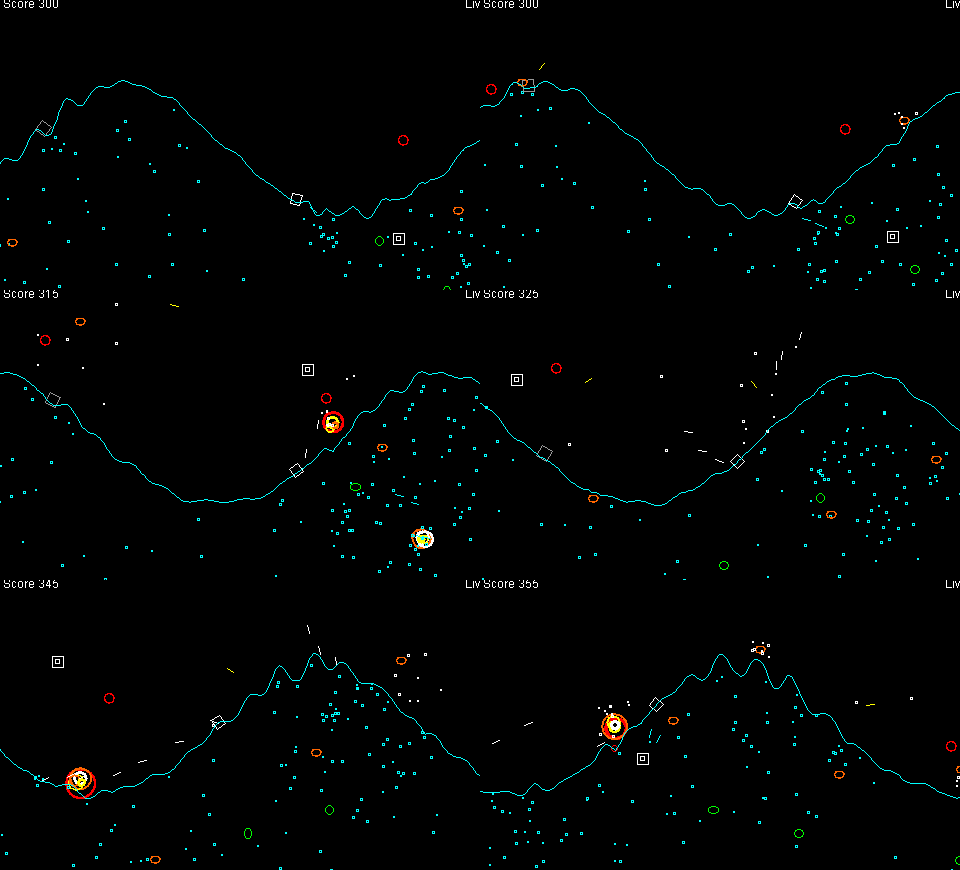
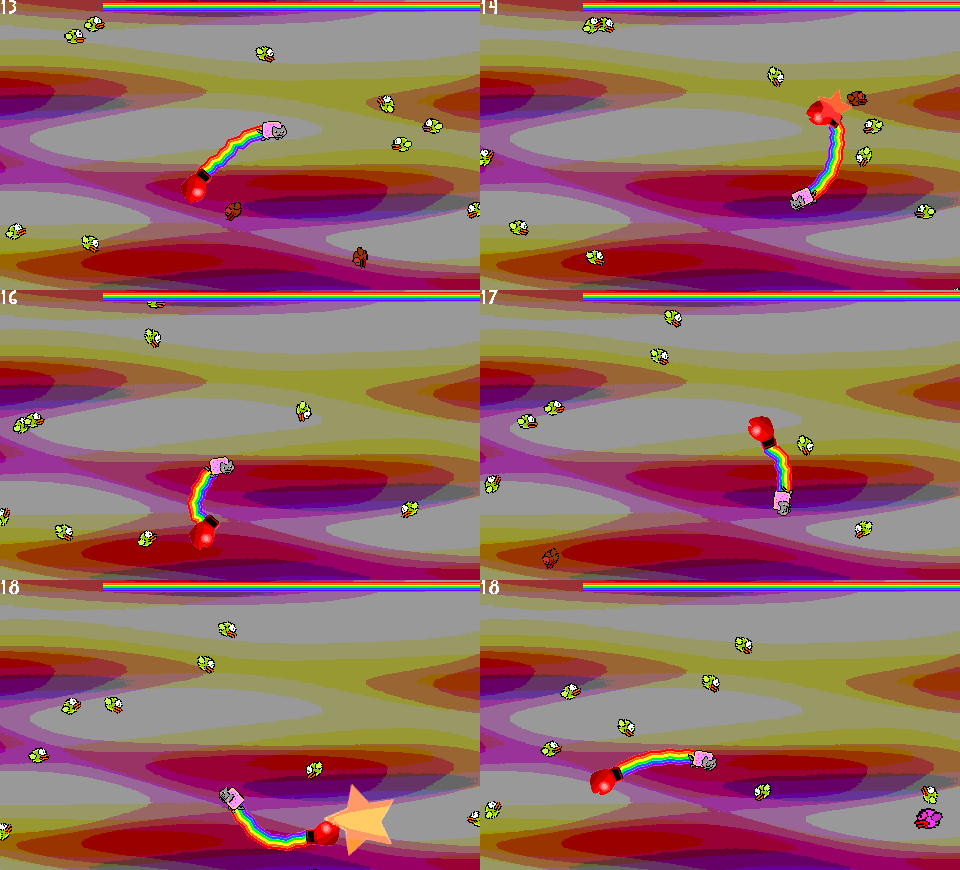
A week later I had this silly idea that I wanted to implement right away.  The result was Nyan Cat vs Flappy Bird clones, another WebGL game, and my second “cooldown game”. I came up with the theme because I was getting a bit peeved with the number of Flappy Bird clones appearing on the Ouya appstore.  LDers seem to like this game too, so I’ll keep working on it. And last but not least, I now got to #3 on the One Game a Month highscores list!

nyancat-grab2-3

All in all a very satisfying LD this time. Thanks to everyone for your comments and support, for making great and inspiring games, and generally for making this event one of the most fun things to participate in!

Tags: #1GAM

Strike Team

Hey all,

Today I finished and posted my first mobile game “Strike Team” to the google play store. This was a quick build, something I started on last Wednesday and finished up today. It is a homage to one of my favorite high school flash games “Helicopter Game”. I created all of the art using Pickle, finishing things up in photoshop.

Please let me know your thoughts! Any feedback would be great.
Google Play:
https://play.google.com/store/apps/details?id=com.travislucia.striketeam

Screen Shot 2014-05-23 at 10.43.10 AM

Comments

MaesK
24. May 2014 · 12:48 UTC
Looks good! Reminds me of Silkworm from Spectrum! :)

Post-LD upgraded version

Hi,

I’ve just created an upgraded version of my LD entry.

I’ve added drills, mines, best scores, better Android controls, and infinite digging.

Have a look on the play store: Diggity

diggity1


Mission Luna Post-LD (#27) Preview

Whats on the dark side of the moon?

Back in LudumDare #27 (10 seconds), Mission Luna was my entry and it surprisingly got some reviews on media and some players asking about post compo version. So, here is the first preview from new version gameplay where (finally) moon landing is implemented along with new graphics, models, ship upgrades and a sure cliche alien plot.

Free Lily [android]

180x12My first game has just landed on google play. The game is made in a style of the 80s, it is linked to the games like:
– Donkey Kong
– Pac Man
– Popeye

The joystick can be placed wherether you want to in the game, just for your own comfort.
Free Lily link

MiniLD51 – Little Polygon Toolchain

MAX!

Hi! I’m Max.  I collaborated with @petey123567 on DIGHARD for LD29, and it felt so good I’ve decided to keep the ball rolling and go in for MiniLD51.

In general I’ve been developing with Unity, but it’s been kind of love-hate.  I love the content management, but the programming interface is a bit of a minefield (e.g. did you know that .transform is just an alias for .GetComponent<Transform>(), and it’s nontrivially expensive to call a whole bunch every frame? Ew!).  So I’ve been wanting to transition to SDL2, but first I need a better content solution, since SDL2 doesn’t have one, and some higher level rendering primitives than OpenGL.

Enter the Little Polygon Toolchain.

Firstly, there’s a pile of python scripts for plotting sprite and font-glyph atlases, parsing tilemaps, compressing audio and userdata, and exporting everything to a fast native format with a pointer-fixup table that load quickly with plain SDL IO and no fat third-party libraries.

Secondly, there’s efficient Sprite and Spline batchers for using the assets and a GameJam-friendly context-setup-and-teardown object, as well as other handy utilities.  I’m even playing around with Mono bindings for doing mixed C++/C# development and opening builds to end-user modding.

Making tech is fun, but collaborating is even more fun, so I’m totally game to help if you’d like to use this for your project or help me turn this into a proper shrink-wrapped open-source toolkit for general consumption 😀

Excelsior!

Little Polygon Tools – A Case Study

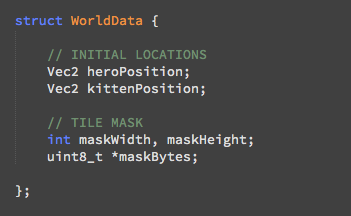
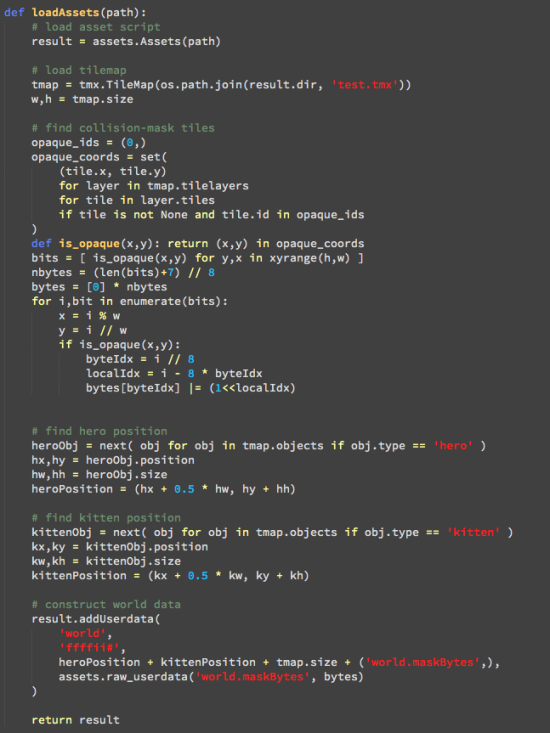
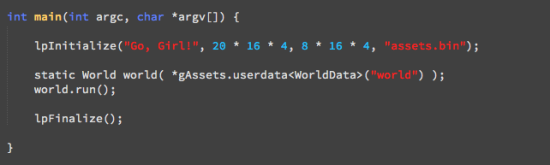
So my announcement post yesterday for my Asset Toolchain was a bit technical.  Here’s a concrete example using features I finished this morning: you design a level using Tiled, and would like to load up the data in SDL.  Parsing the XML and compositing the images is tedious in C++, but super-simple in Python, so let’s do the content construction at build-time, and just hand SDL a “ready to go” native asset.

Step 1: Define a Native Format (just plain-old data – pointers OK!)

Screen Shot 2014-05-25 at 2.02.53 PM

Step 2: Transform Portable Map Data to Native World Data (offline)

Screen Shot 2014-05-25 at 2.02.23 PM

Step 3: Dead-Simple Bootstrap!

Screen Shot 2014-05-25 at 2.03.35 PM

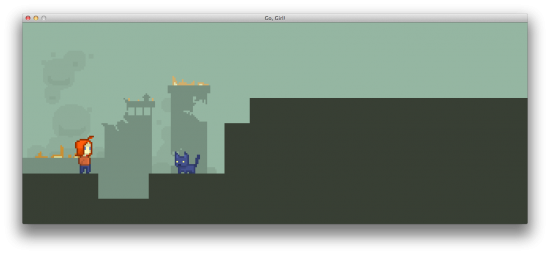
Step 4: Profit!

Screen Shot 2014-05-24 at 11.40.17 PM


In progress – Updated sprites for Dead Men Tell No Tales (post comp)

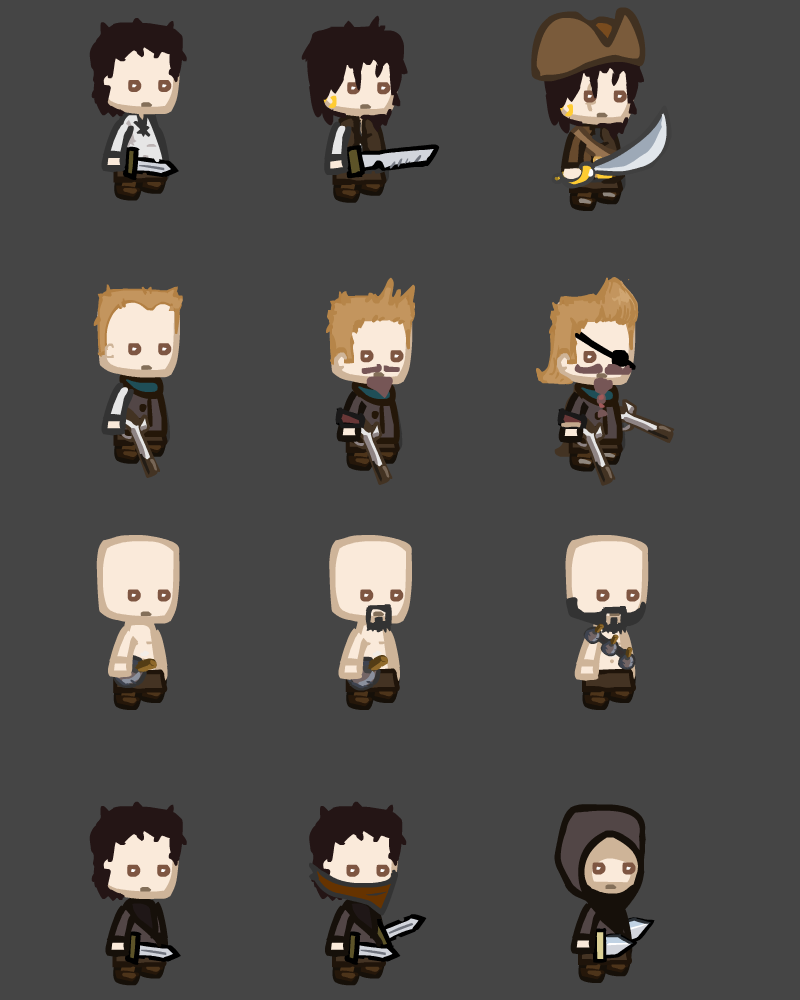
I’ve been working hard on a polished post comp version of Dead Men Tell No Tales. New features added so far:

  • Better balance and control over waves
  • Multiple decks on the ship to defend
  • Choose location and deck where to place pirates (instead of random)
  • Limited the number of pirates (for balancing). Instead:
  • Pirates can be upgraded
  • The ship has a heartstone, you lose the game when this is destroyed
  • Pirates faint instead of die and come back on the next wave
  • Bug fixes, improved pathfinding, visuals and UI

Hot off the press, here’s some of the new pirates (from top to bottom): Swashbuckler, Gunslinger, Grenader and Rogue. The upgrades are shown left to right.

DeadMenTellNoTales

Next on the to do list:

  • Animation states – idle, running, attacking, fainted and when taking damage.


Tilemap Editor

Hey guys ;)

Here’s the current state of the tilemap editor, I’m writing for the Tool Jam :D

ss

Of course I’ll develop further and enter into the Tool Jam.

With regards,

Frank

3

This entry was posted on Monday, May 26th, 2014 at 7:21 am and is filed under MiniLD #51. You can follow any responses to this entry through the RSS 2.0 feed. You can leave a response, or trackback from your own site.

Beneath the Sky: Post-Compo Release

screenshot100


I decided that I wasn’t happy with many of the bugs that people were reporting on my game, so I decided to do a post-compo release fixing most of the bugs, adding new music tracks and refinements to old music, a new movement system, and overall just more polish than before.
Since I changed too much to just update the original #LD48 page for the game, I’m just going to post the newest build here.

Hope you guys like the improvements!

Windows Build (Mediafire): http://bit.ly/1mtE5fo


Awesome tool might be coming!

Hey, tool jam is on and i might manage to create a really cool tool (its cool at least for me) until this weekend despite my homeworks (i have years of school ahead of me)!

Hope you guys are gonna like it :D!

Ants at War – Postmortem 2/2

My brother did a great job presenting our LD29 participation. But he still asked me to write a post-mortem post on Ants at War. So, more than speaking technically about the project, I will focus on presenting my personal feedback on my first participation to a LD event.

Graphics

Being the developer of the project, I ran the game for a while with just colored square on the screen. It was already nice to see the things moving as expected but it was even nicer when the objects started to obtain their final look and animations. Importing the graphic into the game gave me two important points:

  1. Adding the graphics, especially when they look nice, really boost yourself during the competition. So I think it’s a really good point to import them not too quickly to have something bringing back motivation when you start to be tired (this doesn’t mean that the time at which you will import the graphics will depend on your tiredness but just that it is a great side effect).
  2. Graphics are not totally disconnected from programming and, in this sense, a part of them has to be imported completely (and not only in some test applications/scripts) to be sure that the whole chain from the graphic artist to the game does not bring any problem. In fact, as the graphic artist could prepare and export the graphics in different ways, the programmer has to check that the process is going the right way. Additionally it will give an information about the time you may need afterwards to import the whole and will help checking the game’s behaviour with the final graphics. Just to give an example on this last point, if you are checking collisions between objects according to the visual bitmap, you may have some trouble with noisy pixels (close to zero but non-zero pixels) in alpha channel (eventually, collisions in Ants at War are not dependant on graphics but it was the case at first).

External libraries

In my opinion, it is not a good idea to look for and use an external library you are not used to use. Having a limited time, it is better to focus on the game and ensure to be able to bring this game to an acceptable point than creating a kind of proof-of-concept using unknown libraries.

But, the second conclusion on this part is that even with known libraries, do not try to use them further than what you have already done in the past. During Ants at War conception I tried to create different perceptions of the environment for the ants. For example, the red ants would have not been affected in path-finding by black ants’ buildings (and vice versa). Using one map for path-finding was already well-known on my side, but using multiple maps eventually turned out to be not possible with the library used (in fact, in multiple maps scenario, one and just only one function of the library was always referring to the first map created). This is a waste of time and looking at the current result, using only one shared map is already good. Consequently, do not try to push libraries out of known states! You will probably not obtain something worth it but more certainly waste your time.

Conception

To finish this post-mortem post, perhaps just a note and conclusion on the way the game has been designed and what should have been done. With the limited time allowed, we focused almost completely on designing the game and make it work as expected. This may sound great but in fact it is loosing sight of one important point: the player. Even if we were playing the game to check that everything was working fine, we did not try to see it from players point-of-view. Therefore, the game was lacking enough explanations how to use and play it. We really should think and focus on the player, even if the time is short, during game conception.

Conclusion

This Ludum Dare participation was really great. A little bit stressful at beginning, I should admit, but worth it at the end. Jam competitions are great at allowing a team to work on the same project for a short time and to see progress in another area (like graphics, music and so on) what really boost yourself. So more than the result obtained, it is really this time shared with my brother on a specific project that made of this LD 29 a great and fun experience!

So, hopefully, see you another time for a new LD 😉

ouly

Don’t have ideas for tool jam

So this is the first time I have seen a tool jam occur.  I really like the idea but can’t come up with any ideas :( I started working on a key generator but I don’t see how that could be helpful to a LD game. If anyone has any ideas please tell me :)

Better Parsing: First Update

Hey!

I have created a tool that is still being worked on for MiniLD51 -Revenge of the Tool Jam. It’s called Better Parsing for Java. This is made for easier data saving to files, and dummy-proofing user input in games. For example: You could ask the user his/her age, and the user replies, “I am 14.” The Better Parsing would read the whole line, and pick out 14 from that String, and convert it to an Integer. With save files, you could save the data “Can Fly = false” and Better parsing could load that String, pick out “false”, and convert it to a Boolean. Right now there are Integers, Booleans, Doubles, and Bytes. I plan on more to come!

I streamed the whole thing, which you can find here.

Have a great day!

– Gandalf1209

Postmortem: Kraken Unchained

It’s taken a while to get around to composing this from the notes we scribbled down after the jam, but here we go!

What went well

Teamwork

Overall, our team worked really well together, given that this was our first “high-stakes” deadlined project. Being able to work in the same physical space was a big part of our productivity over the weekend, and we were able to help each other with problems or changes quickly and effectively.

Planning

We felt it was important to spend an appropriate amount of time discussing ideas before we settled on making anything. This turned out to be several hours. We took a walk around the neighborhood and brainstormed ideas that would fit within the theme, eventually settling on a much more elaborate version of what would become our game.

Sleeping & Eating

While Ludum Dare takes place within a limited time frame, we had no intention of staying awake for the entire duration. Overwork and sleep deprivation leads to inefficiency. We also made sure that we remembered to eat food at regular, human intervals. This helped maintain a positive mood and keep us from consuming each other and/or the neighbors.

Map Editor

We decided to use Tiled to create our map. We spent a bit of time getting it to integrate with Excalibur, but being able to graphically edit everything in the level on the fly was definitely worth it.

Art & Effects

I5cnjFG

Overall, our art process went better than expected. We leveraged an existing tileset for our geography and map background. We put together the ship and kraken sprites ourselves with Photoshop and Paint.net, and they turned out well with relatively few frames of animation. We used color blending to darken up the map, which really helped set the mood of the game. The ship spotlights were created using a radial gradient effect, which was pretty simple to do and looked great. Additionally, we added a little bit of camera shake into the game when the kraken attacks ships. This was easily the best payoff for the least amount of code.

Stats

The end-game score screen was a last-minute alternative to a boss fight that we cut from our scope. It ended up adding a good deal of replay value to the game, and encouraged players to come back and try to beat their previous score. We also hooked the game up to Google Analytics, which we think everyone should look into doing if they can. It helped give some insight into how people were playing the game, as well as give us an idea of how difficult the level was.

kraken_stats_1 kraken_stats_2 kraken_stats_3

TypeScript

If you’re developing a game using JavaScript, we recommend giving TypeScript a try. Static typing really helped us during the rapid game-building process of Ludum Dare.

Testing Excalibur

One of the main goals we had in mind for this jam was to put our game engine through its paces. We were able to push the limits of Excalibur and find a number of opportunities for improvement. The more we do game jams like this, the more filled-out the engine should become.


What didn’t go so well

Testing Excalibur

On the same hand, we encountered several critical issues that halted game development for several hours each. Excalibur, still in early alpha, didn’t fully support a lot of the features we tried to use it for. While this was expected, we spent a lot of time fixing bugs and adding features to the engine instead of working on the game. Next time, we plan on prioritizing quick workarounds when we’re in a time crunch.

Deadlines

We often didn’t stick to our self-imposed deadlines. For example, we had planned on halting development several hours before the submission time, but we ended up working until fifteen minutes prior to the end of the jam. In the future, we definitely need to timebox better and set more realistic goals around task completion.

Playtesting

As a result of ignoring all of our deadlines, we hardly did any playtesting of the full level. While this luckily wasn’t a huge issue in the end, it had the potential to be absolutely disastrous.

Game Controls

The game ended up with slightly unintuitive player controls. The kraken followed the player’s mouse pointer, but we required you to press the spacebar to attack; we should have just used mouse clicks for attacking the ships. We also only played the attacking animation when the kraken was within attack range of a ship; while this contextual logic was a cool idea initially, it ended up being confusing for players. In addition, the kraken would spin wildly on occasion when attacking ships, which we affectionately referred to as “Spinning Squid Syndrome”. While this rotation was somewhat intentional (it was a workaround to avoid doing a lot more sprite animation), it definitely needed some fine tuning.

Another surprise for us was that many of the players we talked to were much more interested in sneaking around the ships than attacking them. We didn’t really reward this in the ending score screen, as we had always assumed everyone would want to attack the ships.

Tools & Process

We encountered a problem with deploying the game to Github Pages. With very little time left until submission, we all vaguely thought we were doomed. Luckily, we were able to deploy straight from Visual Studio with Azure publishing, which royally saved our collective asses.


Improvements for next time

Know the tools

We had never really used Tiled before, and while it was definitely helpful, it took some getting used to. Next time, we’ll use all of our development tools beforehand to gain some familiarity with them.

Test the process

In the same vein, we should have tested the entire development process on a small scale, end to end. We could have set up the code repository, ran through a sample game to test the workflow, and deployed it to make sure the entire pipeline worked before the jam started.

Work around issues with Excalibur

While discovering issues with our game engine is an important goal for us, it shouldn’t get in the way of finishing the game. The next time we encounter a show-stopping engine bug, we’ll consider changing the mechanics or creating a simple workaround rather than dropping everything to fix it. For example, we spent hours smoothing ship rotations, when we could have just had them snap to their new travel direction.

Define the scope more clearly

While we did a pretty good job of cutting features and scope from the project as we went along, it would have been better to cut those things earlier; there were several things (boss battles, different enemy types, etc.) that we still planned on implementing even when we didn’t really have any time to do so.

Add more stats

We plan on adding even more stats and analytics from now on. We could have kept track of player pathing information to see if there were any problems with the level design, or gotten more insight into the play style choices that everyone was making.


Future plans

We have been working a little bit in our free time to clean up the game code and add more features. It would be really cool to add more of our original scope back into the game now that we’re not under any time constraints. You can take a look at the post-dare branch of the repository to see how we’re doing.


Conclusions

  • Teamwork is key
  • Your scope is too damn big
  • Prepare your tools
  • Have an idea of where you’re going before you start

Overall, Ludum Dare 29 was an amazing experience, and we will definitely be back for another one sometime in the future.


Radix is growing up!

My game for LD29 was Radix, a game about growing tree roots. I got very constructive and helpful comments, and my ratings are higher than ever (see graphic below), but I’m not at all satisfied with how it turned out. However, thanks to your feedback, I know how to improve it and I’ve already started developing it further. I’m trying out a new graphics style, and since I’m terrible at drawing, I’m going minimalistic. I know it’s still not very good, but at least it’s better.

Ratings

Ratings of my compo entries.

comparison_0

Before – after.

comparison_1

Before – after.

Thank you, Ludum Dare community, for making me make better stuff.

When is tool jam ending

Hi, can anyone please tell me until when are submissions for tool jam open?

Comments

01. Jun 2014 · 13:56 UTC
They’ve been open since the announcement 2 weeks ago. Top of the page.
Tosic
01. Jun 2014 · 14:56 UTC
Yeah, but when is the end

I’m in for Tool Jam

I have already started making my tool after LD29, but i will submit for this event to see what do you guys think about it.

My entry will be a 2D HTML5 Game engine which can be used with the Dart language.  It’s name is DartRocket and you can already found it on github and on Pub(Dart package manager).  My plan is to make it a more usable during Tool Jam and I hope I can show that Dart is capable of making HTML5 games.

End of the day

So what did i implement in my engine?

  • Background is working and can be animated.
  • Text class is made more simple to use.
  • New Sound class for making sounds and playing them.
  • Reworked the Space Invader example: moving background, score, sound for shooting.

It’s a fair amount of work, but I’m not too happy because i had to think about how to implement some stuff and i think i wasted some time overthinking these problems.

To make a post compo, or not to make a post compo

That is the question.


I got some good comments on my game but feels I need a bunch of suggestions to help. I also feel I should change my graphics style, I think minimalistic could be better

Any way go mad! Critisize. I dont care. JUST GOPHER IT

(Yes I am a fan of puns)

oranebeast.co.vu – This is just because I opened a blog up! Yay!

http://www.ludumdare.com/compo/ludum-dare-29/?action=preview&uid=33501 – the game

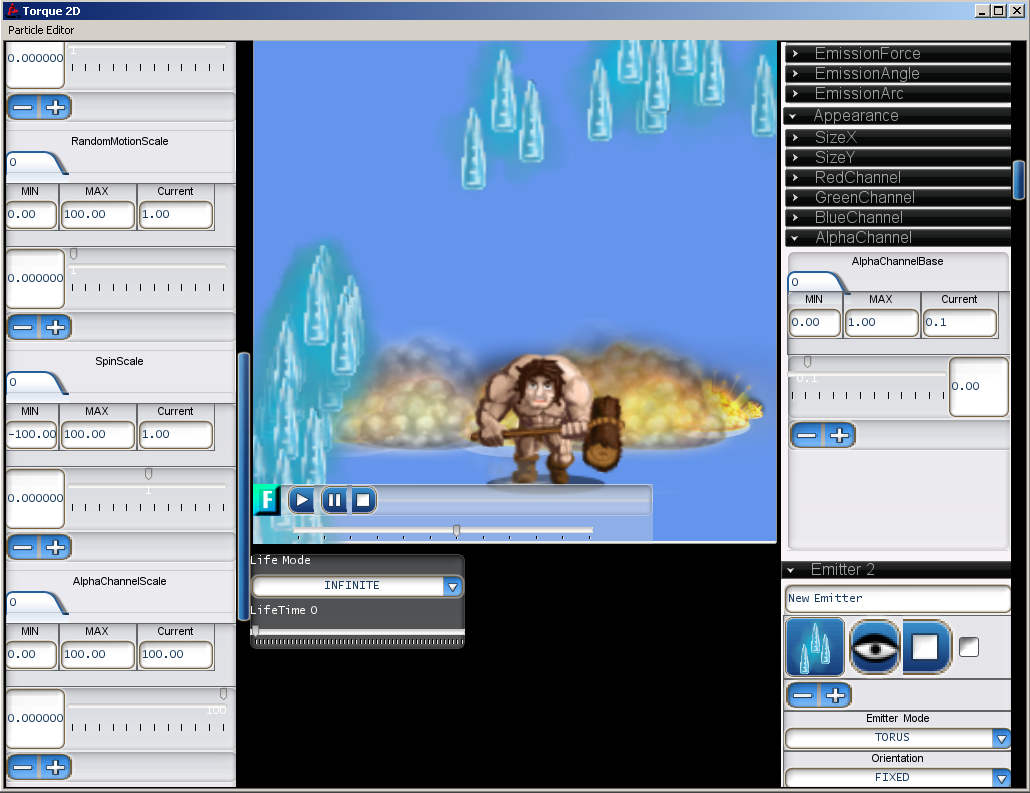
Torque 2D MIT Particle Effects Editor Update

Howdy! As a personal challenge, I’ve decided to get in on this Mini Ludum Dare, having faced sore disappointment last time I’ve tried :) 48 hours goes by way too fast but I’ve managed to whip up a pretty sweet Particle Editor for the Torque 2D game engine.

A few noteworthy…notes! – The whole thing is made with a stock copy of T2D engine 3.0 – All assets used here are distributed under the MIT license along with the Torque 2D game engine. – The UI is obviously unfinished and many features remain unhandled. Still lots to do but I’ll keep updating it throughout the week since submissions are accepted until the end of the week. In the meantime, enjoy the video! Particle FX editor – WIP video

A Family Affair – Turn Based Strategy and Action Platforming by Team Quadratics

Team Quadratics is proud to present the first demo of our newest project, A Family Affair, a game about an ongoing Mob War in a small city. Designed for the Stemfuse Spring Got Game Competition, A Family Affair strives to combine the tactical thought of a turn based strategy game with the quick reflexes and skill required for an action platformer. Although this initial release is somewhat unpolished, especially in regards to the AI, we are planning on continuing development over the Summer to improve the game. In the mean time, we’d love to hear your thoughts on the game so far. Also, we’d really appreciate it if you could take a quick moment to vote for A Family Affair in the competition. Every vote counts, and we’d really appreciate your support.

Comments

shinoa
03. Jun 2014 · 20:48 UTC
fantastic and i love to play the second one

Rapid Pygame!

LD 29 is the first LD that I participated in. The jam went okay, beside not having a great idea, I didn’t get to finish all that I wanted to do. The game didn’t do too well in the rankings, but its not a big deal. Every time I make a game using Pygame, I find myself typing in the same thing over and over, wasting time. That’s why I made Rapid Pygame for MiniLD 51.

Rapid Pygame is a set of classes and tools that help accelerate the game development process when using Pygame, letting the developers to focus on game play features rather than the tiny building blocks behind the scene. It requires Python 3+ (Its time to move on)

Now of course, since Pygame uses Python, no body is going to use it, let alone this library. However I did spent a lot of time writing the docs for this project.

Enough words! Lets see what it can do!

Painless relative loading

Games load stuff. Images, sound, levels… And its pretty common to load a file relative to the executable or script. How do you do it in Pygame normally?

1

(Getting the path of the script, and then use os.path.join to join together path names. Loading from “./” wouldn’t always work since its relative to the current working directory)

Its fairly easy to read and understand, but its long and kind of messy.

Enter the ImageLoader class

2
Easier to read and understand. Loading using the instance is all relative to the path given in the constructor. Cross-platform relative path loading made easier.

It would be a pretty boring helper class if that’s all it can do. ImageLoader is also capable of  other things outline here. Loading all images in a folder, loading a sequence of images and giving back a path string relative to the origin if you don’t want to load an image.

Collision powered level manager

One approach of managing a map in games is using collision, the player can move around, as long as he/she is not colliding with the level. Its intuitive and powerful. Rapid Pygame provides a way of quickly getting a level up and running.

3

This will produce a level that a player can move around in (left right and jump). The level manager will take care of gravity, player movement and level collision. Pretty simple right? A 60 line basic game :). This will become even shorter and simpler in future version of the library. The details about the level format and the player class can all be found in the docs.

Behind the scenes

That’s pretty much all the features of the library, other than the pre-made Player class that renders animation for you.  Below is a bit about how the level manager behind the scenes.

One thing the level manger do is take the level landscape, and break it down into rectangles, which are then used for collision checking with the player. I’ve made some improvement to the algorithm compare to the old ones I used in the past. Each block represents a rectangle

The old approach is to break the level down into strips either vertically or horizontally.

3_result            1_result

The algorithm in the library will try to maximize the area of the rectangles, producing fewer rectangles for faster collision checking

4_result

Although its not prefect

2_result

Both methods are probably fast enough to not have a real impact on the game’s performance, but its nice to know that the algorithm that powers the manager is semi-smart XD


Well, hopefully I didn’t just waste my time typing this up, even though I highly doubt it. Thanks for reading and good luck to everyone in your future LD endeavors! Whether you use Pygame or not

Air Control Jam

After seeing the Air Control posts all over the Internet today it has inspired me to host my first Game Jam!

Create a Simulator game by the end of June and submit to:

http://itch.io/jam/air-control-jam

Starts on Monday and runs until the end of the month, winner decided by way of vote!

Untitled-2 Please come and take part 😀


Accessibility Jam Report

So, my Accessibility Jam game is more or less finished. The jam is not really a competition, but I actually have a few friends who’re blind (and they’re all Linux experts, a pretty geeky blind bunch IMO) so I really wanted to finish it. My game is completely audio based, so that any blind person can play it with a screen reader + standard browser. (There’s a visual so deaf people can play it too, although it’s impossible for deafblind people.)

Game “Arpeggio”:

Arpeggio

(Direct link: http://ludumdare.tabesugi.net/arpeggio/)

The overall experience was quite fun. Since this was a long jam, I made a couple of generic library/functions for audio and keyboard based games. Also the feedback was generally positive. I still have a couple of ideas of audio-only games. I think I will continue this line of project.

Remake of LD28 entry, “Wraith”

I decided to give my LD28 entry, “Wraith”, a quick face-lift.  I basically replaced the low-res textures with better ones, added some models, fixed the problems with the Oculus Rift settings, and made it so that killing the wraith doesn’t win the game (it only causes it to go away for a minute, giving you more time to escape from the maze).  I’ve renamed this version, “Wraith: Haunted Halls”.

whh_ss

Here’s the link to a YouTube video showing it off:  https://www.youtube.com/watch?v=D1lUSYzyGaE

The download links are:

Windows:  http://www.parsecproductions.net/games/wraith_hh.zip or https://www.dropbox.com/s/fntgdl7nnnu3q0q/wraith_hh.zip

Mac:  https://www.dropbox.com/s/q5caehsww8q3p3x/wraith_hh_mac.zip

Feedback appreciated!

Almost there

I’m almost done for submitting the game! it doesnt have a lot of features yet but ill add more after ludum, im to short on time to do that now! see ya in a few hours!

Comments

george12
10. Jun 2014 · 04:49 UTC
–

Mini LD 51 – Success!

I must admit that it feels pretty awesome to complete a project, not only for the venerable Ludum Dare comp but also for the Torque 2D community, which have been sans-editors for way too long now.

Get the editor here!

This is a fully functional Particle Effects Editor, allowing you to create new Particle FX from scratch, load a few examples from disk and save your work to use in the Torque 2D game engine!

The UI is a bit clunky and this required a few source code modifications and bugfixes to the Torque 2D MIT codebase but this tool can definitely help anyone create kick-ass particle effects!

screen2

Barbarian slowly walking away from explosions, while magic hale surrounds him. Metal.

If you want to understand how everything works, make sure to read the T2D Wiki as it covers everything related to the Particle Effects in T2D.

A few things to note :

– Example Files are loaded from \modules\Editor\plugins\ParticleEditor\1\ParticleFX\

– The animations and images must be declared as a valid T2D asset – just look at the examples in the ToyAssets and ParticleViewer folders. Feel free to drop your own assets in there for additional fun!

– If you plan to use these Effects in a T2D project, you have to manually edit the .asset.taml file (it’s XML format) and change the AssetName field to something unique. (Will be fixed eventually)


For those who aren’t familiar with the Torque 2D game engine, know that it is an open-source 2d game engine powerhouse, maintained by its community of users and game-makers

You can grab it from here

If you have any questions, make sure to visit the garagegames.com forums, that’s where we all hang out!


Took a week, totally worth it!

Is there any way to find past rated entries?

Hi all,

During a past compo, the LD#22 if I remember well, I tested and rated a game that I really liked.

I would like to find that game back, but I didn’t found it by browsing, so I was thinking to see my past rated games.

Is there any way to do that?

Thanks

C.D

Comments

07. Jun 2014 · 19:29 UTC
I don’t think so :( PoV said something on twitter about that he/LD have the data to what games people have rated(or commented, don’t remember), but it isn’t a feature on the LD site (yet..?). So yea I don’t think it’s possible, but I would really like a way to do it too :)
Tosic
08. Jun 2014 · 04:09 UTC
I think it is possible, just google ludum dare 22 ( or whatever ludum dare you need ) and you are about to see LD 22 results, so go there, and browse entries, that is how I managed to find LD 28, but LD 22 is really old, so you might not find anything, but give it a shot anyway!
Tosic
08. Jun 2014 · 04:12 UTC
Also, if the game is so good, it might be on the site, on the right side of the screen!

Discussion: Removing the Source Code requirement

Well, it looks like it’s time to talk about removing the Source Code requirement from Ludum Dare. For 12 years, one of the key differentiating factors between the Compo and Jam has been the requirement for source code. You were never required to GPL the code, just share it. It still belonged to you. Alas, this generosity is getting abused more and more these days.

Please help me out by posting other reports of abuse in the comments. I seem to get these every so often, but I’ve neglected to keep a record of them. I will add them to the list above.

Proposal: Source Code is Optional

There are definite benefits to everyone sharing source code, so we don’t want to discourage it. But at the same time, the internet sometimes abuses good thing, and the source code has been abused for a few years now. Not to mention, some companies make it difficult to report fraudulent apps, so I would rather err on the side of the community and make it entirely optional. That’s my thinking anyway.

This ultimately means that the difference between the Compo and the Jam are the following:

  • Compo is Solo, Jam is Solo or Teams
  • Compo is 48 hours, Jam is 72 hours
  • Compo assets must be created in 48 hours, yourself. Jam assets can come from anywhere (pre-existing, Google Image Search, etc). In a way, using 3rd party assets is *like* working in a team, even if you’re solo.

Share your thoughts in the comments.

For reference, an older discussion on this topic.

First Ludum Dare

Hi, this is going to be my first time doing the ludum dare. Does anyone have some tips they could share with me?

Comments

Tosic
07. Jun 2014 · 12:25 UTC
I do: try your best and dont give up!
07. Jun 2014 · 19:39 UTC
Depending on how much knowledge/experience you have with making games, try not to spend a lot of time thinking of a super original take on the theme.

Anyone Want To Tell Me How This Performs On There PC?

So i’ve just made a quick “game” if you would even call it that to try out random tile generation. It only works on windows because i haven’t got around to make it work on the mac or linux. So if anyone would try this on there windows machine that would be great! 

0

This entry was posted on Saturday, June 7th, 2014 at 3:45 pm and is filed under MiniLD. You can follow any responses to this entry through the RSS 2.0 feed. You can leave a response, or trackback from your own site.

Root Framework – a game library written on top of LWJGL for the creation of 2D games

Hey all! I wrote a game framework for the creation of 2D games. It’s written on top of LWJGL for OpenGL bindings (meaning it’s super fast!). Here’s a link the GitHub repository, if anyone is interested in helping me out, or you want to try it out. Here’s a quick example of a platformer I scratched up in 20 – 30 minutes, it uses modern OpenGL for rendering – but in this gif it may be laggy, since, well, it is a gif.


example

IceEntity (haxeflixel entity-framework)

Since last ludum dare, I’ve been working on what was my basecode, expanding it, and making it generally more useful. Some cool features it now supports are:

-Parsing in entities and components from XML

IceEntity Demo

-Live-Scripting of game-logic during play

Live-Scripting Demo

Note that this is a work in progress, it may be buggy, and often some things stop working correctly, which is exactly why I would love more people to check it out, and give me some feedback, be it bug reports, feature requests, or just your general thoughts, thanks:)


You can find IceEntity here: https://github.com/NicoM1/IceEntity


If anyone wishes to contribute, I would love that as well, just submit a pull request, or tweet me @nico_m__


Thanks for reading, make cool games;)


Tags: basecode, Entity-Framework, haXe, HaXeFlixel

Super Plumber Bros (post-compo)

Hi

My LD29 JAM entry was Super Plumber Bros, a collaboration with @clangmuir and @nomoon based on our impressions of some rather obscure old Japanese games. We just finished and released the full, post-compo magic version complete with leader-board and Japanese localization! Seriously, when you are playing for a high score, the game is completely rad: well beyond my expectations. I’m super happy to have been able to carry a game like this, and it would never have happened without the Ludum Dare.

Oh by the way: right now the leader-board is just us devs. I doubt you could make it on if you tried.

Who posts a screenshot of their leaderboard? I mean, seriously! Who does that!?

Who posts a screenshot of their leaderboard? I mean, seriously! Who does that!?

Thanks!

z.

Dodge, quite a while later.

Back in LD26, I made a game called Dodge. I thought it was pretty great, and it seems that the community agreed. Recently, I built it again from scratch, with a bunch of new features, some levels and the greatest options menu ever to exist.

Runner 2014-06-13 16-29-21-74The title screen, now with nothing new.

Runner 2014-06-13 16-30-58-51

The midst of a default game on Level Infinity.

Runner 2014-06-13 16-31-29-54

The midst of a slightly customised game on Level Infinity.

Whereas the LD26 version featured the ability to endlessly dodge black squares on a 3×3 grid, this version allows one to dodge black squares and black rectangles on an ever-changing (if you want) grid and possibly also collect outlines of squares, if you want to do that. You can very heavily customise the game, to make it as easy or as difficult as you please.

I am now in need of other people to tell me of the flaws and merits of this game, and if they so desire, make suggestions. If you would like to do this, do say so and I shall give you a link.

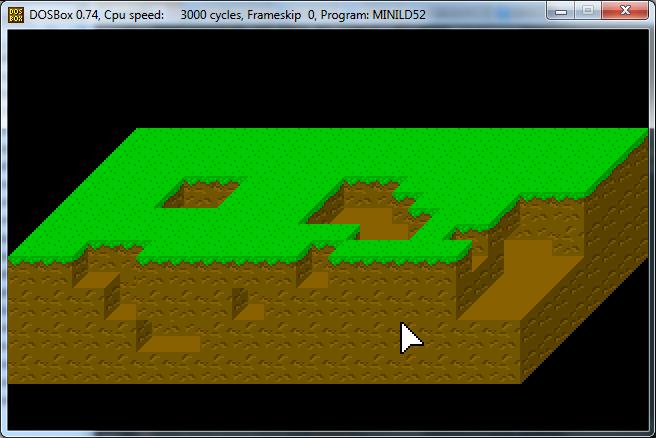
Something MSDOS-y for Mini LD 52

Well, I’ve made a start on my Mini LD 52 project, making some kinda game for MSDOS 😛

The good news is I’m up and running with some basic input and graphics!

The “bad news” is my progress so far is basically a rudimentary etch-a-sketch:

For those interested I’m using the following bits and bobs for this:

Oracle VirtualBox, running MSDOS 6.22 on a VHD

VHD means I can mount it in Windows 😉 so can use Notepad++ for most of my coding, and also mount that path in DOSBox for testing the game in the way it’ll be run by most.

I’m also using a DOS port of vi when I need to quickly edit a file in the DOS environment.

OpenWatcom is compiling and linking my C++ for me :)

If I get as far as some actual bitmappy graphics, I’ll be using Deluxe Paint II Enhanced for MSDOS.

Sound and music are kind of on the backburner at the moment, when I start thinking about them I’ll decide what DOS-based tools to use!

LoveDOS

A small test game running in LoveDOS

A small test demo running in LoveDOS

In preparation for MiniLD52 I wrote a small framework for making 2D DOS games in Lua; the framework provides a loose subset of the Love2D API. Currently it supports only a single image format and runs in mode 13h: 320×200, 8bit. It doesn’t yet provide sound, scaling/rotation or mouse support.

If you want to give it a go, check out the “Getting started” section on the project’s github. If you encounter any issues then leave me a comment; given how new the project is, it may have some bugs, but hopefully there isn’t anything too major.

Though the framework has been tested on DOS, as well as on an emulation of older hardware, I haven’t had a chance to see how it runs on real older hardware. If you happen to have an early Pentium 1 and wouldn’t mind trying out some little test programs on the framework and reporting back the kind of FPS you get, let me know!

My first NES game for Mini LD 52

The last weekend, I was still hesitating between making an action game for Amstrad CPC using BASIC (like when I was child) or doing something new. Finally after consulting various tutorials, I decided yesterday to start on programming a NES game in assembler… what I would have dreamed of as a child.

Tutorials:

Tools:

  • NESASM
  • FCEUXD SP
  • YY-CHR
  • Tile Molester

Here’s a screenshot of my (very simple) game after a first day of work:

meteors-0

This is a one-button game. The flying saucer goes right when you press the A button and left otherwise. Of course, you have to avoid asteroids. My first feeling is that the NES is very pleasant to program (hardware scrolling, hardware sprites and so on).

Obviously there is a lot to improve… to start by changing this ugly color palette!


Tags: MiniLD #52

Seriously late post mortem…

Ok, this is a bit embarassing… It’s been almost 2 months and I still haven’t posted my post mortem for LD29. I actually had some rough thoughts written down right after the compo but have been postponing writing a proper post because of school and such… I know, excuses, excuses… So anyway, here goes:

The bad

  • Idea was not very coherent – This time around I spent less time thinking up an idea and started a little quicker. The problem was that I had a few loose ideas which seemed nice at first, but later I had a hard time getting them to fit together.
  • Panic – Because of the above, some time around the middle of the compo I was worried I wouldn’t be able to finish anything playable and was starting to think about quitting.
  • Not enough polish – Some parts of the game were a little rushed, like the level design (same problem as in my last compo, will I ever learn? :P). Other things that could use some more love: the graphics, the HUD and I’m also not 100% happy with the “physics”.

The good

  • Kind of fun movement mechanics – This was what prevented me from giving up on the game. I wasn’t sure if my overall gameplay ideas made any sense but in my moment of weakness I just sat and played around with the small prototype that I had so far. I noticed that the movement mechanics, though kind of wonky, were pretty fun and I decided to keep going, thinking that at the very least I’d have a boring game with fun character movement.
  • Ideas somehow fit together in the end – I threw in most of the elements I wanted to include and to my surprise something more or less playable came out…

Other observations

  • Even simple platformer physics take time to code (compared to simple top-down movement).
  • Pixel-based maps are fun and easy to edit.

Next time

  • Spend more time on graphics to get a nice art style?
  • Don’t worry so much about finishing.
  • Get something playable on day 1 (and later polish).
  • Maybe finally make some music…
  • Start playing with level design early (having an interesting map helps to come up with game mechanics).

Copycats and protecting against them

It hurts to see that most lovely game ideas and even complete games get ripped, copied and being sold. It makes it impossible for those who had the idea to improve it beyond “good”. So what would be the good kind of “protection” against this?

It’s never impossible to copy or even recreate if they want to. (re-engineering get’s easier by the day). The thing is, you shouldn’t rely on the product you create. You should rely on your ideas. Rely on the experience you design instead of the product itself. Keep developing, keep ahead of your competition and copycats. Everything gets copied from books, movies, games up to houses. Did you know they remodelled Paris and Venice in the USA and even bigger in China? It’s a small sized mini-Paris city. Things get already copied before they’re a day old. Don’t rely on your product, rely on your innovative ideas. Create your space, your slice of the world where people can sign up and enjoy your ideas (a brand so to say) instead of a single product at a time. That’s what Ludum Dare could be, beyond the compo, it’s own brand where people come to enjoy the fresh ideas of the community.

Image from http://www.dailymail.co.uk/news/article-2384036/Inside-Chinas-mini-Paris-Town-built-look-just-like-French-capital-complete-Eiffel-Tower-Champs-Elys-es.html

Image source, daily motion, copy of Paris.

That said, always keep an eye out for copycats. If you can take them down from stores, go ahead, but don’t rely solely on your product that is always copyable.

I regularly compete in the Ludum Dare competition and develop games for companies. I like using these kinds of competitions to get in touch with creative minds and recruit them. If they stop competing it would be a great loss. I designed the online tool GameCreator to easily create and share games or interactive presentations to wherever and whoever you want. It doesn’t contain code in the old sense of the word. But the idea behind it is to easily mock up, extend, improve and share your ideas. Instead of developing a few weeks, mock it in a day, share, improve and share again. Since it’s an online cloud service it’s also a bit harder to directly copy it from the web to an appstore without ripping almost the entire service and its build in protection. Instead they could set up a link and embed in an app’s browser. Which you would always notice in the tool’s analytics. But the game’s source code would always be shareable for the competition.

Feel free to contact me through twitter, linkedin or otherwise.

Tags: cloud, copycats, gamecreator, islandworks, Ludumdare, rex van dorp, stealing, stolen, strong99, tool

Tiny Haunt submitted to IndieCade 2014

Well, after some tuning and graphics updates, I decided to submit Tiny Haunt, my LD29 entry, to IndieCade.  While the LD feedback was vastly positive, there was one common complaint: the game wasn’t hard enough.  I intended the game to be fairly sandboxy, and to that end, fairly easy if you choose.  However, I ran out of time to implement the mechanics that made it more than that.  In the IndieCade build each of the four levels has its own optional challenge, which might be defeating enemies within a certain amount of time, or using only one ability.  I’m happy with the progress I’ve made so far, but there is still so much to do!  A big part of the future experience will be enhanced interactions with enemies and more objects put at your disposal.  On top of that I have plans to add an exploration element that allows you to uncover the long lost secrets of your castle.  Exciting times ahead!

Here’s a preview of the IndieCade build.  If you’re interested in the game, don’t hesitate to follow me on Twitter (@rojomojogogo), or add Tiny Haunt to your watch list on IndieDB.

Tags: IndieCade, ld29, postcompo, tiny haunt, unity, video

First gameplay video of my NES game

Some new features are added to my NES game for the Mini LD 52:

  • The graphics are slightly improved.
  • Asteroid field is denser and therefore more difficult to cross.
  • Collision detection between the flying saucer and asteroids is implemented.

These few features are usually easy to implement with a high-level language, but with assembler, it becomes a challenge…

A short video for having an overview:

meteors3-0

The goal is to avoid asteroids by pressing the A button and going to the right; otherwise, the saucer goes left. When the flying saucer flashes black, it means that a collision is detected but currently, nothing happens.

That’s all for today!

Tags: 8-bit nes assembly homebrew, MiniLD52

Comments

17. Jun 2014 · 20:26 UTC
Cool, I thought that I was the only one creating an NES game. Maybe we can share notes. ;D

I’m starting to work on collision detection in my game. I think it’s going to turn out to be a long series of CMP, BCC, and BCS statements.
19. Jun 2014 · 17:04 UTC
OK I’ll take a look at it…

A Nice Compilation for the Latest Ludum Dare Compo!

I stumbled upon this nice compilation of 20 entries for #LD29 by the YouTuber, IGP (The Indie Game Promoter)

It covers a lot of the higher ranked ones, but I saw quite a few ones that weren’t on the list of high-rankers.

It’s straight to the point, and it seems well edited. I really like the background track, and the games he covers are of a wide-variety.

Anyways, just thought I’d share it!

I have an idea!

HI!

Since I found out for LD I wanted to participate, but since I found out for MiniLDs I was wondering why should not minilds have results like Ludum Dare? Of course I dont 100% know how things have been going here from 2002, but I thought minilds should have some sort of light voting category ( for example – only overall ). I know minilds are suposed to be relaxed, but i want to know what do people think about my entry ( not just by comments, since I havent got any comments for my last entry, LDML ).

I am sorry if this is somewhat stupid idea, but could you please comment what do you think about it?

Comments

20. Jun 2014 · 00:50 UTC
The trouble with that is twofold:
20. Jun 2014 · 04:11 UTC
I know the MiniLD 44 (7dRTS) last year was rated, but I’m not sure how meaningful the ratings were.
Tosic
20. Jun 2014 · 10:50 UTC
@Tim Bumpus

1) I know, but for me, it was exiting to wait for the resluts of voting ( in LD29 )

2) Very few people enter MiniLDs indeed, but I doubt that will be the case if it would have voting option, so in fact it only has one problem.

Although it has problems, I really hope that majority will like my idea!
28. Jun 2014 · 10:49 UTC
We’ve tried it more than once. Most recently for the 7dRTS that I hosted last July.

Electron Runner – Android Game (MiniLD #49 entry)

Hi guys and gal’s

I finally released my latest Android Application (Game) made in jMonkeyEngine.

I wrote this game originally for the 49th Mini Ludum Dare Contest but now I took it a step further and finished it up to be a proper and complete Android game.

Link to old post: http://www.ludumdare.com/compo/minild-49/?action=preview&uid=32655

Can you guys please download it and try it? Any feedback will be awesome. Also if you could rate it I would also appreciate.

Thanks guys

Get it here: https://play.google.com/store/apps/details?id=com.tgiantlab.electron

Here is a small video:

Creating a team

Hello fellow game developers, artists, and musicians. I am 16 and looking to create a team watch this https://www.youtube.com/watch?v=AzKH7N0Gx7w video for more details. Thanks

Finally, some progress.

flappyUfo


From single color blocks with default CPC palette and random pixels for sprite placeholder, to something that looks a bit better, not perfect but I am surprised I came so far. This a CPC+ project, which originally started as an attempt to make flappy bird for CPC+ (which I learn in some news someone already is working on). So, now this is Flappy UFO or something like that, and all I have now is a bouncing sprite that doesn’t collide, smooth scrolling background and raster sky colors (courtesy of CPC+ line interrupts magic!). Hopefully I will finish this tomorrow and it might even have gameplay if I am not too lazy.

Tags: CPC, MiniLD #52

Comments

22. Jun 2014 · 19:02 UTC
I developed a lot of mini-games on CPC when I was a child but only in BASIC. Games with sprites, raster and other made ​​me dream… and I’m still a child when it comes CPC. I can’t wait to test your game!

Astroid: first playable version


Finally, my first nes game is called Astroid. Currently, only the core of the game is developed. There are still many things to improve and complete… the sound, a title screen, etc. Everything is incredibly slow to program in assembler (especially for a beginner).

Click on the screenshot to go directly to the Astroid entry (with rom, source files and gameplay video).

astroid

Of course, all your comments will be very welcome. I’m not sure I have time to rework the game tomorrow… the first playable version might be the last :)


Tags: 8-bit nes assembly homebrew, MiniLD #52

Comments

Tosic
24. Jun 2014 · 16:58 UTC
Hey, it looks cool. Can you please check out (and comment) my entry and I will see yours?

Creating My First NES Game

For this mini-LD challenge, I decided to try to create a game for the original 8-bit Nintendo Entertainment System (NES).  This was the first game console that I ever owned as a kid, so creating a game for it was something that I had always wanted to do.

Unfortunately, to create an NES game, everything has to be written in assembly.  When I was at Georgia Tech working on my computer science undergraduate degree, I did have one project where I had to write assembly code for an emulated MIPS system.  The emulator was called SPIM (MIPS spelled backwards), and it looks like it is still available for download today.  While writing assembly is not completely foreign to me, it definitely is not one of my favorite things to do.  However, it was my only option for creating an NES game, and it was a nice refresher since I had not written any assembly code in years.
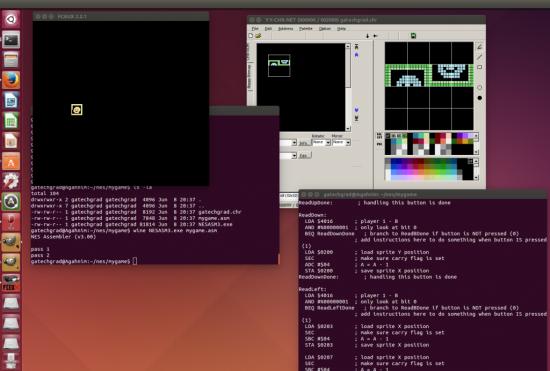
Getting a 4x4 tile sprite moving around on the screen

Running NES assembler to get a sprite to move on the screen in the NES emulator

The good news is that I found a great series of tutorials on the basics of creating a NES game written by bunnyboy at NintendoAge.  He also has a wide variety of NES homebrew games available on his site, and an adapter for sale which allows compiled NES games to be played on actual NES hardware using a flash drive.

I started by working through weeks 1 to 5 of the “Nerdy Nights” tutorials.  The first tutorial is the basics of binary and hexadecimal number systems.  The second tutorial goes over the architecture of the NES, and provides a barebones example of an NES game with assembly code and example CHR ROM dump.  I liked this incremental example approach, which allowed me to just to get something to compile and run, before tackling things like sprites and sounds.  I tried a few different NES emulators, but FCEUX seemed to be the one that most people recommended these days.  It was also available for download from the Ubuntu software center, so the installation was simple.  However, the program that is used to compile the NES assembly code called NESASM3 is only offered as a Windows executable, so I had to install Wine to run it.  After the setup was complete, I was successfully able to generate a .NES file, which ran in my NES emulator.  However, it only displayed a blank screen, but it didn’t crash which was a start.

In the third tutorial, it goes into the details of the 6502 assembly code, which is the instruction set used by the NES assembler.  It has all of the standard operators that you would expect, like “load” and “store” for writing to registers and memory.  The NES is a fairly simplistic system, which only has three registers which are the Accumulator, Register X, and Register Y.  The instruction set also has simple math functions like “add” and “subtract”, and control operators like “jump” and “branch”.  The example of this lesson gave enough to get started to change the color of the screen based on the selected palette value.  I tested by changing the screen color to different combinations of red, green, and blue by modifying the binary code of the byte which controls the screen color.

The fourth tutorial made things a little more interesting, as it taught me how to display a sprite to the screen and change its colors by modifying the color palette values.  The color code chart at the top of the page was a very helpful reference.  The fifth tutorial shows how to display even more sprites, and how to move them around on the screen using the controller.  The example code just shows how to detect input from the A and B buttons, so I extended that code to detect all buttons on the NES controller.  The test for the other buttons are just detected by additional “loads” from the from the address of the controller port ($4016).  It also only moved the sprite in the left and right direction, so by writing to the sprite’s Y memory location, I was able to make the sprite move vertically when the up and down buttons are pressed on the virtual D-pad.  The example only moved one “tile” of the sprite, so I extended the assembly code so that it moved all four tiles together.

In order to make the sprites for my game, I used a program called YY-CHR.  It is another Windows executable, but it also runs well under Ubuntu using Wine.  The only issue that I encountered was that I was not able to create a bitmap in Gimp, and then copy and paste it into YY-CHR.  Therefore, I created my own “hand drawn” smiley face sprite, which is made up of four 8×8 pixel tiles.

I quickly discovered that writing everything in assembly was going to be a real pain.  Therefore, I started writing a simple script that would read some parameters out of a file.  Since this is going to be simple, I decided to write the script in Ruby.  First, I took the 6502 assembly that I wrote and broke it into five pieces: the header (which doesn’t change), controls (player input), palette, sprites, and footer (also doesn’t change).  I put each section of assembly into its own text file, and the main nesc.rb script just reads the contents of those files, and then calls NESASM3.exe at the end.  I tested my script, and it successfully compiled an .NES image which I could play in my FCEUX emulator.

However, that isn’t very interesting since it always just compiles into the same game.  As a starting point, I created a game.xml file, and defined four colors which define the four colors of the current palette.  In the included nes_palette.rb file, I started defining colors based on the tutorial table, and stored those color constants and the corresponding hex values into a Hash.  Then, in another script which reads the game.xml file using REXML and XPath, I stored the user’s defined palette colors in array.  Then the palette code just looks up those values in the Hash to get the correct hex values to write palette data using the .db directive.  Finally, I added a <palette> tag to contain these <color> elements.


Changing the palette colors of a sprite using user defined values in an XML file

Changing the palette colors of a sprite using user defined values in an XML file


I expanded my XML file specification format by adding a <player> tag for player attributes.  The first player attribute I added was <speed>, which controls how fast the player moves around on the screen.  This is currently a hexadecimal value, which is either added or subtracted (ADC / SBC) from from the x and y memory locations of the player’s tiles.  In my original code, it only moved one of the player’s tiles, however with my Ruby compiler script I was able to create a simple loop to apply the add or subtract to each tile in the player sprite.  In my user input code, I made a hash table of the user defined values so that it can be passed around to each of the functions.  One issue I had was sometimes the tiles would not move at the correct speed.  I found that this was because  I was not clearing the carry flag.  CLC must be called before every ADC, and SEC must be called before every SBC.

Creating a simple sprite in YY-CHR

Creating a simple sprite in YY-CHR

Now that I had a way to display a sprite to the screen, I needed a way to change the sprite displayed on the screen.  I created a simple rocketship sprite which is four tiles in YY-CHR and saved it to gatechgrad.chr.  In my game.xml file, I created a new tag element called <spritesheet>, which holds the name of the CHR file containing the sprites to use for the game.  I updated my nesc_userinput.rb script to store this value into the userOptions hash table, which is passed to the new nesc_footer.rb which generates the 6502 assembly to read the data from that CHR file.  The NESASM3 assembler will throw a compile time error if the CHR file name is invalid.

While making these updates, I created a Makefile which simply recompiles everything (ruby nesc.rb; wine NESASM3 temp.asm) whenever the game.xml file is updated.

game.xml which defines various properties of the NES game

In the game.xml file, I added a new <sprite> tag inside of the <player> tags, and the <sprite> tag contains multiple <tile> tags which have “row” and “col” as attributes and the tile number (in hexadecimal) as text.  I updated the nesc_userinput.rb again to load all of these values into the user option hash table.  That data then gets used by the nesc_sprites.rb file to write the assembly for the sprite data.  After this was completed, I was successfully able to change which tiles composed the player sprite through the game.xml file.  It is interesting that most sprites for NES games use sequential tiles, where the head may be tiles 0 and 1, body 2 and 3, and feet 4 and 5.  This makes the reads sequential, but it is more difficult to edit a sprite sheet that way since the head, body, and feet are all of the same tile row.  For my game, I just specified 0 and 1 ($00 and $01) as the top part of my ship and 16 and 17 ($10 and $11) as the bottom, that way the sprite is easily editable in the sprite sheet.

The next step is to get the ship shooting.  I added a new bullet tile to the spritesheet using YY-CHR.  In the nes_sprites.rb script, I added a new line to load the bullet sprite.  Then I increased the loop counter in the header to read the new sprite by increasing the CPX value to #$30.  This should actually load 12 tiles, since each tile is defined by 4 bytes (x, attributes, tile index, y).  In the controller code, under the ReadA: label, which is executed when the A button is pressed, I set bullet’s x and y location values to the position of the spaceship.  I used the values of the first spaceship tile, to make things simple for now.  After the control handling code, I added a section to add (CLC/ADC) the bullet speed to the x position of the bullet.  Now, the bullet’s position will fly from left to right on the screen.  In the game.xml file, I added a <bullet> tag which contains <speed> containing the speed of the bullet in hexadecimal, just like the player speed.  This value is read and used to determine the bullet speed in the game.

Unfortunately, when the bullet reaches the right edge of the screen, it will loop back to the left side.  Also, if the A button is repeatedly pressed, the one bullet will reset back to the location of the spaceship.  I created a variable in the assembly code to hold the “alive” flag.  When the A button is pressed, I load a 1 (LDA #$01) and store it in the alive flag.  In the UpdateBullets section, I load the bullet alive flag and compare it with 1 (CMP #$01) and jump to the end of the section if it is not equal (BNE).  This will make the bullet stop if it is not alive.  Using this reference I learned how to check if a value is greater than or less than a number by using the BCC and BCS (“branch carry clear” and “branch carry set”) instructions.  Using BCC, if the bullet’s x location is less than 240 (#$F0) then it will jump to the end of the section, otherwise it will set the alive flag to zero.  I used 240 instead of 255, due to the values looping back around to zero when value exceeds the 255 limit for a byte.  As long as the bullet speed is less than 15 there should be no problems.  There are techniques for checking if the summed value exceeds 255, which is used for 16-bit numbers, so I will investigate that later.  To fix the other bullet position reset problem when A is repeatedly pressed, after the A button is read I simply loaded the bullet alive flag, compared it with one and jumped to the end if it is equal.

Displaying player ship, missile, enemy ship, and score on the game screen.

The next step was to get an enemy on the screen.  I used YY-CHR to create a new enemy ship sprite on my spritesheet, which is another four tile sprite.  I added a new <enemy> tag to my XML file, which contains all of the properties of the enemy.  In the Ruby code, I added an array to hold all of the enemies, and an Enemy class which contains the memory locations of the X and Y position of the enemy.  I also defined an “alive” flag variable for the enemy, so that I can set it to dead when it is destroyed.  In the future, I could also add a life value, if the enemy takes multiple hits to be killed.  To get the enemy moving, I just simply keep subtracting the ship’s speed value to the x location variable, so the enemy will continually keep moving toward the left side of the screen.  This isn’t really impressive, but at least it’s moving which gives the game a bit of a challenge.  When the ship’s “alive” flag is set to zero (#$00), then the enemy ship stops moving.

Displaying text in the game is done by writing the text tiles to background name table.  For my spritesheet, “0” starts at tile $00 and goes up to “9” at tile $09.  The letter “A” starts at tile $0A and goes up to “Z” at $23.  The letter mappings can be seen in the PPU viewer of FCEUX.  Using the technique explained in the tutorial, I was able to display the score up to six digits at the top of the screen.  I created a Hash in the script to map all of the letters to the equivalent tile numbers.  It may be possible to write a function to do this conversion, but I will leave that to do later.

I separated all of the object code into its own Ruby script, which held the memory locations of all of the tiles for each of the objects.  The update code for each of the objects was also moved to another script containing update subroutines.  In the update script, the locations of the tiles are set based on the location of the object, plus an offset which is added based on the tile’s row and column in the sprite.

Next, I added collision detection between the bullet and the enemy ship.  This was accomplished through a series of CMP, BCS, and BCC statements which check to see if the bullet’s x and y position are within the enemy sprite.  I subtracted 4 from the left and top bounds of the enemy ship, so that a collision is detected when the bullet’s x or y is equal to the enemy ship’s x or y, since there is no “greater than or equal to” operator.  When the bullet collides with the enemy ship, the bullet alive variable is set to #$00.  Then JSR is called to execute the code to increment the player’s score.  This collision code just checks to see if the bullet’s x, y location is inside the enemy ship rectangle to make things simple.  Modifying the code to do rectangle/rectangle would complicate things too much for this simple game.

The next step was to get a simple sound to play when a bullet is shot, which I got working by following this tutorial.  This just plays a simple beep, and I modified it so that it doesn’t continually play by enabling the length counter and setting it to 0001.

Two enemies on screen with six digit score

Two enemies on screen with six digit score

I added a second enemy by adding to the enemy array defined in the object script, and set the appropriate address values for the x, y, and tile index values.  For now, I just duplicated all of the bullet collision and enemy movement code for the second enemy.  I added a new “gametime” varaible that gets incremented on every NMI interrupt break.  When the gametime variable is equal to #$FF, then both enemies are set to alive and their y position are set back to a position on screen.  This gives the appearance of new enemy ships spawning.

In order to have a game over state, I added a new variable to track the player’s lives.  Whenever the player’s ship collides with an enemy ship, a new subroutine is called which subtracts one from the player’s lives, and set the game state to “GAME OVER” if the number of lives are equal to zero.

Using my sprite editor, I created a title graphic for the game.  However, I quickly found that it isn’t so easy to change all of the background tiles on the screen at once.  I tried a few things, but I had little luck.  After digging around on some forums, I found that it really isn’t possible to update the entire background in one update, like updating the screen in modern game programming environments.  One poster said that it’s only possible to update 3 rows or columns in one update, or the game will start to slow down.  For now I’m leaving the title screen out, but I’m hoping to eventually get it working in the game.

spacedude05

Title screen… to be added… hopefully.

Overall, I’m happy with what I was able to accomplish in a relatively short period of time.  I’ve decided to give a 20 minute Lightning Talk on the process of creating a NES game using 6502 assembly at the CodeStock technical conference in Knoxville next month (July 2014).

Download and play Space Dude here

Resources:

Nerdy Nights at NintendoAge

NesDev : Wiki,   NES Coding Competition, NES Tech FAQ

Programming M.C. Kids
All I need is to play some samples now.

ufo1ufo2

I am surprised I reached it so far. The collision was something I was afraid because CPC+ hardware sprite do not have collision detection (like the C64). The screen is HW scrolled and I just render the new incoming tiles at the right side. So, I don’t have a full map to track which tiles are solid in comparison with the hardware sprite. But I did manage to keep track of floor/ceiling edges in an array and compare the Y coordinate of the UFO with these incoming data. And it worked perfectly, tweaked it even to be precise. I am so happy about that!

Then I am surprised how much easier my job was with some great CPC+ capabilities. Easily to setup raster with line interrupts (almost no need for perfect NOP synchronization). And then drop few more sprites for the energy bar and LVL number and they stay there and are even another layer to the scrolling background, with no crazy programming effort. I love the CPC+! If only the original CPC had the same hardware chip..

Another feature of the CPC+ is some DMA chip to transfer data fast to the sound chip, many times per second. I know it’s used to play sampled sound effects, I just don’t know how easy it will be to use it and there is not enough time. Maybe this will be the next I will try, also maybe make the passage more narrow every other level (right now just the colors are changing every time a level is passing), and maybe some score (I have a lot of hardware sprites to abuse) and in the future some enemies/bonus (I don’t think I’ll finish this now). At least now it’s playable enough, more than just a scrolling preview, you can loose and reset to the beginning, or pass levels.

Tags: CPC, MiniLD #52

Little Hardware, Big Challenge

This Mini-LD hasn’t turned up as many entries so far as I expected, but given the challenge that it can be to program anything for some of these old platforms, I guess I can’t be too surprised.  It actually makes me wonder how many people thought they were going to participate, and then just gave up along the way.  I even hit one of those points myself.

My game started out as something different altogether.  I had no idea what I was going to make before it started, I’d only practiced blitting some tiles on the screen and trying to get a feel for the VGA hardware.  After the competition started, though, I got it into my head that I was going to do a Minecraft-ish style of game, since I make mods for the real Minecraft, and have even experimented with my own voxel engine.  I could quickly envision what I had in mind, so I whipped up some simple graphics, and after a day or two I managed to have code together that could render tile-based cubes drawn in an oblique perspective.


Scrapped Mini-LD52 attempt


That mouse cursor you see could in fact click blocks and remove them from the grid, and the arrow keys panned all around.  But, there were a couple of problems.

The first is the issue of depth.  You can already see in that picture, particularly around the bottom left, how when you delete blocks from the front-most rows that they tend to bleed right into the rows farther behind.  I tried to combat this by giving blocks a defined edge, but this actually didn’t help; it just made the perceived depth bleed together two rows apart instead of one.

The other problem was performance.  Each cube is four tiles.  The order that the tiles are drawn is also very important.  You have to draw the grid from back to front, bottom to top.  You can skip drawing tiles for blocks which have blocks around them, which does help performance.  But the issue is what to do when you change the structure.  If you delete just one block, then the entire thing has to be redrawn.  I tried to think of ways to avoid this, like making special tiles to represent blocks beside one another with already-connected surfaces drawn on them, so that I could potentially only draw onto the screen the parts that were changed (maybe).  But if I was to have multiple kinds of blocks, then I was going to need combination tiles of every possible combination.  And even if I had tiles like that, it wouldn’t necessarily help at all if I were deleting blocks from deeper inside the structure.

In other words, deleting a block caused a noticeable hiccup until the grid drew back in, and I’m not really smart or patient enough to solve it!

Eventually I decided it just wasn’t practical.  And it was more of just a gimmick than an actual game, since I could have never had sprites moving through the terrain without more problems of dealing with depth and redrawing, so I scrapped it.  Which sucked, because suddenly I had no ideas.

On a side note, that mouse cursor is completely software-based.  When running in unchained VGA mode 13h, the standard mouse cursor is all messed up, still expecting a non-planar video memory arrangement.  So I’m having to capture what’s behind the cursor, draw it, then on the next frame, draw back the captured area to erase the cursor, capture the area of where the cursor moved to, then draw the cursor on the screen again.  So much work and processing just for something simple that we take for granted today!

And in case you’re wondering what I mean when I say “unchained” VGA, it basically means you’re tweaking registers in the card, turning VGA mode 13h (320x200x256) from a nice mode where video memory is one byte per pixel and linear into a more difficult to program mode where each byte is every fourth pixel, forcing you to switch between planes of video memory to write to the ones in between.   But this allows you to access all of the card’s video memory for things like panning, scrolling, double-buffering, etc, as well as doing some tricks like fast blitting from the vram using the card’s latches.

I was going to write about how I did my final game, too, but perhaps I should save that for another post at this point!


Planvas – Art Experiment

A while back I tried to make a worm game, But created this instead.

You choose a color (Through spacebar or the 123 keys) and overlap to make more vibrant colors and move around to draw,

See an example:

/me sucks at flowers

I suck at flowers

So I’d just like to see your thoughts on this “thing”

http://oranebeast.itch.io/planvas/

Tags: art, experiment, plug, plz, THIS, try

Comments

Tosic
26. Jun 2014 · 15:27 UTC
Nice flower, bro…

Dodge on Steam Greenlight

Steam link

More limited versions:

Ludum Dare version

Game Jolt version

Runner 2014-06-25 17-44-45-15

Dodge is a minimalist arcade game involving the act of dodging squares. In the eventual Steam version, this would be possible to do infinitely, as in other versions, or it would be possible to complete prepared levels. A level editor is included. The eventual Steam version would be greatly improved over the other versions, shipping with a level editor, 50 levels (they take about 10 seconds each, if done in one try), more customisation for the endless Level Infinity, and a few other things that I don’t care to mention.

Feel free to vote it up. Or down, if you really want to.

Tags: LD#26, postcompo, SuccessStory, successtory

Who shall claim the trophy first?(POST CLOSED)

cooltree Hi!

As you (probably) know, I built the Tree OS to celebrete the ending of my fifth grade!

In the mentioned OS there is a game called quiz! (BTW, to start the quiz, type in command games; then type in quiz and choose your difficulty (you need to answer all of them, the order doesnt matter) There are three difficulties (easy, medium, hard) and 5 questions for each! Whoever posts correct answers (just numbers in front of correct answers) on all of them (in comments section below) will get a True Game Dev Trophy!!!

Hurry up and download Tree OS, play the game, and, hopefully get the trophy (I will say it in the post when the trophy has been handed over to the winner)!

WHO SHALL CLAIM THE TROPHY FIRST, THE DICE HAS BEEN THROWN!!! 😀

— POST CLOSED!!! WINNER HAS COME!!!

Comments

26. Jun 2014 · 20:19 UTC
I couldn’t find the questions, and what did you use to make this? thanks!
Tosic
27. Jun 2014 · 03:18 UTC
To find questions type in ‘command games’ and then type in ‘quiz’, then choose difficulty.

I can’t tell you what have I used (’cause it is one of the questions in the quiz), but I will say that after the winner claims the trophy!
27. Jun 2014 · 12:33 UTC
Let’s see if I can remember it from when I played it…

easy

3 1 2 4 2
27. Jun 2014 · 12:35 UTC
Also, I don’t think you should call the trophy “True Game Dev”, because if you know the answers it doesn’t make you a game developer at all. You just know the answers. That’s all.
YarharALC
28. Jun 2014 · 04:06 UTC
Easy

1. 3

2. 1

3. 2

4. 4

5. 2

My plans for LD30

Ludum Dare 30 won’t be my first, but it should hopefully be my first time entering. To sum up the issue I had with the first time around for LD27, I was entering the jam with a friend. Our communication was awful. For just one example, we were making a game that would take place on a 2D plane, but it would have 3D art. I didn’t know the latter, so I was making pixelated art (which he told me to make). I am not pushing blame on either of us.

As for this time around. I familiarized myself with Stencyl (but I am currently learning GM:S) enough to make a game efficiently. I will be using GIMP, Paint.NET, or an awkward combination for the art. Sound effects will be done in sfxr, as almost any entry. I plan on buying a nanoKEY2, that I will use with SunVox. To clarify, I am not a musician in any way, shape, or form. I can improv on the piano, as well as play Mary Had a Little Lamb (I am obviously very qualified).  I also played the sexysax for about three years before getting tired of the headaches I would get every day (thanks, you annoying clarinets in front of me). If you hadn’t noticed, I’m a cheapskate! Most of the stuff on here is free.

Any tips for me based on my equipment?

2

This entry was posted on Friday, June 27th, 2014 at 12:25 pm and is filed under LD #30. You can follow any responses to this entry through the RSS 2.0 feed. You can leave a response, or trackback from your own site.

SPECTR (a shameless advertisement from the nerd who brought you Dr Pepsi Marriage Consultant)

Hey there! Did you know that me and Nick (of Undermined and Loose Cannon fame) recently collaborated on a platformer called SPECTR? And by collaborated I mean “I did the music and Nick did literally everything else”.

If you’re interested in playing the game, you can find it here. Generally speaking here, the game takes about one hour to complete on a blind run, but you can speedrun the game in ten minutes if you know what you’re doing.

Wanna have a trophy, if yes, then this might be your lucky day!(POST CLOSED)

Thats right, go to my “Who shall claim the trophy first?” post unerneath, read it, and then decide: Will you claim the trophy first!?

PS: This post might be quite confusing, but everything is explained in the “Who shall claim the trophy first?” post.

What does it take to host a mini LD?

Hello, I was wondering something, there were a lot of minilds and there is a link to sing up to host them, BUT, I am not sure do you need to have a certain amount of entries?

Can anyone answer my question above: What does it take to host a mini ld?

PS: I read that mini lds are hosted by LD veterans, but what does it mean to be an LD veteran?

Also, there might be an obvious answer to this question, but I was looking for a month and couldn`t find it, so please answer! Thanks! 😀

Comments

28. Jun 2014 · 10:29 UTC
The current rule is that you have taken part in at least 4 LDs.
01. Jul 2014 · 08:19 UTC
MiniLDs don’t count.

The Spectre Game Jam

Hello my fellow Ludum Darers!

So who is ready to jamming!

I will be hosting my game jam, The Spectre Game Jam, from July 1st to 7th.

SO GO CHECK IT OUT!!! at http://itch.io/jam/TSGJ

More Info:

The Spectre Game Jam is a brand new game Jam that is going to be hosted the first seven days of each month. At the end of each Jam participants and viewers are going to be able to vote for their favourite games for next two weeks. After that the voting has ended the top 10 games will be shown on the home page. The other games will be on a side page.

At the beginning of the Jam a theme will be posted and the gaming developing can begin. Each day a new theme will be posted, these themes will be subthemes. These subthemes will not be required, but the more subthemes used then the higher the game is on the list on the voting page, so more likely it will be seen and voted.

There will be winners for each subtheme, the theme, and some other usual topics in games. For now their are no awards for winning other than feeling good, being on the home page, and did I forget to mention that the winner of the theme award gets to choose a subtheme for the next Spectre Game Jam.

Thanks

— Sponsored by DIVINIZE STUDIOS —

Comments

Tosic
28. Jun 2014 · 16:58 UTC
I am probably gonna participate, because it is cool!
01. Jul 2014 · 00:25 UTC
You should consider adding it to compohub.net

A half – decent spammer award??? …again

Um… I dont quite know how to say this, but I have got a half – decent spammer award and I just want to know where did I go wrong, what did I do, I never wanted to harm anyone…

And if the award is a joke thek ok, but tell me if it is…

Comments

29. Jun 2014 · 07:59 UTC
Welllll – to my opinion – you have made some unrelated posts that promoted your Tree OS (no hard feelings). The posts were a little decent thought. Half-decent. Some one else also said that too.

So I thought let’s give him a half-decent spammer award! A (ugly, brought to you by MS-Paint!) rotten apple!

As a joke with a message: maybe a little less posts.

Retrocard

Speaking of Hypcard stacks..   I forgot about this project I never quite finished a while ago…

Retrocard

Click here to test-play.
RetrocardClick here to test-play.


How do you guys deal with losing interest?

Hey there. I’ve been developing a game recently called ‘A Ferret Story’. It’s a pretty simple game, just a multi-level puzzle game. I’ve thought of almost all the game components, what I have to do, etc. I started coding it, and got pretty far, but all of a sudden my motivation just plummeted. This has not only happened with this, but with a lot of my other projects too. Does this happen to you guys as well? Is it only me? Any tips?

Thanks in advance :)

//Joe

**EDIT** Thank you guys so much for all the useful advice <3

4

This entry was posted on Monday, June 30th, 2014 at 10:05 am and is filed under MiniLD. You can follow any responses to this entry through the RSS 2.0 feed. You can leave a response, or trackback from your own site.

Mini LD #51 Entry Updated

Hey! I really liked the tool jam (mini LD #51), and I have made a game engine, but the thing is… I didn`t get any comments for my entry (LDML), so I thought I might make an update so people would like it!

So I have made it, just use the link below and download it, extract the files open developer or player and use it, everything is explained, just one thing in player: you`ve got health and under are xp, so enjoy. To publish it take all txt files from C:/Users/Your User (which start with the name of your game, e.g. lordex1, the name is lord) Also, if someone is playing games made with it, the one who plays that game needs to put all txt files in C:/Users/His User.

I put lot of effort into this so please comment or ask me anything that you need I would be happy to answer!!!

If you guys like it I will make more updates, but you can freely use it and post LDML player with the games you made with it!

I put some pictures below…

The link (copy it in your url place above…): https://www.mediafire.com/?zcq9r1m97bcmpk4

LDML dev


LDML play

Tosic is out! – BYE!!! 😀

Comments

30. Jun 2014 · 13:46 UTC
A postmotrem is how I call it a reflection(what went good, what went bad) of your LD entry, not, ehh, asking people to watch your entry.

Young persons.

Hello. I’m orane. You knew that. Title on the left. Or up. I don’t know.


I inquire today about young people doing Ludum dare. I have heard a few stories (Tosic in particular) of young people doing LD. I myself am one of them (Aged 13) and I did well *ahem* 36th place for fun *ahem* So I just want to know how old were you when you started LD’s, and who is the youngest you know.


sys.exit(“orane out”)

Themes?

I have decided to create a game and publish it every where unity3d will let me. Any theme suggestions? What kind of game would you like to see on the app store/every where else

Released Miopia – a procedurally generated endless 2D katamari-like game

A friend and I recently decided to enter the Indie Game Maker Contest and we just submitted our entry earlier this week. Would love for some of you to take a look at it and let us know what you think. We ran out of time to do everything we wanted, but it is in a very playable and fairly polished state. We plan on adding a few more features and then giving it a full release.

The concept is something I had considered doing for a previous Ludum Dare, but ended up not having the time. It is pretty unique, I think, combining the procedurally generated gameplay of an endless runner with the scaling mechanics of Katamari Damacy. Yes, you can play it forever if you’re good enough. It’s also got a very nice hand-painted art-style.

On our contest entry page you can find more screenshots, longer gameplay video, and links to either download (Windows EXE) Miopia or play it in your browser (via the Unity plugin).

Miopia at the Indie Game Maker Contest 2014


miopia-gameplay

Tags: 2D, prerelease, unity

Comments

Caridorc
04. Jul 2014 · 18:30 UTC
‘Miopia’ in italian means that you don’t see well, but you already knew this, right?
06. Jul 2014 · 22:05 UTC
Ha, yes we knew that. :)

Anyone up for an official LD plug.dj community?

Let’s face it, most of us listen to music while making games. Plug.dj allows you to listen to music as a community. Anyone else up for an official Ludum Dare plug.dj room that would be similar to the IRC, but with music instead of chat? I think this would be neat during the competitions themselves, and for random times.

Entering the #1GAM

I’m thirsty of making games.

I decided that 3 games per year wasn’t enough, so I seriously thought of making my own games alone.

But with my new job, my free time considerably dropped, and every game I started never stand more than two months, mainly because of a lack of motivation.

So, when I saw the #1GAM jam, I first just thought that I can’t do 12 games a year, I’m not even able to make one a year !

After several weeks, it came to me that this jam was not about forcing you to make games quickly, but more about how can you make games quickly. And when I say how, I talk about organization.

That was the key of all my failures, and that’s why #1GAM was made for.

So if you want to make your own games alone, and you’re a totally mess about making games done, it’s a really good place to start.

The #1GAM uses the gamification to encourage you to focus on time constraint, and with less time, you must make smaller games, and smaller games means less gameplay. And that’s here where it become interesting. You choose what’s important, what’s essential, what’s impossible to make within time and what’s not worth to make.

You work alone, but there’s thousands of people making the jam for the same reasons. If you’re bad at writing or designing, some people may look for coders like you, and if you’re a good writer but have bad dev skills, there’s even more people looking for you.

It’s a unique experience I strongly recommend, you can only get out with even more experience in game development, and all organization aspects that comes with.

Tags: OneGameAMonth

What should i use to load images in lwjgl?

I thought this would be a good place to post this question.

LWJGL doesn’t have a built in texture loader so what is the best thing to use to load textures.

I tried the slick-util but it gave me an error. If it is possible to load images without any added libraries that would be awesome.

this is the error that the slick util gave me:

WARN:class org.newdawn.slick.opengl.PNGImageData failed to read the data
java.lang.UnsupportedOperationException: Unsupported format for this image

Thanks in advance!!

Ned

EDIT:

I sorted that problem however if somebody could tell me how to use a part of an image so i can make a sprite sheet, that would be awesome

Thanks in advance !!

Tags: images, lwjgl

Comments

GMan1337
05. Jul 2014 · 15:40 UTC
Im not much experiensed wiht Java Light wight game librari :( sorry man. all i haerd is that its a game set of jars for easy game development :d here ill give you a link to some videos to help you out :) best of luck!
FyberOptic
05. Jul 2014 · 17:41 UTC
I’ve used slick-util quite a bit with LWJGL and never had that particular problem. Perhaps it’s not able to interpret something added by the program you’re making the PNGs in. Try opening and saving them again in another program, just to help rule that out.
Nnnnneeeedddd
05. Jul 2014 · 18:27 UTC
Ok thanks guys. I worked out that the image had to be a power of two. Also if somebody could tell me how to use only a part of an image with slick-util so i could make a sprite sheet that would be amazing.
FyberOptic
05. Jul 2014 · 22:33 UTC
Ah okay cool, glad you got it sorted.
Nnnnneeeedddd
06. Jul 2014 · 08:50 UTC
Thanks dude you are awesome!!!!! 😀 😀
jedilemons
08. Jul 2014 · 13:17 UTC
I always just load it through a BufferedImage and put the pixel information into a ByteBuffer by doing
marccspro
10. Jul 2014 · 08:37 UTC
Here is my way of loading textures in lwjgl:

VAMflax – Rock And Field™. Made in one day!

I would like to present to you the world’s first “athletics rock simulator game”, VAMflax Rock And Field™. Completely free, and available for PC and Mac now, download at vamflax.com.

I made it in a 24 hour period, using Unity. A practice run for the upcoming LD!  😀

Think of it as an homage to Konami’s legendary Track & Field fused with the hot new Rock Simulation genre.

Rock And Field features three time attack modes: 10,000, 100,000, and the gruelling 1,000,000 mode. So, whether you’ve got a minute or an hour to spare, you’ve always got the time to improve your best times!

As you can see in figure 1 below, it also features high end graphics including soft shadows, image-based lighting, and some excessive post-processing.


Figure 1. A rock, in a field.


I also have Super Something Squad™ in development. A mission-based vehicle-playground type of game that builds on VAMflax’s first release, Chopper Mike. In addition to this, my 11-year-old son is developing his first game, Spacial Invadeners, due out later this year. All this can be seen and played to various degrees at vamflax.com.


Enjoy!! 😀

Hi! Just Joined! wanna work?

Hi! I just joined the ludum dare fun 😀 and was wondering if anyone would like to work together? I’m very new to game engines and modeling D:

but i would love to work with somebody and get to now some new stuff! thx if you reply! Peace


Sincerly GMan1337

Tags: Brand new, crankgaming, games

Comments

07. Jul 2014 · 11:01 UTC
Hello and welcome!
Nnnnneeeedddd
21. Jul 2014 · 13:13 UTC
Are you any good at pixel-art because i am terrible. Plus i love programming games but i don’t really like the drawing, so having someone to draw would be great!!

c4 Lazy Lib 2D

ARE YOU TIRED OF WRITING THE SAME BORING CODE OVER AND OVER AGAIN WHEN YOU WANT TO GET TO THE FUN STUFF? Now you don’t! presenting Lazy Lib! Just create a new instance of the game class, call a few methods.. and you got … EVERYTHING!!!*

  • customization JFrame (size, pixel resolution, decoration,fullscrean and more!)
  • game loop
  • custom (c4) and Java2D graphics (c4 graphics come with basic stuff, rectangles images and sprites.
  • input

Here is a link
*disclaimer: not really.
PS this is my first post, and i’me not exactly sure how its done. please excuse me if i do something wrong or annoy the moderators (and so on)