adsilcott

LD33

Super Snack Time! Post-mortem

Play the game here!

We were a team of four people this time, though one person had to leave after the first night, and I was busy Saturday evening and Sunday morning. Since we were especially limited on time and resources we really needed a simple idea. Besides, I like simple ideas because it’s easier to focus on making one concept polished and fun. Of course all of our initial ideas were very complicated, until…
The player-plant

Once we had the idea, and we knew it was going to be a parody, then the issue was how to do the art in a way that paid tribute to the source without copying it. I do a lot of traditional/fine-art (My work: http://alwaysfromlife.com/) and I’d been thinking for a while that it would be interesting to do a game in a very painterly style. I did some quick sketches of mario in ArtRage and then used Aseprite animate them and export a tilesheet. It looked pretty good so we decided to go with it:
Painted Spritesheet for the


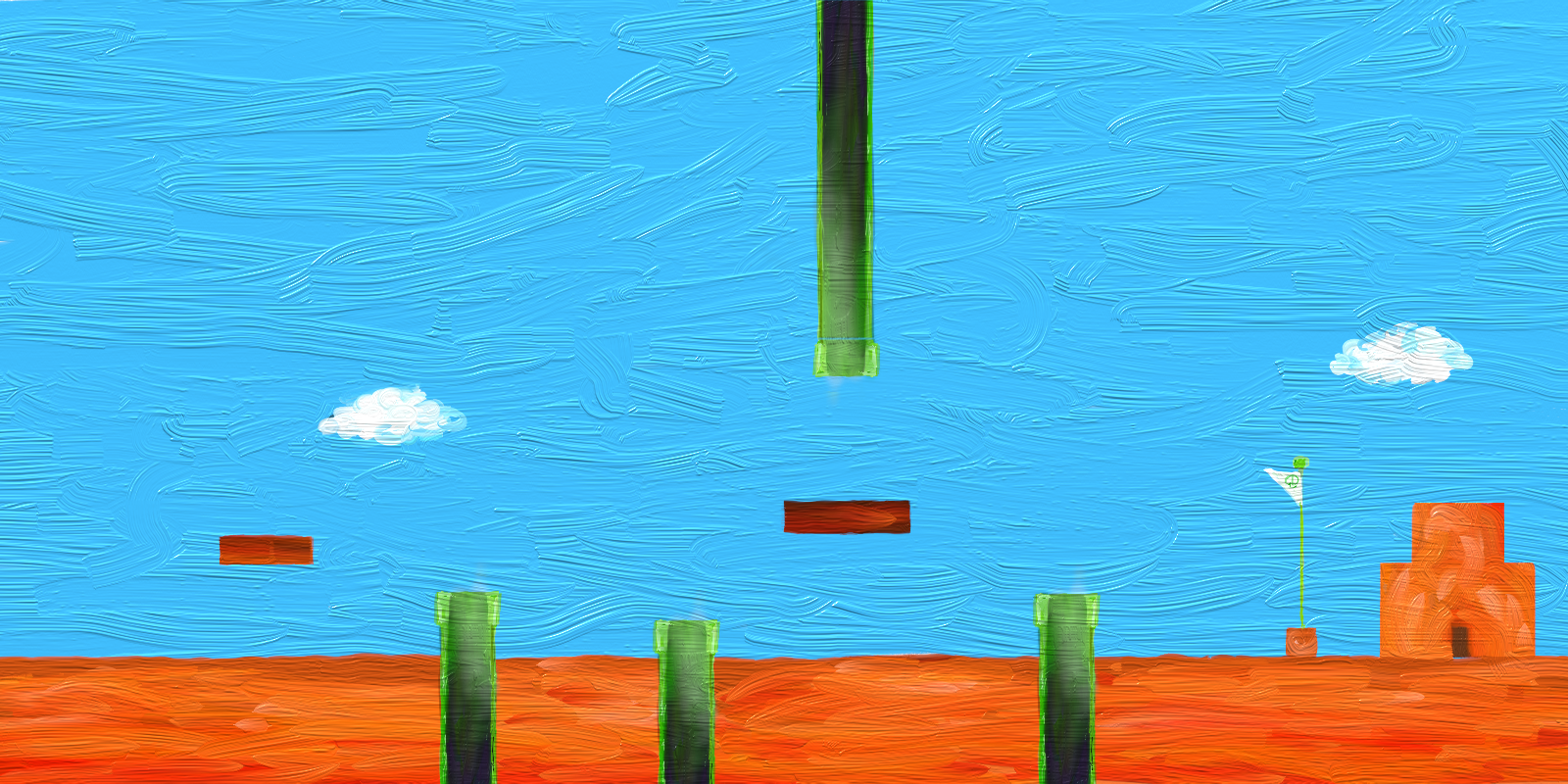
Even though we wanted a more organic look to the game, I decided to use Tiled to create the level, because that would make it easy to experiment with different layouts, and the excellent Tiled2Unity tool would generate the collision meshes for me. Once I had the level laid out in a way that worked well with the bouncing marios, I used Tiled’s “export to image” feature, and Ian used that as a reference to paint the lovely background that you see in the game.
Painted Background

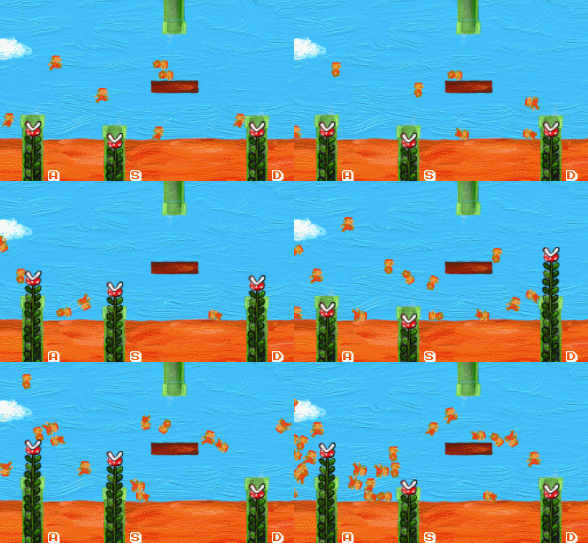
Probably anyone who’s used Unity for 2D has made the mistake of leaving the “fixed rotation” option off on your sprite’s rigidbody and then watching your character spin and flop around unexpectedly. For this game I wanted mario to have a silly, clumsy quality, so I left it off intentionally. The challenge then was getting a reasonable amount of these clumsy marios to the end of the level. I used several invisible triggers to tell mario when to jump. Each trigger had a percent change of triggering, so we would end up with marios taking random paths through the level.

Marios moving through level
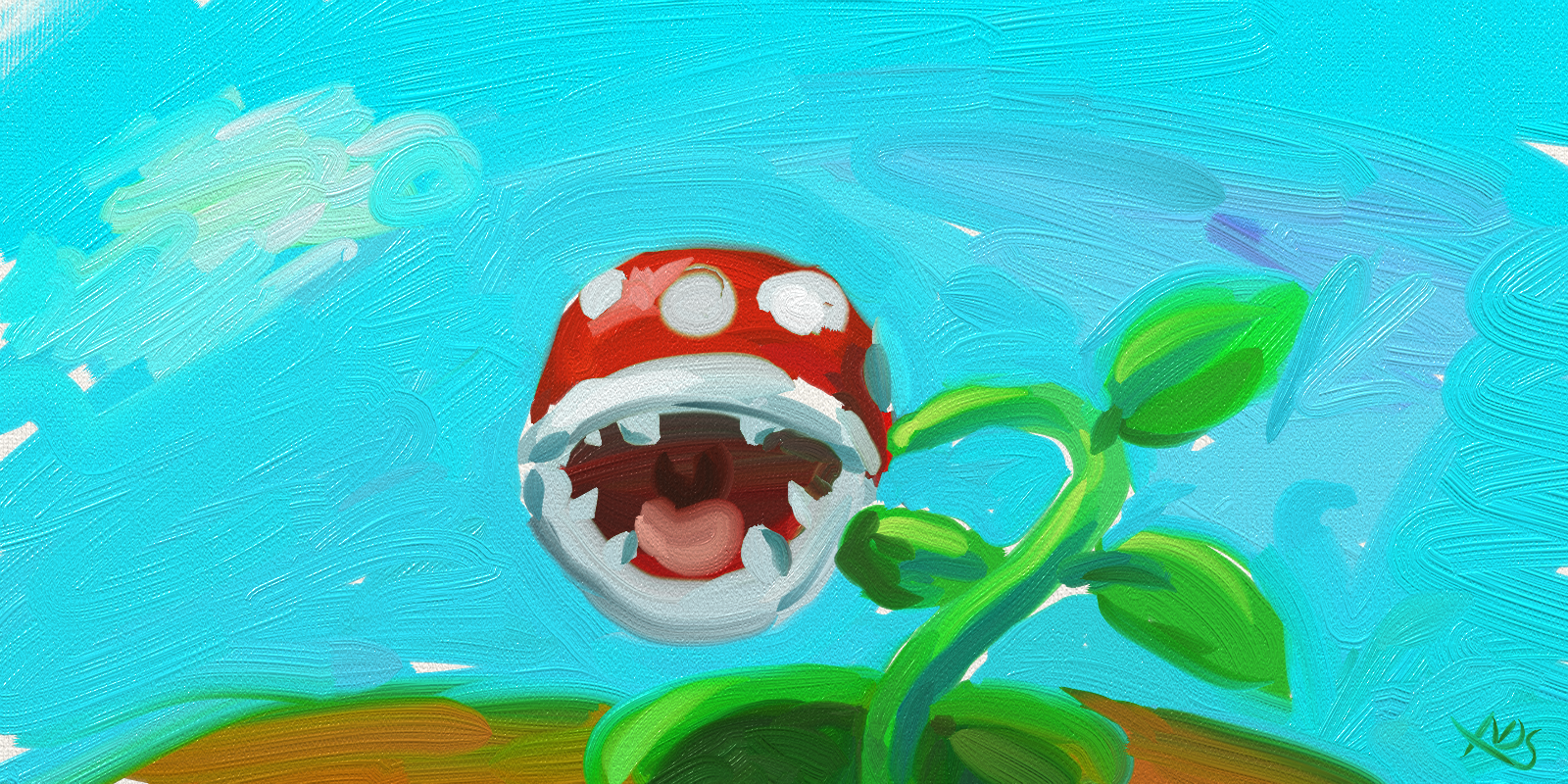
While Jesse made a mario spawner and worked on the plants, I painted the title screen as quickly as possible. I’m sure I didn’t spend more than 20 minutes on it. My plan was to hand paint the title text as well but that just would have taken too much time.
Quickly painted title screen

At the end of Saturday we were at the testing stage, and while it was already making us laugh (a good sign!), we had a lot of ideas for how to make it better. I assumed I wouldn’t have time for any of them. But Monday morning I was determined to add them. I added the “withering” plants feature and the heart counter as ways to add challenge and excitement to the game, and Brian added a score counter and cleverly tied the rate that marios spawned to your score, which leads to a hilarious avalanche of marios if you get far enough. At this point I think it went from being a silly game to one that was actually fun to play.
Many marios

Of course I always forget how stressful the submission process is, especially when you’re already exhausted from lack of sleep. But in the end I’m very happy with what we made. There’s only a couple of minor things I would have done differently. Much gratitude to my team, and to everyone who has left feedback!
Adam

Play the game here!

Tags: art, jam, LD33, postmortem, process, tools

LD34

Sushi Roll: Design Postmortem

LD34 was a blast for our team.  We’re extremely grateful for the ratings, comments, and feedback that people have given our game so far!  Now that we’re down to the final hours for reviews, we wanted to ask for anyone’s last-minute thoughts, and, to give that some context, we hoped it would be fun to walk through the design process that went into our game’s art and animation efforts.

sushiroll-logo

After a while of grappling with the double-themes of the jam, our team got a huge creative charge out of taking the “let’s just start working” approach, which let us divide up our first technical and creative steps.

On the design side, the first thing to tackle was naturally our star and hero, Fugu the pufferfish.  The pufferfish (his name didn’t happen until mid-day Saturday or so) was the first of a few ideas meant to capture the “Growing” theme (among others such as a pig that grew by eating, a snowball that grew by rolling up more snow, and just a man that happened to fall down a hill… whose misadventures made him “grow as a person,” we joked).  While all of these were fun and funny to us, the pufferfish had a kind of instant magic once he appeared on the screen, and gave us all the laugh that sent him rolling along down our creative pipeline.

pufferfish

Blender (free and open source!) gave our team the full 3D production workflow we needed to produce assets for Unity — sculpture, polygon modeling, texture painting, rigging, and animating.

Our team had decided even before the jam to commit to making a fully 3D game, so the first step was to get our fish sculpted in Blender.  This was the first challenge in matching the art to the theme(s), since this meant that our star required two different base sculptures — one to represent both his puffed and unpuffed state.  (The puffed version actually came first, and was saved and then I sculpted that down to his unpuffy self for the second version.)

With a normal model, the next step would be to adapt the sculpture into a game-ready, lower-polygon model.  We actually had to do this pretty differently, essentially making the same model fit both sculptures, in order to reflect both of the puffed/unpuffed states.  This was one of our bigger design challenges, and took a good bit of finessing to get just right, but when it came together we had a version of Fugu that was able to morph (using Blender’s Shape Keys feature) between both states, using a numerical value that we would later be able to drive in Unity.

SushiRoll-ShapeKeyMorph

The same low-polygon mesh had to be adapted to fit both original sculptures, letting us make use of Blender’s “Shape Keys” (“BlendShapes,” in Unity) to morph between them incrementally.

The result was something both simple and perfectly suited to the second theme goal: “two-button controls.”  One button grows, one button shrinks.  The game design decisions (where growing makes you pop off the ground, and boosts your speed) all fell in line as a natural progression from that idea, giving us room to test, tune, and try to make it feel fun.

After a team vote on what would ultimately be our game’s main color palette, Fugu was given his texture pass (painted in Blender) and finalized.  …But not before we all decided to push the design one step further and give our fish even one more level of “hyperinflation” puff.  (Sadly, we didn’t get to use this extra-puffy state by the end of the jam, but ohh, do we have plans…)

SushiRoll-Fugu

(Side note: The wincing puffed face only got funnier when we realized that, as he rolls, he rolls over his face.)

With our fish all ready to go into our world, the logical next step was to fill that world with things that would try to kill him.

First up was the (slightly less-than-menacing) “foe” of the tree, which we tried to keep simple enough to pay off twice over, as the simple low-poly shapes of the leaves were easy to repurpose afterwards into the rocks and pebbles that would block the path.  Navigating over and under these obstacles is intended to set the pace for the bulk of the game’s flow, so it was important to get these into the game early, letting us start to fine-tune them into our terrain generation workflow.

Next up was the first of the true villains, who we designed as the answer to the question of: “if trees force you to shrink, what forces you to grow?”  Enter the natural enemy of fish everywhere: the cat.  Running into one would force you to puff up in order to get by unharmed — too small, and you’re cat food.

SushiRoll-Cat

(Pretty much the sushi chefs of the animal kingdom.)

The cat was our first rigged/animated character in the game, and took a fair bit of time to get implemented.  We knew we wanted him to have a menacing pounce to avoid, but seeing him in action (in Blender), gave us all another useful creative kick, and we all laughed at the idea that this cat (when bopped by a large-enough Fugu) could be yet another thing that rolled down the hill with you.  (Poor kitty.)

sushiroll-tree-pagoda

With the cat modeled, rigged, animated, and finally painted, we had (most of) the main art assets we were hoping for (mostly) in place.  We started on the final assets — a quick Japanese-styled pagoda to sit on top of our hill as our deadly restaurant escape scene intro — and started to pull everything together in Unity.  This was Sunday evening.  We were getting close to the end of our art assets to-do list, and (somehow) even a bit ahead of schedule…

Which, naturally, meant it was time to go big or go home — the last idea that had been lurking in the room (initially deemed too much to hope for) was to load in the villain himself: the Sushi Chef.  It’s hard for me to imagine the game without him at this point, but even for his huge role, he was actually a fairly last-minute long-shot of an idea to try to build him by the jam deadline.  (This also meant programming him, after all.)  But, hey, we decided to go for it.

There was really only time for one round of character design, so it was important to get our chef “right” on the first try.  We agreed right away to keep him pretty cartoony, in order to let me design and sculpt him quickly, keep his rig and animation simple, and of course to match him to the cartoon style of the fish and the cat.  Thus, between trying to keep his facial features simple and trying to keep him a bit funny (he is a knife-wielding would-be fish-murderer, after all), I tried to simplify his face by pulling his headband down over his eyes, colorfully emphasizing what had become a running theme of cartoonishly-angry eyebrows in the other character designs up to that point.  He made us laugh on the first try, which we decided meant that he was probably good enough to move ahead with.

SushiRoll-Chef

He’s a man with a dream.

By the (late) end of the night, the chef was ready to go as a low-poly game model, rigged, animated, and painted, and our fish was free to be chased by a floating placeholder-Unity-capsule no longer — and, instead, by an angry, knife-waggling chef.

Our group parted ways on early Monday morning, leaving the final design work of our game’s logo and game over screen graphics (a last-minute 3D scene modeled and rendered just in time to drop into the final jam build) to be assembled remotely.

It was amazing to see it all come together, once everything was rolling, hopping, pouncing, and knife-waggling together in one combined setting.  That, plus the final versions of the movement/controls, terrain generation, and chef-chasing functionality — and all set to the final music handed off by our team’s musician — really pulled it together into something that we were extremely proud of.

ld-gameover-fornow

We wanted to say a huge thank you to everyone that played, rated, and commented on our game.  It’s been extremely gratifying to get all of your kind and helpful feedback, and it’s given our team the drive to keep working.  We’re happy to say that we’re already well on our way to implementing some of our next ideas, which we hope will help turn Sushi Roll from a prototype into a really fun little game.  So please stay tuned — and send us your thoughts!

  • Try out Sushi Roll here, if you haven’t already.  We’d love your review!


LD35

Hart of the Forest – Post-jam Preview

LD35 might officially be over within the hour, but our 2nd Door Studio team is excited to carry on the project with our continued development of our game, Hart of the Forest.  From the beginning, we knew that our project was probably a bigger idea than the fast time limit of the Ludum Dare would allow, but the last three weeks have given us the chance to keep going, bringing our original jam submission to something that’s starting to feel much closer to the game we have in mind.  We’d love to share that with you now, to celebrate the end of the review period!

To jump right into the good part, please feel free to try our latest post-jam build at the link below:

Hart of the Forest – Post-Jam Preview Build (WebGL, early alpha test!)

Or, if you want to see the original, here’s our Original Ludum Dare Page

Controls:

  • W, A, S, D (or Arrow Keys): Move
  • Mouse Move: Rotate, move camera
  • 1, 2, 3: Shapeshift forms (Druid, Stag, Bear)
  • Z: Change Camera Angle (Overhead / Third-person)

Before diving in, here are a few screenshots, to help paint the picture:

#gallery-1 { margin: auto; } #gallery-1 .gallery-item { float: left; margin-top: 10px; text-align: center; width: 50%; } #gallery-1 img { border: 2px solid #cfcfcf; } #gallery-1 .gallery-caption { margin-left: 0; } /* see gallery_shortcode() in wp-includes/media.php */ The Druid, protector of the forest The Druid, protector of the forest The Dark Bear, cursed warrior spirit The Dark Bear, cursed warrior spirit
The White Hart, sacred forest spirit The White Hart, sacred forest spirit New terrain, and a much larger forest New terrain, and a much larger forest

The idea behind our game (and our implementation in the jam edition) started fairly small, and has grown into something we hope is much larger and more cohesive, in terms of both the gameplay and the story/experience.

For starters, we’ve moved away from the strictly top-down view, offering both an over-the-shoulder third person camera (with more traditional adventure/RPG game controls), and an overhead camera that will make it easier to see your surroundings (when, say, escorting villagers or the like).  This opened up a range of new visual dimensions to explore, including:

  • New terrain, with regions like hills and valleys, a river, a lake, and denser/sparser stretches of forest
  • Light and shadow effects both tree shadows, dynamic leaf shadows, and rolling cloud shadows
  • Water effects including the flowing river, waterfalls, and bridges
  • Pathways that wind through the forest, which will become the roads that both villagers and enemies follow

Put simply, this let the whole forest start to feel more like a real place, and, hopefully, someplace you could get to know by exploring it.  We picture a forest teeming with life, plants, animals, spirits and people, all good and bad alike.  (And therefore tasking you, as its protector, try to do the best you can to protect this place as things begin to play out.)

We’ve also been playing with a number of new features, many of which are implemented already (though not necessarily in this build, as we test), including:

New Abilities and Features

  • Spells, in the Druid form (including our first test spell, which locates lost villagers and sends out a glowing beacon trail, to help you find them)
  • Combat abilities as the Druid (you can test what will be our archery system by holding down left-click — pretend this is fully implemented)
  • Spirit Vision (a Good/Evil Detection system), in the Hart form (letting you detect good villagers from corrupted ones, and helping you spot enemies in the woods)
  • Combat abilities as the Bear (including charges, roars, and swipes)
  • A minimap (sadly omitted for now, as we decide how much this helps or hurts the feeling of immersion in the game)
  • Enemy abilities (including a particularly wicked Area of Effect spell by the new enemy spellcaster, which targets groups of your villagers as they follow you!)
  • Dynamic pathfinding, based on Unity’s NavMesh system, and a custom waypoint system, letting friends and enemies follow roads to their destinations.

We also have a range of new visual updates in the worlds, including an overhaul of our Druid hero (with all this new movement and action, it was time for him to get a bit younger and stronger…!), and some new enemies to face, including the new sort of “anti-Druid,” the “beast-man” berserker enemy.  See those two below:

#gallery-2 { margin: auto; } #gallery-2 .gallery-item { float: left; margin-top: 10px; text-align: center; width: 50%; } #gallery-2 img { border: 2px solid #cfcfcf; } #gallery-2 .gallery-caption { margin-left: 0; } /* see gallery_shortcode() in wp-includes/media.php */ Latest concept sculpt of our (new) hero Latest concept sculpt of our (new) hero Rough draft of our first high-detail enemy, the Beast-Man Rough draft of our first high-detail enemy, the Beast-Man

The game certainly still has a long way to go, but we’ve been so glad to work on this while the reviews were still coming in for the rough prototype of the jam version, and we can’t thank you all enough for the kind words of encouragement!  They have kept us inspired, even through the frustration of posting an incomplete game at the end of the jam!

The concept, as we see it now, will be a kind of single-player open world game set in this one large, high-detailed forest map, where individual “levels” are comprised of objectives including (you guessed it) saving villagers, repelling enemies, and also new things such as saving or defeating good and evil forest spirits, collecting needed components throughout the forest, building up your sanctuary by bringing it new people and materials, and completing quests for the various inhabitants of the forest.

The end result is a hybrid game that we think will be a new and interesting mix of familiar ideas, and one that we’re really looking forward to playing, ourselves.

We would love to hear your feedback, and to offer you the glimpse of the work we’ve put in so far over these last three weeks, in the form of our current nightly build — link below:

Hart of the Forest – Post-Jam Preview Build (WebGL, early alpha test!)

Or, for these last few minutes, see our Original Ludum Dare Page, if you want to leave a last-minute review!  (Thanks!)

Thank you all, hugely, again for the feedback and support, and keep the suggestions coming!  It’s been an honor, everyone — and we hope to see you all in the future!

Tags: blender, mechanics, post-jam, preview, sculpture, unity

LD36

We’re in! (live stream?)


A three person team this time. Tools: Unity, Photoshop, Garageband and various others!

We made the kind of crazy decision to live stream our jam this time around, so check out if you want to:

https://www.twitch.tv/stellardoorgames

Ludum Dare 37

We’re in

We are in for the Jam event! We are:

Adam: code and art

Greg: 3D and sprite art, music, writing, code

Ian: code and art

Melanie: 2D art  https://www.instagram.com/inkystache/

Ricky: 3D art

Brian: code

Tools of choice: Unity C#, Photoshop, Blender, Reason, Pyxel Edit, Aseprite, Illustrator, Audacity, Tiled

Workflow: Slack, Git, Google Drive

We are going to try to twitch stream some of our work in progress:

https://www.twitch.tv/stellardoorgames

This will be my 6th Ludum Dare — I live for these times of the year!

Comments

09. Dec 2016 · 16:44 UTC
Hey, another 3D entry. I’ll be following your stream for sure!

Arm’s Reach Linux version tester?

We’re trying to test the Linux build of our game, Arm’s Reach, but having some technical difficulties. If anyone wants to try it, feedback would be greatly appreciated!

ArmsReach_3

Post-Jam Arm’s Reach, now with gameplay!

2017-01-02 (5)

We spent the last three weeks continuing to work on our entry! I was bummed that I didn’t get to add the gameplay that I wanted to during the jam, and the team created so much great artwork, it was a shame not to use it. So here’s a new version, still not complete, but much closer to our original vision for the game.

Windows Version

Mac Version

Web Version

Here’s the page for our original entry:

http://ludumdare.com/compo/ludum-dare-37/?action=preview&uid=49637

We want to turn this into a full game. Let us know what you think!

LD 40

Tools used for making The Will of the Wisps

TWotW0005.gif

Play The Will of the Wisps

I can't comment about all the music tools that Greg used to make the amazing music for this game, and there's not much to say about Photoshop that Melanie used to make her incredible artwork, but I wanted to mention some of the tools that I used to develop it:

Tilemaps: I've been a big fan of Tiled (http://www.mapeditor.org/) and Tiled2Unity (http://www.seanba.com/tiled2unity), and I still am! It's a powerful combo. But for this game I thought I 'd try Unity's new Tilemap system (https://docs.unity3d.com/Manual/Tilemap.html). My verdict: I like it! I'll still use Tiled for some projects, but for this one Unity's built in one was perfect, especially with the 2d extras.

Normalmapped sprites: Getting cool lighting effects on the artwork was a big part of creating the atmosphere in this game. I tried using Sprite Dlight at first to get generate normal maps, but it couldn't handle the large textures that we were using. Then I remembered I had bought SpriteIllumitator (https://www.codeandweb.com/spriteilluminator) as part of a package. Man this program is great! It handled the huge textures and was easy to use.

Sprite Sheets: I have plenty of tools for making pixel art sprite sheets, but these are a lot bigger images, so I downloaded the free version of TexturePacker (https://www.codeandweb.com/texturepacker). It worked great!

Renamer: One of the issues I had with trying to combine various animation sequences into one sprite sheet was the sequences had names that overlapped (walk/0001 and idle/0001… etc). So I want to plug a little tool I've been using for years that made fixing this easy: Bulk Rename Utility (http://www.bulkrenameutility.co.uk/Main_Intro.php).

Anyway, there are others but I think those are some of the more interesting tools I used. I hope you enjoy the game!