Instead of a standard post mortem I’ll just talk about the development process I went through when making The Sun And Moon.
If you haven’t played it already, I would love for you to give my game a go before reading on! A lot of what I talk about won’t make much sense otherwise, and I think it’s really fun to discover the mechanics of the game for yourself.
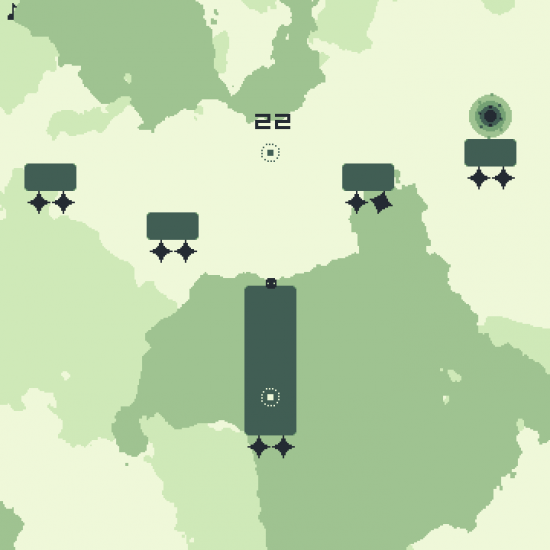
One of the later levels in The Sun And Moon
The Idea
Long before the weekend I knew I would be out for the entirety of the first day. On the downside this meant I had a lot less time to work on the game than I would like. On the upside, I would have plenty of time to think of a good interpretation of the theme.
By Saturday night I had come up with two ideas.
- My first idea was to make either a top down game or a platformer where you could use the mouse to flip tiles and expose what was beneath the surface. By flipping tiles you could create paths, remove spikes, block enemies, and so on.
- My second idea involved controlling two characters at once. One would be above water, and the other would be underwater, and there would be multiple ways for the two characters to interact with each other. For example, I thought about the underwater character being able to surface and act as a temporary platform for the above water character.
I felt that either of these ideas might have had the potential to turn into a good game but that neither was really quite there yet.
So I kept thinking.
In particular, I thought of how the theme Beneath the Surface could apply directly to the mechanics of a platformer.
And then I came up with the concept which would eventually become The Sun And Moon. Very briefly my idea was to have the player control a bubble moving through air and water, but I quickly dropped this in favour of simply moving through air and ground.
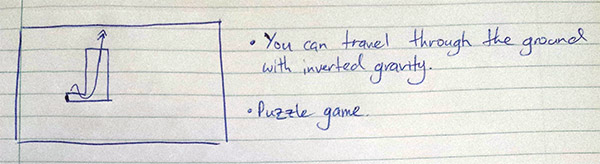
My original concept
The Features
I knew from this point that my game was going to be about using and building momentum to move through the level. I was starting to get ideas for puzzles, but wanted to lock down what elements the game would have before I started designing these particular puzzles.
Firstly, I considered having both passable ground and impassable ground, as this would give me the tools needed to make lots of interesting puzzles. I felt that, without impassable walls, the player would be able to find easy ways to move through each level which would limit the different ways I could challenge them. After some thought I dropped the idea of impassable ground as I felt it would make the levels feel too closed in; I didn’t want to build a wall around the player and force them down a single route. I wanted my game to feel open and free. On the other hand, I couldn’t let the player have complete and utter freedom of movement through each level so I introduced the spikes.
I thought about adding more features to the game, features such as enemies, moving platforms, ground that would make you weightless, buttons, springs and so on, but I decided against it. I wanted to keep the game as simple as possible and I wanted to challenge myself and see how much I could explore the central mechanic. I really like the idea of creating complex gameplay out of simple concepts.
When I added the collectible bits I hadn’t decided whether to make them bonus collectibles or a requirement to beat the level. After I made a few levels I found that making them compulsory allowed me to introduce more interesting challenges into levels by forcing players to move in and out of an area.
I spent about two hours while in the car planning the features.
The Code
I used Gamemaker: Studio, as it is fast and what I’m most familiar with. I also used my Beaver Engine for collision detection, tiling and camera control. There isn’t much I can think to say about the coding process. I knew what I wanted the game to do, and I knew what to code so that the game would do it, so for the most part I was simply on autopilot. The exception being that the following things all took a considerable amount of time and effort to get right: the player trail, the level select screen and fine tuning the player movement so that it felt exactly like I wanted it to.
Overall I spent about four hours coding, but most of this was interspersed with graphics and sound.
The Graphics
All my graphics were made in Photoshop CS6. I started off with a very basic Gameboy-esque color palette and over time I added more colors as I needed them.

Original Palette

Final Palette
For the parallax background images I created Render Clouds in Photoshop and used blending options to make the lighter half of the image transparent. By making the Render Clouds 1024px by 1024px they automatically tile. I really like this technique as it’s an easy way to create interesting, abstract shapes. So I made two images this way, colored each with a solid color and added parallax scrolling at different speeds to each. Much later on I added horizontal scrolling as well, to add more activity and life to the game.

Render clouds with transparency
For a while the player was a simple blob with no eyes or trail. I experimented a lot with different trails before I came up with the current version. In the current version, at each frame I created either a “light” or “dark” trail at the player’s position. For the light trail, it draws circles all the same size but of decreasing opacity. For the dark trail, it draws a line from (x,y) to (previous_x, previous_y) and the line thickness slowly decreases. I originally had it drawing circles of decreasing size but this had a few issues, mostly that as you began to move fast enough the circles would separate from each other and look terrible. Because I wanted my game to include really fast vertical speeds I needed a better approach.

Sprites and tiles
Lastly, I wanted to make sure my game felt really responsive and so I added sound effects, screen shake and screen flash to various events. The intensity of the response varies depending on the event. For example, when you hit the ground the screen shakes relative to the speed you were travelling at.

An early example of what the game looked like
I spent around four hours on graphics, though much of this was spent testing different styles.
The Audio
I used bfxr for the sound effects and FL Studio for music. Early on the Sunday I spent a long time trying to come up with an interesting melody for my game but with no success. It was only a few hours before the deadline that I came up with a track that I was relatively happy with. If I had had more time I would have made the track much longer and much less repetitive, but I’m happy nonetheless that I was able to include what I would consider adequate sound effects and music. In my previous Ludum Dare game, Javel-ein, the lack of music was one of my biggest regrets.
I spent about four hours working on the audio, but a lot of this was unproductive.
The Levels
I kept a notebook (the paper kind) with me at all times, and any level ideas I had I would quickly sketch them down. I found this really useful as it meant I could focus on keeping the coding, visuals and sound on track while slowly building up pages of level ideas. Then, when I wanted to take a break from some other aspect of the game which wasn’t working, I could begin creating levels without having to think. I made a large number of levels then began to play through them and test them for difficulty, uniqueness and fun. Any levels that weren’t unique or fun enough were modified or removed, then I ordered the levels.
Of course the main factor in ordering the levels was difficulty, but I also tried my best to order the levels so that levels with a similar structure or featuring a particular mechanic didn’t appear too close together. For example, levels 13, 17 and 26 all involve jumping from a large height and diving deep into a solid block. I wanted to keep similar levels far apart from each other so the player didn’t grow tired of a particular mechanic. I also didn’t want the difficulty curve to be simply increasing. When players beat an unusually difficult level I wanted to reward them with a fun, easier level. Here is one of many articles on this concept, which explains it much better than I have here.
I introduced the controls and mechanics across the first two levels and introduced spikes in the third level as I felt this was the fastest way to get the player used to the main ideas of the game. I purposefully left the central mechanic of the game up to the player to discover. I set up the second level so that (if all went according to plan) the player would find themselves in a pit too tall to jump out of, with instructions on which button the action button was and with nothing to do except try to figure out what this button did.
I also included a level select screen as I wanted a way for the player to track their progress as well as skip and later return to levels that they were stuck on.
Here are most of my level idea sketches. If you’ve played The Sun And Moon, a lot of these sketches should look familiar to you.

Level ideas

More level ideas

Even more level ideas
I spent about 5 hours making and testing the levels.
The Plan
Finally, something I’ve had trouble with in the past was keeping myself on track and making sure that everything got done in time. For this, I constantly referred to my online To Do list to make sure I was always working on the most urgent and important aspect of the game. I used Trello for this and I highly recommend it to everyone. On reflection, I could have made my To Do list much more in depth and extensive but it worked well enough anyway.

To Do list
Thank you for reading this and I hope you enjoyed my game! If you have any comments or questions I would love to hear them.
Tags: ld29, postmortem, The Sun And Moon




![gif [3mb]](http://puu.sh/dkWA5/c8ac198657.gif)