LD33 August 21–24, 2015

I’m in

It is my first Ludum Dare. I will work solo, and it will be my first time to draw something for my game. It’s a challenge!

My tools:

  • JavaScript / HTML5 with small frameworks, Brackets as editor
  • GIMP, Inkscape, I may draw on my galaxy note
  • Audacity, Rosegarden

^o^/

I remember !

Not going to forget about it this year…LETS DO THIS!

In.

No idea what libraries I’ll be using yet.

Thinking about Irrlicht + SFML’s Audio module, maybe PhysFS as well.

But we’ll see how that goes.

Graphics will definitely use open source stuff. Blender + Krita, most likely.

Music and sounds in Renoise, no VSTi.

In

First Ludum Dare…

Probably just going to use Unity, because the last time I jammed I tried to learn too many tools all at once

Awesome Ludum Dare Incoming, looking for graphist!

Hey guys!
Can’t wait to participe to this new ludum dare, i’ve been doing it for nearly  2 years with great pleasure and a better ranking everytime! (37th overall last time with this game : http://ludumdare.com/compo/ludum-dare-32/?action=preview&uid=29406)
I’m french and I’m working with a talented musician and you can see our last game jams games here : http://louis-denizet.fr/videos/I am a young designer that likes programming too, but I’m a really awful artist so we are looking for an artist to work with us during this new challenge! ^^
We also create some games on our spare times and that could be a good way to meet someone to work with!
Anyway don’t hesitate to contact me if you are interested here or by email at ldnz@hotmail.fr
Cya and have an amazing ludum dare guys =)


I’m in!

Let’s see if I can do a little better than last time.


Hopefully going to be competing this time

I never ended up really even starting last competition because I couldn’t get with the theme. This time I’m planning on competing no matter the theme, however things do change.

I’ll most likely be working on the solo competition, which means terrible art and music, but hopefully a fairly decent game.

————————————————-

Tools I’ll Be Using:

Construct 2 (Maybe. I’m experimenting with it a little right now and it seems like a solid game jam engine)

Game Maker: Studio (This is what I’ll most likely be using if I decide not to go with construct.)

Flash (Most likely going to be using flash for art)

Abundant Music???

BFXR

————————————————-

I look forward to seeing and playing everyone submissions. Happy Ludum Daring!

————————————————-

Shameless Plug For My LD 31 Game: Duck, Jump, Die!

Click To Play
42014_82540_orig

Taking Automated Screenshots at Intervals for Multiple Monitors (Windows)

Taking Automated Screenshots Header

Ohai there! Since I am planning to record a timelapse of my gamedev for the upcoming LD#33, I thought it would be nice to take a series of screenshots for creating a nice timelapse animation afterwards. I went ahead and did some testing and ran into problems with multi-monitor setups, especially when one monitor has a different pixel density (dpi) than the other(s). This little post is my solution to the problem and provide every Windows user (even on single-screen setups) with a free solution to take screenshots at a set interval.

The Problem

While I tried different tools for the task at hand (screen recording via BandiCam, automated screenshot taking with boxcutter or cmdcapture, and other freeware), none was perfect or even up to the task at hand. The problem is that I am running a very uncommon setup of monitors and resolutions:

displays
Monitor 1 is an UHD display with a resolution of 3840×2160px while monitors 2 and 3 are each 1920×1200px. What complicates things further, is that the UI on screen 1 is scaled up to 125% by Windows which many programs have troubles with. Did I mention I am also running Windows 10?

I spent the evening trying different programs and approaches and came up with a solid solution which doesn’t even cost you anything!

The Solution

I found the incredibly versatile command-line tool NirCmd to be perfect for taking a screenshot of my entire desktop — yet not without tweaking. This is how I got it to work:

When you run nircmd.exe from a Windows command line, you can use it to perform a plethora of tasks, not only taking screenshots, but also turning off your monitor, waiting for programs to close, and a lot more. The option I was most interested is savescreenshotfull to save the entire screen which I thought would do the trick. Well, not quite: The bottom-part of my big screen was cut off while the screenshot was padded with a lot of black on the right:

screenshot-comparison

The trick is not to rely on the savescreenshotfull option for it produces erroneous results, instead use savescreenshot which allows you to specify the coordinates and dimensions of the capture rectangle. Getting the right coorddinates was a bit tricky. Let’s refer to my monitor setup again:

displays

Starting from 0,0 only would capture my screens 1 and 3, because monitor 1 is set as my “primary monitor” and this means that Windows’ coordinate system treats it as origin. Instead I had to use the starting coordinates of -1920,0 and — presto! — that worked. Calculating the width and height of the rectangle was a matter of basic arithmetic. This was the command that worked for me:

nircmd savescreenshot file.png -1920 0 7680 2160

Great! But how about taking a screenshot at a given interval? Glad you asked:

Taking Screenshots at Intervals

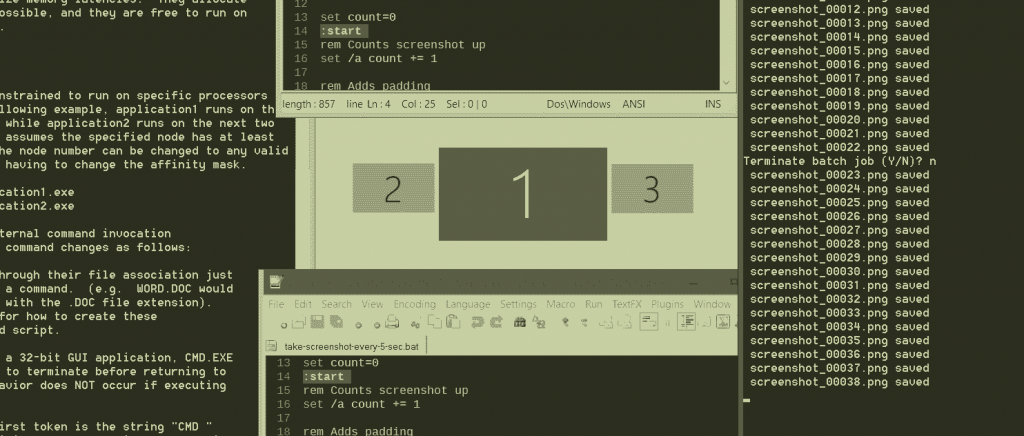
Did I mention that NirCmd has a plethora of options? It not only allows to run one option, no, you can run multiple. The attribute cmdwait followed by an amount of milliseconds defers the following command by the given delay. Neat! In order to wait 5 seconds before taking a screenshot, just run

nircmd cmdwait 5000 savescreenshot file.png -1920 0 7680 2160

The only thing left to do was to run the command over and over until I wanted it to stop. NirCmd even has an option for that (loop that is), but you can’t say “run this one in an infinite loop”, so I thought I write a little batch-script for this which also lets you define the filename and saving location of the created screenshots. You know, for convenience sake :)

In the same folder where nircmd.exe resides, create a new text file and title it something like “Take screenshot at interval.txt” and copy/paste the following block of code. Don’t worry, I’ll run you through it below.

@echo off
rem  Set your custom options in the following four lines:
set       prefix=screenshot_
set     interval=5
set    extension=png
set  destination=G:\temp\screenshot\

set count=0
:start
rem Counts screenshot up
set /a count += 1

rem Adds padding
if %count% LEQ 9999 (set padding=0)
if %count% LEQ 999 (set padding=00)
if %count% LEQ 99 (set padding=000)
if %count% LEQ 9 (set padding=0000)
if %count% GTR 9999 (set padding=)

:screenshot
set filename=%prefix%%padding%%count%.%extension%

rem Actual command to take screenshot
nircmd.exe cmdwait %interval%000 savescreenshot "%destination%%filename%" -1920 0 7680 2160 
echo.%filename% saved

goto start

It’s pretty straight forward but since I’m in a nice mood, I’ll explain it to those of you who never really worked with batch scripts:

  • @ECHO OFF just means not to print every command from the batch file and only the results.
  • Each line starting with rem is an inline comment
  • With set you can define variables and strings. Here, just change the values to your liking. By default, the resulting screenshot will be titled to look like “screenshot_0123.png” and saved to “G:\temp\screenshot\”, but you can put in whatever you like. The interval is set to 5 which means to wait 5 seconds before executing the screenshot command.
  • A line starting with a colon, :, is a label. I use it as jump-points for the goto-command and to structure the code a little.
  • set /a count += 1 adds 1 to the value of the variable “count”. This is used to number the screenshots sequentially
  • The IF %count% LEQ 9999 (set padding=0) line is a simple IF statement. If the variable “count” is less-or-equal (that’s the “LEQ”) to 9999, then the variable called “padding” will be set to “0”, and so on. The reason for this is to always have the serial number in the file name amount to six digits for sorting reasons.
  • In the :screenshot section the final file name is constructed from the prefix, the padding, the current serial number (“count”) and the file extension.
  • And finally, I call NirCmd with my settings from above. If you don’t have a multi-monitor setup (or one that doesn’t get cut off), you can just write “savescreenshotfull” instead of “savescreenshot” and delete the numbers at the end.
  • %interval%000 looks odd, doesn’t it? Because the cmdwait option expects milliseconds as parameter, I just add three zeroes after the interval-variable and “5” becomes “5000”
  • Then, the echo. command just outputs the current file name in the command window so we know that everything is working like it should.
  • And last but not least a goto command instructs the script to run again from the :start label. This means that the script will run until closed.

Now simply change the file extension of the text file to .bat and double click it. This will run the script and it begins taking screenshots.

Great, but how do I close it?

Just click the X on the window’s top corner or hit Ctrl+C to pause the script.

Closing Notes

What’s cool is that this doesn’t cost any money and the memory footprint is very low, nircmd.exe uses around 1.5 megs of RAM on my system while running. But note that depending on how much is going on on your screen, the resulting image-sequence of screenshots can amount to several gigabytes! So make sure that you save them on a drive where you have enough space left.

I hope anybody still is reading because it took me quite some time to type this up! Happy jamming and all the best for the upcoming LD#33!

Tags: batch, Interval, screenshot, script, timelapse, tools

In for a 7th

Well, here’s your generic I’m in post. This is the 7th time I attempt this event.

This is actually my true 6th attempt since I wasn’t really feeling it last April and dropped midway after having countless issues with the library I was using.

Below, I shall present my pocket knives

Language: Coffeescript
Library: Phaser (Gets stuff done fast)
Text editor: The excellent Sublime Text 3
Graphics editor: GraphicsGale, the perfect choice for drawing colorful pixels
Music: Bosca Ceoil, the only software that I can produce “decent” music in
Sound effects: Bfxr or some similar sound generation software
Timelapse: Chronolapse as always
Extra: Weed to get mad blazed and brainstorm fun ideas, and copious amounts of coffee to write quality code

here goes for another insane 48 hours, good luck to everyone!

I think I’m in

I think I’m in for my third Ludum Dare.

This time I didn’t plan much so I might do just about anything I guess, going pretty casual. I guess one cool aspect of LD is that you can try stuff you haven’t tried before while game developing;

I decided to leave the C++ DirectX 9 2D platformers and go blind with the only direction I have right now in mind is using Blender Game Engine. I learned a bit today, and I’m gonna learn some more until the comp begins which gives me about a week to prepare myself. I NEVER used it before so this is gonna be lots of fun and surely different than before. In case things go horribly wrong I might quit to Java and LWJGL which still isn’t my most comfortable zone, but still I wanna do something new. I might even try to make some web-based game using JS if things go REALLY BAD.

In the most saddening case in which I cannot finish anything –  here’s my last resort – the safe old most basic and simple 2D system for C++ and DX9: >Github Link<

and.. that’s about it. Hope you’ll also DARE (see what I did DARE?) yourselves to do LD in a tool you’ve never used before during the compo or even at all!

As for graphics – as always I’m gonna use GIMP, Photoshop maybe and pixlr .

As for sound – as always gonna make original sounds. Use Yamaha keyboard or maybe I’ll try using my Electric guitar. I might also try my luck with software-based synths and 8 bit music. We’ll see 😉

I’m 99% percent sure I’m in. unless something’ll pop up – I think I’m gonna go for it.

Good Luck, and as always – Happy Ludum Dare!

Warmuping

Prototyping a boids engine for a game of bubble

Bubble Letter Gif

I’m in

As a programmer, I’m looking for any artist that wants to join me… (:

I’m in again.

This will be my second Ludum Dare. :)

I’m In for the 2nd time!

I’m in, for the 2nd time! 😛

No big ambitions for this one, will try to keep it simple because the first time I thought about too many things and ended up with just a sketch of what I really wanted.

The same way I didn’t know what I was going to use, I still don’t know what I’m going to use this time. Might be one of these (or none of them):

  • Engine: Clickteam Fusion, Stencyl, GameMaker or Haxe/OpenFL;
  • Audio: FL Studio, iPad + AmpKit + Guitar, sfxr;
  • Graphics: PyxelEdit, ProMotion, Mischief, TileCraft, CorelDRAW, Spriter;

I hope I can properly finish work until LD starts. 😛

Good luck for everyone!


EDIT: Forgot to put the empty repo address, ready to receive whatever comes in LD! https://github.com/yuigoto/LD-33/

Am I insane, or a genius?

My “I’m In” Announcement

Hey guys, I want to share my newest musical project to warm-up my skills for Ludum Dare with you guys! This song is unlike anything ever created. This song is a mixture of something good, and something else good, and I love it! You will never hear anything like this anywhere else… Am I Insane?

Hidden Voices

Hidden Voices is a innovative song unlike any other ever created. It features a heavily synthesized / Vo-Coded Audio sample of my Voice. This song is incredibly complex and unique. (I had a extremely long description written here… But my web crashed and I lost it :/ )

https://dl.dropboxusercontent.com/u/275699050/Hidden%20Voices.mp3

Comments

Flygamer101
15. Aug 2015 · 13:46 UTC
Genius 😀 I love it!
15. Aug 2015 · 15:56 UTC
Haha you’re not insane, just proud and not very modest. The track is OK, though I’m sure you could do better.
xWarZonex
16. Aug 2015 · 17:12 UTC
I understand where your coming from, from the outside, all the verses and such sound quite simple, and the a good majority of the verses are simple, but this song in general, even though it may not seem like it, it quite complex if you look at it closely. In the chorus, over 15 tracks of patterns, drum loops, automation, and filtering are being played at the same time. The verses are quite simple, mainly because the style I was going for, but the second chorus is different from the first, and the difference was complex. I first had to use a time modulating and effect plug-in slice the first verse, then export this, and slice it back into the song, giving it the choppy effect it has. I did a lot of filtering, ALL the sounds I used, I made from scratch. I used 13 different masters to control effects, reverb, and filtering. I Vo-Coded my voice and chopped the samples into a pattern, which is hard to make sound good.
17. Aug 2015 · 10:15 UTC
Lol dude, I’m sorry that you did all of this work and still when I listen to it I barely hear it .. it does sound like you put a bunch of effort but I can’t honestly say I hear any of that. I guess it just didn’t pay off.

I think what happened was – it took you lots of work to create the sounds but your dynamics sucked.

And honestly the drum machines beats and time shifts weren’t that impressive. When it doesn’t flow, it doesn’t flow, and sound can’t fix that!

And I’m very sorry but I don’t hear 15 patterns (not to mention that’s not enough for making a riff last 4 minutes). If you mean the vocal pattern in terms of stopping and resuming it (aka glitching it) – it’s not impressive at all. I’m gonna be honest hope you won’t take it personally, once again you are the one who asked me to elaborate – it’s not just boring to my ears it’s boring to my brain. The patterns are plain so you can’t help quality with quantity. That just makes it longer. Also, if you made so much effort to make your vocals make ’em more loud! the freaking annoying repititve synths are all over my face!! Nuffff

The stuff you linked suffered from the same problem as well as your descriptions of them staying wierdly self-complementive. I’ll be honest with you it’s below average. I probably won’t have time to keep chatting with u cause I gotta prepare for the compo but if you want a piece of advice: One cannot judge himself properly, especially when one likes himself (which is almost always the case). Try to ask other people to try to listen to this and check if they finish it without you instructing them to do so. If they won’t, it seems like I’m right. If they do, try random people on the net and ask them if they did. If they did, well; At least you know I’m the only one who thinks that, and you may feel free to embrace or reject my criticism, otherwise you probably NEED to pay attention to what’s being said. Well, that’s my advice Good Luck =]
08. Jan 2019 · 19:56 UTC

Mimi nina katika

I thought writing “I’m in” in Swahili would make my title more interesting.

Anyways, on to the tools:

-Framework: LibGDX

-Development Environment: Intellij IDEA

-Graphics: Paint.NET and Spriter

-Sound: Bfxr and Audacity

-Music: LMMS

Comments

FacticiusVir
15. Aug 2015 · 11:11 UTC
Weka mchezo
18. Aug 2015 · 20:03 UTC
i am also doing in libgdx… but very new to the framework.. in this jam i am learning and developing the game in libgdx, any tips for a newbie in libgdx…

I’m in

Hopefully using Java and LWJGL, Eclipse, GIMP and SFXR.

Best of luck, need I say more?

It’s Been a While – I’m In

The dare just so happens to be timed perfectly for me to participate. I’ll be kicking the family out of the house for the weekend and hoping I get get something (ANYTHING) finished for the compo.

I will probably use these:

  1. C
  2. SDL
  3. Vim
  4. GIMP
  5. LMMS
  6. My public code

C isn’t the best language for prototyping quickly, but I love it anyway. I might change my mind by the time I start writing the game and switch to Haxe with OpenFL. We shall see…

Tags: C++, SDL, Vim