gonna see if i can make anything useful with these two things.
LD21 August 19–22, 2011
Messing around in flashpunk and box2d
Here we go again!
Hi, I’m Xedfire (or Erifdex, spot the connection..) This will be my second ludum dare compo, and I’m really feeling pumped for it this time!
I’ll be using FlashPunk.
LD21 I’m in!
I don’t know if I will have enought time to build a game, but I’ll try.
My declaration:
1) flashpunk as library with punk.ui for user interface, if I can also Explode image and Lighting stuff from previous LD or Lightus we’ll see 😀
2) all graphics made by myself (and so it will be some crap graphics), no more mistake with this!!
3) music using as as3sfxr
I don’t know if theme will allow a top down game but I think is the most simple game to do this time 😀
I’ll try to think before do something, promise!! 😀
Tags: LD #21
Workstations and All That
Eighteen hours to go… . So I’ve got this computer that I’m going to use for the competition.

At the moment, this is the only computer I have. Power supply is still in the mail. I guess if it doesn’t arrive on time, I might just close up the case and use it as a desk.
Depending on what comes to mind, I’ll either be building a game with FlashPunk, Flixel, C+SDL, possibly OpenGL 3, or just pen and paper. Really haven’t committed to a medium yet on this; I’d like to keep my options open! And just in case I don’t pull my desktop together before the competition, I am actively considering building a choose-your-own-adventure website.
With a make-shift desk, a stock of pens, a ream of paper, and my trusty phone, anything is possible!
Comments
19. Aug 2011 · 07:19 UTC
I like how the image is named ‘sadsm’
19. Aug 2011 · 09:09 UTC
oh man, pen and paper game would be cool.
Creating a timelapse in Linux
Hello,
I’ve written a couple of scripts for making timelapses in Linux. It’s fairly simple stuff;
Create a screenshot every 15th second by running the following script in a terminal;
#!/bin/bash
# Takes a screenshot of my second monitor every 15 seconds
# Only have one monitor? Drop the -crop part ...
mkdir ~/img
while [ 1 ]; do
# Uncomment the line below if you only want timelapse of your second monitor, and both monitors are 1680x1050 big.
# import -window root -crop 1680x1050+1680+0 ~/img/LD21-$(date +%y%m%d-%H%M%S).jpg
import -window root ~/img/LD21-$(date +%y%m%d-%H%M%S).jpg
sleep 15
done
(The script is interrupted by pressing CTRL+C)
Then encoding the images can be done using mencoder, like this;
mencoder mf://*.jpg -ovc lavc -lavcopts vcodec=mpeg4:mbd=2:trell -oac copy -o output.avi
If you want audio, add ‘-audiofile somefile.mp3’.
Hurray!
I’m in (for the first time)
Hi all,
This is my first post, first message of intent to participate, and generally first online game programming competition I’m signing up for. It seems that everyone is doing an “I’m in” post, so I might as well; you know, so twenty years from now my humble beginnings can be traced back once I inevitably become a billi… moving on:
Actually, I do need to declare my base code: http://blog.capdb.net/wp-content/uploads/XnaBase.zip . This is the default XNA new project spiced up with a few custom classes/structure. There’s a simple rendering loop to draw a cursor and some text, a simple input processor for mouse/keyboard/controller, and a simple game state machine (playing/paused/menu). Just the basic stuff I’ll need to code for any XNA project anyway.
I’m using C# and XNA (Visual Studio 2010 + ReSharper). Photoshop for sprites. May be Maya for 3D rendered sprites if I feel masochistic. And, of course, Notepad for a TODO/TONOTTODO list.
Cheers.
I’m in
This is my first Ludum Dare!
For coding I’ll be using the Processing (and the simple graphics library that comes with that).
I have some base code that I might use. I put them all here.
All images will be created and edited with Photoshop. The images will then be compiled with Sprite Sheet Packer.
Most sound effects will be created with sfxr.
I’ll create music with PixelBlitz (recording it with Audacity), which is perfect for creating simple music under time constraint. If I need something more complex, I might create something with Ableton.
Good luck to everyone!
I’m in, like Donkey King
This is my 3rd LD. Last time I wanted to see if I can maed a facebook game in 48 hours.
This time, my goal is to make something polished. I might make a very generic game but with all the bells and whistles.. like a 3D tic-tac-toe game with achievements or something.
Tech stuff:
PushButtonEngine
RPGAutomata
Tiled
Sfxr
Tags: flash, pushbutton
Almost time
Ok we are nearly there, i was hoping to get an actually decent nights sleep last night but that failed. I was also hoping to get an easy day in work today but that is looking unlikely too!
Whatever nothing prepares you for coding like more, different coding.
Following up from my last post I will be using http://www.bfxr.net/ as a sound generation tool. In my previous experiences with intense programming competitions, I can make passable art and great code but terrible sound so a tool like that which lets me create sound files fast is a real boon.
At the moment i’m hoping Adaptation or Evolution will be the theme but i’m up for anything!
Additional important tool for LD
Just have to add one strictly necessary tool for the coming two days ;).

Moka pot! Espresso!
Tags: foodphoto
I’m hopefully in!
Hi!
I’m a Norwegian “game-programmer” (Not really, but I’ll give it a try).
I’ll try to finish a game this weekend, but inexperienced as I am, I guess theres a good chance I might fail badly :p (still an optimist)
I’ll be coding in Java using Slick2D
Last minute entry
I wasn’t planning to enter this time, but decided to anyway at the last minute, so I’m not very well prepared. I have to work on Monday so it will only be a 24-hour contest for me. This time I will be using D instead of C++. I’ll still be using my custom library (Obelisk) which I’ve mostly ported (except I haven’t done a Linux version, so my game won’t have a Linux port this time :()
Since I’m short on time, I’ll try to keep my game simple instead of making something unique like I usually do. So I’ll probably do a shooter or platformer or something.
Tools:
- IRC: HydraIRC
- IDE: text editor and makefiles
- Graphics: Paint.NET
- Audio: sfxr, Audacity
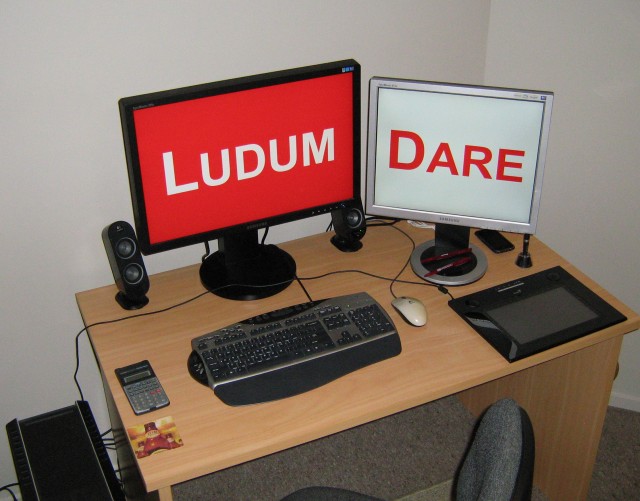
This desk layout has survived two house moves :)
Tags: declaration, deskphoto
I’m Cheating. :D
<hystericalrant>
Yesterday I got my wisdom teeth removed. Now, I’m on totally psychadelic drugs. Oxyconton, Oxycodone, prescription strength Ibuprofen, antibiotics with some weird side effects, and an anti nausea drug known to cause hallucinations. I now exist in a state in which none of you can. My ideas will be invincible. XD
</hystericalrant>
Blowout Soon, Fellow LD Competitors!
Hi everyone.
I’m entering Ludum Dare for the first time. My weapons of choice will likely be Flash (AS2), Graphics Gale, FL Studio and SFXR (at the very least for placeholder sound effects). Way in over my head with this, but it’ll be a lot of fun (he says in blithe oblivion).
Timelapse Recorder
Just before the competition starts, does anyone have any good free timelapse screen-recorders for windows? I have Camtasia but don’t want to save the large files for the hours I will be recording.
Comments
19. Aug 2011 · 10:43 UTC
Yep, Chronolapse is the one! 😉
HELLO I AM in!
Yep!
Ill be using my own engine laboratory2d (javascript mac/windows/linux standalone exe) to make my entry.
I last entered LD19, so glad to be entering again. I already have some ideas about what I want to try mechanics wise (like, physics based rope) so I will be waiting to see the theme.
I’m a spy and I’m in!
Ok, fine…
I confess…
I lied about being a spy…
But I am in!
I added the Espionage theme a few weeks back and to my amazement it made it to the final round, so I can’t not be in! This will be my 4th LD and I’ll be using Java with Slick2D and a little library of my own. I’m very excited about the themes, there are so many good ones this time!
Good luck to all and enjoy!
Tags: java, LD21, LD21 Im In, Slick
Comments
19. Aug 2011 · 10:24 UTC
regardless of what wins, you should do espionage to celebrate the fact that it made it to the finals.
Tools for Timelapse Making
So you are joining the Ludum Dare #21 and you feel like recording the step-by-step creation of your humble entry. But… how?
Worry not, my gimmicky friend! The community has made available many tools for the painless production of said development video. The birth of your interactive offspring will forever be registered with the assistance of those timelapse tools:
Windows and Linux

Linux

Other options:
- For Mac OS X, this tutorial will get you started in no time: Take Timed Lapsed Screen Shots From Terminal
- Another option for Windows is Fiona’s PyCatcher
- Kvisle wrote a very useful post to guide for Linux users: Creating a timelapse in Linux
First time !
Hi everyone !
It’s my first time to participate 
I will use AS3 script, FL Studio, and for graphism, i don’t known at this time… Have the evening for find it and prepare for it !
Good luck :3