LD22 December 16–19, 2011

Entry finished

So, i participated and finished my entry “In the middle of the road

Here is a mini post-mortem:

What went right

Graphics: the pixel art is a great choice for people who can`t draw well. I had no problems making pixel art, and it was funny.

Planning: all the gameplay was written on two small lists of paper beforehand. I just did what I planned.

What went wrong

Sound effects: I don`t know any other way of making sound effects I want but using sfxr/bfxr. That`s why there were a little of them.

Gameplay: thought the idea seemed original, the gameplay spoiled it. All the item interacting was just some part of a game.


I also made a timelapse, but I will post it later.

Nyctophobia – Ludum Dare Mini #31

Phew… Just submitted it with a whole 15 minutes left. If you have a free moment, please check it out.

Using long words make me feel smart :D

I’ll admit, the game itself varies a bit from the theme… It’s more “dealing with fear”, as opposed to “creating fear for the player”. But, I guess it still counts as “Fear”, right?

All-in-all, I’m pretty happy with how it turned out. I mean, it’s completely different to what I’d planned to make, it doesn’t have any sounds, and it’s really short… but hey, I guess you can’t have everything.

‘Pickle’ Pixel Editor Alpha Release

The public alpha release of my cross-platform pixel editor Pickle is now available for download.

The app features animation preview, seamless tile preview, and terrain preview—all live updating as you edit.

I’m trying to get feedback from the game dev community to help make it better. So if you have a few minutes to try it out and let me know what you think I’d really appreciate it. It would be great to have a more full-featured version complete for people to use in the next LD.

Download Pickle at PickleEditor.com 

Follow @pickleEditor for updates

Tags: pixel art, tools

The results of my “learn a new language” jam…

My foray into Flixel development is going pretty OK so far, I think! Admittedly, I have been pretty busy this weekend and not very focused when I did have time to code, but I successfully completed a Hello World, EZPlatformer, and a simple shmup. Although I haven’t gotten into all that “win state” and “score counting” nonsense yet. Figured I’d just jump into making a fully-featured FPS with 256 player online or something.

The shmup. Sadly it looks like I lost the files for the platformer (and no one cares about hello world screenshots).

Not really, obviously. I’m going to try to make a sort of sort-of unique “tower” defense game; basically, you drop stuff on the bad guys from orbit. Simple, but that’s how first games should be right? Not to mention simple games can be pretty popular. I hope to update tonight w/ the basics (control of your attacks, but not enemies, a good UI, or win/loss. etc.)!

PS – also, /compo/ has been updating really erratically, and I can’t connect to the IRC either. Anyone else getting that?

So close…

So when does the submission period for mini LD #31 officially end? I’m close to being finished, but still have some work to do… and I also need to figure out how I will get the game unto the internet. It will hopefully be my first time putting a game up on the internet. Excitement!

Comments

7heSAMA
24. Jan 2012 · 04:51 UTC
Uh… I dunno, technically it was over yesterday right? But they’re pretty lax with the miniLDs from what I gather.
25. Jan 2012 · 09:51 UTC
Hey,

Postmortem MiniLD #31

Over all, the development of this game went a lot quicker than my December entry. I had a partner and we knew pretty early on that we wanted a game that used the uncanny valley and time to create fear. Our design called for the people on each floor to slowly turn into … something else, while a darkness creeped around you, even starting to turn the player. A puzzle game with a time limit.


We used ImpactJS, JavaScript, Canvas, HTML5 to develop this game. I used it in December and really like the engine. It takes care of the details involved in a game engine while still giving me the source and power to bend it to my will. We ended up not changing anything with the engine it’s self and just focused on creating entities.


What went right:

The entity system worked really well with my partner. We split up the entities we thought we needed and we each developed them independently in our own little test level.

ImpactJS has a great level editor that let us quickly build some prototype levels. We realized that we wouldn’t have time to create the changing co-workers or even the dark cloud taking over the tower. We reduced the game to just a puzzle platformer.


What went wrong:

I over abstracted and complicated the puzzle logic. During the planning stage the idea was to create an itemGoal entity that could be configured to activate when the player has specific items in the inventory. It could block the player’s way or even give the player new inventory items. Sounds simple enough. But then we needed an entity that allows the player to only move though it in one direction (so you can jump up though an object and stand on the top.) So we made the itemGoal inherit from the oneWay entity so it could use that behaviour. But as we developed the actual level, setting up the configuration for each itemGoal was troublesome. Items started to become inconsistent, like filing cabinets that you can stand on in one level but not in the next level.

It would have been better to create specific entities for each item instead of a generic itemGoal. We ended up needing to do this anyway for some items like the door, grate, and fire. I’m sure there is some logic that could be in a base like checking the player’s inventory, but all that configuration only got in the way.


Overall

I think the game turned out pretty well. It’s better than my December entry and the programming only took about 12 hours. Creating the levels took another 12 hours but that includes creating the art. I think the game has promise so I’m going to refactor it and continue development.

Ludum Dare GDC Survey

Hey Folks! We (Phil and I) will be at GDC this year, and want to know if you will be too.

https://docs.google.com/dG1lQmlXNkZ5X3BHalVmT3JZaVhGQWc6MQ

We’re looking to gauge interest in doing something “LD”. Fill out that survey and let us know!

3

This entry was posted on Tuesday, January 24th, 2012 at 11:30 am and is filed under MiniLD #31. You can follow any responses to this entry through the RSS 2.0 feed. You can leave a response, or trackback from your own site.

Coracao Branco v0.1 Hintthough/Walkthrough

I like hard games, I tried to make Coracao Branco nearly impossible to win without hints on purpose, but I wanted it to be winnable just using hints. Anyway, here is a hint through at the top, and an actual walk through at the bottom.

Hints:

Puzzle 1:

  1.  This is the title screen. No tricks here, just do as it says.

Puzzle 2:

  1.  The game has started, and this acts as a sort of tutorial.
  2. The heart is the one speaking.
  3. Even after you changed mitso to something else, clicked on him, and waited until he is gone, you still need to do something to advance.
  4. Try using the standard controls in video games to advance.

Puzzle 3:

  1. This is the first real puzzle. You need a very specific answer now, not a general thing like not mitso. Capitalization and spelling is important.
  2. Notice the g. Its important, but not for this particular puzzle. This puzzle is a lot simpler than that.
  3. He asked you a question. You should respond.
  4. Generally, use the same conventions found within that puzzle.
  5. Here the answer is found within the body of the text.

Puzzle 4:

  1. Coracao Branco does not lie.
  2. Really, the answer is obvious.
  3. There is nothing subjective here.
  4. Sometimes you want to take things as literally as possible, other times he is speaking extremely figuratively.

Puzzle 5:

  1. There is no clear question or puzzle here, but this time its a game of guess who.
  2. Google is a friend while solving theses. Here there is a reference you need to look up.
  3. Its a reference to a book.
  4. This book is so famous that references to this book have their name.
  5. There is only name in the full version of this reference, and that is the answer.

Puzzle 6:

  1. I goofed here. The answer is “gronk”, but I meant to but something else. Continue reading the clues and you may found out what that was.
  2. I also meant to add the phrase “different book”, but I forgot to do that as well.
  3. This word is closely associated with the book in a meme like way, and it does in fact start with the same first letter as the last answer.
  4. It is no longer a name.

Puzzle 7:

  1. Everyone spells it wrong. Its impossible not to.
  2. If you don’t spell this wrong, you will spell spell it wrong.
  3. There is only one word like this.
  4. This puzzle is very similar to an earlier one.

Puzzle 8:

  1. You cannot open Coracao Branco alone.
  2. You can do it, but you need help.
  3. The point of this game is to open up the heart.
  4. This might technically be the one time Coracao Branco is lying, but since you are looking through the walkthrough
  5. This person is known by many names, but you do not want to enter in his true name.
  6. Some of my puzzles are a bit egocentric.
  7. The proper name is the one associated with Ludum Dare.

Puzzle 9:

  1. All the words have something in common. You need to complete the set.
  2. He is really just saying the same thing over and over again.
  3. This puzzle is easier if you are multilingual.
  4. Several words could theoretically complete the set, but only one is correct.
  5. To find the correct word, look at the title of the game. Its not English, is it?

Puzzle 10:

  1. Several puzzles like this want you to look at previous answers. This is one of them.
  2. Usually these puzzles want you to look at the previous puzzle, though that is not always the case.
  3. Puzzle answers can be interpreted different ways depending on the context.
  4. Here you need to interpret it as it would be in the main language of the game.
  5. You could interpret the previous answer as a well known acronym.
  6. Here you want the actual conventions, not the puzzle’s conventions.
  7. This is the first answer that is multiple words.

Puzzle 11:

  1. I did not make this riddle up, its slightly famous.
  2. One word, lowercase

Puzzle 12:

  1. We is plural.
  2. Depending on how you look at the nature of Coracao Branco, it may only refer to one person.
  3. The answer is on the title page.
  4. English Latin refers to the 26  letters of the English Alphabet.
  5. To convert just split ash and drop accents.

Puzzle 13:

  1. Solving this puzzle requires knowledge of two languages that are not English.
  2. The question is in the same language as the answer, but not the source of the answer.
  3. This language is Japanese.
  4. You have entered an answer in the same language as the source of this answer before.
  5. Remember to use the same spelling and grammar conventions as in the question.

Puzzle 14:

  1. This isn’t an existentialist or religious question.
  2. This time you are part of the we, but that may not be true. At the very least it is true for Corcao Branco.
  3. Here refers to the game itself.
  4. It’s two words.
  5. It’s the same reason there are puppies to be slain and blocks to be turned to gold.

Puzzle 15:

  1. Math time!
  2. You need a basic knowledge of calculus to solve this.
  3. x is not the variable.
  4. There is a reason the S is capitalized, it has to do with the notion being used.

Puzzle 16:

  1. Puzzle 2 is not the start.
  2. The less you do for this puzzle, the easier is.
  3. The answer is two words.

Puzzle 17:

  1. You must now do the opposite as you did in the past.
  2. For the past you need to go way back, but not quite to the start.
  3. Its a nonsense word.

Puzzle 18:

  1. If you weren’t paying attention you might need to restart the game.
  2. If you memory is bad, write stuff down.
  3. This is the first time the red is a clue, but it always was important.
  4. Solving the puzzle is as simple as concatenating a string.
  5. Spaces are to be ignored. The answer is one word.
  6. The answers are often nonsense, but it is always clear exactly how that nonsense word is supposed to be structured.

Puzzle 19:

  1. He hasn’t actually gone anywhere, but you still need to find him.
  2. Its pretty much impossible to solve this puzzle without looking outside of the swf file.
  3. Google isn’t your only friend.
  4. Where do you find people?
  5. Someone better not create a fan page for this game.
  6. You need to get on Facebook to find the answer.
  7. Info is informative.
  8. Nonsense words on official pages are usually the correct answer.
  9. Copy/Paste is useful.

Puzzle 20:

  1. You aren’t done yet! You now need to dispel Coracao Branco.
  2. There is two ways to go about solving this.
  3. Do you prefer ponies or vampires?
  4. If you like ponies, complete the name.
  5. If you vampires, what do they do in the sun?
  6. Remember that capitalization is important.

Puzzle 21 :

  1. It’s another translation puzzle.
  2. Coracao Branco is in Portuguese.
  3. Though he speaks in English.
  4. This is gonna sound like a stereotypical Native American name.

Puzzle 22:

  1. Complete the name.
  2. Its not Hans Christian Andersen, though some would argue that they are more in common than just their first name.
  3. Some theorize that he had the condition which now bears his name.
  4. Some say that he gave purposely biased reports to save children from his Nazi overlords.
  5. His American counterpart is Kanner.
  6. If you pronounce it correctly it does not sound like a donkey sandwich.

Puzzle 23:

  1. This is text.
  2. Once again you need to look outside of the game.
  3. (-4, 0) is coordinates. If you don’t have them you might get lost forever.
  4. You are even more likely to get lost forever if you did not have the handle, signup
  5. Coracao Branco will make it rather obvious that you have found the answer if you find it.
  6. Use the URL http://www.yourworldoftext.com/signup

Puzzle 24:

  1. I made this riddle up, though its based on a well known murder riddle.
  2. Technically it neither creates nor destroys itself, nature does that.
  3. A liquid will remain once its gone.
  4. Its only found where its cold.
  5. One word, lowercase

Puzzle 25:

  1. The answer is the answer to the riddle being referenced.
  2. Once again, one word, lowercase
  3. Three letters

Puzzle 26:

  1. Yes, this is a riddle.
  2. There is a definite question, but it lacks a question mark.
  3. There is a reason for that.
  4. Conventions are exttremely important for this one.
  5. If you aren’t ready, you cannot continue. You need to be nice and assertive.
  6. Its only one short word, but its also a bit more.

Puzzle 27:

  1. There has been a drastic game play change, but its not over yet. Just one more riddle.
  2. Well, you could look through the source code, but that wasn’t the code being referenced.
  3.  It actually probably easier to solve this puzzle using the actual code than by looking at the source.
  4. This code is popular in video games.
  5. You are now in birds eye view, and another axis has been opened up.
  6. You enter the next screen the same way you entered all the others.
  7. Think of the original Legend of Zelda, and of Contra.

Puzzle 28:

  1. This is the final puzzle.
  2.  Figuring out how to solve this puzzle is the easy part, you need a lot of gaming skill to win this game, and it’s hard. Like, really hard.
  3. You cannot die. Coracao Branco can.
  4. This boss battle is backwards.
  5. Make him disappear the same way you did every other time, only this time you need to do it a lot.
  6. You will know when you have won the game. You can still move around, but that’s it.
  7. If you slip up the boss fight will reset.
  8. You cannot defeat the small hearts in the same way that you can defeat the larger heart.
  9. Don’t sue me if your hand cramps.

Walkthorugh:


1. Click on the heart in the center of the screen.

2. Click on the purple text, type something.  Then click on the heart. Once it disappears walk out the right side of the screen by holding down the right arrow.

3.  Type in the word “ok”, without quotes, into the purple text box. Then click on the heart and proceed as you would have done for the previous puzzle. For puzzles 4- 18, and 20-27 I will only post the word need to answer. For example, the answer here would be”ok.

4. obvious

5. Gershom

6. gronk

7. wrong

8. Ganondox

9. eu

10. European Union

11. egg

12. Gaeoedoae

13. shiro

14. Ludum Dare

15. sino

16. type here

17. mitso

18. golstam

19. First replace the word with Talfos. Then click where the heart was in the other puzzles, and wait for it to reappear.

20. Sparkle

21. White Heart

22. Asperger

23. Dilfrak

24. icicle

25. man

26. YES!!

28. Hold the arrows to go in the same direction as the arrow, go out the top of the screen twice, then the bottom twice, the left side once, the right side once, the left side again, and the right side again. Its the Konomi code.

29. Click him 500 times to destroy him, run in the little hearts to destroy them, if one of them his him his health will reset. A message will appear once you win.

New Sprite/Animations Editor

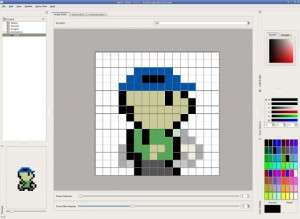
Hey guys, just thought i’d toss this out here for anyone interested.  Finished a first “stable” release of my new sprite editor, It’s QT4 and written to be cross-platform but at the moment only downloads for linux are up, as I’ve yet to figure out how to use the mingw cross compiler with QT.  Tailored for my engine’s format but the toolset can also easily export to png spritesheets.


Short version of the features (full list on download page)

  • Onion skinning to help with animating
  • customizable palletes w/ full save/load/rip from image support
  • more color picking tools than you’ll ever know what to do with
  • fully integrated with system clipboard so you can freely select, copy,cut, paste, etc..with other image editors
  • large undo/redo bufers, specific to each frame
  • live animation preview
  • fast control scheme (mouse + command keys, or hotkeys control every action, all hotkeys are listed in the edit menu)
  • customizable UI, all toolbars can be reshaped, floated,  pushed behind tabs, hidden….etc

Still got a lot of bugs to work out, and missing features, but it’s at least stable and capable of image editing at this point. You can download it and try it here http://www.midnightfragfest.com/sprite-editor/

Edit: Windows download is now available, but somewhat untested, I would appreciate any feedback on how it runs.

Tags: art, pixel, sprite, tools

My Un-Success Story (What could never happen – Isolated Assault 2!)

Ludum Dare 22:

While Isolated Assault was huge success in my eyes considering it was my first Ludum Dare game, and by the scores it received, I’m struggling to come up with a Post-Compo version. You see, I’m just not feeling the motivation to work on it. Every time I sit down, I just feel, “Wow, this is old.” It’s like one of those projects I just gave up because I had no motivation for it.

That’s how it went with Dunnet (My most worked on game), and with my First Person Shooter (My first professional game), and with all those projects I started but never got around to.

Currently my Unity Project Folder looks like this:
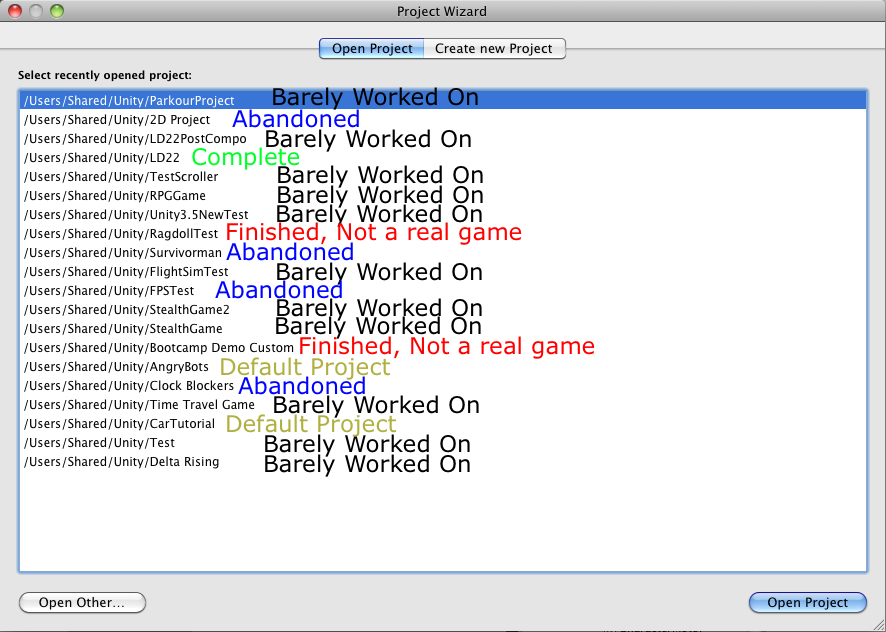
Where “Abandoned” have been worked on for a while. I could always go back to the “Abandoned,” but I haven’t, and why should I?

My Problem:

I need a due date on projects.

Some people can never get work done knowing there’s time management involved. For me, it’s the other way. Knowing that there’s no time to procrastinate, and that there’s a reward for finished, I can get a lot of good things done.

I also have problems focusing on one idea and getting it implemented quickly. All of focused ideas I have are too complicated even for top-notch game companies.

Therefore, Ludum Dare was perfect for me–it gave a theme for the game and a deadline. I now know my best work will probably come from future LDs.

Will there ever be an Isolated Assault 2?

Not now. And probably not from me. Anyone familiar with Unity (That means you, reader!) can take my Isolated Assault Source files, and add some new levels, as long as I receive credit.

I have no motivation whatsoever to make an Isolated Assault 2. All my ideas were expressed in the first one. You are a guy. That fights cubes. That wears glasses. The only thing added to this game would be gloss.

Will you participate in LD 23?

Of course! Ludum Dare is the best way to manage time and get good games squeezed out!

Will you stop asking yourself random questions?

Never!!!!

Now I ask you, do I stick with deadlines for making games, or do I learn to get around them?

Do I use Ludum Dare to create all my of my work?

For some reason, I need some sort of reward/time limit for everything I make, because that’s just how I work.

Either way, I’ll obviously still be doing LDs, and I can’t wait for LD23!

Tags: Assault, can't wait, Failure, Isolated, LD #22, motivation, postmortem, progress, time management, unity, unity3d, UnSuccessStory, update

ItMOtR Timelapse!

So, i finally submitted a timelapse for my game, “In the middle of the road“! (ItMOtR for short)

I cut out parts where i did nothing, and missed some other parts.

Comments

28. Jan 2012 · 14:16 UTC
You don’t need to use the embed code, just paste the link into the text without anything special.
29. Jan 2012 · 01:08 UTC
No, don’t use the link button, just paste the URL without a link.

Tool Update: Online HTML5 Mapper v0.5

First, congrats to all the GGJammers! Looking forward to playing a bunch of cool new games. So yeah V0.5 Beta of the HTML5 tile map editor is now online. This version adds the following features

  • Map Zoom. Yeah we got zoom!!
  • Right button erase (reset to tile index 0).
  • URL API.
  • Small UI rendering fixes.

More info here http://callidusrex.com/?p=101

(Untitled)

After really enjoying the prototype I produced for Ludum Dare 22, I  decided to continue develop on the idea.  After another month of development, I’m happy to announce that I’ve officially released v1.0 of Atlantic Flight One on Kongregate.  You can find it here.  I would appreciate any thoughts and/or criticisms.  Thanks!

It’s changed its mechanics a bit, though the core gameplay is still there.   The original LD22 entry can be found here and a post-mortem can be read here.


Tags: LD22, released, update

It’s Java tower defense – preparing for april 2012 jam

Finally I was able to overcome myself and created an account and an entry on ludumdare.com. Still unsure if I’ll be able to participate in the upcoming jam with my homey or if I am still preparing for any jam in the future. Damn, pushing myself hard to understand lwjgl (aka OpenGl in Java) :(

Currently I am working on a Tower Defense game because it is easy to begin with (don’t want to start another Jump’N Run game…). Can’t wait for the theme selection and hopefully it won’t be another indie cliché like “Alone”. However, it there is still some time left and exams to write until the jam begins.

If you are interested in what I do then visit my “homepage”: *click me*

Greetings steamx

Tags: LD #23

Comments

tunnel
09. Feb 2012 · 20:29 UTC
if lwjgl doesnt work out for you you can look at jmonkey, i dont use it yet but its still a nice 3d engine based off of lwjgl
horatiodante
21. Feb 2012 · 08:10 UTC
I’ve done the same and looking at both lwjgl, jgame and jmonkey

Dev Blog

Hi all,

I am sad I could not participate to the last Ludum Dare mainly due to the simple fact that I was working to release the very  first commercial game of my very new small business.

Now that I have finished this project, and since I owe much to the Ludum Dare community because it is always a source of personal motivation as well as a trigger to enhance my creativity I would like to share some things about my developement (postmortem like ) in a series a articles which would cover a large array of themes  from project management, to languages, gfx, sfx, install process, strange device handling, etc…

So, would you be interested by this kind of information ? And is Ludum dare a good place to publish that kind of stuff ?

Thanks for your answers :)

Comments

7heSAMA
04. Feb 2012 · 00:02 UTC
Not sure about posting every article here, but maybe the bigger stories could be linked? Talk to a mod, but either way, definitely shoot us a link to the blog.
jeffz
05. Feb 2012 · 08:57 UTC
you might be interested in sharing your writeups on reddit.com/r/gamedev

How To Write Music For Video Games

So one of the most important parts of game development is getting the music to fit the game. In this post, I’m going to show you how to write your own music from scratch while still giving some tips for advanced composers.

This tutorial focuses mainly on Garageband users, so forgive me if some of the terms are incorrect for different programs.

Software

  • You don’t need costly software to write music, some of the most default programs can do the job.
  • Garageband is recommended for Mac users.
  • A good alternative is Noteflight.com, which can write music the… professional… way. You can save it to a wav. file.


WARNING TO GARAGEBAND USERS – DO NOT USE MUSICAL TYPING FOR RECORDING, use the SCORE EDITOR
A – Region Name field: Type a new name for the selected region in the field.

B – Region Pitch slider and field: Drag the slider to transpose the selected Software Instrument region up or down by up to 36 semitones.
You can also type the number of semitones in the field.

C – Velocity slider and field: Drag the slider to change the velocity of selected notes.
You can also type the velocity value in the field.
A note’s velocity reflects how hard the key is pressed when you play the note.

D – Zoom slider: Drag to zoom in for a closer view or to zoom out to see more of the track.

E – Graphic/Notation View buttons: Click to change the editor to graphic view or notation view.

F – Note Value button: Click to choose the note value for notes you add.

G – Fix Timing button: Click to fix the timing of notes in the selected region, or notes selected in the editor, so that notes move to the nearest grid position.

H – Beat ruler: Shows beats and measures for the area visible in the editor.

I – Playhead: Shows the point in the project currently playing.

J – Notation display: Shows the musical events of Software Instrument regions in standard music notation.
You can move notes to adjust their pitch and where they start playing, and change how long they play.

K – Scroll bar: Drag the scroller to move to a different part of a track.

Chord Progression

  • To start off writing your piece, you need a good chord progression.
  • Pick a tune you think can be repeated for the entire song.
  • If stuck, choose four whole notes that descend or ascend.
  • Place the rest of notes in the chord.
  • Try placing a note that’s two steps away to complete the chord.

Adding Other Instruments

  • If you want your song to slowly gain instruments over time:
  1. pick a short tune that can be played to the measures of your chosen chord progression.
  2. One by one, add the instruments with their short tunes until the climax of the song.
  3. This is where the lead comes in.
  • If not, add all the instruments at once at the beginning of the song.
  • There should be only one or two instruments playing the lead in a simple song.

Writing The Lead

  • The lead should have its own instrument(s).
  • Pick a tune that fits the chord.
  • The lead will not have a repeatable tune.

Increasing your song’s intensity with EQ

  • In Garageband, you can edit the instrument’s EQ levels under “Edit Instrument”.
  • EQ levels are the different frequencies of normal sound.
  • Each instrument should have a different EQ frequency.
  • Bass instruments should have a higher base and lower treble.
  • Lead instruments should have a higher treble and lower bass.
  • Feel free to mix these last two up for variation.
  • An example of the lead instrument’s EQ
  • Notice how the lead instrument’s EQ is not that extreme. For background instruments, extreme EQ can be a good thing.

Variations

  • Note that all songs don’t follow the same pattern, this is just one way of writing a song.
  • To make your song sound different or catchy, think of it like making a movie, or a level.
  • Introduce the background instruments first, then show the listener your lead instrument.
  • During a change from loud to soft in music, have a common tune play before the change.
  • If it happens several times, the audience knows that whenever you play that tune, the sound level will drop.
  • Let the audience expect what is going to happen next, so that it becomes catchy.

Obviously I didn’t go into the more advanced note placement tips, or note timing instructions, but this is just a general tutorial.

Good luck writing music in the future, and hope to see more music in Ludum Dare games! :)

If you want to see an example of a Garageband project, see my Isolated Assault Piece (from Ludum Dare 22).

And if you crack open the Isolated Assault Source Files, you can see the same song under Assets/Sound/LD22Track.mp3

One final note: You learn best from experience, so out there and make a song!

Tags: game, music, tutorial

Comments

callidus
05. Feb 2012 · 16:54 UTC
Thanks for taking the time to write this @RobProductions :-)
09. Feb 2012 · 21:06 UTC
No problem. I actually could’ve taken more, but I was in a hurry, and I already had written a similar post on Noteflight.com (After it was accidentally deleted because of “Character Limit” :( ) I was worried all my writing would be dumped in the trash again, but I guess not! :) Thanks Ludum Dare system!

This is the year

Soon to begin learning game programming. I know many ‘just do it’, but I need to do it my way.

I was just on your donate page. I see you got one from Anonymous. That’s cool, cause I would really hate to get on their bad side.

ndotl


Comments

05. Feb 2012 · 16:51 UTC
Do it “your way”? That’s the best way to do it!