grayhaze

LD27

I’m in!

I’m hoping to enter for the first time, but I doubt I’ll be waking up at 2am to do so from the start! I’ll be fitting coding in around real life and starting out with something small using HaxeFlixel and an old copy of Fireworks.

Good luck everyone!

Birth… or not

I’ve spent the day trying to implement an idea I had based on the following quote:

“Somewhere on this globe, every ten seconds, there is a woman giving birth to a child. She must be found and stopped.” – Sam Levenson

Unfortunately I decided to try some pseudo-3D using scaled sprites in HaxeFlixel and have hit a brick wall when it comes to the math. Currently I have some nice red balls rotating around a globe, but I’ve been unable to get scaling working properly and Google isn’t being my friend today.

Birth

I’m now undecided whether to scrap the idea and start something new, or approach the same idea from a different perspective… The clock is ticking.

Birth… or rebirth

So I started from scratch after my aborted attempts at pseudo-3D on a sphere. I’m now working purely in 2D, but still rotating around a circle. Below is a greatly sped up version of the spores that spawn every ten seconds.

Birth - Spores

Tomorrow I’ll add in the player and give you some way of dealing with the epidemic.

Birth

So after two days of frustration and restarts, I’ve managed to get something together that resembles a game. I used HaxeFlixel and OpenFL to create a retro-style bombing game called Birth:

Birth

http://www.ludumdare.com/compo/ludum-dare-27/?action=preview&uid=23957

I didn’t have time to add any sound, and there were quite a few things that I wanted to add to the gameplay (eg. flying enemies, land masses on the planets and some animation), but at least it’s playable! It’s been a good learning experience and I may well continue working on the game to release on Android and Windows at some point.

I really need sleep now…

LD28

One Rescue

I started out with an idea that I thought could work and wouldn’t be too difficult to finish in time, but ended up falling at the first hurdle and giving up after a few hours of frustration. I’m not sure I’m cut out for rapid game development, as I’m so fussy about the details that I need time to polish and tweak my games.

If anyone else wants to grab my idea at the last minute, it was going to involve you being in a helicopter crash in remote wilderness with one other survivor. The other guy is seriously injured and you have to keep him warm over the course of one day and night with nothing more than a single match with which to start a fire. The game was going to involve balancing keeping the fire going with exploring the surrounding area to gather wood for fuel. If you strayed too far from the fire for a period of time you’d start to freeze, but as the day goes on you need to venture further and further to find resources as you deplete those closest to your camp. As night falls, you need to carry a torch with you, which takes a little fuel away from your fire and burns out after a short while. If you succeed in keeping your companion (and yourself) alive for the night, rescue arrives in the form of another helicopter.

The issue I had was trying to come up with a good way of handling multiple light sources in HaxeFlixel, as it seems it’s really not suited to doing this through masking. Next time I’ll make sure I choose a game set in the daytime.

Comments

Johnman
15. Dec 2013 · 10:58 UTC
I think the key is to go for the simplest stuff. I’ve realized now for the first time that if you think your idea is going to be done in a couple of hours, it actually takes a couple of days :S And even I had to pass on polishing a lot of the ugly stuff.
grayhaze
15. Dec 2013 · 12:16 UTC
In my head this seemed a simple idea. I always seem to come up with ideas which require working out some complicated stuff for the basic engine to work though. Last time it was all about angles and matrices, this time masking. Next time I’ll go for a one-screen grid-based walking simulator. 😉

LD29

Poor Bob

I made a little more progress with Bob yesterday, implementing the ability to pause the physics to allow the player to move objects around. This likely won’t be the way the final game works, but it allows me to easily test which combinations of objects work best for drowning poor Bob.

The next thing to add is the timer and animation for Bob running out of air, then I’ll move on to building some levels. I’m still not convinced I’ll have time to finish this today, as my herd of guinea pigs need their cages cleaned.

Time to die, Bob

I took a bit of a detour and added some background animation, along with an easy first level to demonstrate the concept. I also knocked Bob’s teeth out, as my wife didn’t like them. Poor Bob.

I still need to actually make Bob drown, but that should be pretty straightforward now I have the level set up. The sky above the water actually has collision detection on it, so all I need to do is start a timer when Bob stops colliding with that area and freeze or reset it if he comes back to the surface. He also needs to go purple over time.

Almost, Bob, but not quite

So I failed to finish my entry, but I feel like I’ve learnt a huge amount over this weekend. What I currently have is a fun little physics sandbox without an endgame.

Screenshot 2014-04-27 23.28.11

Click here to see my (unfinished) entry!

If I’d had more time, here’s what would have happened to Bob as you held him under:

bob

You had a lucky escape this time, Bob.

LD30

Bound – Level Generation

After a late start this morning, I’ve spent most of the day working on procedural level generation for my game. You can see some of the results below:

boundlevelgen

In the final game, each coloured block will be a stand-alone module which can be moved around to open up the path from the start (the red block currently) to the end. Currently the path is pretty linear, but I have the individual blocks generating using a template system from eighty different designs. The levels vary in length and complexity.

I’m not sure I’m going to have time to finish the actual game, but learning this much has been pretty fun so far. I have a very definite idea of how the final game should work, but there’s a huge amount left to do. The blocks you see here make up a platforming level, with controls similar but not identical to Super Meat Boy. The screen will be split into two, with a character on one side pushing the blocks around while the character on the left tries to navigate through them.

Bound – Play Now!

Well I managed to finish something, even if it wasn’t quite what I was aiming for! Enjoy! :)

bound4

http://www.ludumdare.com/compo/ludum-dare-30/?action=preview&uid=23957

Game platforms

As I’m working my way through the entries for LD 30 I’m noticing that fewer games are being made in a format which is playable on the web these days. As I’m often short on time and dip in and out of rating entries, taking the time to download, virus check and run an unknown executable file isn’t really viable for me. I also alternate between working on a Windows machine and a Mac, so it’s not always possible to play the majority of Windows-only games. I therefore tend to gravitate toward those entries that have a web version and ignore those that don’t.

What are other people’s opinions on this? Are you turned off by games in a particular format? What holds you back from creating web-based versions along with executables?

Having said this, I have personally started uploading Windows versions of my entries to go along with the web versions, as I know there are likely to be people who feel the opposite way. If you’re looking for a good 2D game framework which compiles to the full range of platforms (Flash, HTML5, Windows, Mac, Linux, Android, iOS and more) I’d recommend taking a look at HaxeFlixel, a popular port and improvement of the original Flixel for Flash written in Haxe and using the OpenFL framework. You can develop your games on Windows, Mac or Linux and usually create versions for other platforms with little to no changes.

Comments

WiErD0
29. Aug 2014 · 19:27 UTC
I guess I agree with that feeling when I am playing other people’s games, but for the process of making it, it isn’t so easy. Making a JAR file is so tempting because you can do it with just the click of a button on alot of programs, and there are rarely any problems. However, if you try to make an applet instead, you run into the thousands of problems with what is and isn’t allowed on certain websites.
WiErD0
29. Aug 2014 · 19:28 UTC
I do have to say, though, I don’t find JARs any more annoying than the (like 40% of) games that run through unity web player, because that takes a good 10 minutes to boot up every time.
grayhaze
29. Aug 2014 · 19:35 UTC
I’m a hobby game developer too primarily, which is why I only use free, open source tools for my development. My primary goal in choosing a language and game framework was to find something which was designed from the ground up to be cross-platform, which is how I came across the tools mentioned in my post.
30. Aug 2014 · 06:39 UTC
I’ve been playing pretty much the same as you. Quite often I’ll come across an entry I’m really interested in playing, but there is no web link. I think I’ve only downloaded two EXE. games so far out of all the ones I’ve played!

Developing my entry into a full game

I’ve started work on developing my entry ‘Bound‘ into a full game. This isn’t the first time I’ve tried to develop a Ludum Dare entry further to make a full game, as I also started doing so with my first entry ‘Birth‘ after LD 27. But this is the first time I’ve had a clear vision for how the final game will look and play.

I thought some of you might be interested to see my current progress in developing the visual style of the game:

nomnom3


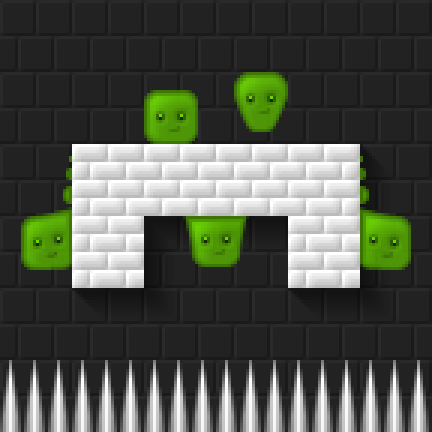
There are obvious comparisons to be drawn with Super Meat Boy, but the little slime guy in my game (currently called Nomnom) has a slightly bigger range of movement options to Meat Boy, being able to stick to and walk across ceilings for limited periods of time. The tile graphics are still very much a work in progress, but the character is coming along nicely.

I’ll shortly be starting a development blog for this game on my new site http://cavycade.com, so if you’re interested in seeing how he progresses come along and have a read. In the meantime, if you’d like to have a play of my admittedly incomplete entry for the contest, take a look here. You can at least get an idea of how Nomnom will control in the final game.


LD35

Keyboard Ghosting Issues

Despite my best efforts, my entry Shifty’s Shape Escape has presented issues for people using non-English keyboard layouts and keyboards on which certain combinations of simultaneous keypresses don’t register due to ghosting.

See https://www.microsoft.com/appliedsciences/content/projects/KeyboardGhostingDemo.aspx) for more information on this.

As a result I changed the controls from “Q”, “W”, “A” and “S” to “Q”, “P”, “A” and “;”, which has at least enabled people using Macs to play the game, but has had the side effect of rendering the controls difficult or broken for those on non-English keyboards.

shapeescape1shapeescape2

Obviously a way to solve this with more development would be to support keyboard remapping within the game, but that luxury wouldn’t be considered a bugfix. I’m interested to hear thoughts from anyone else who has tried implementing keyboard controls where more than three keys can be pressed simultaneously, and if there’s any configuration which would work universally for my game. Note the controls need to represent four diagonal corners, so arrow keys or WASD wouldn’t solve the problem and likely would suffer from ghosting issues anyway.

Let me hear your thoughts on the issue, and your experiences with the controls in my game!

Shifty’s Keyboard Ghost Buster

After a bit more tinkering, I’ve uploaded another accessibility bugfix version of my game Shifty’s Shape Escape which allows for switching between a set of different keyboard control layouts. This should hopefully put to rest all the issues people have been having with keyboard ghosting preventing more than three keys being pressed simultaneously, as it includes three different layouts for each of QWERTY, QWERTZ and AZERTY keyboards, a numpad layout, and a “universal” layout which uses Tab, Shift, Backspace and Enter. If you had issues with ghosting before, give one of the alternative layouts a try and let me know how you get on.

shapeescape1shapeescape2